
In a significant advancement for digital marketing professionals and small business owners alike, AWeber, a leading email marketing service provider, announced on June 24, 2026, the launch of an enhanced AI Signup Form Builder capable of creating and visually placing inline forms directly onto live websites without requiring any code. This new functionality promises to dramatically simplify the process of capturing leads and growing email lists, empowering users to strategically position conversion elements where reader engagement is highest.
The Strategic Imperative of Form Placement
The effectiveness of a signup form is intrinsically linked to its placement on a webpage. Traditional wisdom in digital marketing has long held that a form’s location dictates who encounters it and, consequently, who is most likely to subscribe. A form seamlessly embedded within content, for instance, intercepts a reader at a point of high interest, mid-read, when their attention is fully invested in the subject matter. This context-rich placement often yields higher conversion rates compared to forms relegated to a sidebar, which typically catch users who are merely scanning a page and may not be as deeply engaged. Pop-up forms, while sometimes effective, can disrupt the user experience, leading to frustration and bounce rates if not implemented carefully.
Recognizing this critical distinction, AWeber’s latest update to its AI Signup Form Builder directly addresses the challenge of optimal form placement. By enabling the creation of inline forms and facilitating their visual, code-free integration into any part of a website, AWeber is democratizing a sophisticated marketing tactic previously requiring developer input or complex CMS knowledge.
The Evolution of Digital Forms and the Rise of AI

For decades, collecting subscriber information has been a cornerstone of digital marketing. Early web forms were rudimentary, often requiring manual coding and significant technical expertise to integrate into a website. Over time, content management systems (CMS) and marketing automation platforms introduced form builders, simplifying the design process but often still leaving the placement and customization of these forms as a technical hurdle. Marketers frequently found themselves reliant on web developers to embed forms precisely where they envisioned them, leading to delays and increased costs.
The advent of Artificial Intelligence has fundamentally reshaped the digital marketing landscape, moving beyond simple automation to intelligent design and optimization. AI is increasingly being leveraged for content generation, predictive analytics, personalization, and now, form creation and strategic placement. AWeber’s AI Signup Form Builder exemplifies this trend, harnessing machine learning to assist users in crafting effective forms tailored to their specific needs and brand aesthetics. This evolution signifies a broader industry shift towards making advanced marketing tools more accessible and intuitive, allowing marketers to focus on strategy rather than technical implementation.
Creating Intelligent Inline Forms in Seconds
AWeber’s updated AI Signup Form Builder provides three intuitive starting points, catering to different user preferences and workflows, all designed to expedite the creation of inline forms:
- Custom Prompt: Users can articulate their vision for the form using natural language prompts. For example, a user might type, "Create an inline form for my blog post about sustainable living, offering a free e-book on eco-friendly tips." The AI then interprets this request, generating a form structure, copy, and design elements relevant to the specified context, with the crucial instruction that it is intended for inline placement. This method leverages the power of generative AI to translate conceptual ideas into tangible marketing assets.
- Fill-in-the-Blanks: For users who prefer a more guided approach, this option presents a series of prompts where they can input key details such as the purpose of the form, the desired call to action, and the type of content it relates to. Crucially, during this process, users select "embeds directly on my website" as their preferred form type, signaling the AI to optimize the form’s design for seamless inline integration. This method streamlines the form-building process by providing structured guidance.
- Template Gallery: A comprehensive gallery of pre-designed inline form templates offers a quick-start solution. Users can browse a variety of professionally designed layouts, select one that aligns with their brand and objective, and then customize it further. These templates serve as excellent starting points, incorporating best practices for design and user experience, which can then be refined to meet specific campaign requirements.
Regardless of the chosen starting point, all paths converge into the same powerful and intuitive form editor. Here, users have granular control over every aspect of their form. They can adjust the copy to refine their messaging, modify design elements suchating colors, fonts, and button styles to match their brand guidelines, and configure various settings such as success messages, tagging, and automation rules. This comprehensive editing capability ensures that while the AI accelerates the initial creation, the final form remains fully customizable to the user’s exact specifications before it is deployed.
Precision Placement: A Four-Click Revolution
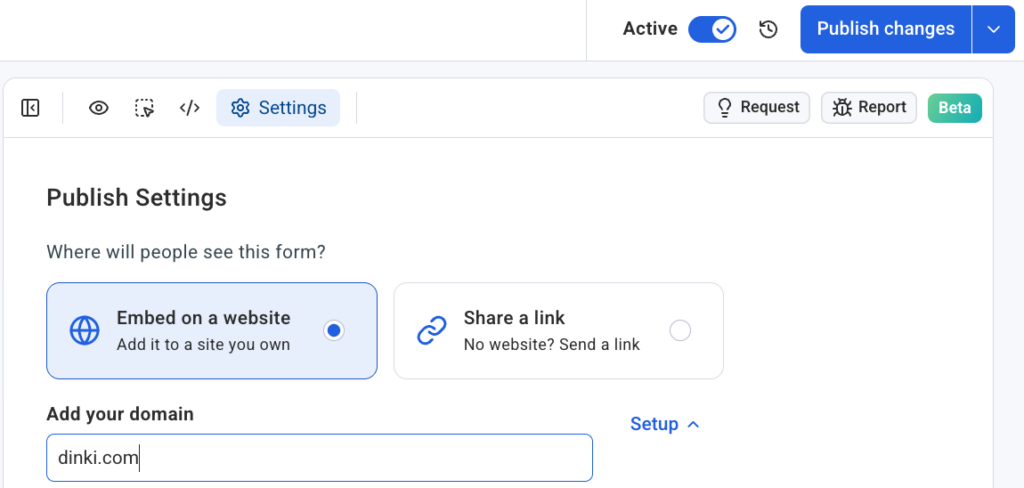
The most groundbreaking aspect of this update is the visual, code-free placement mechanism. Once a form has been meticulously designed and configured in the editor, placing it onto a live website becomes a remarkably straightforward process, executable in just four clicks:
- Access Settings Tab: Within the form editor, the user navigates to the "Settings" tab. This section consolidates all deployment-related configurations, making the process logical and centralized.
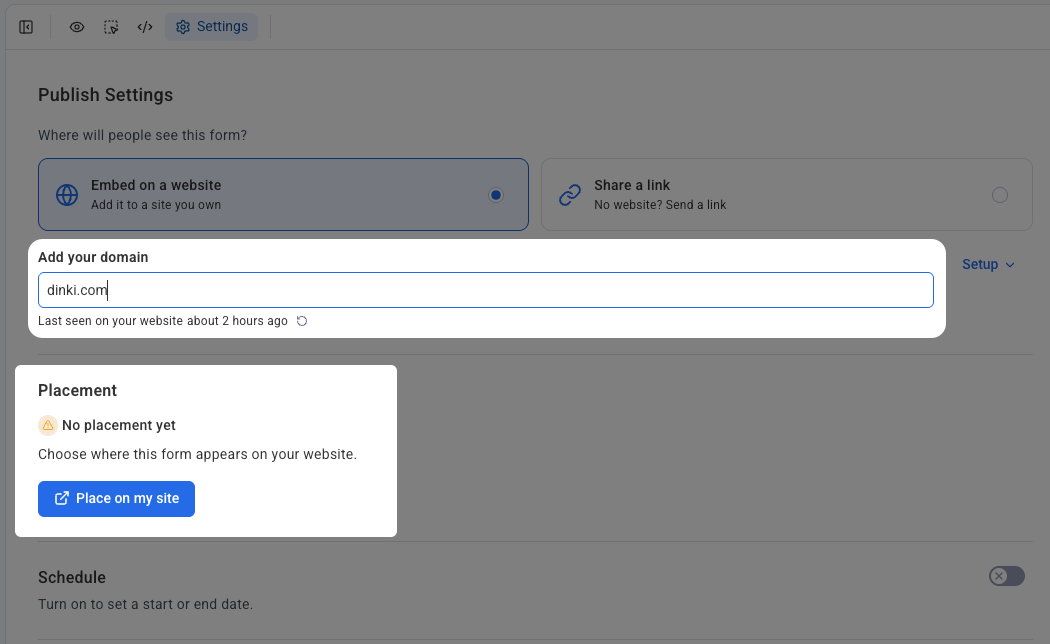
- Domain Configuration and Snippet Confirmation: The user specifies the domain where the form is intended to appear. This step is crucial for security and ensuring that forms are only deployed on authorized websites. Concurrently, the system prompts the user to confirm that the AWeber signup form snippet—a small piece of JavaScript code—is already installed on their website. This snippet acts as the bridge, allowing AWeber to dynamically inject forms without direct manipulation of the site’s underlying code for each form. This one-time installation enables seamless, ongoing form management and placement.
- Initiate Placement: With the domain confirmed and the snippet verified, the user clicks the "Place on my site" button. This action triggers the innovative visual placement widget, preparing it for real-time interaction with the live website.
- Visual Selection and Confirmation: A new browser window or tab opens, displaying the user’s actual live website. Crucially, this is not a wireframe or a static preview, but the live, functioning page. The placement widget becomes active, allowing the user to visually interact with the page. They can hover over different sections, and the widget intelligently highlights potential placement areas. The user simply clicks on the exact section where they wish the inline form to appear. Once satisfied with the chosen location, a final click on "Confirm placement" instantly embeds the form. This real-time, visual interaction eliminates guesswork, ensures pixel-perfect placement, and removes any need for backend code adjustments. The form instantly appears on the live page, accessible to visitors.
This four-step process fundamentally transforms form deployment, shifting it from a technical task to an intuitive, visual drag-and-drop-like experience. The real-time feedback and direct interaction with the live site ensure accuracy and empower marketers to iterate on placement strategies without developer dependency.
Universal Compatibility Across Self-Hosted Platforms
A key advantage of AWeber’s new inline form placement feature is its broad compatibility across a myriad of self-hosted website platforms. This includes industry giants such as WordPress, Shopify, Wix, Squarespace, and many others. The underlying mechanism, relying on a single, universal signup form snippet, ensures that once installed, the visual placement functionality works seamlessly irrespective of the website’s underlying architecture.
For businesses and agencies managing multiple websites or client accounts, this compatibility is invaluable. Each domain can be independently connected and configured within the AWeber settings. This ensures that form placements remain organized and isolated across different properties, preventing accidental deployments or conflicts. This flexibility positions AWeber as a versatile solution for diverse digital ecosystems, from personal blogs to large e-commerce stores and corporate websites. The one-time snippet installation simplifies ongoing management, allowing marketers to focus on content and strategy rather than platform-specific integrations.
The Impact on Conversion Rates and User Experience
The ability to place forms precisely where readers are most engaged has profound implications for conversion rates. Research consistently shows that forms integrated naturally into content perform significantly better than those that interrupt or are easily overlooked. For instance, studies indicate that inline forms can achieve conversion rates upwards of 5-10%, sometimes even higher for highly targeted content, surpassing the average 1-2% often seen with less strategically placed forms. By catching readers mid-flow, already interested in the topic, these forms capitalize on a moment of high intent, turning passive consumption into active participation.
Beyond mere conversion numbers, optimal form placement enhances the overall user experience. An inline form feels like a natural extension of the content, offering a logical next step rather than an intrusive advertisement. This seamless integration reduces friction, builds trust, and encourages a more positive interaction with the brand. Users appreciate not being redirected to separate landing pages or being bombarded with unexpected pop-ups, leading to a smoother, more enjoyable browsing experience.
Broader Implications for Digital Marketing
AWeber’s innovation is more than just a new feature; it represents a significant step forward in the democratization of advanced marketing tools.
- Empowerment of Non-Technical Marketers: This update significantly lowers the barrier to entry for effective lead generation. Marketers who lack coding skills or access to dedicated web developers can now implement sophisticated form strategies with ease, bringing high-level tactics within reach of small businesses and individual entrepreneurs.
- Increased Efficiency and Agility: The rapid creation and placement capabilities mean marketers can react more quickly to campaigns, A/B test different form placements, and optimize their conversion funnels without logistical delays. This agility is crucial in today’s fast-paced digital environment.
- Focus on Strategy Over Execution: By automating and simplifying the technical aspects of form deployment, marketers can dedicate more time and resources to developing compelling content, crafting persuasive offers, and refining their overall email marketing strategy.
- Competitive Edge for AWeber: This innovation positions AWeber as a frontrunner in integrating AI and user-centric design into email marketing platforms. It challenges competitors to match or exceed this level of ease and sophistication in form management.
- Future of Web Design and Marketing Integration: This move further blurs the lines between marketing platforms and website design tools, signaling a future where website elements can be dynamically managed and optimized directly from marketing dashboards, leading to more integrated and intelligent web experiences.
Conclusion
AWeber’s introduction of AI-powered inline signup forms with visual placement marks a pivotal moment in the evolution of email marketing and website conversion strategies. Launched on June 24, 2026, this enhancement addresses long-standing challenges related to form integration and optimization, offering a robust, code-free solution. By allowing marketers to create intelligent forms and embed them precisely where their readers are most engaged, AWeber is not only boosting potential conversion rates but also significantly improving the user experience. This innovation empowers a broader spectrum of users, from seasoned digital marketing professionals to small business owners, to harness the full potential of their content and effectively grow their subscriber lists, cementing AWeber’s position at the forefront of marketing technology. The future of lead capture is intuitive, intelligent, and integrated, and AWeber is leading the charge.