rifanmuazin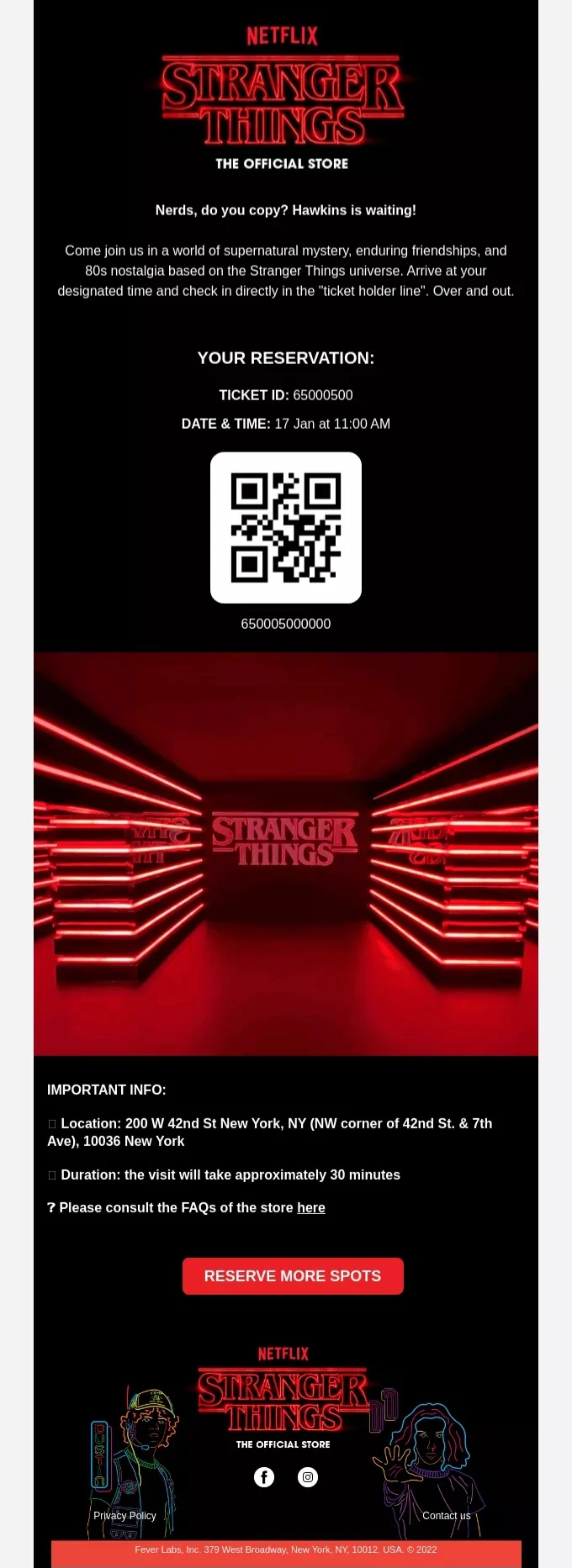
In the increasingly competitive and digitally saturated landscape of event marketing, the humble event reminder email has emerged as a critical tool, transforming from a simple notification into a strategic touchpoint essential for ensuring robust attendance and optimizing return on investment. With schedules more packed than ever and digital distractions vying for attention, registrants often find themselves forgetting about commitments they made days or even weeks prior. This phenomenon, commonly referred to as "no-shows," can significantly erode the effectiveness and financial viability of any event, whether it’s a high-profile industry conference, an intimate workshop, or a large-scale virtual summit. Data consistently indicates that without timely and well-crafted reminders, attendance rates can plummet by as much as 30-50% for virtual events, and still impact physical gatherings by 10-20% due to logistical oversight or simple forgetfulness. The strategic deployment of event reminder emails is therefore not merely a courtesy, but a fundamental pillar of successful event execution, designed to keep the event top-of-mind, facilitate preparation, and guide attendees seamlessly to their destination, be it a physical venue or a virtual meeting room.
The Pervasive Challenge of Attendee Attrition
The core problem that event reminder emails address is human forgetfulness compounded by modern life’s relentless pace. When an individual registers for an event, they often do so with good intentions and genuine interest. However, between the moment of registration and the event date, numerous other obligations, meetings, and personal commitments can fill their calendar. Without periodic nudges, the event can easily slip from priority, leading to last-minute cancellations or simply non-attendance. This attrition rate poses significant challenges for event organizers, affecting everything from catering estimates and venue capacity planning for in-person events to engagement metrics and sponsor satisfaction for virtual ones. Every no-show represents a missed opportunity—a potential lead not captured, a networking connection not made, or a piece of valuable content not consumed. Industry experts, such as Sarah Johnson, CEO of EventFlow Solutions, often emphasize, "The initial registration is just the first step. Nurturing that registrant through strategic communication is what truly converts interest into attendance. Reminder emails are the workhorse of this nurturing process."
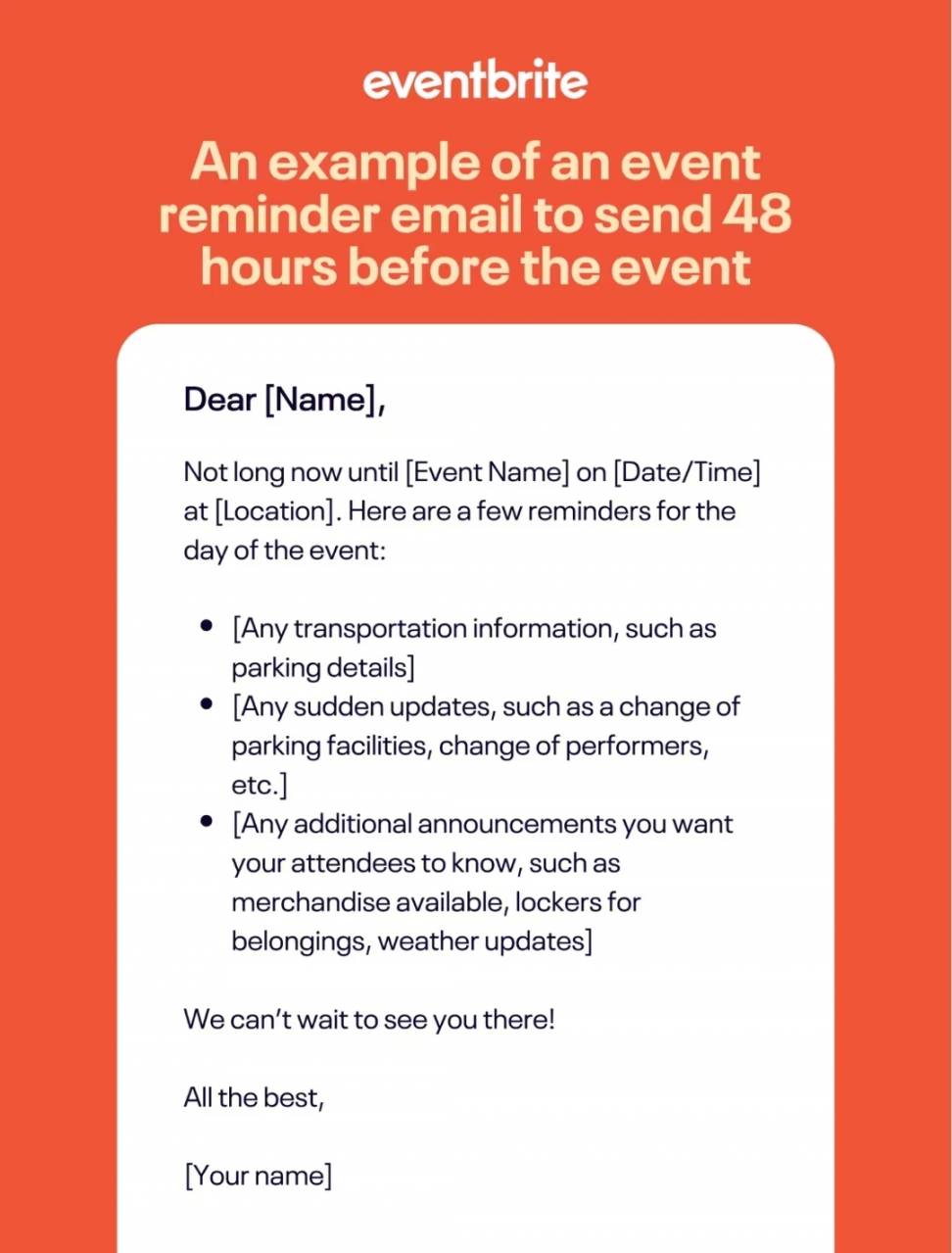
A Strategic Chronology of Engagement: When to Send Reminders
The effectiveness of event reminder emails hinges significantly on their timing. A well-orchestrated sequence of reminders creates a supportive journey for the attendee, providing necessary information without overwhelming them. The optimal cadence varies depending on the nature of the event—virtual events, with their lower barrier to entry, often require more frequent, shorter reminders, while physical events necessitate earlier communications to facilitate travel and logistical planning.
- Immediate Confirmation (All Events): The very first email, sent seconds after registration, is paramount. Beyond confirming registration, it should immediately provide key details (event name, date, time, location/link) and, crucially, an "Add to Calendar" button. This action solidifies the commitment and integrates the event into the attendee’s personal schedule from the outset.
- Two Weeks Before (Physical Events) / One Week Before (Virtual Events): This initial substantial reminder serves as a planning prompt. For physical events, this is the time to prompt attendees to consider travel arrangements, accommodation, and attire. Providing information on nearby hotels, transportation options, and even parking availability can significantly reduce pre-event stress. For virtual events, this reminder can focus on reinforcing the value proposition, introducing key speakers, outlining the agenda, and perhaps suggesting any pre-event reading or preparatory tasks. This timing allows attendees ample opportunity to adjust their schedules and prepare.
- Three Days Before (Physical Events) / 24 Hours Before (Virtual Events): As the event draws nearer, the focus shifts to actionable logistics. For physical attendees, this email should reiterate the venue address, arrival instructions, and check-in procedures. It’s also an opportune moment to share contact information for any last-minute queries. For virtual participants, this reminder is critical for reconfirming the event time (including time zones), providing the direct access link, and advising on any necessary software downloads or technical checks. This email builds anticipation and ensures readiness.
- Morning of Event (Physical Events) / One Hour Before (Virtual Events): These are high-impact, immediate action emails. For physical attendees, a brief morning reminder can include a link to a venue map, a quick parking reminder, and an emergency contact number. For virtual participants, the "one hour before" email is arguably the most crucial, directly providing the join link and a concise call to action, minimizing the chance of them missing the start.
- "Starting Now" (Virtual Events): A final, very brief email or notification sent precisely at the event start time acts as a final nudge. Messages like "We are live now!" with a prominent join link can capture those who might have momentarily overlooked earlier reminders or lost track of time.
This phased approach ensures that information is delivered progressively, preventing information overload while maintaining consistent engagement and reinforcing the event’s importance.
Anatomy of an Effective Reminder Email: Best Practices in Detail

Crafting reminder emails goes beyond mere scheduling; the content and presentation are equally vital. Event marketing professionals consistently adhere to several best practices to maximize impact:
- Clarity and Conciseness: In a world of overflowing inboxes, brevity is appreciated. Reminder emails should be short, to the point, and free of superfluous marketing jargon or lengthy promotional content. The primary goal is to inform and guide. Utilize bullet points, short paragraphs, and clear headings to ensure scannability, especially on mobile devices, where many emails are first opened.
- Compelling Subject Lines: The subject line is the gatekeeper of the inbox. It must be clear, indicative of the email’s purpose, and create a sense of urgency or importance. Examples include:
- "Reminder: [Event Name] – Just 1 Week Away!"
- "Your Session Starts in 1 Hour: [Event Name] Link Inside"
- "[First Name], Don’t Miss [Event Name] Tomorrow!"
- "Important: Venue Details for [Event Name]"
- "We’re Live! Join [Event Name] Now!"
Personalization, such as including the recipient’s name, can significantly boost open rates, as can emojis (used sparingly and appropriately for brand tone).
- Highlight Key Event Details Prominently: All essential information must be immediately visible. This includes:
- Event Name
- Date and Time (with time zone clearly specified for virtual events)
- Location (full address, directions for physical events; direct link for virtual)
- Brief Agenda or Key Speakers (to re-emphasize value)
- Any unique access codes or passwords
Placing this information near the top of the email, perhaps in a dedicated section, ensures attendees can find it at a glance.
- Clear Call-to-Action (CTA): Every reminder email should feature one or two prominent CTAs that guide the attendee to their next step. These should be visually distinct (e.g., a button) and use action-oriented language. Common CTAs include:
- "Add to Calendar"
- "Join Event Here"
- "View Full Agenda"
- "Get Directions"
- "Contact Support"
The CTA should ideally be placed where it’s easily seen, often near the middle or end of the email.
- Preparation Instructions and FAQs: Anticipating attendee needs can dramatically improve their experience and reduce support queries. If specific materials are required, software needs to be downloaded, or pre-reading is recommended, this should be clearly stated. For physical events, check-in procedures or security information is valuable. A concise FAQ section addressing common questions about accessibility, technical issues, or what to expect can also be highly beneficial.
- Reliable Reply-to Email Address: Sending reminders from a "no-reply" address can be detrimental to attendee trust and engagement. Attendees often have last-minute questions, and providing a legitimate, monitored email address (e.g.,
[email protected]) fosters a sense of support and professionalism. This two-way communication channel is invaluable for addressing concerns and improving the overall event experience.
The Power of Automation: Streamlining Event Communication
Manually sending a sequence of personalized reminder emails to potentially thousands of registrants is an arduous and error-prone task. This is where email automation platforms become indispensable. Tools like Omnisend allow event organizers to set up sophisticated automated workflows (known as "journeys" or "sequences") that trigger emails based on specific actions (e.g., registration) or predefined time intervals leading up to the event.
Automation offers several key advantages:
- Scalability: Effortlessly manage communications for events of any size.
- Consistency: Ensure every registrant receives the right message at the right time, without human error.
- Personalization: Dynamically insert attendee names, specific event links, and even segment audiences for tailored messages (e.g., different reminders for VIPs vs. general attendees, or for different workshop tracks).
- Analytics: Track open rates, click-through rates, and ultimately, attendance rates, providing valuable data for optimizing future campaigns.
- Efficiency: Frees up marketing and event teams to focus on other critical aspects of event planning and execution, rather than manual email management.
According to a report by the Event Marketing Institute, businesses leveraging marketing automation for events see a 14.5% increase in sales productivity and a 12.2% reduction in marketing overhead. This highlights the operational and financial benefits of integrating automation into event reminder strategies.
Case Studies in Effective Reminders: Lessons from Leading Brands
Observing how established brands utilize event reminder emails provides practical insights:
- Apple: Known for its highly anticipated product launches and developer conferences, Apple’s event reminders often excel by not just stating the logistics but by subtly restating the event’s value. Their emails might highlight key speakers or groundbreaking topics, reminding attendees why they registered in the first place, thus building excitement and reinforcing the decision to attend. This approach transforms a simple reminder into a mini-marketing piece.
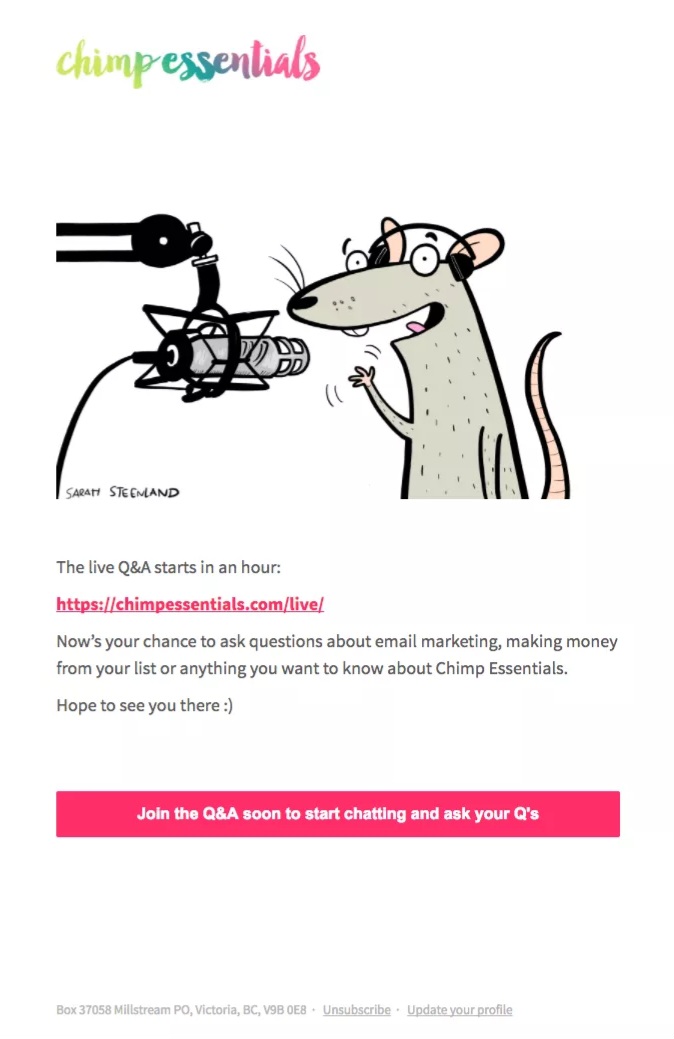
- Chimp Essentials: For virtual events like webinars, immediate utility is paramount. Chimp Essentials’ "one hour before" reminder is a masterclass in brevity and directness. It cuts straight to the chase, providing the access link clearly and prominently. This no-fuss approach is perfect for busy professionals who need quick access without navigating through excessive text.
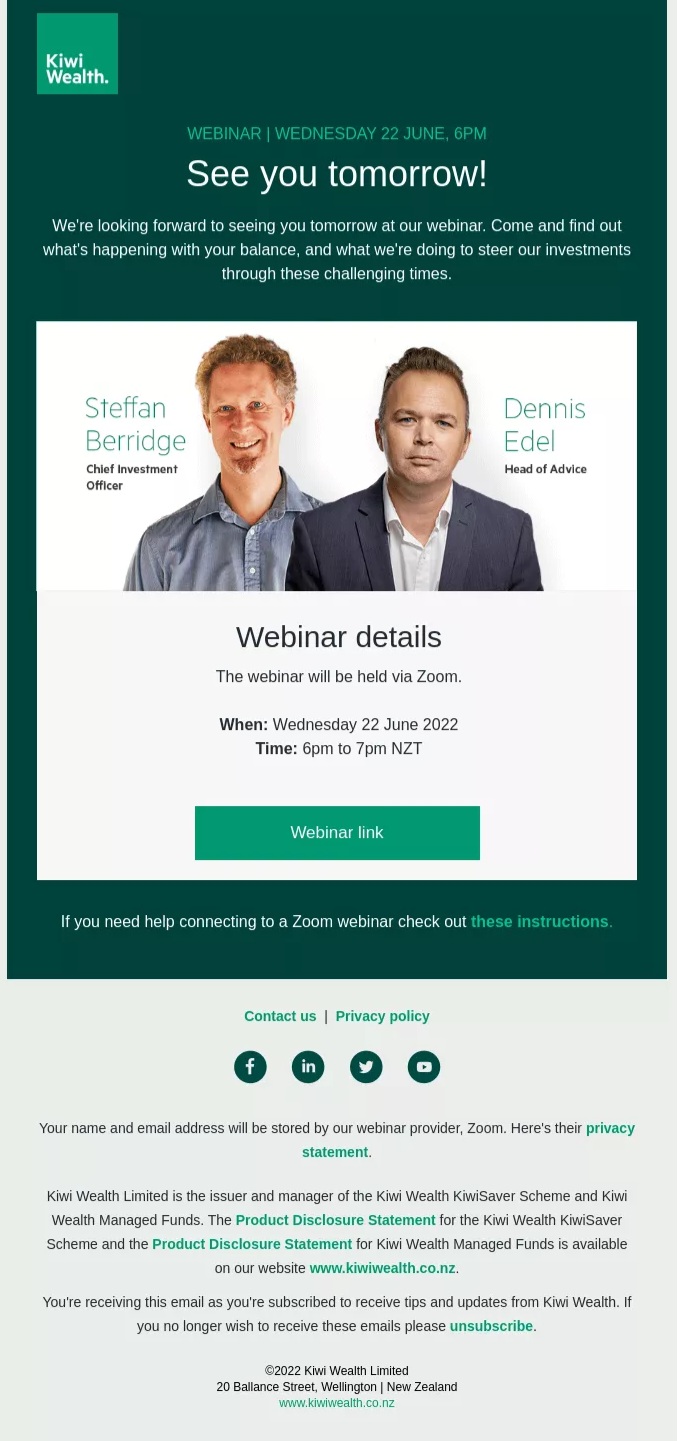
- Kiwi Wealth: When information is complex or numerous, structure is key. Kiwi Wealth’s 24-hour webinar reminder is highly informative, well-structured, and includes speaker previews to rebuild excitement. By providing comprehensive details and instructions on how to join, alongside links to social media for further engagement, they ensure attendees feel fully prepared and connected.
- Maze: Leveraging psychological triggers like urgency and scarcity can be powerful. Maze’s event reminders for "Disco Conf" effectively use countdown timers and a celebratory tone to create FOMO (Fear Of Missing Out). By strategically placing two clear "Register for free" CTAs, they not only remind existing registrants but also encourage undecided subscribers to convert before a perceived deadline.
- Netflix: For unique, experiential events, convenience is king. Netflix’s reminders for themed events like a "Stranger Things" store activation brilliantly incorporate QR codes for instant access to information or entry. This blend of digital convenience with physical event logistics showcases how reminders can enhance the entire attendee journey, from pre-event planning to seamless entry.
These examples underscore that while the core purpose of a reminder remains constant, the execution can be tailored to brand identity, event type, and desired attendee experience, always prioritizing clarity, actionability, and value reinforcement.
Broader Impact and Implications for Event Success
The strategic implementation of event reminder emails has far-reaching implications for overall event success. Beyond merely boosting attendance, they contribute to:
- Enhanced Attendee Satisfaction: Attendees who feel well-informed and guided are more likely to have a positive experience, leading to higher satisfaction scores and positive word-of-mouth.
- Improved Engagement: A well-timed reminder can prompt attendees to review the agenda, research speakers, or prepare questions, leading to more active participation during the event.
- Stronger Brand Perception: Professional, organized communication reflects positively on the event host or brand, reinforcing reliability and attention to detail.
- Optimized Resource Allocation: For physical events, accurate attendance figures derived from effective reminders help in better planning for catering, materials, and staffing, reducing waste. For virtual events, higher attendance validates content and increases potential lead generation.
- Data-Driven Future Planning: The analytics gathered from reminder email campaigns (open rates, click-throughs) provide invaluable insights into attendee behavior and communication effectiveness, informing strategies for future events.
In conclusion, event reminder emails are far more than mere administrative tasks; they are a strategic cornerstone of modern event marketing. By adopting a well-planned chronology of communications, adhering to best practices in content and design, and leveraging the efficiency of automation, event organizers can significantly mitigate no-shows, enhance the attendee experience, and ultimately, maximize the impact and profitability of their events. In an era where capturing and retaining attention is paramount, the timely and compelling reminder email stands as a testament to thoughtful engagement and meticulous planning, ensuring that every registered attendee transforms into an active participant.

 Asro
Asro
 Nana
Nana