 Neng Nana

In the intricate landscape of digital marketing, understanding the origin and efficacy of website traffic is paramount for strategic decision-making. UTM parameters, or Urchin Tracking Modules, serve as the foundational bedrock for this understanding, allowing marketers to precisely attribute website visits to specific campaigns, channels, and content. These short text codes appended to the end of a URL act as digital breadcrumbs, guiding analytics tools like Google Analytics 4 (GA4) and Hootsuite to reveal where visitors originate and how they interact with content, ultimately transforming raw traffic data into actionable insights. Without them, the digital marketing realm would largely operate in the dark, unable to distinguish between the performance of a Facebook ad versus an Instagram Story, or an email newsletter link from a partner referral.
The Genesis of Digital Tracking: A Brief History of Urchin and Google Analytics
The concept behind UTM parameters is rooted in the early days of web analytics. The acronym "UTM" itself stands for Urchin Tracking Module, named after Urchin, a pioneering web analytics platform that Google acquired in April 2005. This acquisition was a pivotal moment, as Google subsequently relaunched Urchin as Google Analytics, democratizing advanced web tracking for millions of websites worldwide. Before Urchin, website analytics was often rudimentary, relying on server logs or basic hit counters that offered limited insights into user behavior and traffic sources. Urchin’s sophisticated approach, which included the tracking of specific campaign variables through URL parameters, laid the groundwork for the modern attribution models we use today. The naming convention stuck, which is why these critical tracking codes continue to begin with utm_. This historical context underscores the enduring importance of UTMs as a standard, industry-wide method for campaign tracking, enabling marketers to connect specific promotional efforts to tangible website outcomes.

The Anatomy of Attribution: Decoding the Five Standard UTM Parameters
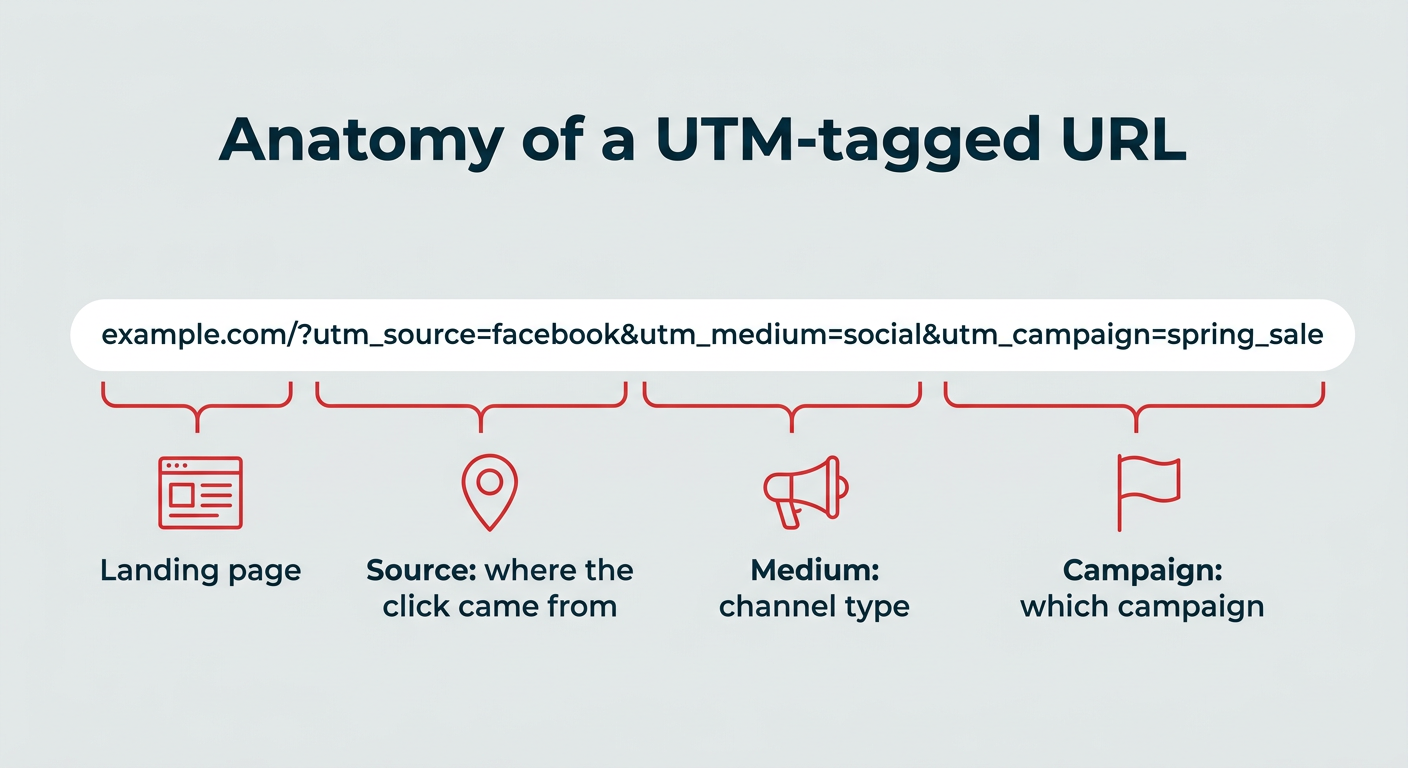
At their core, UTM parameters are simple yet powerful. They are key-value pairs appended to a URL, separated by an ampersand (&) after an initial question mark (?) that marks the beginning of the query string. For instance, www.example.com/?utm_source=facebook&utm_medium=social&utm_campaign=spring_sale clearly illustrates the structure. There are five standard UTM parameters, three of which are generally required for most analytics tools to accurately interpret the data, and two optional ones that provide deeper granularity.
-
utm_source(Required): This parameter identifies the specific platform, site, or partner that sent the traffic. It answers the question, "Where did the user come from?"- Examples:
facebook,linkedin,newsletter,google,partner_website. - Importance: Distinguishes traffic from different social networks, search engines, or referral sites, preventing generic "social" or "referral" buckets from obscuring specific performance.
- Best Practice: Use consistent, lowercase names (e.g.,
instagramnotInstagram).
- Examples:
-
utm_medium(Required): This identifies the channel category through which the traffic arrived. It answers, "How did the user get here?"
- Examples:
social(for organic social posts),cpc(for paid search ads),email,referral,display. - Importance: Allows for broad categorization and comparison of channel performance (e.g., comparing all social media efforts against all email campaigns).
- Best Practice: Maintain a standardized list of mediums across all campaigns to ensure data consistency.
- Examples:
-
utm_campaign(Required): This parameter names the specific marketing campaign or promotion the link belongs to. It answers, "What specific initiative is this part of?"- Examples:
spring_sale,product_launch_q2,blog_promo_june,black_friday_2026. - Importance: Groups all related links and traffic under a single campaign umbrella, enabling marketers to measure the overall impact of a holistic marketing effort across multiple touchpoints and platforms. This is crucial for evaluating return on investment (ROI).
- Best Practice: Use descriptive but concise names, avoiding special characters.
- Examples:
-
utm_term(Optional): Originally designed to track keywords for paid search campaigns, this parameter is now often utilized to identify audience segments, product categories, or other specific targeting details. It answers, "What keyword or audience was targeted?"- Examples:
small_business,b2b_executives,eco_friendly_products. - Importance: Adds an extra layer of detail, particularly valuable for A/B testing different keyword strategies or audience targeting within advertising campaigns.
- Best Practice: Use it judiciously where specific segmentation insights are needed.
- Examples:
-
utm_content(Optional): This parameter distinguishes between different creative elements or links within the same campaign, medium, and source. It answers, "What specific element was clicked?"- Examples:
video_ad,image_banner,text_link_hero,button_cta_sidebar. - Importance: Essential for A/B testing variations of ads, calls to action, or other content elements pointing to the same landing page. It helps determine which specific creative performs best.
- Best Practice: Be specific enough to differentiate elements, but avoid excessive length.
- Examples:
A critical best practice across all UTM parameters is to consistently use lowercase letters. Since analytics tools are case-sensitive, Facebook and facebook would be treated as two distinct sources, fragmenting data and complicating analysis.
Beyond Basic Tracking: UTMs vs. GTM – A Complementary Relationship
While often discussed in the same breath, UTM parameters and Google Tag Manager (GTM) serve fundamentally different purposes, yet they are highly complementary in a robust analytics setup.
- UTM Parameters: These are embedded directly into the URLs shared with users. Their primary function is to label incoming traffic so that analytics platforms can identify its origin (source, medium, campaign, etc.). They live in the link.
- Google Tag Manager (GTM): This is a tag management system that allows marketers to deploy and manage tracking codes (tags) on a website without directly editing the site’s code. GTM simplifies the process of adding analytics tags, conversion pixels, and other snippets. It lives on the website.
In essence, UTMs tell you how a user arrived at your site, while GTM helps you track what the user does once they are there. Most sophisticated marketing teams leverage both: UTMs provide granular attribution data in the URL, and GTM ensures that all other on-site events (like form submissions, video plays, scroll depth, or purchases) are accurately tracked and sent to analytics platforms. If resources are limited, starting with UTMs is often recommended as they address the fundamental attribution challenge without requiring developer intervention.
Crafting Trackable Links: Practical Implementation
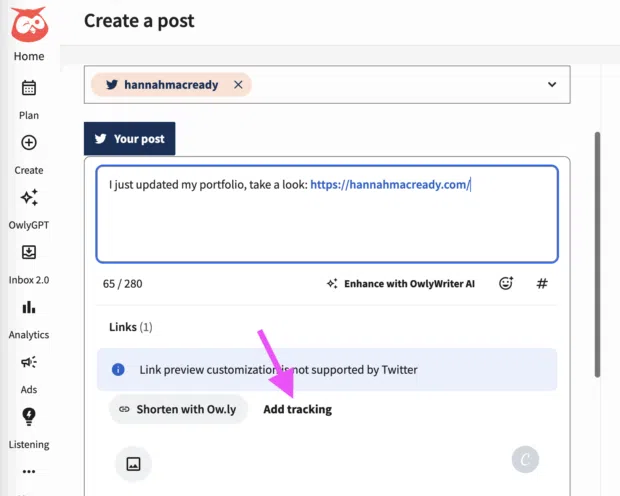
Manually appending UTM parameters to every URL is tedious and prone to errors. Fortunately, several tools streamline this process, ensuring accuracy and consistency.
-
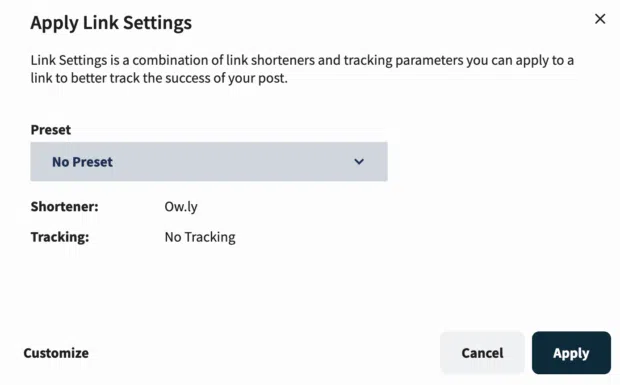
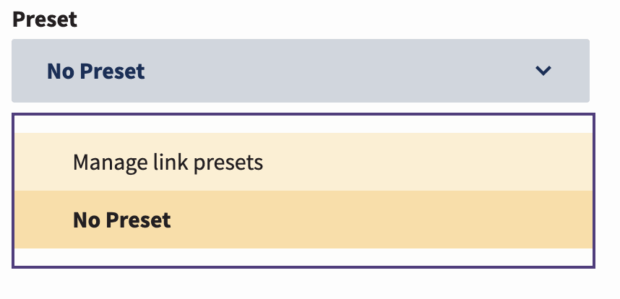
Hootsuite Social OS Integration: For social media marketers, platforms like Hootsuite Social OS offer built-in UTM link builders. When composing a post, users can add a link and then select "Add tracking," which brings up fields for the UTM parameters. A key advantage here is the ability to create and manage "presets." Once a team agrees on naming conventions for common sources, mediums, and campaigns, these presets can be applied with a single click, drastically reducing errors and standardizing tracking across the team. Hootsuite also integrates its own link shortener (ow.ly) or allows for vanity URLs, keeping the public-facing links clean and professional despite the appended tracking codes.
-
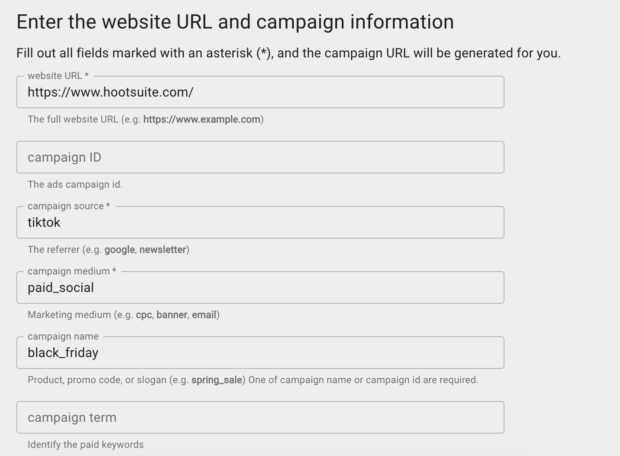
Google Campaign URL Builder: Google’s free Campaign URL Builder (part of GA4’s developer tools) is an essential resource for creating UTM-tagged links for any channel, especially those outside of integrated platforms like Hootsuite (e.g., partner emails, QR codes, guest blog posts). Users simply input their destination URL and then fill in the required
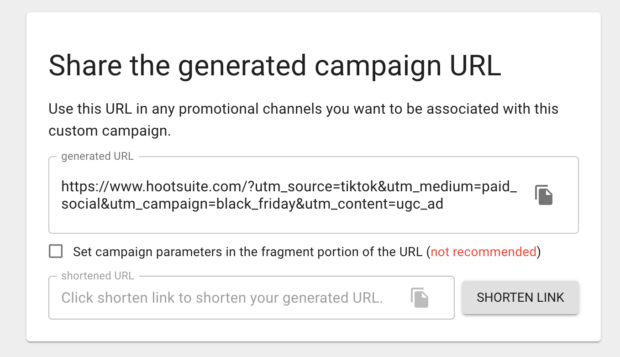
utm_source,utm_medium, andutm_campaignfields, along with optionalutm_termandutm_content. The tool automatically generates the full, tagged URL, which can then be copied and, ideally, shortened using a service like Hootsuite’s Ow.ly or Bitly for better user experience. This builder is particularly useful for ensuring compliance with Google Analytics’ expected parameter formats.
The Strategic Imperative: Why UTMs Drive Marketing Success
The true power of UTM parameters lies in the strategic advantages they unlock for digital marketers:
-
Pinpointing Exact Traffic Origins: Clicks from various platforms might otherwise be lumped into broad categories or even appear as "direct" traffic. UTMs eliminate this ambiguity. For instance, a campaign link shared on an Instagram Story, a LinkedIn post, and an email newsletter, each tagged appropriately, will reveal precisely which channel drove how many clicks, conversions, and even revenue. This granularity is indispensable for understanding audience behavior across diverse touchpoints. With 84% of U.S. adults on YouTube and 50% on Instagram (Pew Research, 2025 data), understanding the nuances of traffic from these platforms is critical.
-
Optimizing Campaign Performance in Real-Time: By assigning a unique
utm_campaignname to all links related to a specific marketing initiative (e.g., a "Summer Sale"), marketers can track its aggregated performance across every platform and content type. If analytics reveal that TikTok is significantly outperforming Facebook for the sale, resources can be reallocated mid-campaign, allowing for agile optimization and maximizing ROI. This ability to make data-driven adjustments on the fly is a cornerstone of modern digital marketing. -
Quantifying Social Media ROI and Securing Budgets: Social media teams frequently face the challenge of demonstrating tangible results. With global social ad spend projected to hit $338 billion, proving ROI is more critical than ever. UTM tracking, when integrated with analytics platforms like GA4, connects social media efforts directly to business outcomes such as leads generated, sales conversions, and even customer lifetime value. This robust attribution model provides the "campaign-to-revenue proof" necessary to justify budgets, secure additional resources, and elevate the strategic importance of social media within an organization.
-
Informing and Refining Content Strategy: UTMs facilitate systematic A/B testing of social content. By tagging two versions of a post (e.g., different headlines, images, or calls-to-action) with distinct
utm_contentvalues, marketers can objectively determine which creative performs better. Over time, these granular insights reveal patterns in audience preferences, enabling continuous refinement of content strategy, messaging, and visual elements for optimal engagement and conversion rates. This data-driven approach replaces guesswork with evidence, leading to more effective content.
Actionable Insights: Tracking and Reporting with GA4 and Beyond
Collecting UTM data is only half the battle; the other half is effectively tracking, analyzing, and reporting on it.
-
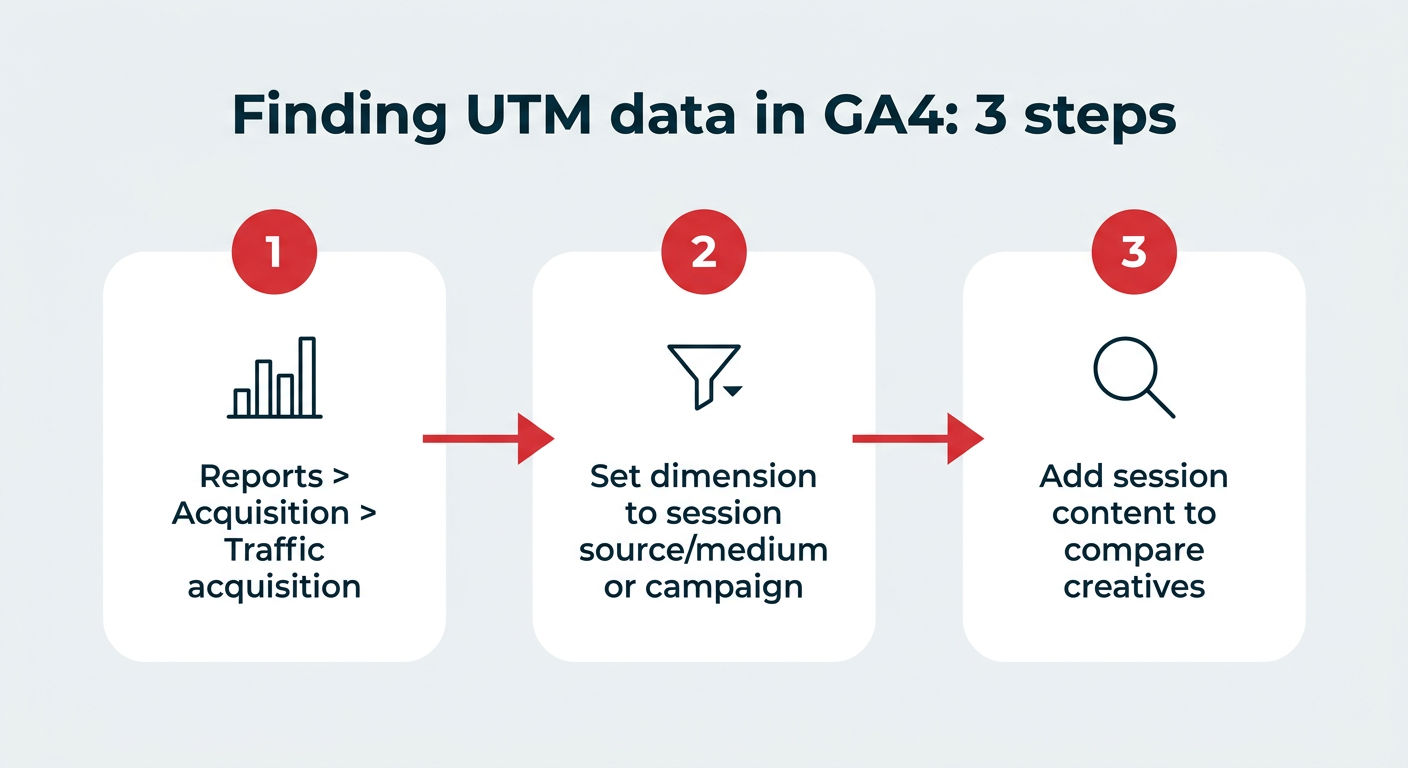
Navigating Google Analytics 4 (GA4): GA4 is the primary destination for UTM performance data.
- Standard Reports: In your GA4 property, navigate to
Reports > Acquisition > Traffic acquisition. Here, you can switch the primary dimension toSession source,Session medium, orSession campaignto view aggregated data. These reports show key metrics like users, sessions, engagement rate, conversions, and total revenue attributed to each UTM parameter. - Custom Explorations: For deeper analysis, GA4’s
Explorationsfeature is invaluable. Users can build custom reports by selecting dimensions likeSession campaign,Session source,Session medium, andSession manual ad content(which corresponds toutm_contentandutm_term). This allows for multi-dimensional analysis, such as comparingutm_contentvariations within a specificutm_campaignandutm_source. - Data Retention: A crucial note for GA4 users: default data retention for user-level and event-level data is two months. This can be extended to 14 months in
Admin > Data Settings > Data Retention. For year-over-year comparisons, exporting data or sending it to a separate dashboard is essential to avoid data loss.
- Standard Reports: In your GA4 property, navigate to
-
Hootsuite Analytics: For links published and tracked through Hootsuite Social OS, performance data can also be accessed directly within Hootsuite Analytics. This provides a convenient, integrated view of social media-specific UTM data, complementing the broader website analytics found in GA4.
-
Centralized Data Management and Visualization: As the number of UTM links grows, a centralized system becomes critical.
- Campaign Log: Maintain a master spreadsheet (e.g., Google Sheets) containing every UTM-tagged URL, its shortened version, individual parameter values, the original destination URL, and notes on its usage. This prevents duplication and ensures consistency.
- Looker Studio (formerly Google Data Studio): This free tool can connect directly to GA4 and Google Sheets, allowing marketers to create dynamic, customizable dashboards that visualize UTM performance data. This provides a lightweight, shareable reporting solution without investing in expensive BI tools, making data accessible and understandable across teams.
Mastering UTMs: Expert Best Practices and Common Pitfalls
Fanny Lau, Social Media and Communications Manager at LivePerson, emphasizes several best practices for effective UTM implementation:
-
Simplicity and Clarity in Naming: Naming conventions should be simple and self-explanatory. Lau advises thinking about how a report might be interpreted by someone outside the immediate team months later. Consistent, concise names like
social-blog-2026orsocial-events-2026ensure immediate understanding. The goal is a shared language, not personal shorthand. -
Vigilant Quality Control: Even minor typos or incorrect characters (e.g., a missing
?after the base URL, or an extra space) can invalidate UTM parameters, causing data to be lost or incorrectly attributed. Lau stresses the importance of slowing down and double-checking links, even when using builder tools. These "seemingly minor things do affect how data shows up in your reporting, if it shows up at all." -
Comprehensive Documentation and Sharing: A single, easily accessible master spreadsheet of all active and past UTMs is crucial. Lau links LivePerson’s sheet in their team’s Slack Canvas for quick reference. Standardizing creation through tools like Google Analytics’ Campaign URL Builder further minimizes errors and ensures team-wide adherence to format.
-
Leveraging Data for Content Strategy: UTM data isn’t just for reporting; it’s a powerful feedback loop for content strategy. Lau notes that LivePerson used UTM insights to discover that educational resources performed exceptionally well when shared on Facebook, leading them to "lean into that content as part of our ongoing plan." This demonstrates how tracking translates directly into optimized content creation.
-
Proactive Adoption: The biggest mistake, according to Lau, is simply not using UTMs, especially for organic social media. Even a basic setup provides invaluable data. Connecting with internal digital marketing teams to align on existing practices is a smart starting point for new users.
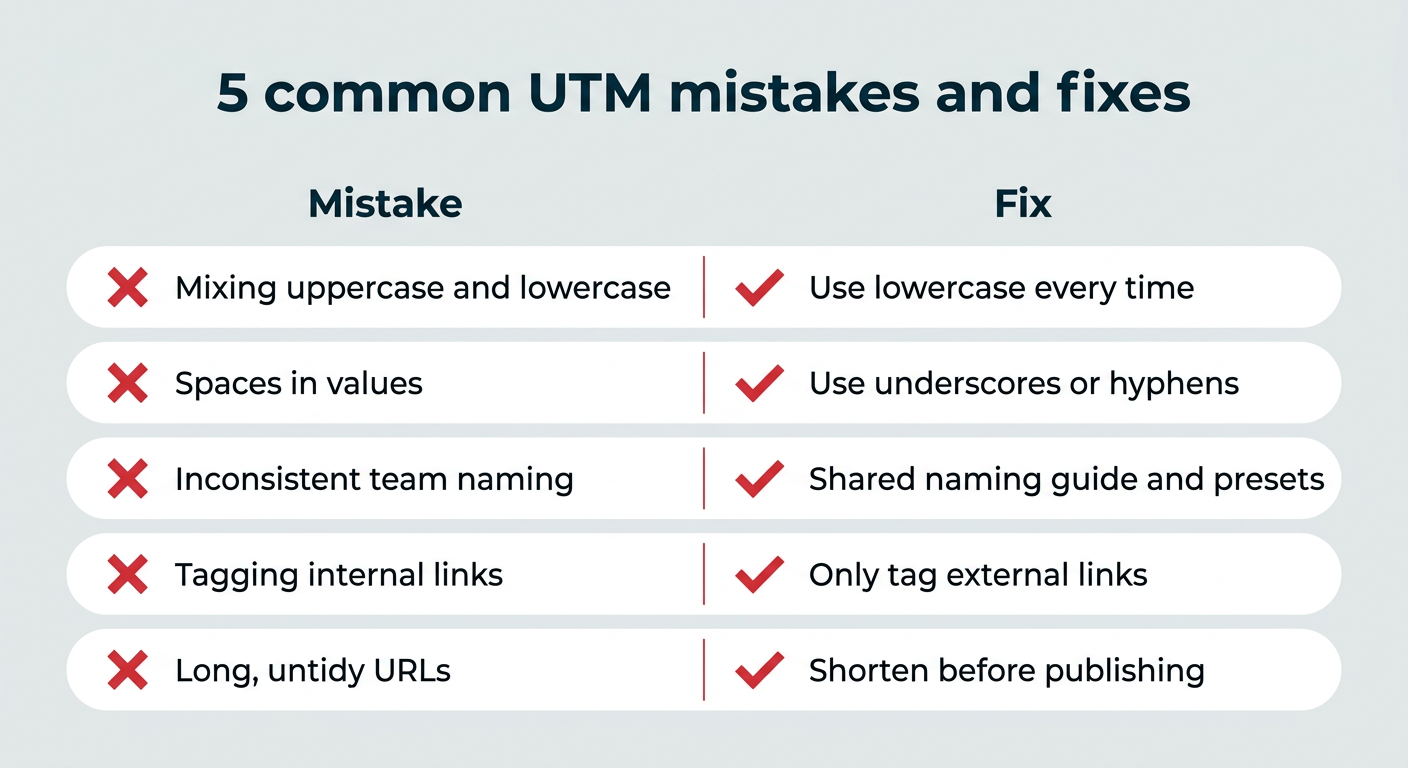
Common UTM Mistakes to Avoid:
Despite their simplicity, several common errors can derail UTM tracking:
- Case Sensitivity Issues: As mentioned,
Facebookandfacebookare seen as different entities. Always use lowercase. - Inconsistent Naming: Using
social-mediafor one campaign andsocialfor anotherutm_mediumwill fragment data. Standardize values. - Missing Required Parameters: Omitting
utm_source,utm_medium, orutm_campaignwill render the tracking incomplete and less useful. - Using UTMs on Internal Links: This is a critical error. Applying UTMs to links within your own website overwrites the original traffic source, making it appear as if your site is referring traffic to itself. Analytics will start a new session, losing the true origin.
- Forgetting to Shorten Long URLs: While not a tracking error, extremely long URLs with UTMs can be off-putting to users and take up valuable character space in social posts. Always shorten them.
The solution to these mistakes boils down to establishing clear, consistent guidelines and using tools that enforce them.

UTM Limitations and Privacy Considerations
While indispensable, UTM parameters have limitations and implications worth noting:
- Data Accuracy: UTM data is directional. Factors like ad blockers, browser privacy settings (e.g., Intelligent Tracking Prevention on Safari), and user behavior (e.g., copying and pasting only part of a URL) can sometimes affect the completeness of data.
- No Personally Identifiable Information (PII): UTMs are designed purely for campaign and traffic attribution. They do not collect any personally identifiable information (PII) about users, adhering to privacy standards.
- Session-Based: In GA4, UTMs primarily provide session-level attribution, meaning they tell you how a user started a session. While GA4 offers more sophisticated event-based tracking, the core UTM parameters focus on the initial entry point.
- User Manipulation: Savvy users can theoretically alter UTM parameters in a URL, though this is rare and generally has negligible impact on aggregate data.
These limitations do not diminish the value of UTMs; rather, they highlight the need to interpret data within context and understand the broader digital analytics ecosystem.
Conclusion
UTM parameters are far more than just technical additions to a URL; they are the backbone of effective digital marketing attribution. From their origins with Urchin to their seamless integration with modern analytics platforms like Google Analytics 4 and Hootsuite, UTMs provide the clarity and precision necessary to navigate the complex digital landscape. By systematically tagging links, marketers can move beyond mere guesswork, accurately pinpointing traffic sources, optimizing campaign performance, proving ROI, and continually refining content strategies based on tangible data. In an era where every marketing dollar must be justified and every digital interaction understood, mastering the use of UTM parameters is not merely a best practice—it is a fundamental requirement for strategic success.


 Jia Lissa

 Ammar Sabilarrohman