Nana Wu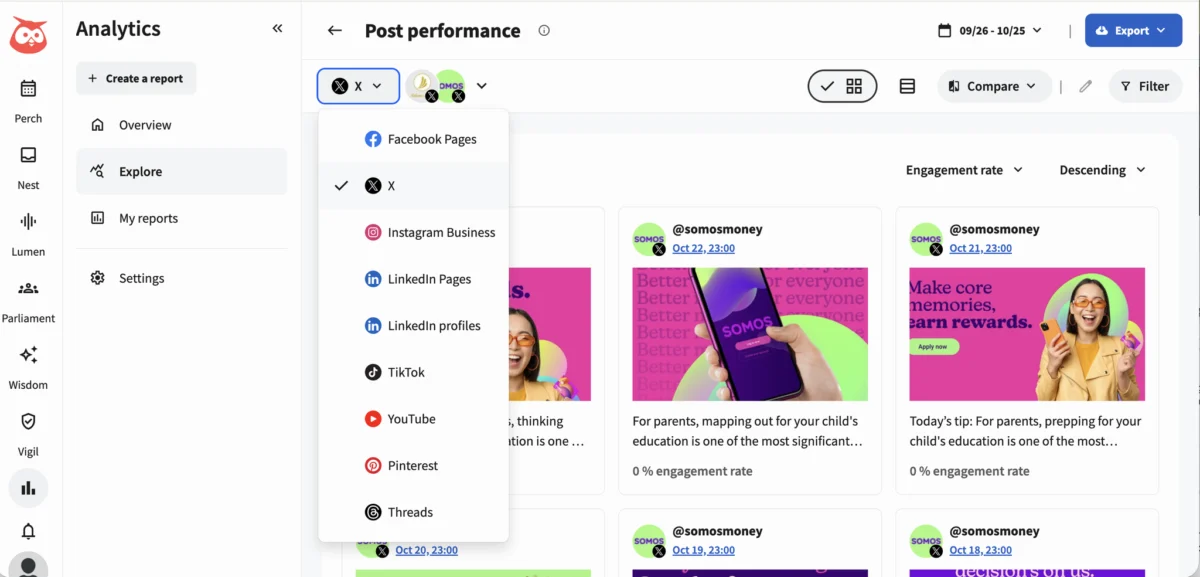
A social media dashboard serves as a singular, unified interface that aggregates critical metrics from all connected social accounts, enabling comprehensive tracking, analysis, and reporting of performance. This centralized view is no longer a luxury but a fundamental necessity for enterprise marketing teams, agencies managing diverse client portfolios, and rapidly expanding social media departments, where the complexity and burden of reporting escalate with each new account and campaign launched. Instead of the laborious process of individually logging into platforms such as Instagram, LinkedIn, Facebook, TikTok, and X (formerly Twitter) to ascertain results, a well-implemented dashboard consolidates all pertinent data. This provides an immediate and holistic understanding of successful strategies, areas requiring improvement, and the direct correlation between social media endeavors and overarching business objectives.

Most advanced social media dashboards are characterized by their ability to provide real-time or near-real-time data, offering immediate insights into campaign performance and audience engagement. They feature highly customizable visualizations, including dynamic charts, graphs, and tables, which transform raw data into easily digestible formats. Furthermore, robust filtering capabilities allow users to segment data by platform, specific date ranges, individual campaigns, or particular metrics, ensuring that insights are precisely tailored to the query at hand. The spectrum of available solutions ranges from accessible free tools like Google Looker Studio, ideal for budget-conscious teams willing to undertake manual setup, to sophisticated, integrated systems such as Hootsuite Social OS, which seamlessly combine scheduling, publishing, and cross-platform analytics into one cohesive environment.
The Evolution and Necessity of Integrated Social Analytics

The proliferation of social media platforms and the exponential growth of user-generated content have transformed social media from a mere communication channel into a powerful engine for marketing, customer service, and brand building. In the early days, marketers relied heavily on native platform analytics, painstakingly compiling data from disparate sources into spreadsheets. This fragmented approach became increasingly untenable as social media budgets swelled and the demand for measurable return on investment (ROI) intensified.
With over $121 billion in US social ad spending projected for 2026, according to eMarketer, the financial stakes are higher than ever. The cost of not knowing what is performing effectively—or failing—is a significant liability. For enterprise teams navigating multiple brand accounts, complex campaigns, and a myriad of internal stakeholders, social media dashboards address critical operational challenges by streamlining data collection and analysis. This evolution underscores a broader shift in digital marketing towards data-driven decision-making, where anecdotal evidence is replaced by verifiable metrics.
Categorizing Social Media Dashboards for Strategic Focus
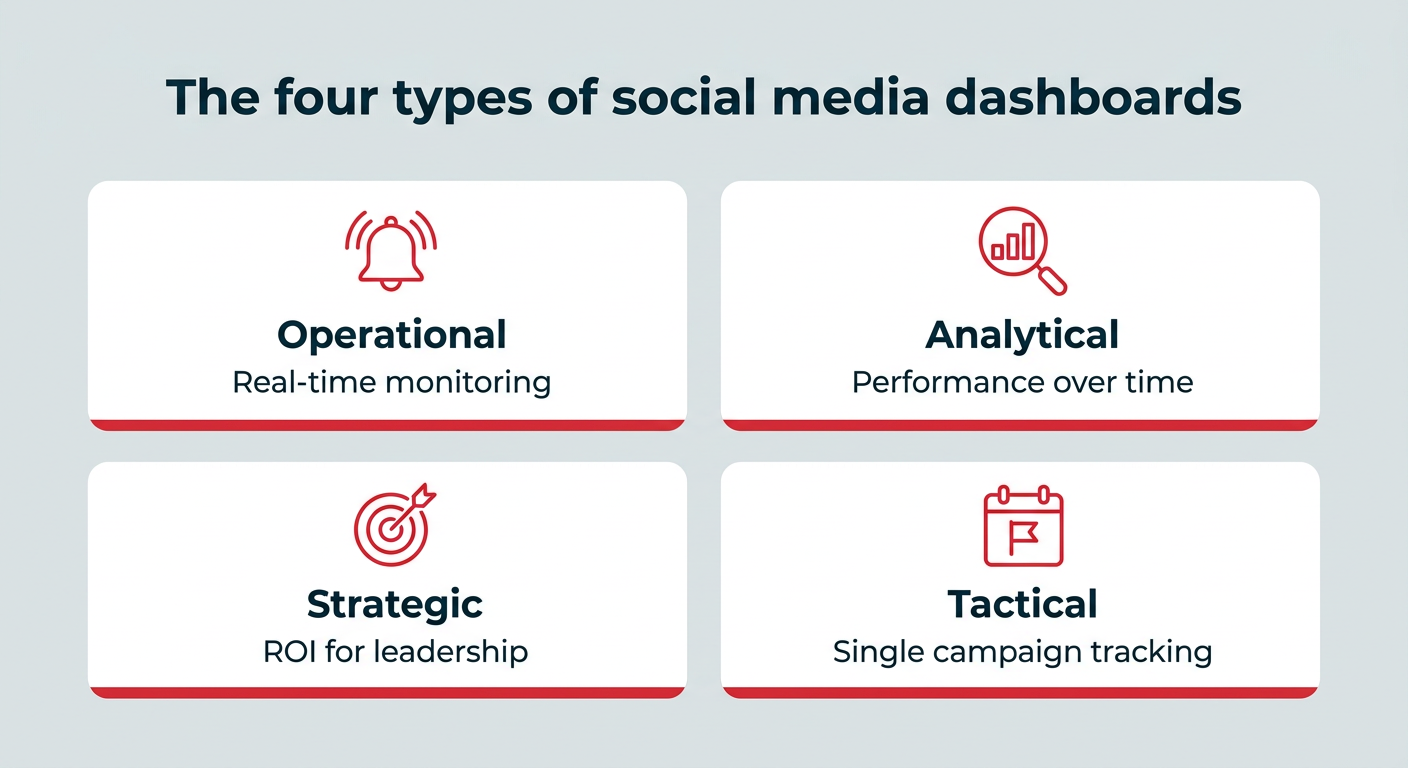
To prevent information overload and ensure utility, social media dashboards are typically categorized into four distinct types, each designed to serve a specific purpose and user group. Understanding these categories is paramount to constructing an effective dashboard that aligns with precise organizational needs:
| Dashboard Type | Purpose | Who Uses It |
|---|---|---|
| Operational | Monitor real-time activity and response needs | Social media coordinators, community and care teams |
| Analytical | Analyze content and audience performance over time | Social media managers, analysts |
| Strategic | Report ROI and progress against business goals | CMOs, VPs of marketing, directors |
| Tactical | Track a specific campaign from launch to wrap | Campaign managers, paid social specialists |
Most of the specialized dashboard templates discussed subsequently are designed to align with one of these four foundational types, enabling users to match the analytical tool directly to the specific task at hand, whether it’s immediate crisis management, long-term content strategy, executive reporting, or campaign optimization.
Addressing Core Operational Challenges

Social media dashboards fundamentally resolve a measurement problem that scales directly with marketing budgets and the ambition of social media initiatives. The increasing investment in social advertising, with global social media ad spending on pace to reach roughly $530 billion by 2030 (Statista), makes robust analytics indispensable. For enterprise teams managing extensive digital footprints, dashboards offer tangible benefits:
- Faster, Easier Reporting: The arduous task of manually switching between native analytics platforms to compile monthly reports can consume countless hours. A centralized dashboard dramatically reduces this time, allowing teams to export comprehensive data and visualizations for presentations and reports in mere minutes, not hours. This reclaimed time can then be reinvested into strategic planning, content creation, and campaign execution.
- Real-time Decision-Making: Without a consolidated view, performance data remains scattered, leading to delayed reactions to evolving trends or issues. Dashboards provide an at-a-glance overview of what is performing well and what is not, empowering teams to pivot their social media strategy in real-time. The integration of AI-powered insights, as seen in platforms like Hootsuite Wisdom AI, can further enhance this by automatically surfacing critical trends and anomalies that might otherwise be overlooked by human analysis.
- Proving Social Media ROI to Leadership: One of the most persistent challenges for social media teams is demonstrating a clear connection between their efforts and tangible business outcomes. This is particularly crucial given that marketing budgets have remained flat at an average of 7.8% of overall company revenue, with 59% of CMOs reporting insufficient budget to execute their strategies effectively (Gartner). Dashboards provide the historical context necessary to track progress toward business goals over time, showcasing trend lines rather than isolated monthly figures. By integrating social media metrics with revenue, lead generation, and brand health indicators, dashboards enable teams to present compelling ROI data that leadership demands, justifying continued investment and strategic expansion.
Matching Metrics to Goals: The Foundation of Effective Dashboards
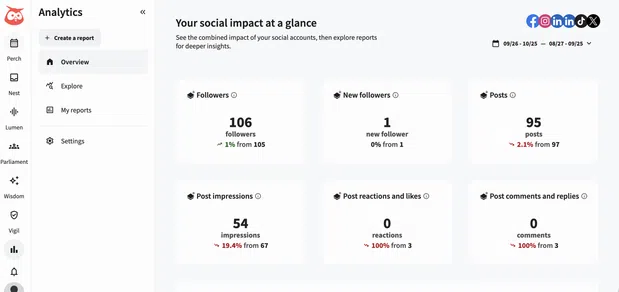
The efficacy of any social media dashboard hinges on its ability to present metrics that directly align with specific business goals. A cluttered dashboard tracking every conceivable metric is less useful than a focused one that highlights the right indicators, leading to more informed and impactful decisions.
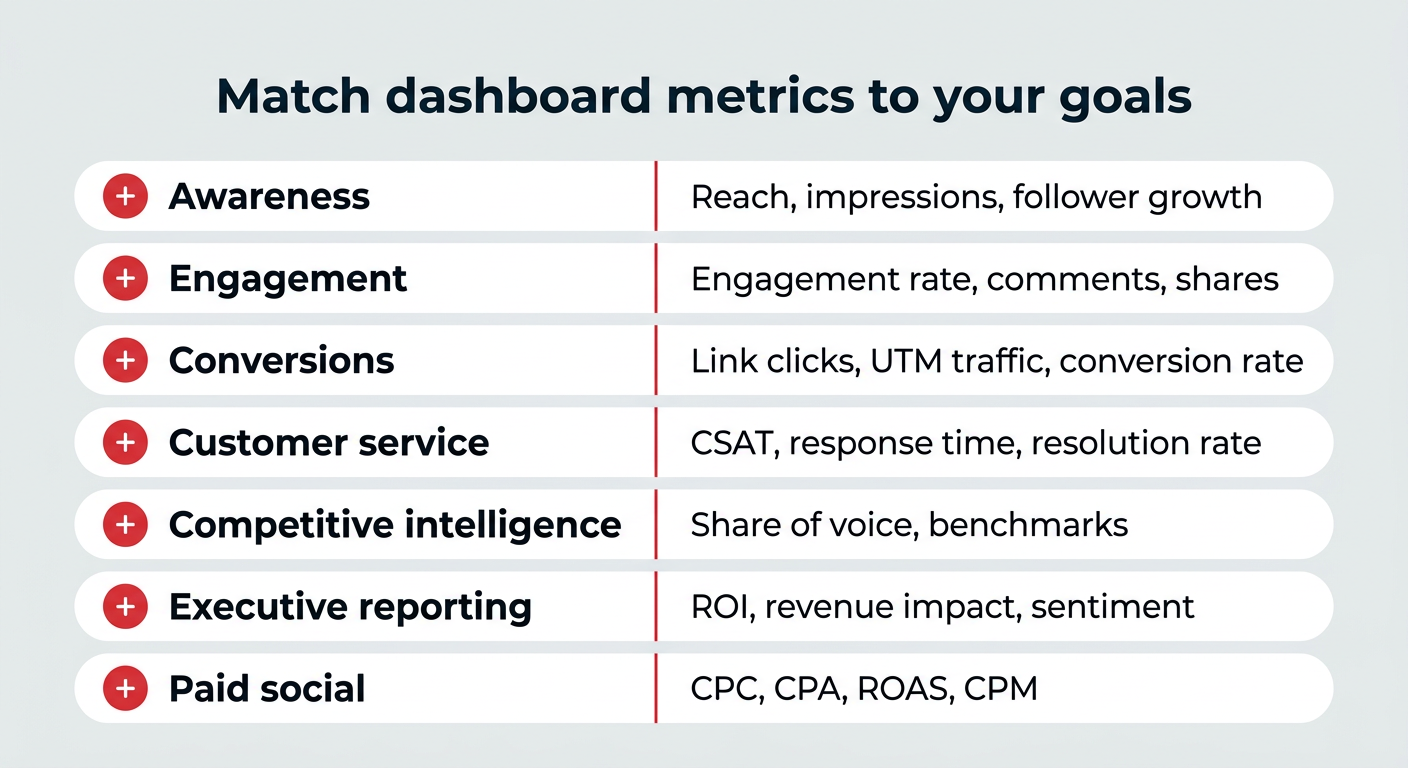
Here’s a guide for aligning objectives with key metrics and their corresponding dashboard types:
| Goal | Key Metrics | Dashboard Type |
|---|---|---|
| Awareness | Reach, impressions, follower growth, brand mentions | Brand awareness dashboard |
| Engagement | Engagement rate, likes, comments, shares, saves | Content and engagement dashboard |
| Conversions | Link clicks, UTM-tracked traffic, conversion rate | Conversions and traffic dashboard |
| Customer service | CSAT score, response time, resolution rate, sentiment | Social customer service dashboard |
| Competitive intelligence | Share of voice, competitor engagement, benchmarks | Competitive analysis dashboard |
| Executive reporting | ROI, revenue impact, goal progress, sentiment | Executive summary dashboard |
| Paid social | CPC, CPA, ROAS, CPM, ad spend | Advertising and paid social dashboard |
A truly effective social media analytics dashboard must also incorporate historical context, allowing for comparisons of current performance against previous periods and the tracking of long-term progress. Once the relevant metrics are identified, the next step involves organizing them into a logical and actionable layout.
Essential Rules for Building Impactful Dashboards
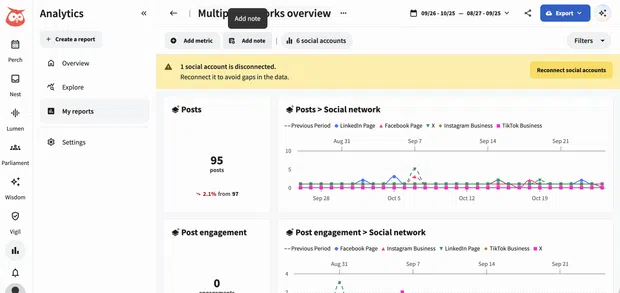
To maximize the utility of a social media dashboard, adherence to a few core principles is crucial. These rules ensure that the dashboard remains focused, actionable, and relevant:
- Define Your Audience and Purpose: Before building, clarify who will use the dashboard and what decisions they need to make. An executive dashboard will differ significantly from one used by a community manager.
- Align Metrics with Goals: Every metric displayed should directly contribute to measuring progress toward a specific, predefined objective. Avoid "vanity metrics" that don’t offer actionable insights.
- Keep it Simple and Visual: Dashboards should be easy to understand at a glance. Use clear charts, graphs, and visual cues. Too much data or complex layouts can be overwhelming.
- Provide Context and Comparisons: Include historical data (e.g., month-over-month, year-over-year) and benchmarks (e.g., industry averages, competitor performance) to give meaning to current numbers.
- Ensure Data Accuracy and Reliability: The dashboard is only as good as its data. Verify that all integrations are functioning correctly and that the data sources are accurate and up-to-date.
- Make it Actionable: The ultimate goal is to drive action. Each section or metric should ideally suggest a potential insight or a course of action.
- Regularly Review and Iterate: Social media landscapes and business goals evolve. Periodically review the dashboard with its users to ensure it remains relevant and useful, making adjustments as needed.
Key Dashboard Templates for Comprehensive Social Media Management
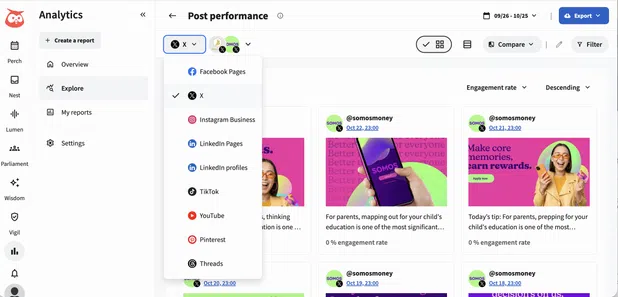
A range of specialized dashboard templates caters to various analytical needs, providing targeted insights for different aspects of social media strategy.
Brand Awareness Dashboard
This template is designed to illustrate the extent of audience interaction with social media posts and accounts, tracking changes in engagement, reach, and follower count over time. For large enterprises, this dashboard is invaluable for quantifying the impact of brand campaigns and understanding audience growth across diverse regions or demographic segments.
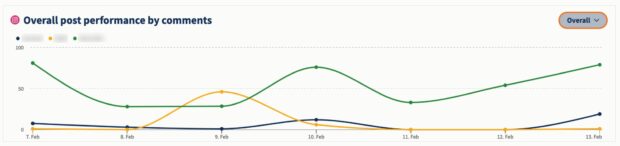
- Why it’s needed: To gauge audience interaction and track awareness growth, informing strategic decisions.
- Metrics to track: Reach, impressions, follower growth, brand mentions, sentiment analysis, share of voice.
Conversions and Traffic Dashboard
This dashboard focuses on tracking link clicks across various platforms, providing an overview of click conversions, including clicks by media format and trends on platforms like Facebook, LinkedIn, and Pinterest. While tracking limitations exist on certain platforms (e.g., Instagram’s in-post clickable links), integrating this data with Google Analytics or a CRM allows for full-funnel measurement, connecting social clicks to downstream actions such as sign-ups, purchases, or pipeline progression.
- Why it’s needed: To demonstrate the true ROI of social media efforts by linking social activity to business results, justifying investment.
- Metrics to track: Link clicks, click-through rate (CTR), conversion rate, UTM-tracked traffic, cost per conversion (CPC).
Content and Engagement Performance Dashboard
Combining overall engagement rate trends with individual post performance, this dashboard allows users to track engagement by platform and per post. It helps identify top-performing content based on chosen metrics and reveals which content formats drive the most interaction. Engagement rate is not a vanity metric; it’s a direct indicator of content resonance, enabling teams to refine their strategy and assess the effectiveness of content experiments.
- Why it’s needed: To quickly identify successful content, understand performance drivers, and brainstorm new, effective content ideas using AI tools or repurposing strategies.
- Metrics to track: Engagement rate, likes, comments, shares, saves, video views, average time spent, top-performing posts by metric.
Network-Specific Dashboards
While overall performance dashboards are essential for a holistic view, platform-specific dashboards (e.g., Instagram overview report) provide deeper insights into individual networks. These dashboards are included in comprehensive social media management plans, allowing for nuanced analysis of each platform’s unique audience, content expectations, and trending formats. This granular view helps optimize strategy for each channel, ensuring content is tailored and effective.
- Why it’s needed: To understand each platform’s contribution to business goals and optimize content formats and topics for specific network audiences.
- Metrics to track: Platform-specific reach, engagement, follower demographics, content type performance, story views, reel plays.
Social Listening Dashboard
Social listening data is crucial for refining content strategy, protecting brand reputation, enhancing customer service, and proving ROI. Tools like Lumen (integrated within Hootsuite Social OS) analyze millions of real-time social conversations, providing AI-powered summaries. This enables rapid data extraction for decision-making, trend identification, and understanding public sentiment toward a brand or specific topics.
- Why it’s needed: To make informed decisions, understand audience needs, and identify what resonates, driving tangible business results.
- Metrics to track: Brand mentions, sentiment score, share of voice, trending topics, competitor mentions, crisis detection.
Competitive Analysis Dashboard
This dashboard provides a pulse on competitor activity, allowing businesses to benchmark their social media performance against industry averages and specific rivals. It tracks follower growth, brand sentiment, and trends within a niche. Competitive benchmarking informs content strategy, justifies budget requests, and uncovers untapped market opportunities.
- Why it’s needed: To understand competitive positioning and identify strategic advantages or areas for improvement.
- Metrics to track: Competitor follower growth, engagement rates, content types, sentiment, share of voice, ad spend estimates.
Social Customer Service Dashboard
With 81% of customers expecting faster service due to technological advancements (Salesforce), social media customer service is a critical function. This dashboard evaluates the effectiveness of social customer service initiatives, whether through chatbots, dedicated social channels, or automated DMs. It’s vital to monitor quality, as a third of companies risk harming customer experience with frustrating AI self-service (Forrester).
- Why it’s needed: To assess and improve customer service effectiveness and prove the ROI of social customer care to leadership.
- Metrics to track: Customer Satisfaction (CSAT) score, response time, resolution rate, sentiment of service interactions, volume of inquiries.
Executive Summary Dashboard
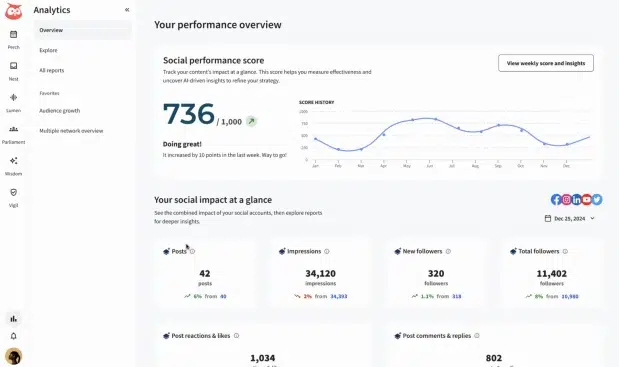
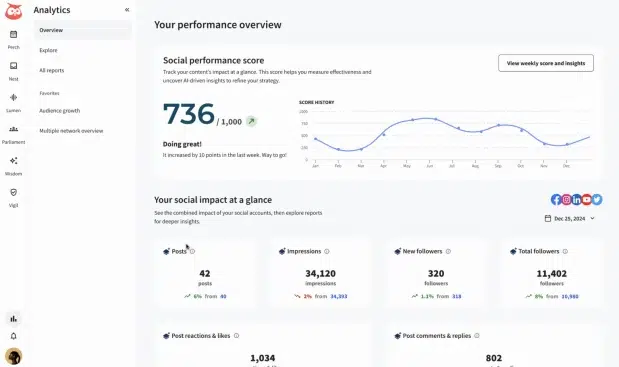
Designed for leadership, this dashboard provides high-level summaries rather than granular details. It focuses on how social media contributes to overarching business objectives, offering quick status reports on key metrics. Hootsuite’s built-in social performance score, for instance, offers a weekly or monthly snapshot of performance across major platforms, providing instant insights into audience growth, content resonance, average engagement, and ad campaign performance.
- Why it’s needed: To provide succinct, actionable reports to leaders, demonstrating ROI and team impact.
- Metrics to track: Overall ROI, progress toward business goals (e.g., revenue generated, leads acquired), brand health indicators, top-level engagement trends, budget utilization.
Employee Advocacy Dashboard
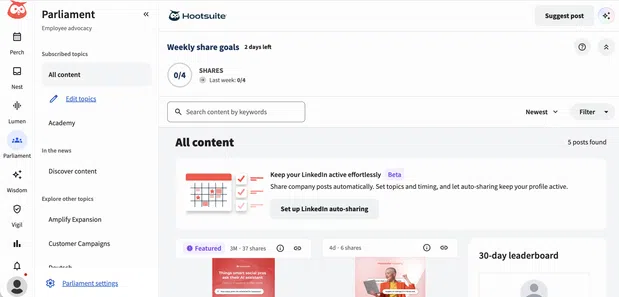
Employee advocacy programs leverage employees as brand ambassadors, allowing them to share pre-approved content on their personal social media profiles. This organically expands reach and builds trust. Dashboards for these programs, such as those integrated with Hootsuite Parliament, facilitate content libraries and measure program success and business impacts.
- Why it’s needed: To build trust with the audience, expand reach, and keep employees engaged as partners in achieving business goals.
- Metrics to track: Employee participation rate, total reach generated by employees, engagement on shared content, website traffic from employee shares, brand mentions from employee networks.
Advertising and Paid Social Dashboard
This dashboard allows for side-by-side viewing of organic and paid content performance, providing a holistic view of social media marketing. It helps understand how organic content influences ad performance and vice versa, enabling optimized campaign management. With global social media ad spending projected to reach $530 billion by 2030, rapid insights are crucial for maximizing campaign impact.
- Why it’s needed: To uncover actionable insights quickly, optimize campaigns, and ensure efficient use of ad spend.
- Metrics to track: Cost Per Click (CPC), Cost Per Acquisition (CPA), Return on Ad Spend (ROAS), Cost Per Mille (CPM), ad impressions, click-through rate (CTR), conversion rate, budget spent.
Implementing Your Social Media Dashboard: Tools and Strategies
When it comes to implementing a social media dashboard, two primary paths are commonly pursued: leveraging integrated social media management platforms or building custom solutions using free tools.
Hootsuite Social OS: Integrated Simplicity
Platforms like Hootsuite Social OS offer a streamlined approach. Users can select a pre-built report template, choose their desired social accounts and date range, and the data automatically populates. These systems are continuously updated to accommodate changes in platform APIs, ensuring ongoing accuracy and relevance without manual intervention. This approach is ideal for teams seeking efficiency, integration of publishing and listening functionalities, and reliable, pre-configured analytics.
Google Looker Studio: Customization with Manual Effort
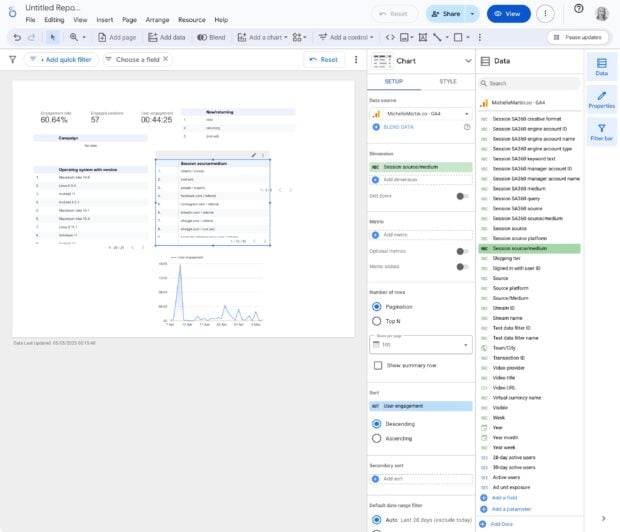
For teams prioritizing complete customization and operating with budget constraints, Google Looker Studio (formerly Google Data Studio) presents a viable, free alternative. However, this option requires more manual setup and ongoing maintenance. The process generally involves six steps:
- Log in to Google Looker Studio: Access the platform using a Google account.
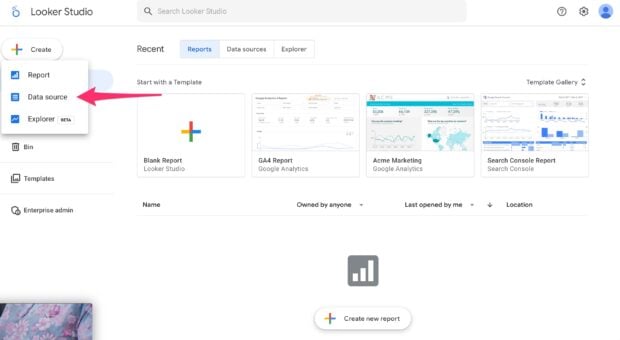
- Create a Data Source: Initiate the creation of a new data source, which will link to your analytics.
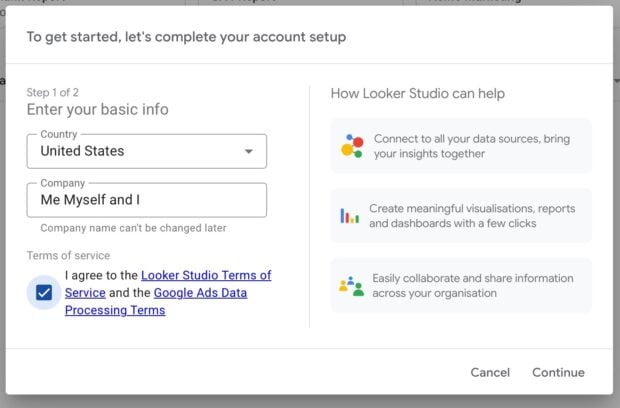
- Enter Business Information: Provide country and business name, then agree to the terms.
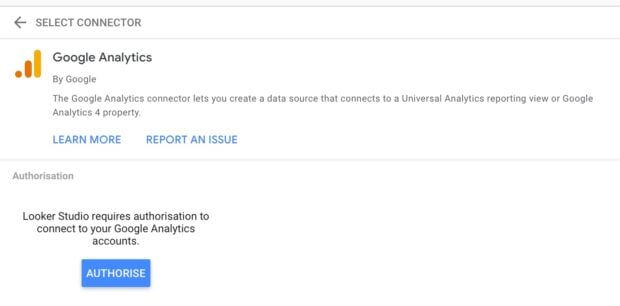
- Connect Google Analytics: Authorize and connect your Google Analytics (GA4) account, serving as a foundational data stream.
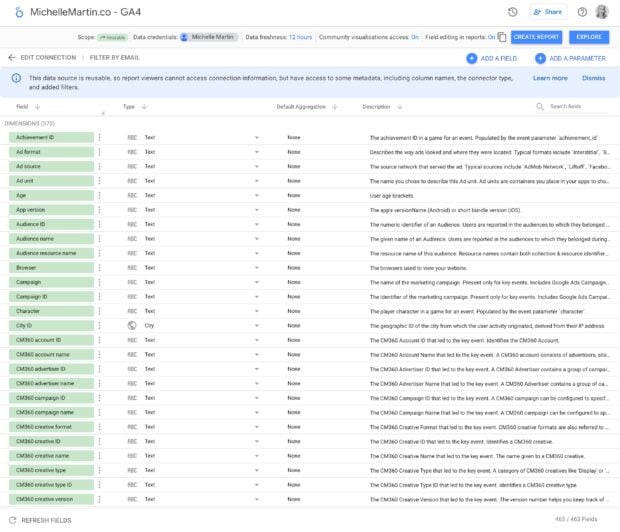
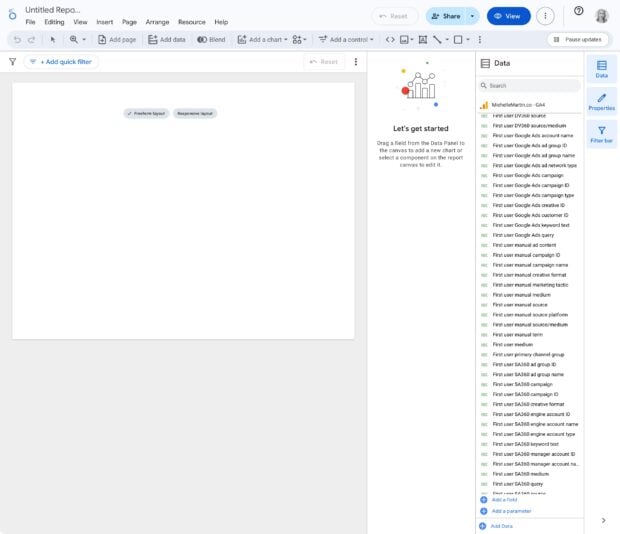
- Create Your Dashboard: From the dense data view, select "Create report" to begin with a blank canvas.
- Add Metrics and Finalize: Manually add desired metrics one by one from the extensive list of over 400 available. Position them, add headings, and adjust the layout for a perfectly customized view.
While Google Looker Studio offers unparalleled control over design and metrics, this comes at the cost of valuable time spent on manual setup and the absence of automatic updates as social platform APIs evolve, requiring regular manual adjustments.
Comparing Leading Social Media Dashboard Tools
The selection of the right social media dashboard tool depends significantly on team size, the number of platforms managed, and the need for integrated publishing and engagement functionalities alongside reporting.
| Tool | Best for | Standout Feature | Starting Price |
|---|---|---|---|
| Hootsuite Social OS | Teams that publish, listen, and report in one place | Pre-built cross-platform reports plus AI-powered insights | $99/user/month (Standard) |
| Google Looker Studio | Budget-conscious teams comfortable with manual setup | Fully custom reports built on GA4 data | Free |
| Klipfolio | Analysts who want granular control over visualizations | Custom metric formulas across many data sources | Paid plans |
| Databox | Teams tracking marketing goals across tools | Goal tracking and automated performance alerts | Paid plans (verify free tier) |
| DashThis | Agencies producing recurring client reports | Automated, white-labeled report delivery | Paid plans |
| Whatagraph | Multi-client reporting at scale | Templated visual reports across marketing channels | Paid plans |
Key Considerations When Choosing a Dashboard Tool:
- Integration Capabilities: Does it connect with all the social platforms and other marketing tools (CRM, Google Analytics) you use?
- Customization: How much control do you have over the metrics, visualizations, and layout?
- Ease of Use: Is the interface intuitive, or does it require extensive training?
- Automation: Does it offer automated data updates, report generation, and alerts?
- Scalability: Can it grow with your team and evolving social media presence?
- Reporting Features: Does it support white-labeling, scheduled delivery, and various export formats?
- Pricing Structure: Does it align with your budget and offer clear value for money?
In essence, Google Looker Studio is the go-to for maximum budget efficiency, a specialized reporting tool like Klipfolio or DashThis suits those focused purely on advanced analytics or client reporting, while Hootsuite Social OS is the comprehensive choice for teams requiring integrated publishing, listening, and customer care alongside robust analytics.
Broader Impact and Implications
The advent and continuous evolution of social media dashboards signify a crucial shift in how businesses approach digital marketing. They transform raw, disparate data into actionable intelligence, allowing organizations to move beyond reactive responses to proactive, data-driven strategies. By clearly demonstrating ROI, optimizing resource allocation, and fostering a culture of continuous improvement, these dashboards empower marketing teams to secure greater budget allocation and elevate the strategic importance of social media within the broader organizational framework. In an increasingly competitive digital landscape, the ability to rapidly understand, adapt, and prove the value of social media efforts through comprehensive dashboards is no longer optional—it is a critical determinant of success.


 rifanmuazin
![What are the latest Hootsuite product features? [September 2026]](https://marketersindex.com/wp-content/uploads/2026/10/what-are-the-latest-hootsuite-product-features-september-2026.webp)
 Azzam Bilal Chamdy