
On May 20th, 2026, WordPress officially launched its latest major iteration, WordPress 7.0, marking a significant leap forward in the platform’s evolution. This release moves beyond incremental block editor improvements, ushering in a new phase of its roadmap focused on smarter workflows, a more intuitive user experience, and foundational support for future innovations, including artificial intelligence. This update is poised to redefine how users interact with the world’s most popular content management system, transforming it into a more robust and app-like environment.
A New Era for WordPress: The Vision Behind 7.0
For over two decades, WordPress has democratized web publishing, evolving from a simple blogging platform to a comprehensive content management system powering an estimated 43% of all websites globally. The journey through the Gutenberg project, introduced in WordPress 5.0, laid the groundwork for a block-based editing experience aimed at visual site building. Subsequent releases incrementally refined Full Site Editing (FSE), empowering users with greater control over their site’s design without code. WordPress 7.0 represents a pivotal moment in this trajectory, signaling a shift towards an even more sophisticated and integrated platform. The core development team’s vision, often articulated through the "make.wordpress.org" channels, has been to cultivate an ecosystem that is not only powerful and flexible but also inherently user-friendly and prepared for emerging web technologies. This release, therefore, is not merely an update but a strategic realignment, positioning WordPress as a competitive player in the broader web application landscape.
Revolutionizing the Admin Experience: A Modern Interface for Enhanced Productivity
One of the most immediate and impactful changes in WordPress 7.0 is the complete overhaul of the administrative interface, designed to make the backend feel less like a traditional CMS and more like a modern web application. This comprehensive refresh introduces several key enhancements aimed at improving user productivity and visual appeal.
A notable, yet seemingly subtle, improvement is the integration of the CSS View Transitions API. This cutting-edge web standard enables smoother, more fluid transitions between pages within the WordPress backend. Instead of abrupt page reloads, users will now experience seamless visual effects when navigating, such as fading or sliding, which significantly enhances the perceived responsiveness and sophistication of the interface. This aligns WordPress with contemporary web design principles, reducing visual jarring and creating a more cohesive user journey within the dashboard.
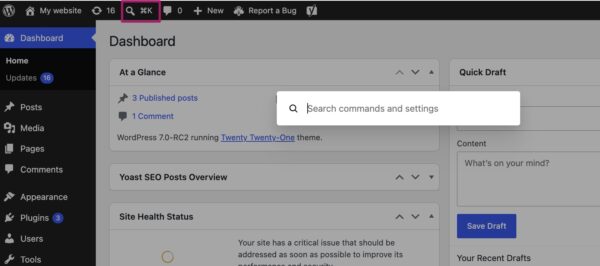
Complementing this visual fluidity is the introduction of the Command Palette shortcut. Accessible via an intuitive icon in the top menu bar or through the universal keyboard shortcuts (⌘K or Ctrl+K), the Command Palette provides rapid, keyboard-driven navigation and action execution. This feature, common in professional-grade software applications, allows users to quickly search for pages, posts, settings, or perform specific actions without having to click through multiple menus. For instance, a user can instantly type "Edit Post" and be presented with a list of recent posts to edit, or "Add New Page" to jump directly to the page creation screen. This dramatically reduces friction and accelerates workflows, particularly for power users and administrators managing complex sites. The Command Palette embodies the "app-like experience" WordPress is striving for, placing efficiency at the forefront of the user interface.
Furthermore, WordPress 7.0 subtly but significantly refreshes the default visual aesthetic. The color palette previously known as "Modern" has now become the standard default. This choice brings the admin interface more in line with the contemporary visual direction established by the block and site editors, creating a unified design language across the entire WordPress experience. The new default features a cleaner, more vibrant, and accessible color scheme. For users who prefer the classic look, the original default, now aptly named "Fresh," remains available within individual profile preferences, ensuring backward compatibility and user choice. These collective improvements deliver a fresh, intuitive, and highly functional backend that streamlines site management and enhances the overall user experience.
Enhanced Content Management: Visual Revisions and Smarter Patterns
For content creators, editors, and site administrators, WordPress 7.0 introduces crucial enhancements that streamline content management and design customization. The revisions system, a cornerstone for tracking changes and restoring previous versions of content, has been profoundly upgraded.
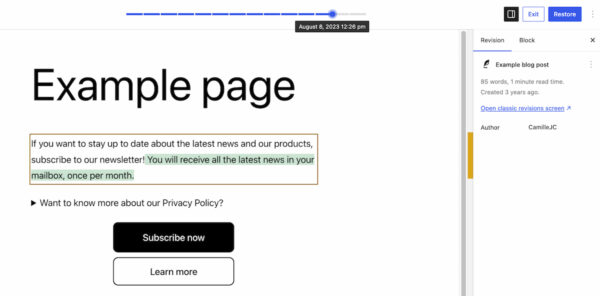
Previously, the revisions interface presented a raw, text-based comparison of content changes, often requiring users to meticulously scan through lines of code or marked-up text to discern modifications. WordPress 7.0 transforms this into a highly intuitive visual revisions system. Now, when accessing the revisions feature, users are presented with a live preview of their page or post. A slider at the top allows effortless navigation through different versions, clearly displaying the date and time of each change. More importantly, the system visually highlights additions in green, modified sections in yellow, and deleted content in red directly within the page preview. This visual differentiation eliminates guesswork, allowing users to instantly identify specific changes, locate the source of layout issues, or quickly review updates. The ability to see "what changed" at a glance significantly reduces the time and effort involved in content auditing and restoration, offering substantial benefits for teams collaborating on content and for maintaining content integrity. This feature aligns WordPress with advanced document management systems, making version control accessible to all users regardless of technical proficiency.
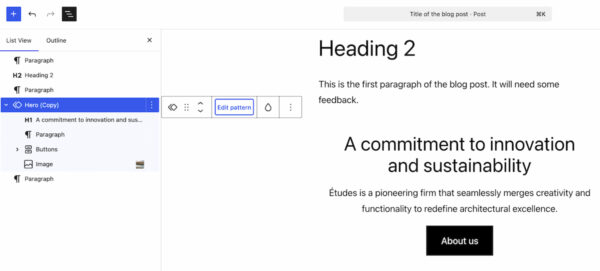
Beyond revisions, the platform introduces smarter pattern editing modes, designed to simplify customization while protecting design integrity. Patterns, pre-designed block layouts, are fundamental to rapid site building in WordPress. With 7.0, selecting a pattern in the List View now initially focuses on "content-focused elements," such as text and image blocks. This allows users to quickly update the primary information within a pattern without being distracted by or accidentally altering underlying design elements. Should more comprehensive design adjustments be needed, an "Edit pattern" button reveals all elements, including spacers, columns, and other structural components. This tiered editing approach ensures that content optimization remains paramount, while still offering the flexibility to fine-tune layout and design when required. This intelligent segmentation of editing capabilities caters to different user needs, fostering a more focused and less error-prone design process.
Empowering Designers: New Blocks and Responsive Controls
The block editor, central to WordPress’s modern editing experience, receives a fresh set of tools and significant enhancements in WordPress 7.0, further empowering designers and reducing reliance on external plugins or custom coding.
Two new blocks debut in this release:
- The Breadcrumbs Block: This highly anticipated block allows users to easily add breadcrumb navigation to their pages. Upon insertion, it automatically generates the correct hierarchical path, enhancing site navigation and user experience. Crucially, the block also offers customization options, allowing users to adjust its appearance and behavior to match their site’s design. This native inclusion removes the need for third-party breadcrumb plugins for many users, streamlining site architecture and improving SEO.
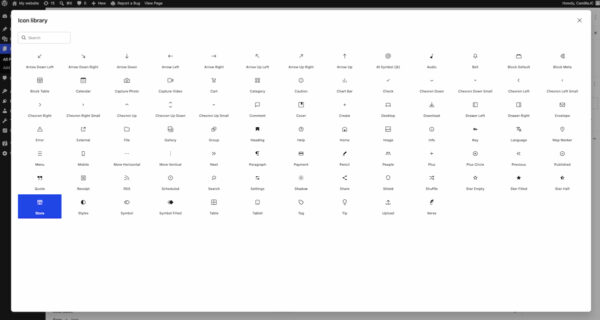
- The Icon Block: This new block provides a straightforward way to embed scalable vector icons into pages and posts. It connects to a directory of pre-installed icons within the WordPress backend, offering a diverse selection that can be easily searched and inserted. This block empowers users to add visual flair and communicate information concisely without resorting to custom SVG code or icon font plugins.
Existing blocks also receive notable upgrades. The Grid Block, previously somewhat constrained, now offers more granular control over responsiveness. The old Auto/Manual toggle has been replaced with a comprehensive set of options that allow designers to precisely define how columns and content adapt across different screen sizes. This significantly enhances the flexibility and power of the Grid block, making it easier to create complex, adaptive layouts. The Cover Block has also been enhanced to support embedded videos as backgrounds. Users can now integrate videos from platforms like YouTube or Vimeo directly into their cover sections, adding dynamic visual interest to hero sections and banners. These new blocks and improvements collectively reduce the need for specialized plugins and custom development, allowing users to achieve sophisticated designs directly within the native WordPress editor.
A major win for responsive web design is the introduction of viewport-based controls for block visibility. This powerful feature allows users to dictate whether a specific block should be displayed on desktop, tablet, or mobile devices. Simply by selecting a block and choosing "Show" in the toolbar, users can toggle its visibility for different screen sizes. For example, a complex table might be hidden on mobile, replaced by a simplified bulleted list shown only on smaller screens. This eliminates the need for custom CSS or JavaScript to achieve device-specific layouts, making responsive design accessible to users without coding knowledge. It democratizes the process of fine-tuning designs for various viewports, ensuring optimal user experience across all devices and significantly aiding in the creation of truly adaptive websites.
Laying the Groundwork for AI Integration
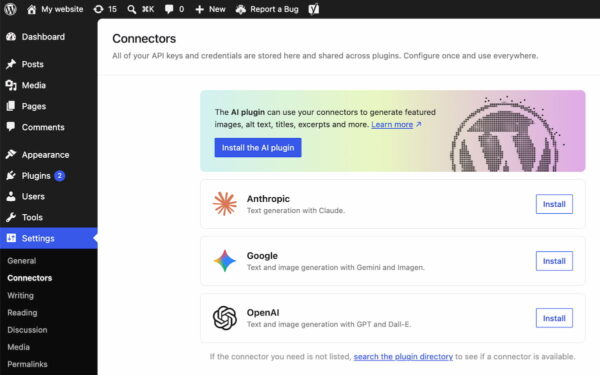
While WordPress 7.0 does not ship with built-in AI-powered tools, it takes a monumental step towards future integration by introducing a dedicated Connectors section under Settings in the WordPress backend. This new area serves as a centralized hub for managing external integrations, particularly with Artificial Intelligence providers and agents.
Users can now connect their WordPress site to prominent AI services such as Claude, Gemini, OpenAI, and potentially many others, through a standardized framework. If a desired integration is not immediately listed, a search directory allows for easy discovery and activation. This initiative provides a consistent and secure method for authenticating and connecting to third-party APIs, using API keys or other credentials, from a single location. For developers, this represents a future-proof ecosystem and a standardized framework for building AI-powered plugins and functionalities. It abstracts away the complexities of disparate API integrations, fostering a more cohesive and robust environment for AI innovation within WordPress. This strategic move anticipates the growing prominence of AI in content creation, optimization, and website management, positioning WordPress at the forefront of this technological shift.
Under the Hood: Performance and Platform Updates
Beyond the user-facing features, WordPress 7.0 includes critical under-the-hood enhancements focused on performance, scalability, and platform modernization. These improvements are vital for maintaining WordPress’s competitive edge and supporting its vast user base.
A significant area of focus has been client-side media processing. This optimization offloads some of the resource-intensive tasks associated with media uploads and manipulation from the server to the user’s browser. For instance, image resizing or optimization might now occur client-side before the final upload, leading to faster upload times and a substantial reduction in server strain. This is particularly beneficial for media-heavy websites and shared hosting environments, improving overall site performance and reducing operational costs. Continued improvements to block rendering further optimize how blocks are loaded and displayed, contributing to faster page load times and a smoother editing experience. The cumulative effect of these performance tweaks ensures that WordPress 7.0 feels snappier and more efficient, even for complex sites.
A notable technical requirement introduced with this release is the elevation of the minimum PHP version to 7.4. This is a crucial step for platform security and performance. PHP 7.4 offers significant performance improvements over older versions, better security features, and support for modern coding practices. While this might require some users on very old hosting environments to upgrade their PHP version, it ensures that WordPress can leverage contemporary server technologies, providing a more stable, secure, and performant foundation for the entire ecosystem. This move encourages hosting providers to keep their environments updated, benefiting all WordPress users in the long run.
The Road Ahead: Real-time Collaboration and Beyond
One highly anticipated feature, real-time collaboration, was initially slated for inclusion in WordPress 7.0 but was ultimately postponed. The decision, announced on make.wordpress.org/core on May 8, 2026, was made to ensure the stability and robustness of the core 7.0 release. This feature, which promises to allow multiple users to edit content simultaneously in a manner similar to Google Docs, remains a high-priority item on the WordPress roadmap and is expected to be part of a future release. Its eventual integration will represent another transformative step for WordPress, particularly for teams and agencies that rely on collaborative content workflows.
Industry Reactions and Future Outlook
The release of WordPress 7.0 has been met with positive anticipation across the web development and content creation communities. Developers appreciate the standardized AI Connectors as a forward-thinking move, providing a clean architecture for future innovation. Content creators and editors are particularly enthusiastic about the visual revisions and smarter pattern editing, recognizing the significant time savings and improved workflow efficiency these features offer. Agencies and designers laud the new responsive design controls for empowering clients and reducing development cycles.
"This release is more than just new features; it’s a testament to WordPress’s commitment to evolving with the web," stated a hypothetical lead developer from the WordPress core team. "We’re not just improving; we’re redefining what a CMS can be, making it more intuitive, more powerful, and ready for the next decade of web innovation."
A web agency owner commented, "The viewport-based block controls alone are a game-changer for our clients. It allows them to manage responsive layouts without needing our help for every small tweak. And the visual revisions? That’s going to save countless hours in content review."
In conclusion, WordPress 7.0 is a landmark release that consolidates past improvements while strategically laying the groundwork for the future. By delivering a modern, app-like administrative experience, enhancing content management with visual tools, empowering designers with new blocks and responsive controls, and building the foundations for AI integration, WordPress continues to affirm its position as the leading platform for building and managing websites. Users are encouraged to update to the latest version to take full advantage of these transformative features and explore the detailed release post on WordPress.org for more in-depth information.