The digital storefront has undergone a radical transformation over the last decade, transitioning from static catalogs to dynamic, interactive experiences where the “Shopify slider” remains one of the most utilized yet debated components of modern web design. A slider, defined as a rotating display element that showcases products, testimonials, or promotional offers in a compact format, serves as a primary tool for merchants attempting to balance high-density information with visual clarity. As e-commerce competition intensifies in 2026, the strategic deployment of these elements has shifted from mere aesthetic choice to a data-driven necessity, requiring a sophisticated understanding of user experience (UX) and conversion rate optimization (CRO).

The Current State of Visual Merchandising on Shopify
In the current e-commerce ecosystem, the primary challenge for retailers is the “paradox of choice.” Customers increasingly demand comprehensive product information—including multi-angle views, social proof via reviews, and clear discount messaging—before committing to a purchase. However, presenting all these data points simultaneously risks overwhelming the user, leading to “choice paralysis.” Sliders offer a technical solution by allowing merchants to utilize conversion triggers without cluttering the landing page.
Industry experts remain divided on the efficacy of these tools. Luke Lee, co-founder of Ever Wallpaper, notes that image sliders are essential for highlighting special offers and adding visual interest. Conversely, research from the Baymard Institute indicates that while approximately 33% of e-commerce sites utilize homepage carousels, nearly 46% of those implementations suffer from significant UX performance issues. This disparity suggests that the value of a slider is not inherent but is entirely dependent on execution, technical optimization, and placement.

A Taxonomy of Modern Slider Applications
To understand the impact of sliders on the modern Shopify store, one must categorize them by their functional intent. In 2026, five distinct categories have emerged as industry standards:
- Testimonial Sliders: Utilized by brands such as QuadLock, these sliders consolidate social proof. By allowing shoppers to navigate reviews at their own pace, brands can build trust without sacrificing significant vertical space on product pages.
- Logo and Trust Signal Sliders: The Honey Pot, a major feminine care brand, utilizes automated logo sliders to showcase retail partnerships with giants like Walmart and CVS. This “as-seen-in” strategy validates the brand’s authority.
- Multi-Angle Product Sliders: Brands like Pura Vida have moved toward vertical product sliders. By providing six or more distinct shots of a single item, they allow the customer to visualize the product’s scale and texture, effectively reducing return rates.
- Bestseller and New Arrival Carousels: Retailers such as Soko Glam and Beauty Solutions use manual and automatic sliders to curate the customer journey, directing first-time visitors toward proven high-conversion items.
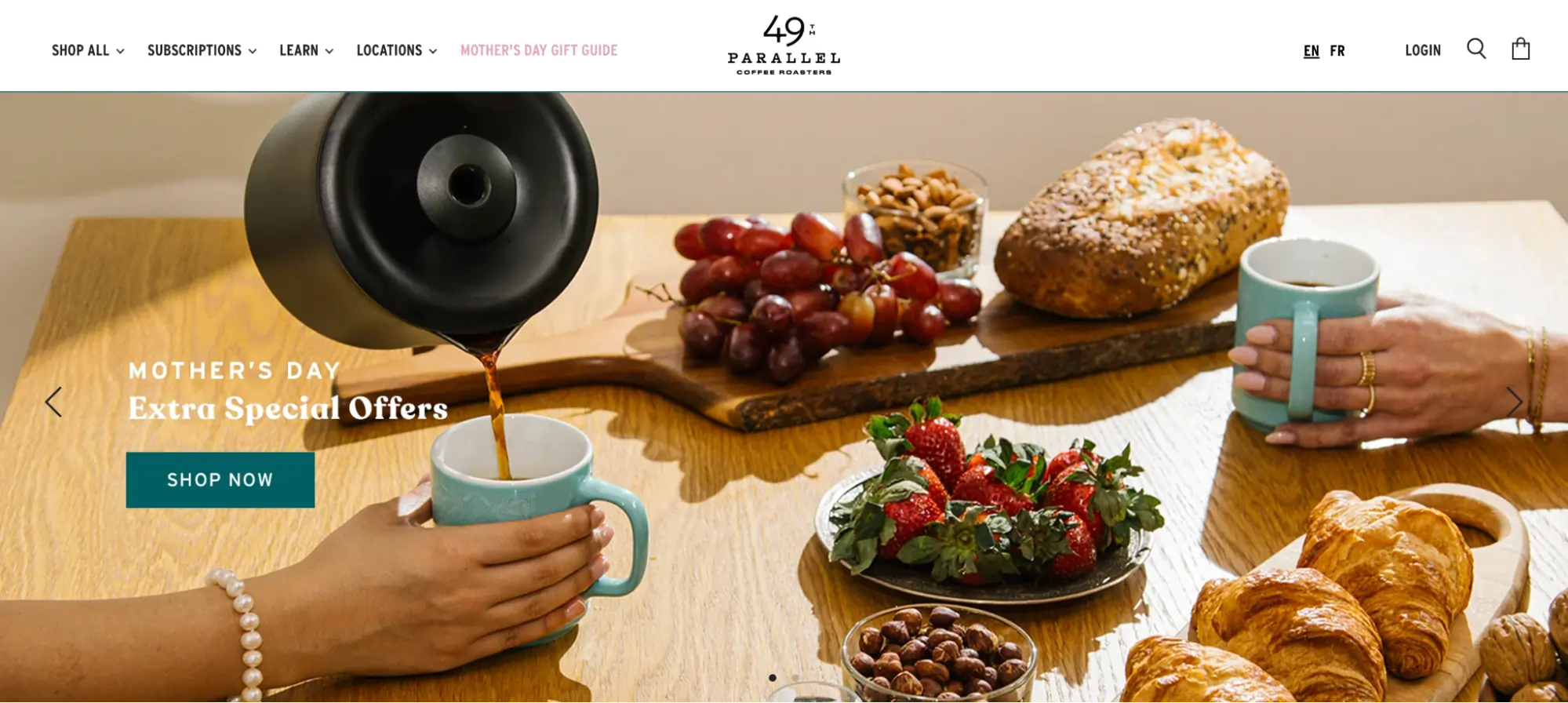
- Hero Banner Sliders: Frequently seen on homepages, such as those for 49th Parallel and Beard & Blade, these sliders act as the “front page news” of the store, highlighting seasonal specials or flagship product launches.
The Conversion Debate: Data-Driven Insights
The debate over sliders often centers on their impact on conversion rates. Tim Brown, a prominent conversion strategist, conducted a landmark study replacing a traditional homepage slider with a static image promo. The result was a 30% improvement in conversions with 98% statistical significance. Brown argues that many users suffer from “ad blindness,” perceiving auto-rotating sliders as intrusive advertisements rather than helpful navigation.
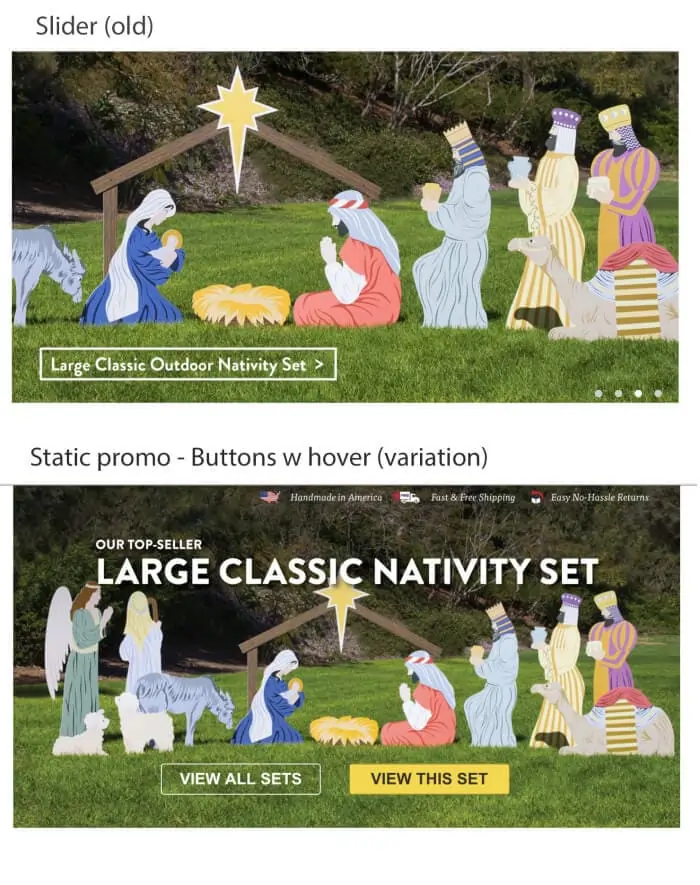
Furthermore, Emily Amor, SEO Manager at Digital Darts, highlights the technical drawbacks, noting that poorly coded slider plugins can significantly degrade page load speeds. In the era of Google’s Core Web Vitals, a delay of even 100 milliseconds can lead to a measurable drop in search rankings and user retention. Dean Kaplan of the Kaplan Collection Agency echoes this sentiment, suggesting that focusing on a single, clear call-to-action (CTA) is often more effective than the “scattergun” approach of multiple sliding messages.
Technical Integration: From Online Store 2.0 to AI-Driven Apps
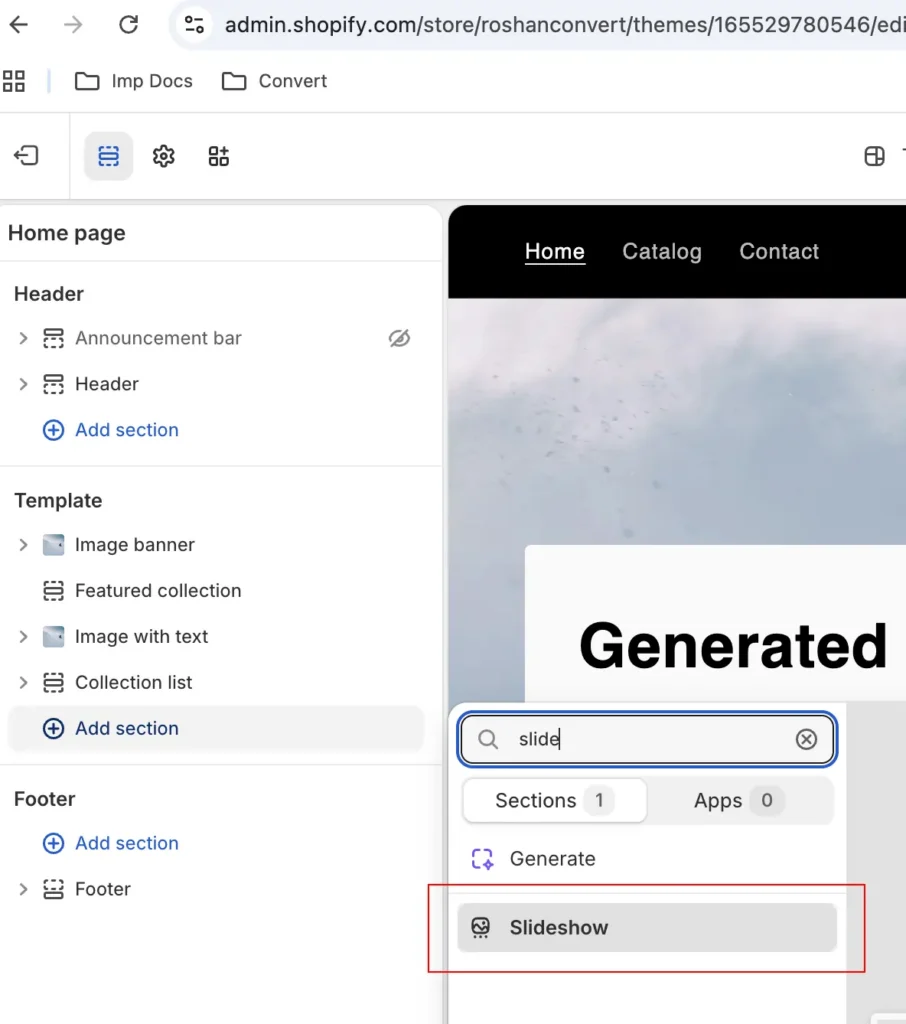
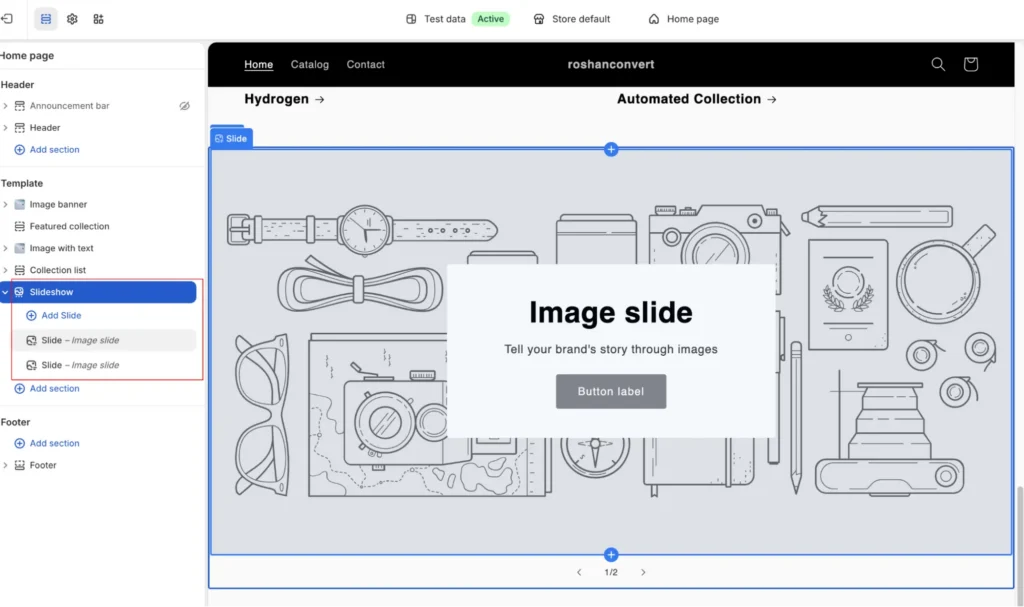
The evolution of the Shopify platform has simplified the implementation of these elements. Since the rollout of Online Store 2.0, most themes—including Dawn, Sense, and Craft—feature built-in slideshow sections. This allows merchants to manage visual assets through a drag-and-drop interface without touching the underlying Liquid or JavaScript code.
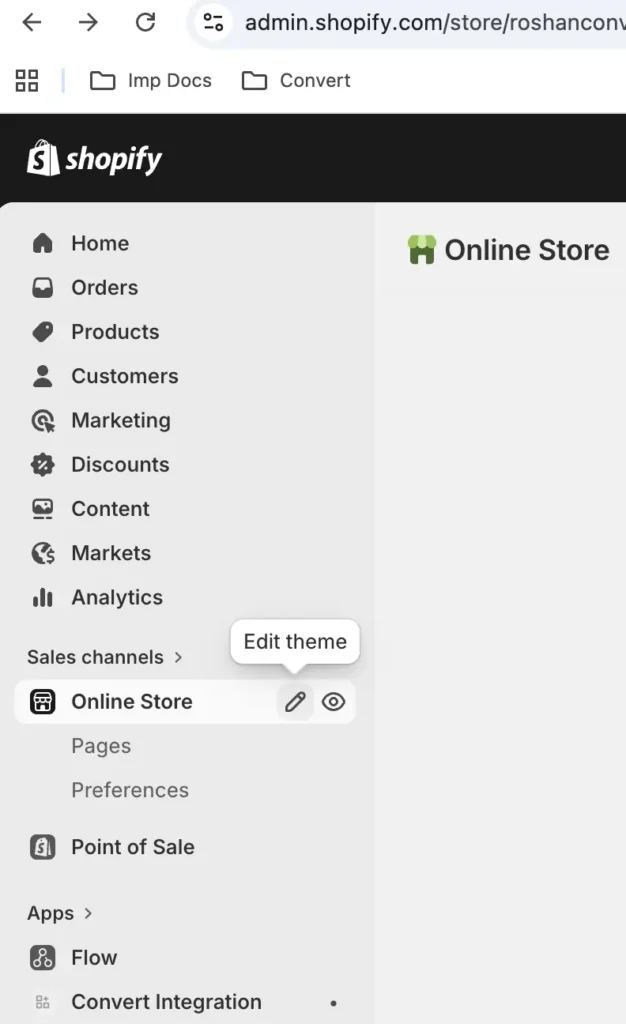
However, for merchants requiring advanced functionality—such as “add-to-cart” buttons within a slider or 3D model support—the Shopify App Store offers specialized tools. In 2026, the landscape of these apps is increasingly influenced by Artificial Intelligence.
Top Slider Applications in 2026:
- POWR Image Slider: Features built-in AI image generation, allowing merchants to create campaign visuals from text prompts.
- GG Product Page Slider: Specialized for high-end retail, supporting 3D models and Augmented Reality (AR) previews.
- OctoSlide: Focuses on performance, utilizing “lazy loading” to ensure that heavy image files do not impede the initial page render.
- Slider Revolution: Offers multilingual and Right-to-Left (RTL) support, essential for global brands operating in diverse markets.
The Role of Artificial Intelligence in Visual Optimization
The integration of AI into Shopify sliders represents the next frontier of e-commerce. AI is no longer just about generating images; it is about personalization. Modern AI-driven sliders can now dynamically reorder slides based on a visitor’s past browsing behavior. If a customer has previously viewed “Men’s Grooming,” the AI will prioritize a banner for the new Hero Sonic electric toothbrush over a generic “Mother’s Day” special.
Furthermore, AI-assisted design tools help merchants optimize the focal point of images, ensuring that the most critical part of a product shot remains visible across desktop, tablet, and mobile orientations. This solves a long-standing issue where mobile users would often see cropped or nonsensical portions of a banner designed for desktop.
Strategic Best Practices for 2026
To mitigate the risks associated with sliders, industry leaders have established a set of “non-negotiable” best practices:
- Prioritize the First Slide: Data indicates that engagement drops by over 50% after the first slide. Consequently, the most critical value proposition or “Hero” offer must be positioned first.
- Manual Control on Mobile: Auto-rotation is often cited as a frustration point for mobile users. Experts recommend static sliders with clear, tappable navigation dots for mobile viewports.
- The Three-Second Rule: For desktop auto-rotation, a three-second interval is the “Goldilocks” zone—long enough to read the headline, but fast enough to maintain interest.
- Image Compression and Modern Formats: To maintain high PageSpeed scores, images must be compressed and served in WebP or AVIF formats. Jeff Moriarty of JMoriarty Marketing notes that uncompressed sliders (some reaching 50MB) are a leading cause of bounce rates.
- Asymmetrical Layouts: Drawing inspiration from platforms like Airbnb, many Shopify stores are adopting asymmetrical carousels—one large “feature” image paired with smaller thumbnails—to provide a clear focal point.
A/B Testing: The Only Path to Certainty
Given the conflicting data on slider efficacy, A/B testing has become the standard procedure for high-growth Shopify stores. Using platforms like Convert Experiences, merchants can run “Slider vs. Static” experiments to determine the actual impact on Revenue Per Visitor (RPV).

Advanced testing involves not just the presence of a slider, but its mechanics. Merchants frequently test:
- Slide Count: Comparing a 3-slide version against a 5-slide version.
- Navigation Style: Testing arrows versus dots versus “peek-a-boo” images (where the edge of the next slide is visible).
- CTA Copy: Testing “Shop Now” against more specific prompts like “Explore the Collection.”
Broader Implications for the Future of E-Commerce
The continued use of sliders in 2026 suggests they are far from obsolete, but they are being used with greater intentionality. The “implication” of a slider today is less about filling space and more about “curated discovery.” As the digital landscape moves toward a “headless” and more modular architecture, the slider is evolving into a smart, personalized component that acts as an usher for the customer journey.

The ultimate takeaway for Shopify merchants is that a slider is a tool, not a strategy. When implemented with high-resolution imagery, lightning-fast load times, and AI-driven personalization, it can significantly enhance the shopping experience. However, without rigorous testing and a “mobile-first” mindset, it remains a potential liability. As e-commerce continues to evolve, the brands that succeed will be those that use data to decide when to slide—and when to stay static.