Choosing an email platform transcends a mere comparison of features; it represents a strategic decision for businesses aiming to sustain growth, optimize operational efficiency, and meet evolving demands in performance, collaboration, and regulatory compliance. As companies mature, their email marketing infrastructure must scale commensurately with expanding teams, increasing sending volumes, and more sophisticated communication strategies. This guide delves into the compelling reasons driving enterprises to migrate from Mailchimp to Sinch Mailjet, offering a detailed, step-by-step chronology for transferring essential assets, including contacts, email templates, and historical data.
The Evolving Landscape of Email Marketing Platforms

The digital marketing ecosystem is in a constant state of flux, with email remaining a cornerstone of customer engagement and retention strategies. However, the tools facilitating these interactions are subject to continuous innovation and shifts in user expectations. For years, platforms like Mailchimp have served as accessible entry points for small to medium-sized businesses (SMBs), lauded for their user-friendly interfaces and robust feature sets. Yet, as these businesses grow, their requirements often outpace the initial capabilities that attracted them. Factors such as escalating costs associated with larger contact lists, the need for more granular control over deliverability, enhanced team collaboration tools, and specialized API integrations become paramount. This creates a natural inflection point where businesses evaluate alternative solutions designed to cater to enterprise-level demands without sacrificing ease of use.
Sinch Mailjet, a prominent player in the transactional and marketing email space, positions itself as a scalable, developer-friendly platform that prioritizes deliverability, real-time analytics, and robust API capabilities. Its appeal often lies in its transparent pricing structure, high-volume sending capacity, and advanced features tailored for larger organizations or those with complex email workflows. The migration trend observed from Mailchimp to Sinch Mailjet reflects a broader industry movement where businesses are increasingly seeking platforms that offer greater flexibility, control, and performance as they scale their operations and deepen their email marketing sophistication.
Why Businesses Consider a Strategic Switch to Sinch Mailjet
The decision to migrate from an established email service provider like Mailchimp to an alternative such as Sinch Mailjet is rarely impulsive. It typically stems from a confluence of strategic business needs and technical considerations. While Mailchimp offers a comprehensive suite of features, growing businesses often encounter specific limitations or find greater value propositions elsewhere.
One primary driver is scalability and cost-effectiveness. As contact lists expand into hundreds of thousands or even millions, Mailchimp’s tiered pricing model can become prohibitive, leading to significantly higher operational costs. Sinch Mailjet often provides more favorable pricing for high-volume senders, allowing businesses to manage larger audiences without disproportionately increasing their marketing budget. Beyond raw volume, the need for enhanced deliverability and performance is critical. For businesses reliant on email for critical communications—be it marketing campaigns, transactional receipts, or password resets—ensuring emails reliably reach inboxes is paramount. Sinch Mailjet’s infrastructure is built for high deliverability rates, offering dedicated IP options, robust bounce management, and proactive monitoring to maintain sender reputation.
Advanced features and API integration also play a significant role. Businesses with complex tech stacks or bespoke applications often require deep integration capabilities that extend beyond standard connectors. Sinch Mailjet’s powerful API allows for greater customization, enabling seamless integration with CRM systems, e-commerce platforms, and custom applications, facilitating sophisticated automation and personalized communication at scale. Furthermore, team collaboration and workflow management become more intricate in larger organizations. Sinch Mailjet offers features designed to support multiple users, roles, and sub-accounts, streamlining internal workflows and ensuring consistent brand messaging across various departments. Finally, evolving data privacy and compliance requirements (such as GDPR and CCPA) necessitate platforms that offer robust security measures and clear data handling policies. Sinch Mailjet, as part of Sinch, a global communications provider, often emphasizes its commitment to these regulatory standards, providing peace of mind for businesses operating in diverse geographical regions.
The Migration Blueprint: A Step-by-Step Chronology
Undertaking an email platform migration requires meticulous planning and execution to ensure a seamless transition and minimize disruption to ongoing campaigns. The process can be broken down into several distinct phases, each critical for a successful outcome.
Phase 1: Pre-Migration Planning and Data Audit

Before initiating any data transfer, a comprehensive audit of existing Mailchimp assets is essential. This involves:
- Identifying all active audiences (contact lists): Understand their segmentation, growth rates, and engagement levels.
- Reviewing email templates: Catalog all active templates, noting their design complexity and any unique coding.
- Assessing automation workflows: Document all active automated email series, welcome sequences, and transactional emails.
- Evaluating historical performance data: Determine which reports are crucial for future trend analysis and historical benchmarking.
- Defining migration goals: Clearly articulate what success looks like post-migration (e.g., reduced costs, improved deliverability, enhanced collaboration).
- Data Hygiene: This is a crucial pre-migration step. Cleaning contact lists by removing inactive or unengaged subscribers can significantly improve deliverability and reduce sending costs on the new platform. Industry data suggests that a clean list can improve open rates by 10-15% and reduce bounce rates by up to 5%.
Phase 2: Data Transfer – Migrating Contacts and Audience Segmentation
The cornerstone of any email platform migration is the accurate transfer of contact data. This phase involves exporting contacts from Mailchimp and importing them into Sinch Mailjet, carefully managing subscribed and unsubscribed lists.
-
Exporting Contacts from Mailchimp:
- Log in to your Mailchimp account.
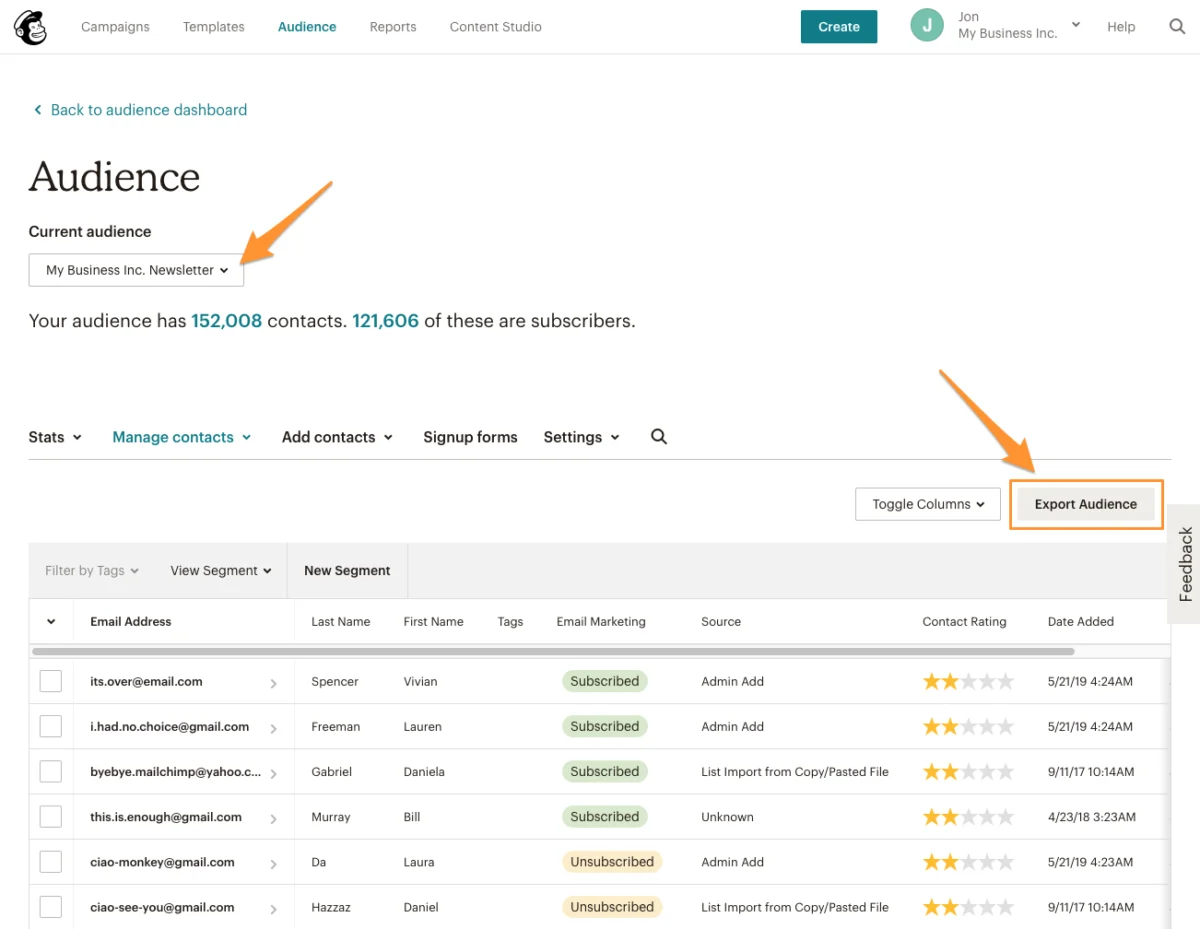
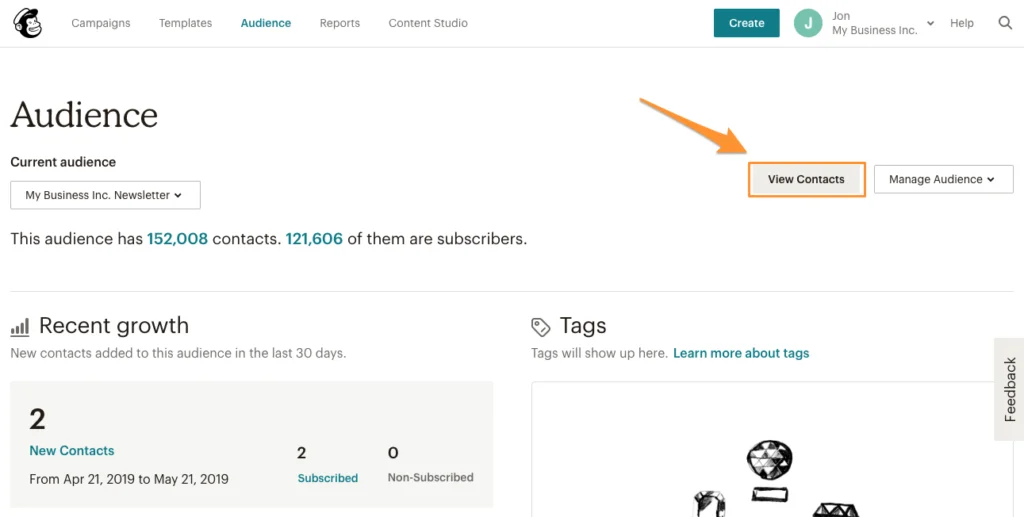
- Navigate to the “Audience” section, then select “View Contacts.”
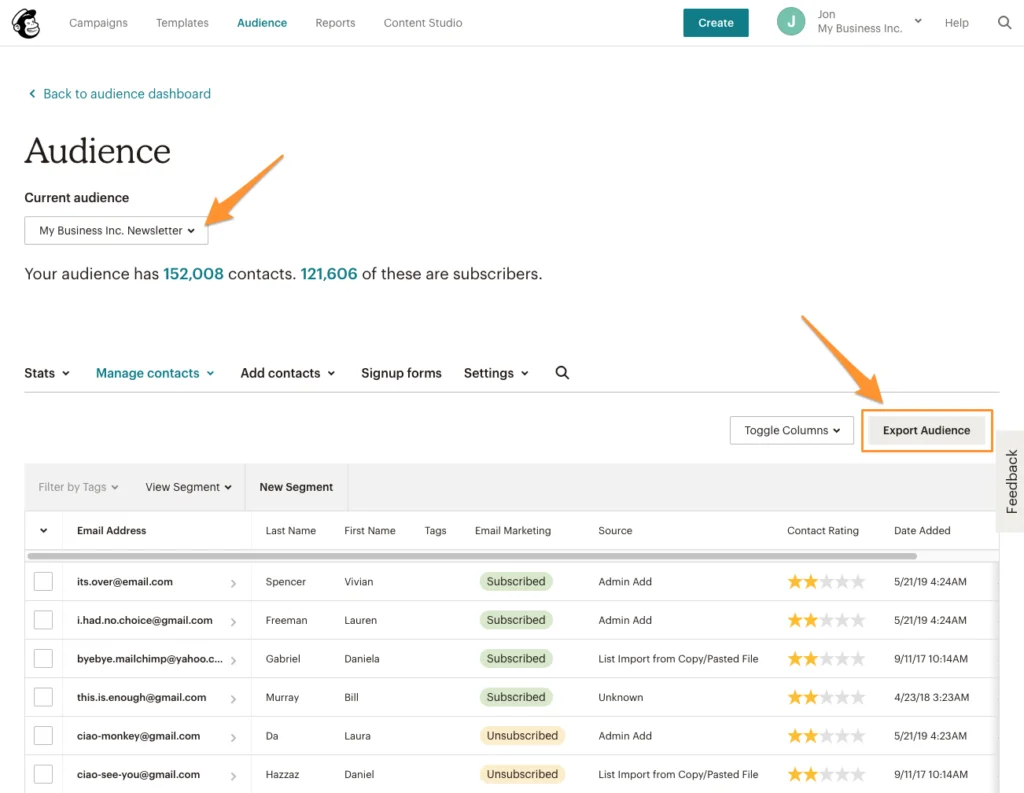
- From the audience dashboard, locate and click “Export Audience.” This action generates a downloadable archive containing your subscribed and unsubscribed contacts. It is imperative to repeat this process for every audience you wish to migrate, ensuring no contact lists are overlooked.
- Download the generated CSV file and unzip the archive. You will typically find separate CSV files for
subscribed_membersandunsubscribed_members.
-
Importing Contacts into Sinch Mailjet:
- Log in to your Sinch Mailjet account.
- Navigate to “Contacts” > “Contact Lists.”
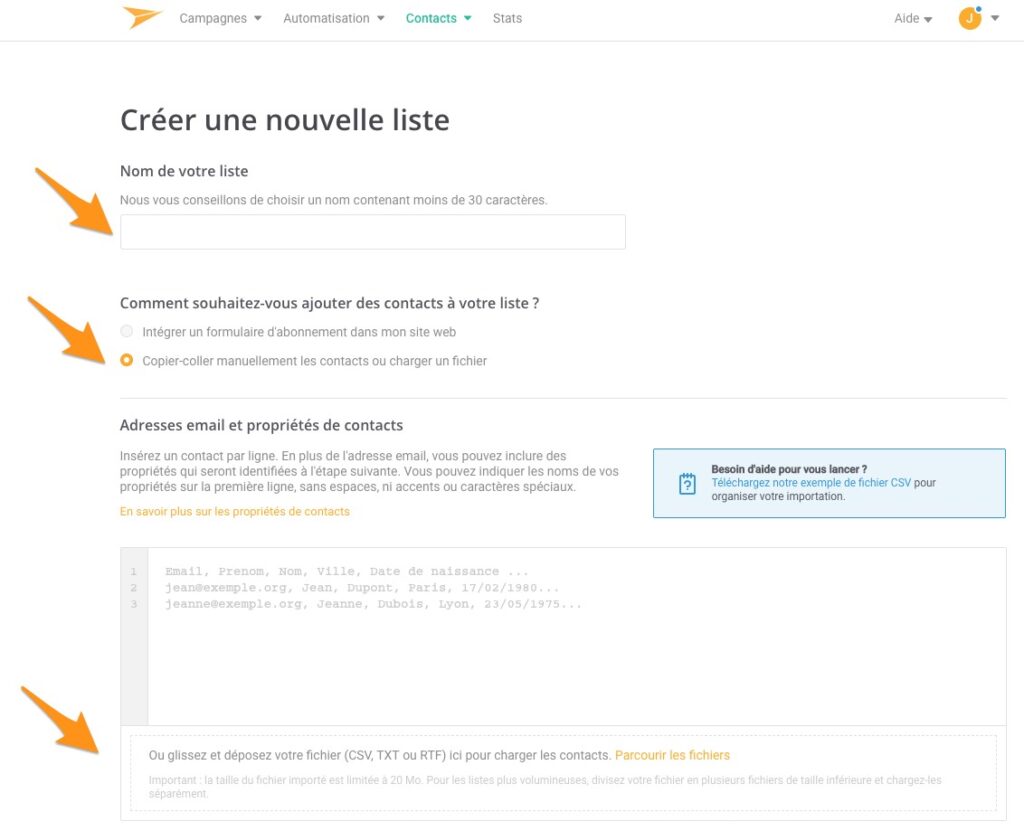
- Click “Create a new list.” For organizational clarity, it is highly recommended to create a separate contact list in Mailjet for each corresponding audience exported from Mailchimp. This preserves your segmentation structure.
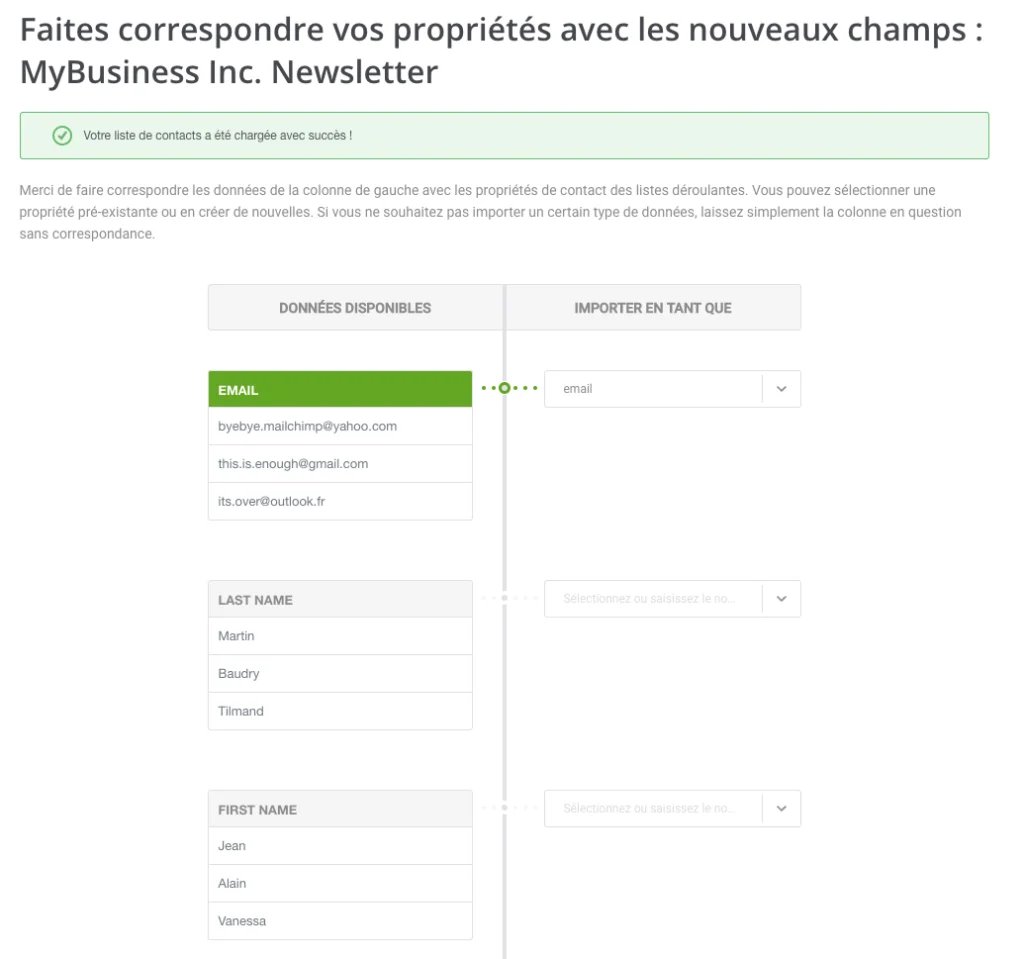
- Choose the option to “Paste contacts manually or upload a file,” then upload the
subscribed_members.csvfile. - During the import process, Mailjet will prompt you to map contact fields (e.g., Email, First Name, Last Name, Company, Birthday). This ensures that all your custom contact properties are correctly transferred, enabling granular segmentation and personalization within Sinch Mailjet. Once mapping is complete, click “Save and continue.”
-
Importing Unsubscribed Contacts for Compliance:
- After importing your subscribed contacts, it is critically important to transfer your unsubscribed list. This step is non-negotiable for maintaining compliance with anti-spam regulations (like CAN-SPAM, GDPR) and preserving your sender reputation. Sending emails to individuals who have previously opted out can lead to severe penalties and damage to your brand’s trust.
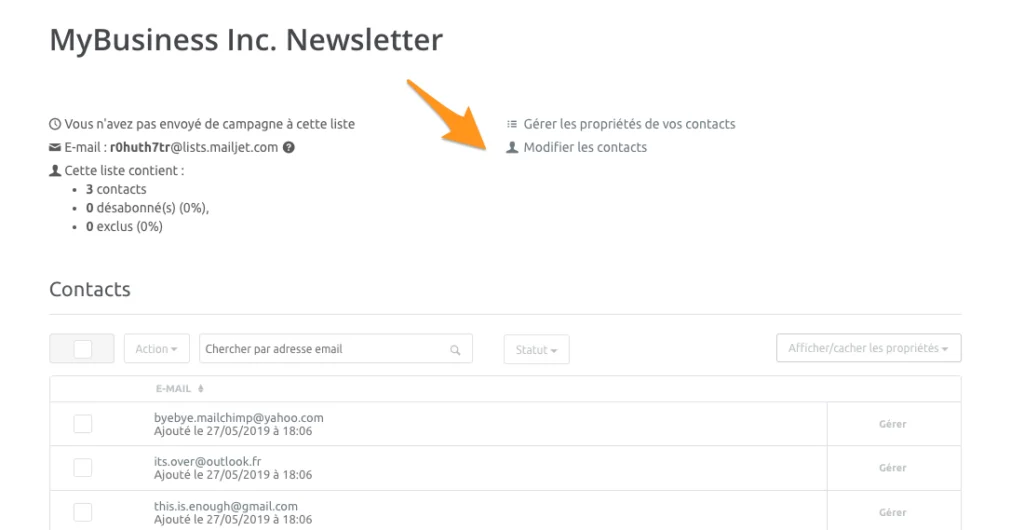
- Within the newly created contact list in Sinch Mailjet, click “Manage contacts.”
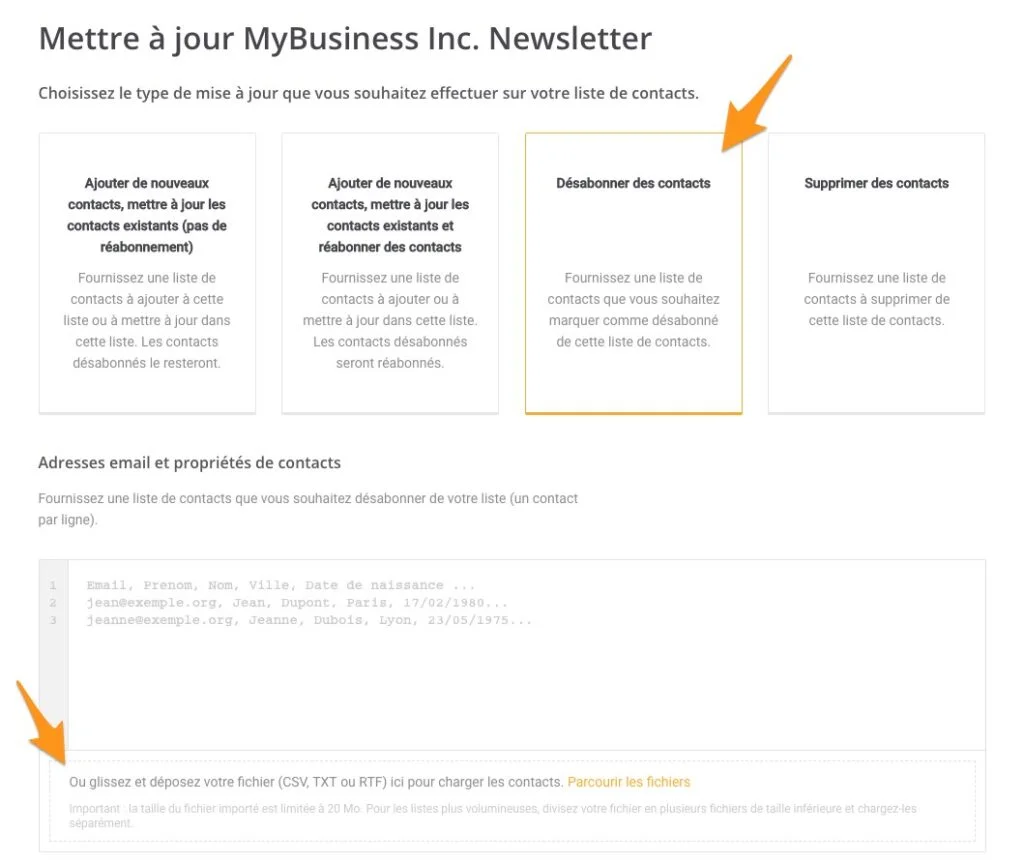
- Select “Unsubscribe contacts” as the update type.
- Drag and drop the
unsubscribed_members.csvfile into the upload area. - Map any necessary fields, then proceed with the import. This action will flag these contacts within your Mailjet list as unsubscribed, preventing future email dispatches to them.
Phase 3: Creative Assets – Migrating Email Templates
While a direct, editable export of Mailchimp templates into Sinch Mailjet’s visual editor is not typically feasible due to differences in platform architecture, businesses have practical options for retaining their designs.
-
Exporting Templates from Mailchimp:
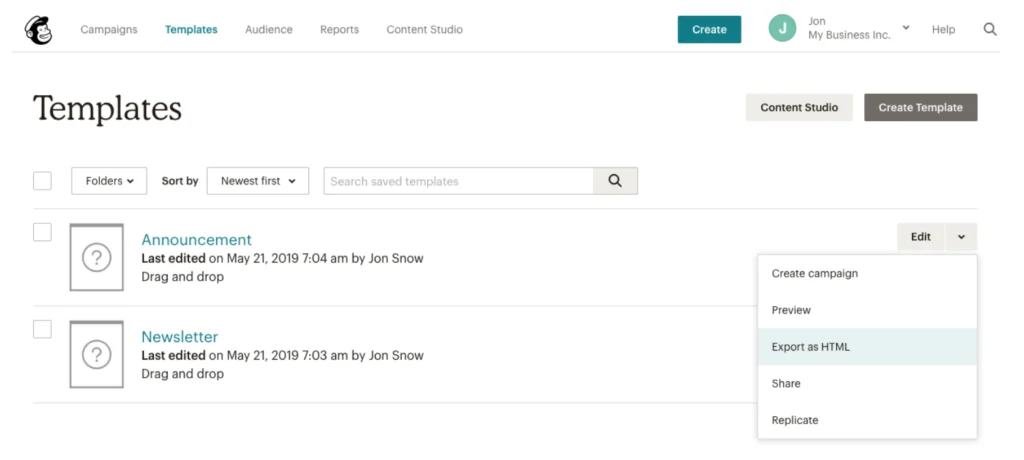
- In your Mailchimp account, navigate to “Templates.”
- For each template you wish to transfer, select the “Export as HTML” option from its dropdown menu. This downloads the complete HTML code of your template.
-
Importing Templates into Sinch Mailjet:
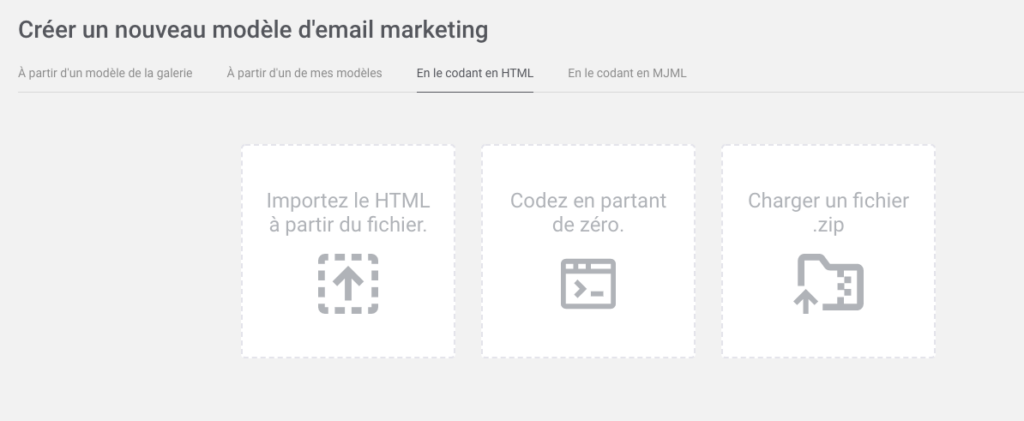
- In your Sinch Mailjet account, go to “Campaigns” and select “Create a new template.”
- Choose the “Code it in HTML” option. You will then be able to upload your downloaded HTML file.
- Implication: While this method preserves the visual design, these imported HTML templates will typically be static in Mailjet. For full editability within Mailjet’s drag-and-drop editor, users may need to rebuild templates using Mailjet’s native tools. Alternatively, the imported HTML can serve as a base, with subsequent edits made directly in the HTML code. This decision depends on the complexity of the templates and the team’s comfort level with HTML. Many businesses opt to migrate critical, highly-designed templates via HTML and gradually rebuild others using the new platform’s native editor to leverage its full functionality.
Phase 4: Historical Performance – Exporting Reporting Data
Direct transfer of historical reporting data from Mailchimp to Sinch Mailjet is generally not possible, as each platform’s analytics infrastructure is proprietary. However, preserving this data is crucial for historical context and future comparative analysis.
- Exporting Reports from Mailchimp:
- In your Mailchimp account, navigate to the “Reports” section.
- Select “Download All Reports.” This action will export your campaign performance data (open rates, click-through rates, bounces, unsubscribes) into a downloadable format, often a CSV or Excel file.
- Recommendation: Store these reports securely, perhaps in a cloud drive or internal database, for future reference. While you won’t see this data within your Mailjet dashboard, having it allows your marketing team to track long-term trends and compare performance before and after the migration.
Phase 5: Post-Migration Configuration and Optimization
With contacts and templates successfully transferred, the final phase involves configuring Sinch Mailjet for optimal performance and deliverability.
- Domain Validation and Sender Authentication: Crucially, validate your sending domains and sender addresses within Sinch Mailjet. This confirms to internet service providers (ISPs) that Mailjet is authorized to send emails on behalf of your domain.
- SPF, DKIM, and DMARC Records: Configure your Sender Policy Framework (SPF), DomainKeys Identified Mail (DKIM), and Domain-based Message Authentication, Reporting & Conformance (DMARC) records in your domain’s DNS settings. These protocols are fundamental for email authentication, preventing spoofing and significantly improving email deliverability. Industry experts consistently highlight that proper authentication can boost inbox placement rates by 15-20%.
- IP Warm-up: If you are using a dedicated IP address with Sinch Mailjet, a gradual IP warm-up process is vital. This involves slowly increasing your sending volume over several days or weeks, allowing ISPs to build a positive reputation for your new sending IP. Failing to warm up an IP can result in emails being flagged as spam.
- Integration with Other Systems: Reconfigure any integrations that previously connected Mailchimp to your CRM, e-commerce platform, or other marketing tools to now work with Sinch Mailjet. This ensures continuity in data flow and automation.
Broader Impact and Implications
The migration from one email service provider to another, particularly for a growing business, carries significant implications. Strategically, it signals a commitment to a more robust, scalable, and potentially more cost-effective email marketing infrastructure. This move can unlock advanced automation capabilities, facilitate deeper personalization, and improve overall campaign performance, directly impacting marketing ROI. For example, improved deliverability can lead to higher engagement, better conversion rates, and ultimately, increased revenue.
Operationally, the transition, while requiring initial effort, promises long-term efficiencies. Teams gain access to tools better suited for collaborative campaign creation and management, while robust APIs empower developers to build custom solutions that seamlessly integrate email into the broader business ecosystem. Furthermore, aligning with a platform like Sinch Mailjet, known for its focus on deliverability and compliance, mitigates risks associated with email blacklisting and data privacy breaches, safeguarding brand reputation.
The trend of businesses migrating from more generalized platforms to specialized, high-performance solutions like Sinch Mailjet underscores the increasing sophistication of email marketing. It highlights that email is no longer a peripheral communication channel but a central nervous system for customer engagement, demanding a platform that can evolve alongside the business. Companies that successfully navigate these migrations are often better positioned to capitalize on future market opportunities, adapt to technological advancements, and maintain a competitive edge in an increasingly digital-first economy.
With contacts and templates now securely established in Sinch Mailjet, and critical post-migration configurations complete, businesses are poised to harness the full potential of their new email marketing platform. This transition is not merely a change of tools but a strategic upgrade designed to empower marketing teams with enhanced capabilities, ensuring every email sent contributes meaningfully to business growth.