Many entrepreneurs embarking on the journey of launching an e-commerce company may not immediately consider HubSpot as their primary tool. However, the reality is that HubSpot CRM stands as one of the most potent platforms available for not only building but also for effectively running an online store. Often, businesses only discover its extensive capabilities after they have already established their presence, typically when the need for a robust Customer Relationship Management (CRM) system becomes a pressing board-level discussion. What many overlook is HubSpot’s profound capacity to drive business growth long before and well after the intricacies of customer record management come into play.
HubSpot offers a suite of powerful, including free Content Management System (CMS) tools, enabling businesses to construct their own websites. Complementing this are a range of e-commerce specific features, such as HubSpot Payments, designed to streamline transactions. Crucially, HubSpot integrates seamlessly with leading e-commerce platforms like Shopify, bridging the gap between customer data management and established online storefronts. This article aims to illuminate why embracing HubSpot for your online store is a strategic advantage and provide a clear roadmap for implementation.
The Multifaceted Power of HubSpot for E-commerce Operations
While many business leaders are well-acquainted with HubSpot CRM as a leading customer relationship management system, its integral role in the broader e-commerce ecosystem is frequently underestimated. For an online retail operation, HubSpot CRM functions as the central nervous system, meticulously tracking and managing every customer interaction that falls outside the immediate point of sale. This encompasses detailed logging of browsing behavior, proactive tracking of sales opportunities, comprehensive oversight of order fulfillment, the precise attribution of emails to individual customers, and the crucial connection of chat conversations to tangible revenue generation. The platform excels at constructing a holistic timeline of each buyer’s journey, a level of insight that remains remarkably rare within the fragmented landscape of e-commerce software.
The typical e-commerce setup often relies on a patchwork of disparate applications, each serving a specific function: one tool to capture abandoned carts, another to dispatch marketing emails, and yet another to surmise which leads warrant follow-up. HubSpot eschews this fragmented approach. Its CRM consolidates all this critical information into a unified view. This makes it one of the few CRM systems where an event as significant as an abandoned cart can directly trigger sophisticated sales automation sequences. The success stories are compelling; for instance, CODE41, a prominent brand, reported a remarkable surge in sales by 257%, revenue by 223%, and leads by 279% through a strategic integration of HubSpot’s comprehensive toolset. Beyond transactional management, HubSpot inherently incorporates inbound marketing capabilities, fostering the cultivation of enduring customer relationships rather than merely facilitating basic storefront operations. This integrated approach is precisely why e-commerce teams increasingly rely on HubSpot, even when their primary storefront is managed by other platforms like Shopify or BigCommerce. While these platforms excel at the storefront experience, HubSpot is dedicated to mastering the customer.
Core Advantages of the HubSpot Platform for E-commerce Ventures
HubSpot possesses a unique characteristic: it presents an accessible, user-friendly interface on initial engagement, yet unfolds a deeper layer of sophisticated functionality as businesses begin to leverage it for their core operational needs. The most significant advantages often emerge from the subtle yet impactful functionalities that are not immediately apparent.
Centralized Customer Action Repository
A prevalent challenge in e-commerce is the pervasive scattering of customer data across multiple applications. A product click might be logged in one system, an email open in another, an order in a third, and customer inquiries often become lost in the ensuing digital disarray. HubSpot CRM masterfully consolidates these disparate data points into a single, cohesive timeline. This means that when a customer views a product multiple times, abandons their cart, opens a marketing campaign email, returns days later, and then engages with customer support via chat, all these interactions are visible within a unified customer profile.
Advanced Automation Tailored for Real-World Teams
HubSpot’s automation capabilities are designed to adapt to the dynamic and often complex workflows of real business teams, eliminating the need for pre-defined, rigid structures. Its sales automation and marketing triggers empower teams to construct practical, real-world workflows that are instrumental in revenue recovery and customer retention. For example, a store can easily link an abandoned cart event to a personalized email, subsequently updating a sales pipeline stage and initiating a follow-up task for a sales representative. This process is designed to be intuitive and frictionless.
Inbound Marketing Tools That Drive Tangible Revenue
The customer journey in e-commerce is rarely a linear path to purchase. Consumers typically engage in a process of searching, comparing, getting distracted, forgetting, returning, browsing, and eventually committing to a purchase. HubSpot meticulously tracks this entire customer journey. Many online stores discover that a significant portion of their repeat purchases originate from content, such as a blog post, that effectively guides customers in selecting the right product.
Seamless Integration of Payments and Quotes
HubSpot Payments offers a more integrated and less fragmented checkout experience compared to the traditional method of sending a PDF quote and hoping for the best. This feature is particularly beneficial for Business-to-Business (B2B) operations. A sales representative can generate a quote, and upon buyer approval, a subscription can be automatically initiated. HubSpot then logs the order, updates the sales pipeline, generates essential onboarding tasks, and enrolls the customer into a tailored welcome sequence.
AI as a Supportive Partner, Not a Dominant Force
HubSpot’s artificial intelligence (AI) tools, particularly within its CMS and campaign builders, effectively address the common “blank page” syndrome that can hinder content creation. These AI assistants are invaluable for generating initial drafts, creating alt text for images, composing meta descriptions, and handling repetitive copywriting tasks that can otherwise drain team resources. Furthermore, the AI-powered workflow suggestions significantly reduce setup time for individuals who may not be automation experts.
Scalable Growth Through Enhanced Operational Efficiency
HubSpot does not promise to magically generate traffic or create revenue out of thin air – a common, often misleading, promise made by many SaaS tools. Instead, its core strength lies in its ability to centralize and organize customer understanding, sales systems, marketing activities, and the overall support experience within a single, cohesive environment. This structural integrity is what empowers a one-person operation to function with the efficiency of a five-person team, or a five-person team to achieve the output of fifteen.
A Practical Guide: Building an Online Store with HubSpot
There are several viable pathways to establishing an online store using HubSpot, tailored to specific business needs. The following step-by-step process outlines the typical implementation flow.
1. Foundation: Establishing a HubSpot CRM Account
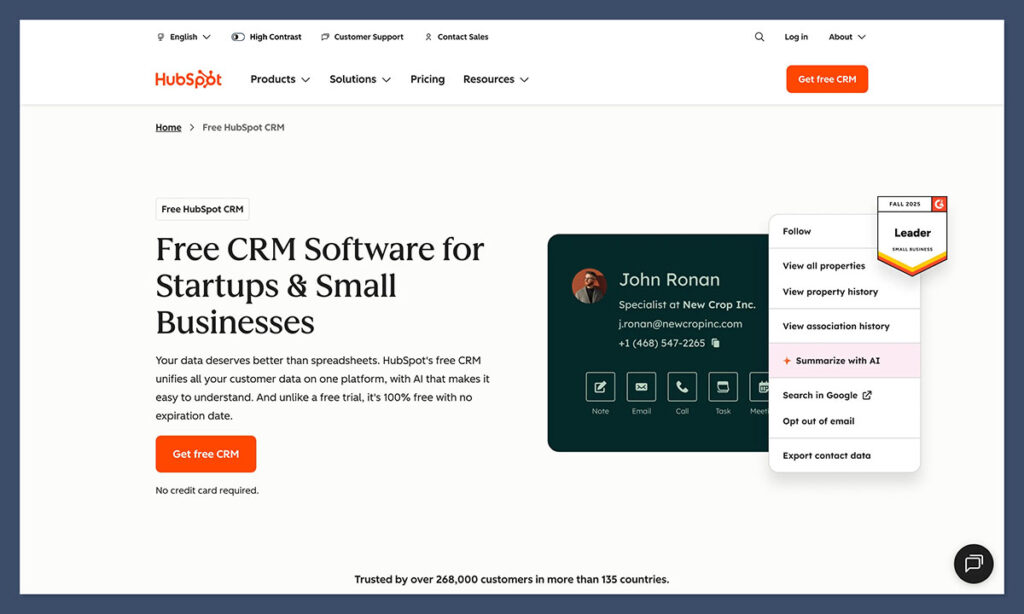
The cornerstone of any HubSpot-powered e-commerce operation is the CRM. A free HubSpot CRM account provides the essential framework, encompassing contact management, list segmentation, pipeline visualization, email communication tools, basic automation capabilities, and site activity tracking. Once this core system is operational, other components naturally integrate and function effectively. The CMS, commerce tools, quoting system, and chat widget all revolve around this central customer record. Many businesses find themselves upgrading to Sales Hub or Marketing Hub as their needs evolve, often triggered by the realization that certain follow-up processes can be automated.
2. Strategic E-commerce Approach Selection
Businesses have a few primary options for their e-commerce strategy within the HubSpot ecosystem:
- Option A: Native HubSpot CMS Storefront: Building and managing your entire storefront directly within HubSpot’s CMS. This is ideal for businesses with a curated product catalog, a focus on direct-to-consumer (DTC) sales, or those prioritizing a tightly integrated customer experience.
- Option B: Integration with Existing Platforms (e.g., Shopify, BigCommerce): Connecting HubSpot to established e-commerce platforms. This allows businesses to leverage the robust features of platforms like Shopify for their storefront while utilizing HubSpot for comprehensive CRM, marketing, and sales automation. This is a popular choice for businesses that already have an established online presence.
- Option C: Hybrid Approach with E-commerce Plugins: Utilizing HubSpot’s CMS for landing pages and marketing content while integrating specialized e-commerce plugins or modules for product management and checkout. This offers flexibility for businesses with complex product lines or specific functional requirements.
The choice between these approaches often depends on the scale of the product catalog and the desired level of customer interaction. For extensive catalogs, Option C or a robust integration (Option B) is often more practical. For businesses focused on curated, high-touch products, Options A or B typically provide a more streamlined experience.
3. Constructing the Storefront with HubSpot CMS
HubSpot’s CMS is lauded for its simplicity, making website development accessible. Users can select a pre-designed theme and utilize an intuitive editor to arrange modules, creating visually appealing pages that are optimized to minimize customer bounce rates. A significant advantage of this CMS is its seamless communication with the CRM. When a customer repeatedly views a product, adds items to their cart and then abandons it, or consults an FAQ page, this behavior is meticulously recorded. This creates a detailed, albeit sometimes surprisingly insightful, profile of customer interest levels, distinguishing genuine curiosity from mere browsing.
4. Integrating Product Information
The process of adding products to your e-commerce setup carries significant long-term implications. A critical aspect is maintaining consistency in product naming conventions. To avoid confusion and ensure efficient management, it is advisable to establish clear standards early on. For instance, having multiple variations of the same product with subtly different names can lead to operational inefficiencies and customer frustration. Standardizing product titles, descriptions, and SKUs from the outset is crucial for a scalable and manageable e-commerce operation.
5. Streamlining Payments and Checkout Flow
For businesses operating within the United States, HubSpot Payments presents the most straightforward integration path. It seamlessly connects with quotes, product pages, forms, and even live chat functionality. Payment links can be easily embedded into emails, direct messages, landing pages, and other communication channels. For international operations, a common and effective pairing is Stripe with CommercePro, though the optimal solution will vary depending on specific regional requirements and business preferences.
6. Synchronizing Carts, Orders, and Sales Pipelines
This is an area where HubSpot often surpasses expectations. The platform allows for the sophisticated linking of abandoned carts to sales pipeline stages. For example, an abandoned cart can automatically trigger a personalized email, update a deal stage in the sales pipeline, and assign a follow-up task to a sales representative. This closed-loop system ensures that no potential sale is overlooked. A practical application of this was observed when a pipeline stage was specifically created for “Customers Considering Churn.” When a customer repeatedly visited the cancellation page within a week, HubSpot automatically generated a task, initiated an email, and flagged the situation. This proactive measure contributed to an increase in customer retention.
7. Developing Adaptive Automation Workflows
HubSpot empowers businesses to create automation workflows that accurately reflect their team’s actual operational processes. It is advisable to start with simpler automations:
- Welcome Email Series: Automatically send a series of welcome emails to new subscribers or customers.
- Abandoned Cart Recovery: Trigger automated emails to remind customers about items left in their cart.
- Post-Purchase Follow-up: Send thank-you notes, request reviews, or provide product care instructions after a purchase.
- Lead Nurturing Sequences: Automatically send targeted content to leads based on their engagement and interests.
- Renewal Reminders: For subscription services, automate reminders for upcoming renewals.
The more comprehensive the data gathered on customer behavior within the store, the more sophisticated and effective automation flows can be implemented. It is imperative, however, to consistently test and evaluate the results of these automations over time to ensure their efficacy.
8. Maximizing the Impact of Inbound Marketing
HubSpot’s design philosophy is deeply rooted in the principles of inbound marketing, and leveraging this strength is paramount. When blog posts, landing pages, email campaigns, and the CRM all operate within the same integrated environment, novel patterns and insights emerge. HubSpot’s ability to track page views, email clicks, order placements, and returning purchases makes the correlation between content strategy and conversion rates exceptionally clear.
9. Vigilant Performance Monitoring
HubSpot’s analytics provide more than just superficial charts; they are intrinsically linked to actual customer records, offering deep contextual understanding. Key performance indicators (KPIs) that can be effectively monitored include:
- Customer Acquisition Cost (CAC): Understanding the expense associated with acquiring new customers.
- Customer Lifetime Value (CLV): Measuring the total revenue a customer is expected to generate over their relationship with the business.
- Conversion Rates: Tracking the percentage of visitors who complete a desired action, such as making a purchase.
- Average Order Value (AOV): Analyzing the average amount spent per transaction.
- Cart Abandonment Rate: Identifying the percentage of customers who leave their cart before completing a purchase.
- Marketing Qualified Leads (MQLs) and Sales Qualified Leads (SQLs): Differentiating between leads based on their readiness for marketing or sales engagement.
This combination of granular data and contextual relevance sharpens strategic decision-making and optimizes operational effectiveness.
Why E-commerce Brands Are Embracing HubSpot
While HubSpot may not be the most obvious choice for an “e-commerce platform” in the traditional sense, it has firmly established itself as an indispensable tool within the e-commerce arsenal. Businesses often begin with a fragmented array of disparate tools, only to gradually realize that HubSpot can serve as the central hub for the strategic aspects of their operations. This includes managing customer relationships, orchestrating follow-up sequences, handling quotations, managing renewals, creating compelling content, and implementing the crucial automation that averts critical oversights, such as forgotten follow-up emails.
Other platforms are proficient at running a storefront – many do so exceptionally well. However, HubSpot’s unique strength lies in its profound understanding of the buyer. It meticulously records what a customer clicked, what they bypassed, when they returned late at night, and which email ultimately persuaded them to overcome hesitation. This deep context fundamentally transforms how an online store operates, shifting the paradigm from merely broadcasting promotions to unsuspecting strangers to skillfully guiding genuine customers through their decision-making process.
For those curious to explore this transformative potential, the journey begins with creating a free HubSpot CRM account. Experiment with the CMS, send out a payment link, construct a rudimentary workflow, and observe how seamlessly the various components integrate and begin to yield tangible results.
Frequently Asked Questions About HubSpot and E-commerce
How does HubSpot compare to Shopify for e-commerce?
Shopify is fundamentally a storefront engine, designed to facilitate online sales. HubSpot, conversely, is a customer engine, built to manage and nurture customer relationships. When used in tandem, they can form a powerful synergy. However, for businesses that prioritize lead nurturing, complex quoting processes, or managing subscription follow-through, HubSpot demonstrably excels in these critical areas.
Can HubSpot manage a complete online store independently?
Yes, HubSpot can effectively manage a complete online store, particularly for businesses with a focused product catalog and a straightforward purchasing process that does not rely on extensive retail infrastructure. The combination of HubSpot CMS, Commerce Hub, and HubSpot Payments is capable of handling digital products, subscriptions, coaching services, product kits, and a significant volume of B2B e-commerce transactions. For businesses with very large and diverse product catalogs, integrating HubSpot with platforms like Shopify or BigCommerce often presents a more scalable solution.
Is HubSpot prohibitively expensive for small e-commerce businesses?
Generally, no. Many small businesses find success starting with the free HubSpot CRM and free CMS tools. Costs typically escalate only when a business requires advanced automation features, more sophisticated sales functionalities, or intensive marketing capabilities. If these advanced features are actively utilized, the return on investment (ROI) is often realized quickly.
Does HubSpot support subscription management and renewals?
Absolutely. Commerce Hub is specifically designed to support recurring payments, manage subscription records, track renewals, and automate workflows directly tied to billing events. This capability transforms a potentially complex and time-consuming aspect of e-commerce into a seamless and largely automated process.
Are HubSpot’s AI tools genuinely beneficial for e-commerce operations?
HubSpot’s AI tools are highly effective in streamlining the more laborious aspects of e-commerce operations. This includes assisting with drafting emails, constructing automated workflows, generating website content, and suggesting customer segmentation strategies. While AI does not replace strategic thinking, it significantly reduces the “noise” and administrative burden, allowing teams to concentrate on the high-impact activities that directly drive revenue and customer engagement.