 rifanmuazin
On May 20th, 2026, the global content management system landscape witnessed a significant evolution with the release of WordPress 7.0. This major update signals a pivotal shift in the platform’s trajectory, moving beyond incremental improvements to the block editor and propelling WordPress into a new era characterized by smarter workflows, an enhanced app-like user experience, and robust foundational elements for future innovations. This release is a testament to the project’s ongoing commitment to democratizing publishing and site building, making advanced web development accessible to a broader audience while providing powerful tools for professionals.
The journey to WordPress 7.0 has been a methodical one, deeply rooted in the long-term vision laid out by the Gutenberg project. Initiated years prior, Gutenberg aimed to transform the core editing experience from a traditional text editor into a flexible, block-based system. Over successive releases, this vision expanded from merely a content editor to a full-site editor, empowering users to design entire websites without writing a single line of code. WordPress 7.0 marks a crucial milestone in this evolution, solidifying the platform’s role as a comprehensive web creation tool that rivals dedicated site builders and modern web applications. The emphasis on user experience, performance, and extensibility reflects a strategic response to the growing demands of the digital landscape, where intuitive interfaces and powerful backend capabilities are paramount.
A Refined Administrative Interface: Enhancing User Experience
One of the most immediately noticeable changes in WordPress 7.0 is the refreshed administrative interface, designed to make the backend feel less like a traditional content management system and more like a contemporary web application. This comprehensive overhaul addresses both aesthetic and functional aspects, aiming to streamline daily tasks and reduce cognitive load for site administrators and content creators alike.
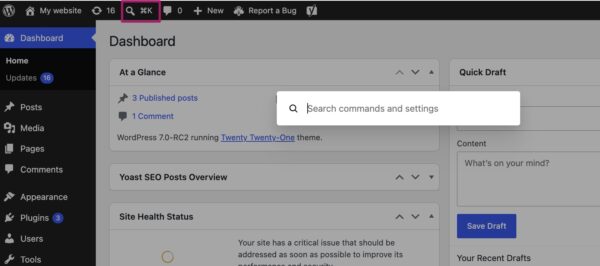
Smoother Transitions and the Command Palette: A seemingly minor but impactful enhancement is the integration of the CSS View Transitions API. This technology enables significantly smoother transitions between pages in the WordPress backend. Instead of abrupt page reloads, users now experience fluid, visually pleasing animations when navigating from one section to another. This subtle refinement contributes significantly to the overall perception of a modern, responsive application, reducing perceived latency and enhancing user satisfaction.
Complementing this visual fluidity is the introduction of the Command Palette shortcut, prominently featured in the top menu bar. Accessible via a click on its dedicated icon or the universal keyboard shortcuts (⌘K on Mac, Ctrl+K on Windows), the Command Palette provides rapid, keyboard-driven access to virtually any backend function. Users can quickly search for pages, posts, settings, or even execute specific actions directly from this centralized bar. This feature mirrors the efficiency tools found in professional design software and integrated development environments, catering to power users who prioritize speed and keyboard navigation, thereby drastically reducing the time spent navigating menus.
A Harmonized Visual Language: The visual refresh extends to the platform’s default aesthetic. WordPress 7.0 adopts the color palette previously known as ‘Modern’ as its new standard. This decision aligns the administrative interface more closely with the visual direction of the block and site editors, fostering a cohesive and contemporary brand identity across the entire WordPress ecosystem. The ‘Modern’ palette, characterized by its clean lines and subtle color scheme, enhances readability and usability. For users who preferred the classic look, the original default is still available under profile preferences, now relabeled as ‘Fresh,’ ensuring continuity and choice while guiding new users towards the updated design language. This shift underscores a deliberate effort to create a more consistent and aesthetically pleasing environment that feels current and intuitive.
These administrative improvements collectively contribute to a backend that is not only more visually appealing but also more efficient and enjoyable to use. For agencies managing multiple client sites, or large organizations with numerous content creators, these enhancements translate into tangible gains in productivity and a reduction in the learning curve for new users.
Visualizing Content Evolution: The Power of Enhanced Revisions
The ability to track and restore previous versions of content is a fundamental feature for any robust content management system. WordPress 7.0 significantly elevates this capability with the introduction of visual revisions, transforming a previously text-based comparison tool into an intuitive, graphical timeline of content changes.
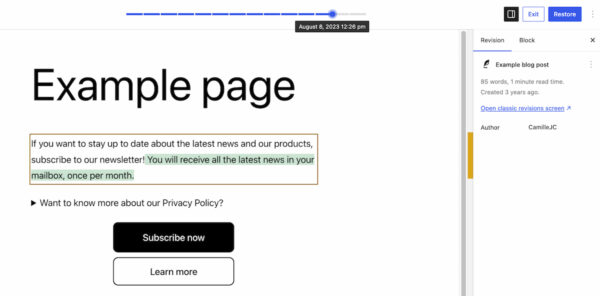
From Textual Logs to Intuitive Visual Diffs: Previously, the revisions feature presented raw text differences, requiring users to meticulously compare lines of code or prose to discern changes. WordPress 7.0 revolutionizes this by offering a live, visual preview of the page at each revision point. When accessing the revisions, users are now presented with a full-page preview, complete with a slider at the top. This slider allows seamless navigation through historical versions, clearly indicating the date and time of each modification.
The core innovation lies in the color-coded differentiation of changes: additions are highlighted in green, modified sections in yellow, and deleted content in red. This immediate visual feedback eliminates the need for detailed textual analysis, enabling users to instantly identify precisely what changes were made, where they occurred, and by whom. For content teams, this feature is invaluable for auditing changes, reverting accidental deletions, or understanding the evolution of an article over time. Site owners can quickly pinpoint the source of layout issues or content discrepancies, significantly reducing debugging time. This visual approach streamlines the review process, making content governance more transparent and efficient.
Expanding Creative Horizons: New Blocks and Block Enhancements
The block editor, a cornerstone of modern WordPress, continues to evolve with WordPress 7.0, introducing new functionalities and refining existing ones to empower users with greater design flexibility and reduce the reliance on third-party plugins.
Introducing the Breadcrumbs and Icon Blocks: Two significant additions to the block library are the Breadcrumbs block and the Icon block. The Breadcrumbs block automatically generates and displays a hierarchical navigation path at the top of a page, enhancing user experience by providing clear contextual navigation and improving search engine optimization (SEO) by signaling site structure to crawlers. Users can customize its appearance and behavior, ensuring it seamlessly integrates with their site’s design. This native inclusion eliminates the need for a dedicated breadcrumbs plugin for many users, streamlining site setup.
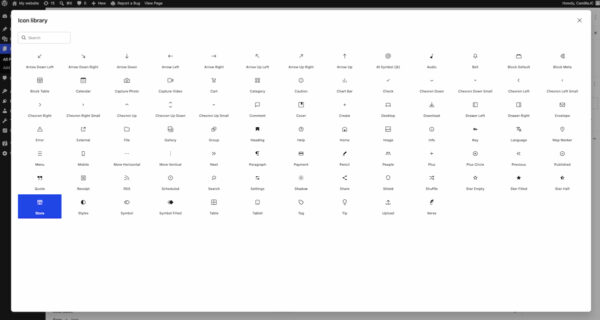
The Icon block introduces a directory of pre-installed icons directly into the WordPress backend, allowing users to easily add visual elements to their pages without uploading individual image files or relying on external icon libraries. This promotes design consistency, reduces page load times (as icons are often vector-based), and simplifies the process of adding visual flair to content. The curated selection of icons caters to common web design needs, from social media links to navigational cues.
Advanced Layout and Media Capabilities: Existing blocks also receive powerful enhancements. The Grid Block, a crucial tool for complex layouts, sees its “Auto/Manual” toggle replaced by a more intuitive suite of options for defining responsiveness. Users now have finer control over how grid columns behave across different screen sizes, enabling sophisticated, device-adaptive layouts without custom CSS. This change significantly empowers designers to create fluid and dynamic content presentations.
The Cover Block, often used for hero sections or prominent visual elements, now supports embedded videos as backgrounds. This means users can directly integrate videos from platforms like YouTube or Vimeo into their cover sections, adding dynamic visual engagement to their pages. This feature further blurs the line between traditional static web pages and immersive multimedia experiences, all manageable within the block editor.
These new blocks and improvements collectively reinforce the WordPress project’s commitment to providing a comprehensive site-building experience. By integrating these functionalities natively, WordPress 7.0 continues to reduce the need for specialized plugins and custom coding, making advanced design and functionality more accessible to users of all skill levels.
Mastering Responsiveness: Granular Control for Every Device
In an increasingly multi-device world, responsive design is not merely a best practice but a fundamental requirement for optimal user experience and search engine visibility. WordPress 7.0 introduces a groundbreaking feature that simplifies the creation of device-specific layouts: viewport-based block visibility controls.
Viewport-Based Block Visibility: This innovative control allows users to precisely dictate which blocks appear on specific device types – desktop, tablet, or mobile. By simply selecting a block and using the new ‘Show’ option in the toolbar, users can toggle its visibility for different viewports. For instance, a complex data table might be visible only on desktop and tablet, while a simplified summary block appears exclusively on mobile.
This feature is a game-changer for non-developers and those who prefer a visual, code-free approach to responsive design. It eliminates the previous reliance on custom CSS snippets or specialized plugins to achieve device-specific content presentations. The ability to fine-tune designs for each breakpoint directly within the block editor empowers users to create highly optimized and tailored experiences for their audience, regardless of the device they use. This not only enhances accessibility and user engagement but also contributes positively to SEO, as search engines prioritize mobile-friendly websites. A spokesperson for the WordPress project noted, “Our goal with viewport-based controls is to empower every site builder to craft truly adaptive experiences, ensuring their content shines on any screen without the need for complex coding.”
Streamlined Content Creation: Smarter Pattern Editing Modes
Patterns and templates have become indispensable tools for accelerating site design and maintaining consistency across a website. WordPress 7.0 enhances the editing experience for these reusable components through the introduction of smarter editing modes, designed to optimize workflows for both content and design adjustments.
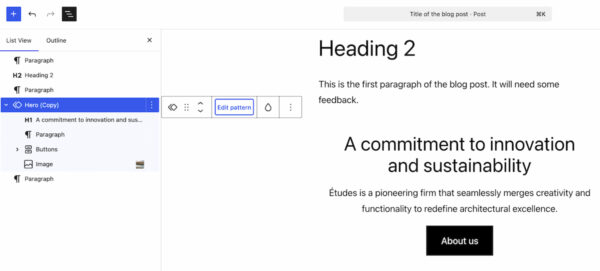
Focusing on Content, While Preserving Design Integrity: When a pattern is selected in WordPress 7.0, the List View now intelligently filters its display, primarily showing only the content-focused elements, such as text and image blocks. This “content-first” approach allows editors to concentrate solely on updating the actual information within the pattern, minimizing distractions from layout or design elements. This is particularly beneficial for large websites with numerous patterns that require frequent content updates.
However, recognizing that design adjustments are sometimes necessary, WordPress 7.0 also includes a dedicated ‘Edit pattern’ button. Clicking this button reveals all elements of the pattern, including design components like spacers, dividers, and custom styling options. This dual-mode approach provides a clear separation of concerns: content editors can quickly update information without fear of inadvertently altering the design, while designers and advanced users retain full control over the pattern’s aesthetic and structural integrity. This refined workflow ensures that patterns remain powerful tools for both efficient content management and consistent design application, further solidifying WordPress’s appeal to both content creators and web developers.
Paving the Way for Intelligent Integration: The AI Connectors Framework
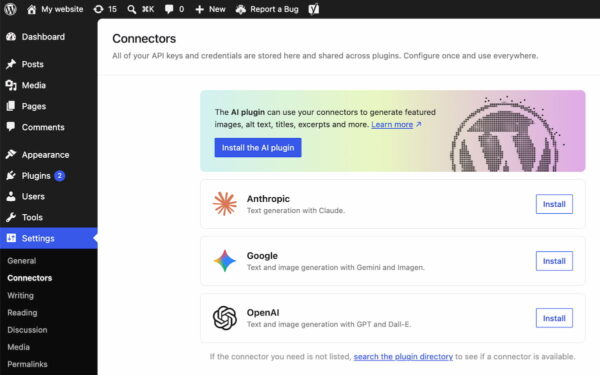
While WordPress 7.0 does not ship with native, AI-powered tools, it lays crucial groundwork for the platform’s future by introducing a standardized framework for external AI integration. This forward-thinking addition positions WordPress to seamlessly incorporate the rapidly evolving landscape of artificial intelligence.
A Central Hub for Future-Proof AI Integration: A new ‘Connectors’ section has been added under the WordPress backend’s ‘Settings’ menu. This dedicated area serves as a central hub for managing integrations with external services, including a wide array of AI providers and agents. Users can connect to popular platforms such as Claude, Gemini, OpenAI, and other specialized AI services. A built-in directory allows for easy discovery and integration of additional connectors not immediately listed.
This framework is a strategic move, offering a standardized, secure, and future-proof ecosystem for developers. It provides a common API (Application Programming Interface) for plugins and themes to interact with external AI services, simplifying development and ensuring consistent integration practices. For site administrators, it offers a single, intuitive location to manage API keys and credentials for all external integrations, enhancing security and reducing administrative overhead. This infrastructure prepares WordPress for a future where AI-powered content generation, image optimization, SEO analysis, and user interaction features become commonplace, enabling the platform and its extensive plugin ecosystem to leverage these advancements effectively. Core contributors highlighted the strategic importance, stating, “The Connectors framework is our answer to the accelerating pace of AI innovation. It ensures WordPress remains adaptable and extensible, allowing our community to integrate the intelligent tools of tomorrow seamlessly.”
Enhanced Plugin Management: The Custom Tab Filter
Managing a growing number of plugins can often become cumbersome for site administrators. WordPress 7.0 addresses this with a practical enhancement to the Plugins screen: a new list filter that allows plugins to register custom tabs.
Organizing the Plugin Ecosystem: This feature enables plugin developers to group their offerings under a dedicated, properly labeled tab on the Plugins screen. For instance, a prominent developer like Yoast has utilized this feature to create a ‘Yoast’ tab, bringing all Yoast-related plugins installed on a website into a single, organized view. This significantly improves administrative efficiency by providing a clear, consolidated overview of related plugins. Site administrators can more easily check versions, manage activation statuses, and ensure the entire suite of tools from a particular vendor is up-to-date. This simple yet effective organizational tool reduces clutter on the Plugins page, making it easier for users to maintain and manage their WordPress installations, particularly those with extensive plugin libraries.
Under the Hood: Performance and Technical Foundations
Beyond the visible user interface and feature enhancements, WordPress 7.0 also delivers significant improvements under the hood, focusing on performance, scalability, and maintaining a modern technical foundation.
Client-Side Processing and Rendering Optimizations: Performance was a key focus for this release. Notably, WordPress 7.0 introduces client-side media processing. This means that certain media operations, such as image resizing and compression, can now be handled by the user’s browser before files are even uploaded to the server. This significantly speeds up media uploads, reduces server strain, and improves the overall responsiveness of the media library, especially for sites handling large volumes of high-resolution images. Coupled with continued optimizations to block rendering, these changes help WordPress scale better, particularly for media-heavy websites and those with complex block-based layouts. The result is a faster, more fluid editing experience and quicker page load times for visitors.
Raising the Bar: PHP 7.4 Minimum Requirement: In a move to ensure the platform remains secure, performant, and compatible with modern web development standards, WordPress 7.0 raises the minimum required PHP version to 7.4. This update encourages users to transition to a more contemporary and supported version of PHP, which brings with it numerous performance enhancements, security fixes, and new developer features. This ensures that the underlying technology powering WordPress sites is robust and up-to-date, providing a more stable and efficient environment for both the core software and the vast ecosystem of themes and plugins.
A Glimpse into the Future: The Postponed Real-Time Collaboration
While WordPress 7.0 delivers a wealth of new features, it’s worth noting one anticipated functionality that was deliberately held back: real-time collaboration. Originally slated for this release, the core development team made a strategic decision to postpone its inclusion to ensure the stability and reliability of the overall 7.0 release.
This feature, which promises to revolutionize how teams create and edit content in WordPress by allowing multiple users to work on the same document simultaneously with live updates, is a complex undertaking. Prioritizing the stability of the entire platform over the immediate release of a single, albeit transformative, feature demonstrates a mature approach to software development. Real-time collaboration is widely expected to be a cornerstone of a future WordPress release, further enhancing its appeal to enterprise clients and content teams requiring synchronized workflows. Its eventual introduction will likely complete the “Phase 3” vision of the Gutenberg project, solidifying WordPress as a truly collaborative content platform.
Conclusion: A Major Leap Forward for the Open-Source Platform
WordPress 7.0 represents a monumental step forward for the world’s most popular content management system. By focusing on a modern administrative experience, intuitive visual tools, enhanced design controls, and foundational AI integration, this release reinforces WordPress’s commitment to providing a powerful, flexible, and user-friendly platform. The strategic shifts toward smarter workflows and an app-like experience reflect a keen understanding of contemporary web development trends and user expectations.
From the seamless transitions and efficient Command Palette to the groundbreaking visual revisions and granular responsive design controls, every feature in WordPress 7.0 is crafted to empower users – from casual bloggers to large enterprises – to build and manage stunning, high-performing websites with greater ease and efficiency. The underlying performance improvements and the updated PHP requirement ensure that this enhanced user experience is built upon a solid, modern technical foundation. As the platform continues to evolve, laying the groundwork for future AI integrations and the eventual release of real-time collaboration, WordPress 7.0 stands as a clear indicator of a vibrant, forward-thinking open-source project. Users are encouraged to update to the latest version and explore the transformative capabilities that define this pivotal release, further details of which can be found in the official release post on WordPress.org.