In the intricate landscape of digital marketing, the phenomenon of website visitors consuming content and departing without leaving a trace presents a persistent challenge for businesses striving to cultivate lasting customer relationships. The absence of contact information – most crucially, an email address – signifies a missed opportunity for follow-up, personalization, and sustained engagement, effectively rendering anonymous traffic into transient interactions. This fundamental challenge underscores the indispensable role of lead capture forms, digital mechanisms designed to convert passive website traffic into actionable subscriber data, laying the groundwork for meaningful ongoing communication.
The Foundational Role of Lead Capture in Digital Ecosystems
A lead capture form, at its core, is a concise interface on a website or landing page that prompts visitors to exchange their contact details for something of perceived value. This "value exchange" could range from exclusive content, a newsletter subscription, access to a free tool, or a discount offer. By effectively implementing these forms, businesses can transform fleeting visits into concrete leads, feeding directly into their customer relationship management (CRM) and email marketing systems. This direct connection ensures that new subscribers are automatically entered into predefined workflows, such as welcome email sequences, thereby initiating a structured communication journey.
The strategic placement and thoughtful design of these forms are paramount. They are ubiquitous across the digital landscape, appearing on homepages, blog posts, dedicated landing pages, and even social media "link-in-bio" pages. Their integration with email marketing platforms is critical, allowing for seamless data flow and immediate activation of marketing automation strategies. This automation is vital for nurturing leads, segmenting audiences, and delivering personalized content that resonates with individual subscriber interests, ultimately driving conversions and fostering loyalty.
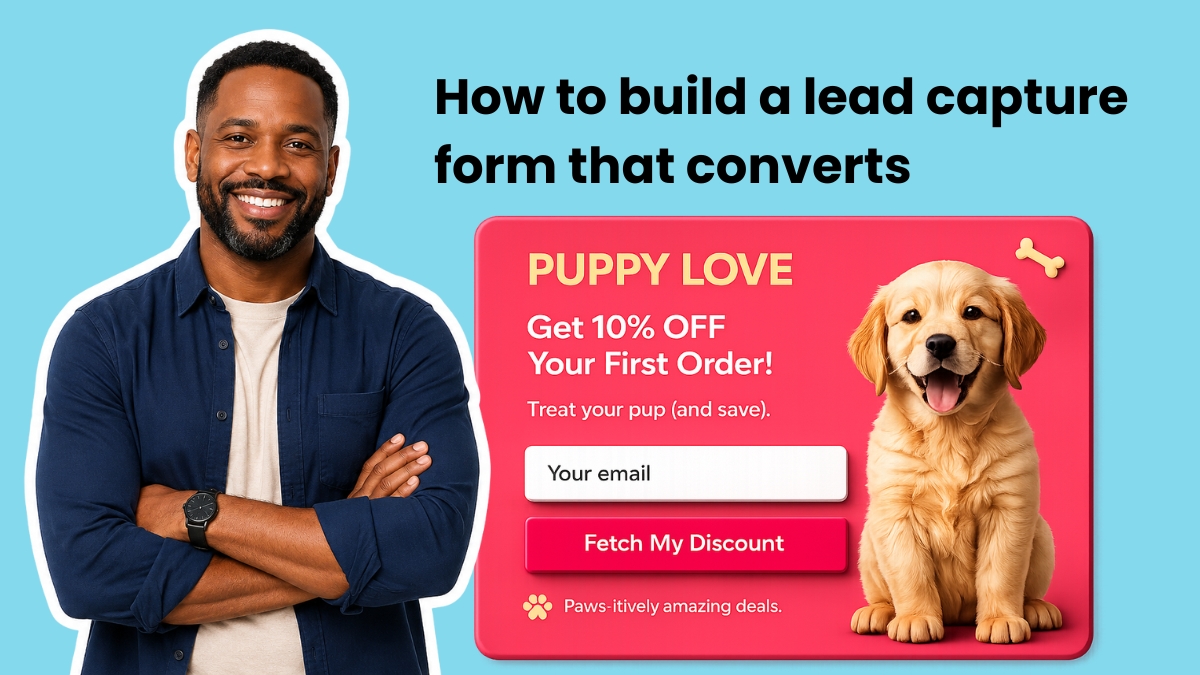
Strategic Design: Optimizing Form Fields for Conversion
The efficacy of a lead capture form is often inversely proportional to its complexity. Industry data consistently indicates that conversion rates decline with each additional field beyond the essential. Therefore, marketers are advised to begin with the absolute minimum: an email address field and a clear submit button. The decision to include supplementary fields must be carefully weighed against the potential reduction in conversion, assessing whether the gained information justifies the lost subscribers.
- Email Address: The Non-Negotiable Core: This remains the singular, indispensable field. Without it, the primary objective of lead capture—the ability to follow up and communicate—is negated. It serves as the gateway to all subsequent digital interactions.
- First Name: Enabling Personalization: Including a "first name" field allows for rudimentary yet effective personalization. Addressing a subscriber by their name (e.g., "Hey Sean") has been shown to yield higher open rates and engagement compared to generic greetings ("Hey there"). This simple addition enhances the perceived relevance of communications and strengthens the nascent relationship.
- Additional Fields: Segmentation for Targeted Engagement: Beyond the basics, additional fields should be highly strategic and geared towards segmentation. A single, well-chosen question, such as "What best describes your business?" or "What’s your biggest challenge right now?", can provide invaluable insights. This information enables marketers to tag subscribers at the point of signup, routing them into highly targeted automation sequences. For instance, in platforms like AWeber, these tags can directly feed into Workflow Builder automations, ensuring that each new subscriber receives content precisely tailored to their indicated interests or needs from their very first email. This level of segmentation is crucial for delivering maximum value and maintaining subscriber engagement.
Fields that typically offer diminishing returns in the initial lead capture phase include phone numbers (unless the business model heavily relies on direct calls, like service bookings), company names, job titles, and physical addresses. Such detailed information is generally best sought later in the customer journey, once a foundational level of trust and engagement has been established. For the vast majority of small to medium-sized businesses, a sweet spot of two to three fields—email, first name, and one strategic segmentation question—provides a robust balance between data collection and conversion optimization. Any requirement for more extensive data typically necessitates a multi-step form, which breaks down the information gathering into manageable screens, mitigating perceived friction.
Placement Matters: Maximizing Visibility and Intent
The physical placement of a lead capture form on a website significantly influences its visibility and conversion potential. Even the most perfectly designed form will fail if it remains unseen by the target audience. Strategic placement capitalizes on different visitor behaviors and intent levels.

- Above the Fold on the Homepage: This is arguably the most prominent position on any website. Placing a lead capture form "above the fold"—meaning visible without scrolling—ensures maximum exposure. This placement is ideal for capturing visitors who arrive with a clear purpose or are immediately interested in the site’s primary offering. It should be paired with an exceptionally clear value proposition, articulating precisely what the visitor will receive, how frequently, and why it is beneficial.
- Inline within Blog Posts: Integrating contextual forms approximately one-third of the way into a blog post is a highly effective strategy. At this point, the reader has typically consumed enough content to trust the author’s expertise and value their insights but has not yet finished the article. The offer presented in this inline form should directly relate to the topic being discussed. For example, a blog post about email subject lines should offer a downloadable subject line template rather than a generic newsletter signup. This relevance dramatically boosts conversion rates.
- Exit-Intent Pop-ups: These dynamic forms are engineered to appear precisely when a visitor’s cursor indicates an intention to leave the page (e.g., moving towards the browser’s close button or back arrow). Exit-intent captures are invaluable for salvaging potential leads who would otherwise depart without interaction. The success of an exit-intent pop-up hinges on a compelling, specific offer. A prompt like "Wait! Grab this free template before you go!" consistently outperforms a generic "Subscribe to our newsletter." Advanced platforms like AWeber feature exit-intent capabilities that automatically detect cursor movement and trigger the form, maximizing last-ditch capture opportunities.
- AI-Driven Placement and Customization: Modern form builders, particularly those leveraging AI, often allow marketers to specify desired placement types (e.g., inline for blogs, pop-up for homepages, exit-intent overlays) directly within the building interface. This intelligent automation streamlines the process of deploying forms optimally for various visitor engagement scenarios.
Crafting Compelling Form Copy: Words that Convert
Every word on a lead capture form plays a critical role, either motivating a subscription or introducing hesitation. The fundamental copy framework involves clearly stating the benefit, frequency of communication, and the immediate next steps.
- Headline: The Benefit Statement: The headline should succinctly describe the primary benefit to the subscriber. For instance, "Get weekly email marketing tips that take five minutes to read" is far more persuasive and informative than "Subscribe to our newsletter." It sets clear expectations and highlights value.
- Subheadline: Addressing Objections: A subheadline can effectively mitigate common visitor concerns. Phrases like "No spam. Unsubscribe anytime." directly address potential objections regarding unwanted emails or difficulty in opting out, thereby reducing perceived risk.
- Button Text: Specific Action, Not Generic Language: The text on the submit button is crucial. Specific, action-oriented language consistently outperforms generic terms. "Send me the templates" converts significantly better than "Submit." The ideal button text should complete the implicit sentence "I want to…" from the user’s perspective.
- Social Proof (Optional but Powerful): When applicable, incorporating social proof can boost confidence. Statements such as "Join 100,000+ small business owners" are highly effective when the number is genuinely impressive. If the list size is modest, a concise testimonial quote positioned near the form can serve a similar purpose, lending credibility and fostering trust.
Technological Advancements: The Rise of AI in Form Building
The landscape of form creation has been significantly transformed by technological advancements, particularly the integration of artificial intelligence. The traditional approach, often reliant on rigid templates or requiring coding skills, is giving way to more intuitive, AI-powered solutions.
These AI Signup Form Builders, exemplified by innovations from platforms like AWeber, empower users to generate highly customized forms using natural language descriptions. Marketers can simply articulate their requirements—whether a single-field email capture for a homepage, a multi-step quiz designed to segment visitors across several screens before asking for an email, or a branded pop-up with specific button copy and an offer—and the AI generates the form accordingly. This paradigm shift liberates marketers from the constraints of pre-set layouts and templates, offering unprecedented flexibility and creative control. This capability ensures that forms are not just functional but also seamlessly integrated with brand identity and specific campaign objectives.

Crucially, the effectiveness of such advanced form builders is amplified when they are natively integrated within the email marketing platform itself. This eliminates the complexities of configuring integrations, maintaining webhooks, or relying on third-party data transfer tools. A subscriber filling out a form created by an integrated AI builder instantly enters the system, is tagged appropriately, and triggers relevant automation sequences within the same platform, ensuring a smooth and immediate lead nurturing process.
Data Privacy and Ethical Considerations
As lead capture forms become more sophisticated in their ability to collect and segment data, the ethical implications and regulatory landscape surrounding data privacy have grown in importance. Regulations such as the General Data Protection Regulation (GDPR) in Europe and the California Consumer Privacy Act (CCPA) in the United States have fundamentally reshaped how businesses must collect, process, and store personal information.
- Transparency and Consent: Modern lead capture forms must clearly communicate what data is being collected, why it is needed, and how it will be used. Explicit consent mechanisms, such as checkboxes, are often required, especially for processing sensitive data or for purposes beyond the primary interaction.
- Data Minimization: The principle of data minimization encourages businesses to collect only the data that is absolutely necessary for the stated purpose. Over-collecting information not only reduces conversion rates but also increases compliance risk and data security liabilities.
- Secure Handling: Ensuring the secure transmission and storage of collected data is paramount. Platforms providing lead capture tools must adhere to robust security protocols to protect subscriber information from breaches.
The implications of these regulations are profound. Businesses that fail to comply face substantial fines and reputational damage. Therefore, the design of lead capture forms must balance the strategic need for data with an unwavering commitment to privacy and ethical data practices.
Lead Capture Form Best Practices for Optimal Performance

Achieving high conversion rates with lead capture forms boils down to minimizing friction and maximizing user motivation. Several best practices consistently yield superior results:
- Ask for One Thing Per Screen (Multi-Step Forms): For forms requiring more than a few fields, breaking them into multiple screens (multi-step forms) significantly improves completion rates. Each screen feels quick and less daunting, typically asking one question, providing a few answer choices, and featuring a clear "next" button.
- Match the Offer to the Page: Contextual relevance is a dominant driver of conversion. A form on a page discussing SEO should offer an SEO checklist, not a generic newsletter. The offer should seamlessly extend the value proposition of the content the visitor is already consuming.
- Use Specific Button Copy: Avoid generic "Submit" buttons. Text like "Get the Free Checklist" or "Send My Guide Now" explicitly tells the visitor what to expect upon clicking, boosting confidence and conversion.
- Show a Progress Bar on Multi-Step Forms: Visual indicators like progress bars on multi-step forms reassure users about their progress and the remaining steps, significantly reducing abandonment rates by making the end visible and achievable.
- Place the Form Where Intent is Highest: Strategic placement is key. Use above-the-fold forms for high-intent homepage visitors, inline forms for engaged blog readers, and exit-intent pop-ups for those about to leave, tailoring placement to specific visitor behaviors.
- Keep the Design Clean: Clutter reduces focus. Ample white space around form fields minimizes visual noise, directing attention to the form itself and simplifying the user experience.
- Tag Subscribers at Submission: Leverage the power of segmentation from the outset. Every answer choice on a multi-step form should ideally apply a specific tag to the subscriber. These tags then serve as triggers for automated email sequences, ensuring that each subscriber receives content precisely matched to the preferences or information they provided during signup.
The Future of Lead Capture: Personalization and Automation
The trajectory of lead capture forms points towards increasingly sophisticated personalization and automation, largely driven by AI. The ability to dynamically adapt form content, offers, and even placement based on real-time user behavior and demographic data will become standard. Voice-activated forms and integration with other emerging technologies could also redefine how leads are captured.
Furthermore, the emphasis on first-party data will continue to grow. As third-party cookies face obsolescence, the direct collection of subscriber data through well-designed, ethical lead capture forms will become an even more critical asset for businesses seeking to understand and engage their audiences effectively. The best form builders will not merely be data collection tools but integrated intelligence hubs, seamlessly connecting subscriber input with advanced marketing automation and personalized customer journeys. The transition from rigid templates to AI-driven, customizable solutions signifies a major leap forward, empowering businesses to create highly effective, brand-aligned forms that maximize lead generation and foster enduring customer relationships in an increasingly competitive digital world.


 Ammar Sabilarrohman
 Asro
Asro