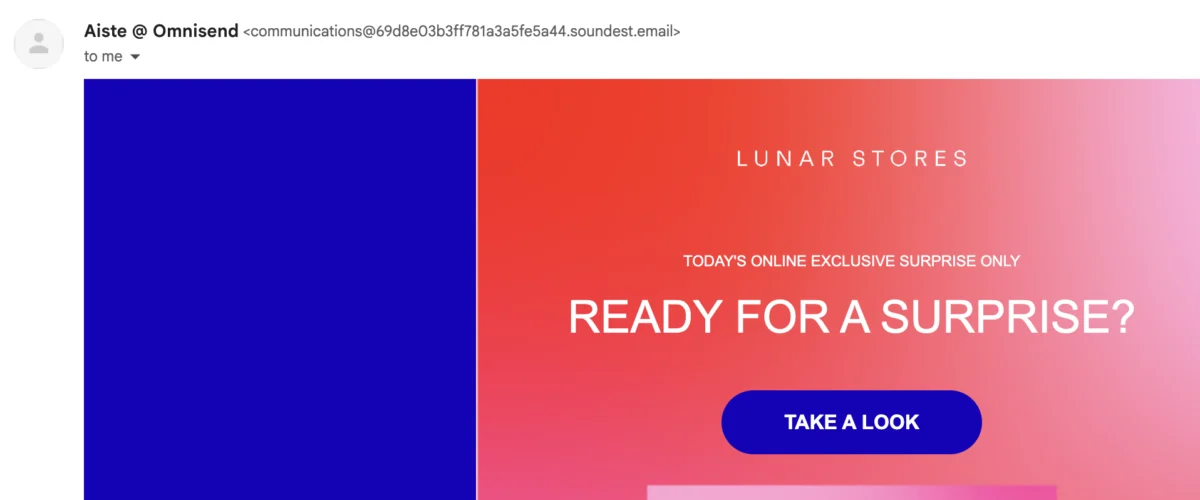
In a significant shift that reshapes the landscape of digital communication, major email service providers (ESPs) including Gmail, Yahoo, and Microsoft have transitioned email domain authentication from an optional best practice to a stringent requirement for bulk senders. This mandate, driven by an escalating need to combat spam, phishing, and email spoofing, now compels businesses and marketers to implement Sender Policy Framework (SPF), DomainKeys Identified Mail (DKIM), and Domain-based Message Authentication, Reporting & Conformance (DMARC) protocols or face severe consequences for their email deliverability. For senders experiencing emails landing in spam folders, receiving 550 5.7.15 rejections from Outlook, or noticing "soundest.email" warnings alongside their sender name, the underlying issue is almost invariably missing or misconfigured email domain authentication.
The Genesis of Email Insecurity: A Historical Overview
The internet’s foundational email protocol, Simple Mail Transfer Protocol (SMTP), was conceived in 1982, an era predating widespread concerns about digital security and sophisticated cyber threats. This early design featured two distinct ‘FROM’ fields: an "envelope sender" used for server-to-server communication, and a "header field" that displays the sender’s address to the recipient. Crucially, original SMTP specifications did not require these fields to match or even accurately reflect the true origin of the email. This architectural oversight created a critical vulnerability, allowing malicious actors to easily forge sender addresses, leading to a proliferation of phishing and spoofing attacks throughout the 1990s and 2000s.
As email evolved into a primary communication channel for both personal and professional interactions, the unchecked ability to spoof sender identities became a significant threat to user trust and data security. Governments, industry bodies, and major email providers recognized the urgent need for a robust authentication framework to verify email legitimacy. SPF, DKIM, and DMARC emerged as layered solutions, retrofitted onto the existing SMTP infrastructure, to provide this much-needed authentication based on DNS (Domain Name System) records. Without these protocols, the integrity of email communication would remain compromised, making it difficult for recipients to distinguish legitimate messages from fraudulent ones.
The New Mandate: Why Authentication is No Longer Optional
The landscape of email security underwent a pivotal transformation starting in early 2024. What was once considered a recommendation for optimal email performance is now a non-negotiable requirement for senders exceeding specific daily volumes. As of February 2024, Gmail and Yahoo began enforcing strict authentication policies, followed by Microsoft Outlook in May 2025. Senders transmitting more than 5,000 emails per day to these providers without proper SPF, DKIM, and DMARC configurations are almost guaranteed to encounter significant deliverability issues, ranging from messages being routed directly to spam folders to outright SMTP rejections.
This coordinated effort by the industry’s largest inbox providers underscores a collective commitment to creating a safer and more trustworthy email environment. The mandates aim to drastically reduce the volume of spam and phishing emails, thereby protecting users from scams and enhancing the overall user experience. For businesses, compliance is no longer just about optimizing marketing reach; it’s about maintaining fundamental communication channels, ensuring critical transactional emails like order confirmations and password resets reach their intended recipients without interruption.
Enforcement Timeline and Consequences:
- Gmail and Yahoo (February 2024): Both companies announced their joint sender requirements in 2023, with enforcement commencing in February 2024. Senders exceeding 5,000 emails per day must have SPF, DKIM, and a DMARC policy set to at least
p=none. Non-compliance initially leads to emails being routed to spam. Repeat offenders, particularly on Gmail, face escalation to active SMTP rejection (often displaying error code 550 5.7.26) and, in severe cases, the blacklisting of their email domain. - Microsoft Outlook (May 2025): Microsoft followed suit, applying similar requirements to its suite of email services, including Outlook.com, Hotmail.com, and Live.com. Microsoft’s enforcement is often more direct, with non-compliant emails frequently receiving an outright SMTP rejection. Bounce logs for such instances typically display messages like "550 5.7.15 Access denied, sending domain does not meet the required authentication level."
Resolving these issues across all three providers follows a consistent path: publishing aligned SPF, DKIM, and DMARC records, and then reattempting email sends. The underlying message from these tech giants is clear: email senders must take ownership of their sending domains and proactively secure them.
The Prohibition of Free Email Addresses for Marketing
A direct consequence of these new authentication mandates is the widespread blocking of free email addresses (e.g., @gmail.com, @yahoo.com, @hotmail.com) as ‘From:’ addresses for marketing campaigns by reputable Email Service Providers (ESPs) like Omnisend and Klaviyo. The reason is rooted in DMARC alignment. When an email is sent through a third-party ESP using a free email address, the ESP’s DMARC record (intended to prevent spoofing) will conflict with the domain of the free email address. The receiving server will then reject the email based on the DMARC policy of the free email provider (e.g., Google’s instructions for @gmail.com), as it cannot verify that the third-party ESP is authorized to send on behalf of Google. This necessitates the use of a custom domain’s email address (e.g., [email protected]) as the ‘From:’ address, allowing senders to control and authenticate their sending identity.
Understanding the Pillars of Email Authentication: SPF, DKIM, and DMARC
These three protocols form a robust, layered security system for email, each playing a distinct yet interconnected role in verifying sender identity and message integrity. They are fundamentally DNS-based standards, relying on records stored in a domain’s DNS as TXT or CNAME files.
-
SPF (Sender Policy Framework): The Authorized Sender List
SPF is a DNS TXT record that explicitly lists which mail servers are authorized to send email on behalf of a particular domain. When a receiving server gets an incoming message, it inspects the sender’s domain (the MAIL FROM address, also known as the "envelope sender") and queries the associated DNS server for its SPF records. If the IP address of the server that sent the email matches one listed in the domain’s SPF record, the email passes the SPF check. If not, it signals a potential spoofing attempt, and DMARC is consulted for further action.- Mechanism: A TXT record at the root of your domain, specifying allowed sending hosts.
- Example (Omnisend’s underlying infrastructure):
v=spf1 include:mailgun.org ~all(Mailgun is the sending infrastructure used by Omnisend). The~allmechanism suggests a "softfail," meaning emails from unauthorized servers might be accepted but marked with a warning. A-allwould indicate a "hardfail," leading to outright rejection. - Importance: Prevents unauthorized servers from sending emails pretending to be from your domain.
-
DKIM (DomainKeys Identified Mail): The Cryptographic Seal of Authenticity
DKIM provides a cryptographic signature appended to every email sent. This signature acts as a digital seal, allowing receiving servers to verify two critical aspects: first, that the message truly originated from the claimed source, and second, that its content has not been altered or tampered with during transit.- Mechanism: When an email is sent through an ESP like Omnisend, it’s signed with a private key held securely within the ESP’s infrastructure. A unique signature is attached to the email header. The receiving server then queries the sender’s DNS for the matching public key (published as a CNAME record). Successful decryption confirms both sender authenticity and message integrity.
- Importance: Protects against email content tampering and verifies the email’s origin, building trust in the message’s legitimacy.
-
DMARC (Domain-based Message Authentication, Reporting & Conformance): The Policy Enforcer and Reporter
DMARC is the policy layer that brings SPF and DKIM together. It’s a DNS TXT record that tells receiving servers what to do with emails that fail either the SPF or DKIM checks. Critically, DMARC also introduces "alignment," ensuring that the visible ‘From:’ address (header field) matches the authenticated domain used by SPF or DKIM. This alignment is what directly addresses issues like the "via soundest.email" warning in Gmail.- Policy Levels: DMARC allows senders to define their policy strictness:
p=none: Monitoring mode. Receivers deliver email normally but send back aggregate reports on pass/fail status. Ideal for initial setup and monitoring.p=quarantine: Failing emails are sent to the recipient’s spam or junk folder. Used after thorough testing confirms legitimate emails pass authentication.p=reject: Failing emails are rejected outright at the SMTP level. The strictest policy, used when full enforcement and strong anti-spoofing measures are required.
- Reporting (
ruatag): DMARC can also be configured to send aggregate reports (via theruatag) detailing authentication attempts, providing invaluable insights into email performance and potential spoofing attempts. - Importance: Enforces consistent domain usage, provides actionable feedback on email authentication, and offers robust protection against direct domain spoofing.
- Policy Levels: DMARC allows senders to define their policy strictness:
Practical Implementation: Setting Up Email Domain Authentication with Omnisend
While the technical details of SPF, DKIM, and DMARC can seem daunting, reputable Email Service Providers (ESPs) like Omnisend simplify the setup process significantly. Omnisend includes email sender authentication as a core feature across all its plans, including the free tier, making it accessible for businesses of all sizes. The entire process, from configuration to record publication, can often be completed in under 15 minutes, though DNS propagation times will add to the overall wait.
-
Verify Your Custom Sending Domain:
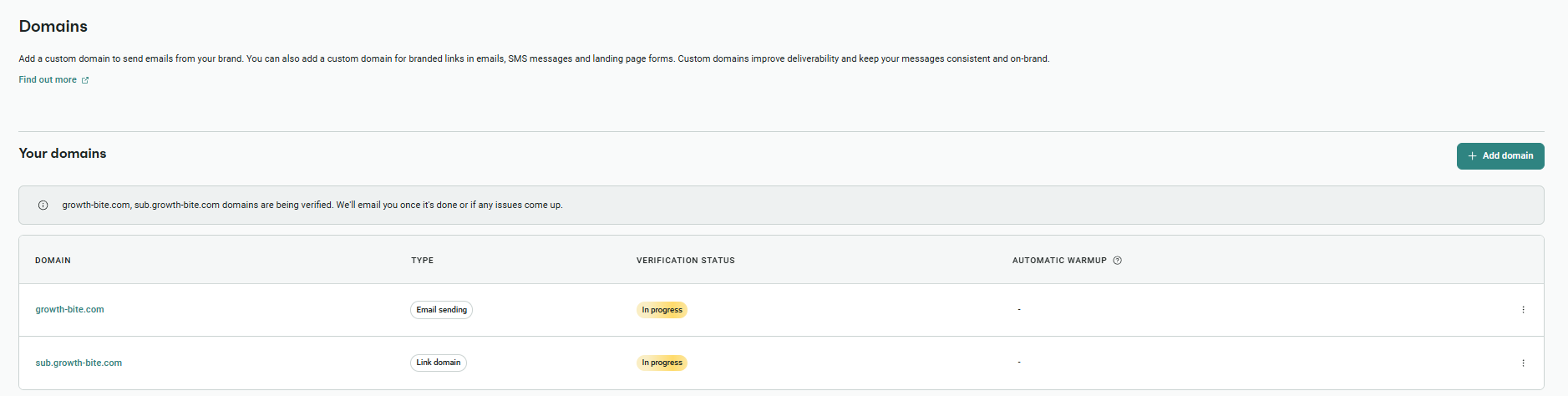
The first step is to inform Omnisend of your official sending domain. Without this verification, Omnisend (or any ESP) will use a placeholder domain for authentication (like "soundest.email" in Omnisend’s case, a remnant from its original brand, Soundest). This placeholder triggers the "via" warning.- Navigate to your Omnisend account settings, find the "Domains" section, and click "Add domain."
- Select "Email sending domain" and input your desired sending domain (e.g., yourdomain.com or a subdomain like send.yourdomain.com). Free email addresses are not permitted here.
- Proceed to the DNS records screen, which will list the specific records you need to add.
-
Add the SPF Record to Your DNS:
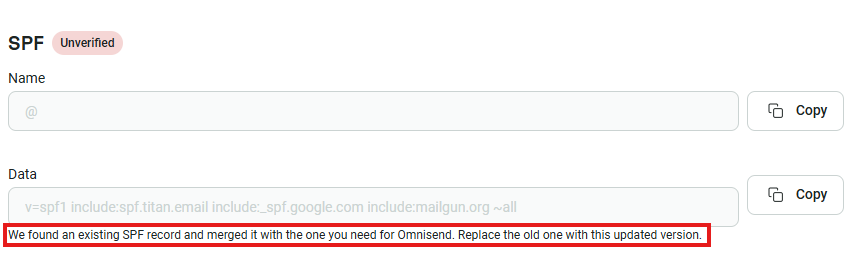
Omnisend will provide a single TXT record value for your SPF. This record should be published at the root of your domain in your hosting provider’s DNS settings.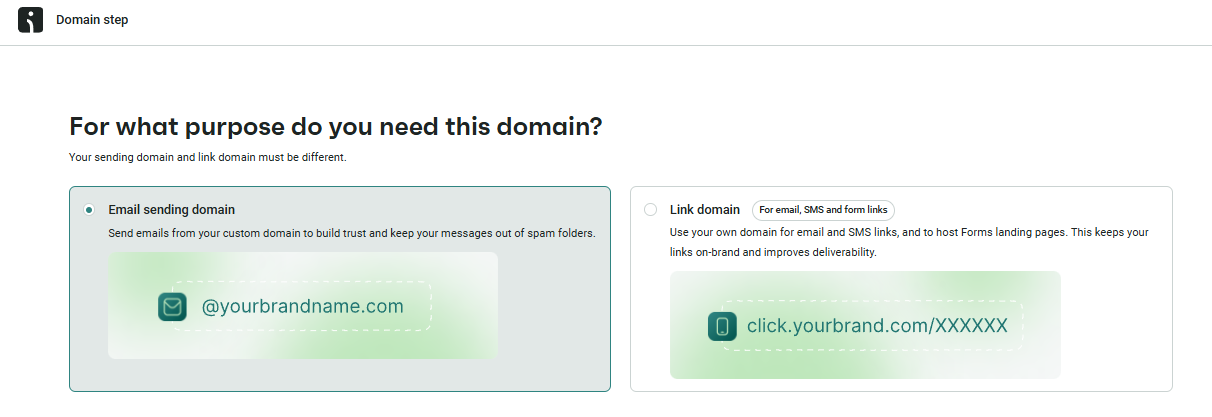
- Example:
v=spf1 include:mailgun.org ~all - Important Note: If an existing SPF record is detected, Omnisend’s system intelligently merges it with the necessary Mailgun entry, providing a single, compliant record to replace any old ones. This prevents common misconfigurations that can break email authentication.
- Access your domain host’s DNS management page (e.g., GoDaddy, Cloudflare, Namecheap). Create a new TXT record, leaving the host/name field blank (or using ‘@’ or your domain name, depending on the provider) and paste the provided SPF value into the value/data field.
- Example:
-
Add the DKIM CNAME Records to Your DNS:
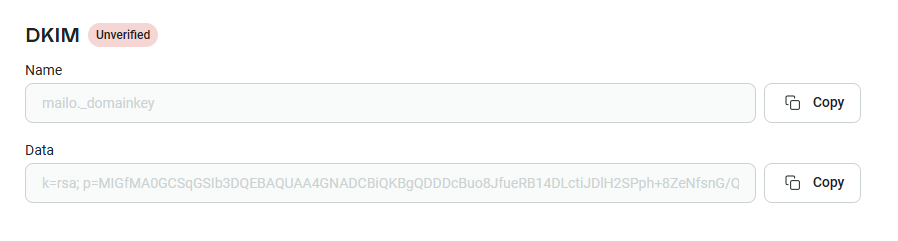
For DKIM, Omnisend will generate a pair of CNAME records. These records point to Omnisend’s selectors, allowing receiving servers to retrieve the public key for verification.- You’ll typically receive two CNAME records, each with a ‘Name’ (or ‘Host’) and ‘Data’ (or ‘Value’).
- Carefully copy and paste these exact values into your DNS settings. Ensure that the ‘Data’ field, which contains the cryptographic key, is copied as a single, unbroken string, even if your hosting provider displays it split into multiple lines. Some providers handle this splitting automatically based on RFC standards.
-
Create Your DMARC Record:
The DMARC record, also a TXT record, specifies your domain’s policy for handling unauthenticated emails and enables reporting.- Omnisend’s default DMARC record typically starts with
v=DMARC1; p=none;. - Create a new TXT record in your DNS. The ‘Name’ or ‘Host’ will usually be
_dmarc(or_dmarc.yourdomain.com). The ‘Value’ will be the full DMARC string provided by Omnisend. - Optional Reporting: To receive aggregate reports on email authentication attempts, you can add a
ruatag to your DMARC record, specifying an email address for report delivery:v=DMARC1; p=none; rua=mailto:[email protected];. - Policy Escalation: Remember to start with
p=none(monitoring). Only after confirming through DMARC reports that all legitimate emails are passing authentication should you consider escalating top=quarantineorp=rejectto enforce stricter email handling.
- Omnisend’s default DMARC record typically starts with
-
Confirm Authentication Status in Omnisend:
Once all records are published in your DNS, return to your Omnisend dashboard.- In the "Domains" section, click "Check status" for your verified domain.
- Omnisend will display the authentication status for SPF, DKIM, and DMARC. Green indicators confirm successful setup.
- Sending a test campaign to a personal email address (e.g., Gmail) is a good final check to ensure everything is functioning correctly and to begin warming up your email domain.
DNS Propagation: Understanding the Wait Time
After publishing DNS records, it’s crucial to understand that these changes are not instantaneous. DNS propagation, the process by which changes to DNS records are updated across the global network of DNS servers, can take anywhere from 1 to 48 hours. Modern DNS providers like Cloudflare and Namecheap often propagate changes in under an hour. Standard providers such as GoDaddy and Google Domains typically take 1-24 hours, while older or corporate DNS systems might require up to 48 hours. Patience is key; making additional changes during this propagation window can inadvertently disrupt a correct setup. Tools like MXToolbox or Mail-tester can be used to query your DNS records and verify successful propagation.
Addressing the "Via Soundest.email" Warning
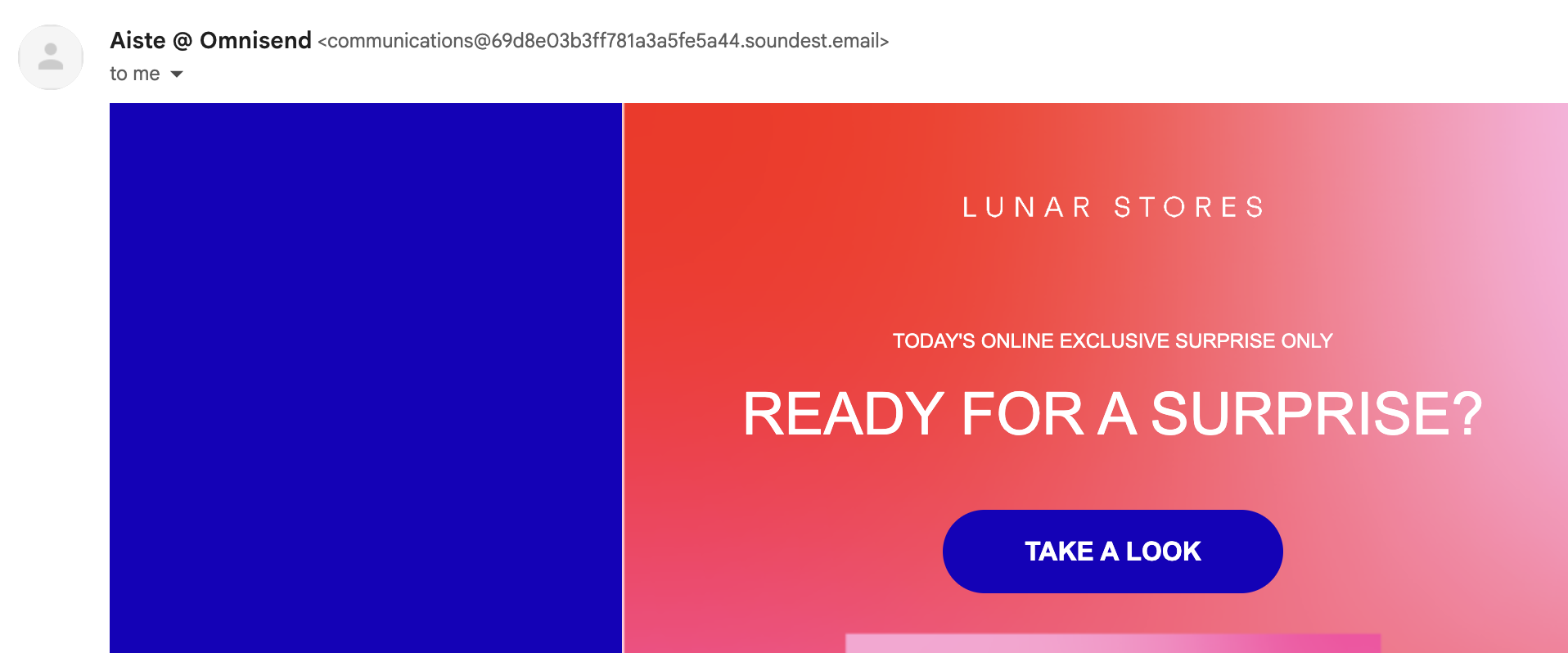
The "via soundest.email" warning, commonly seen in Gmail, is a clear indicator of a DKIM email authentication failure, specifically a DMARC alignment issue. This warning appears when the domain used in the DKIM signature does not align with the visible ‘From:’ domain in the email header. For Omnisend users who have not verified their custom sending domain, Omnisend’s system will sign emails with its default "soundest.email" domain. If the ‘From:’ field of the email is set to your custom domain, this mismatch triggers the "via" warning. The solution is straightforward: verify your custom sending domain within Omnisend and ensure all SPF, DKIM, and DMARC records are correctly published and aligned to your domain. Once Omnisend’s authentication status panel shows green for all three protocols, the "via" warning will disappear, reflecting proper domain alignment.
Advanced Strategy: The Two-Domain Approach for E-commerce
For e-commerce businesses, a sophisticated strategy involves segmenting email sending across two distinct domains to protect sender reputation. Marketing emails, such as newsletters and promotional campaigns, inherently carry a higher risk of spam complaints and unsubscribe rates compared to transactional emails (e.g., order confirmations, shipping updates, password resets), which customers expect and value.
- Root Domain (e.g.,
yourstore.com): Best used for marketing campaigns and newsletters. This builds brand-specific sender reputation directly tied to your primary brand identity. - Subdomain (e.g.,
send.yourstore.comorinfo.yourstore.com): Dedicated to automated flows and critical transactional emails. This isolates the reputation of essential communications from the potentially more volatile reputation of marketing sends.
By separating these sending streams, a surge in spam complaints against a marketing campaign will not negatively impact the deliverability of crucial transactional messages, thereby mitigating risks of customer dissatisfaction, support tickets, chargebacks, or refund requests. Both the root domain and the subdomain must be fully authenticated with SPF, DKIM, and DMARC to ensure optimal deliverability and prevent authentication issues.
BIMI Email Authentication: Adding Your Brand Logo to Authenticated Emails
Beyond ensuring deliverability, a fully authenticated email domain unlocks the possibility of implementing Brand Indicators for Message Identification (BIMI). BIMI is not a separate authentication protocol but rather an additional layer that displays your brand logo next to your emails in supporting inboxes (including Gmail, Yahoo, Apple Mail, AOL, and Fastmail). This visual cue enhances brand recognition, builds trust, and makes your emails stand out in a crowded inbox.
Implementing BIMI requires all three core authentication protocols (SPF, DKIM, DMARC) to be correctly configured and enforced (with DMARC policy at p=quarantine or p=reject). Once these prerequisites are met, publishing a BIMI record involves:
- Obtaining a Verified Mark Certificate (VMC) or Certified Mark Certificate (CMC):
- VMC: Requires a registered trademark for your logo. Historically the primary option, costing approximately $1,500–$2,000 per year.
- CMC: A more recent addition (Google added support in 2025) that does not require a registered trademark but verifies 12+ months of consistent logo use. Costs are generally lower, around $1,000 per year. The introduction of CMC significantly reduced the barrier to entry for many businesses.
- Publishing a BIMI DNS TXT Record: This record points to the location of your logo (SVG format) and your VMC/CMC.
While BIMI offers significant brand visibility benefits, it’s important to note that Microsoft-owned email providers currently do not support BIMI, and there is no announced timeline for their adoption. Despite this, the enhanced trust and recognition provided by BIMI in other major inboxes make it a valuable addition for brands committed to robust email security and branding.
Broader Implications and The Future of Email
The mandatory adoption of SPF, DKIM, and DMARC represents a watershed moment for email communication. For businesses, the benefits extend beyond mere compliance. Enhanced deliverability means higher open rates, more effective marketing campaigns, and reduced operational headaches from undelivered transactional emails. Improved sender reputation fosters greater customer trust, as recipients are confident that emails from a verified domain are legitimate. The collective industry effort also significantly reduces the effectiveness of spammers and phishers, contributing to a cleaner, safer digital environment for all users.
While the initial setup might require a small investment of time and understanding of DNS records, the long-term gains in deliverability, security, and brand reputation are undeniable. Email domain authentication is no longer a technical nicety but a fundamental requirement for any entity that relies on email as a critical communication channel. As the digital landscape continues to evolve, these robust authentication protocols will serve as the bedrock for secure, trustworthy, and effective email engagement.


 Asro
Asro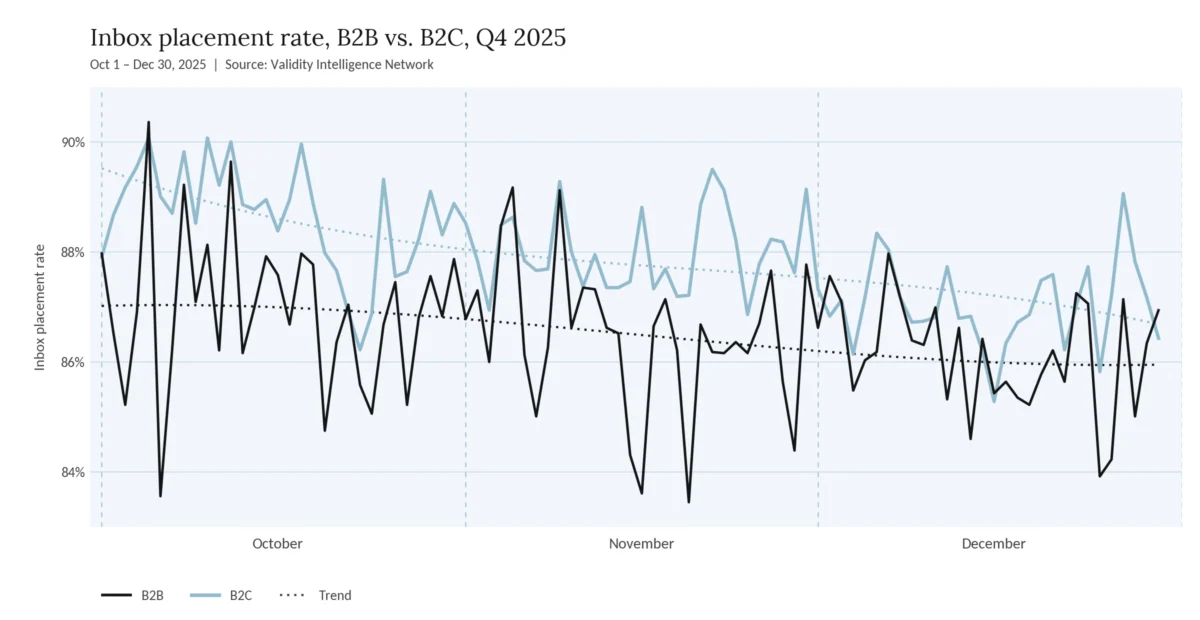
 Nana
Nana