rifanmuazin
In the dynamic and increasingly complex realm of digital marketing, social media calendar tools have emerged as an indispensable asset, fundamentally transforming how brands and organizations manage their online presence. These sophisticated platforms, also known as content calendar software, are critical for planning, scheduling, managing, and distributing content across an ever-expanding array of digital channels. From blogs and email campaigns to a multitude of social media platforms, these tools ensure a cohesive, organized, and efficient content flow, catering to a global content marketing industry projected to reach a staggering $107 billion by 2026.
Defining the Modern Content Strategy Landscape
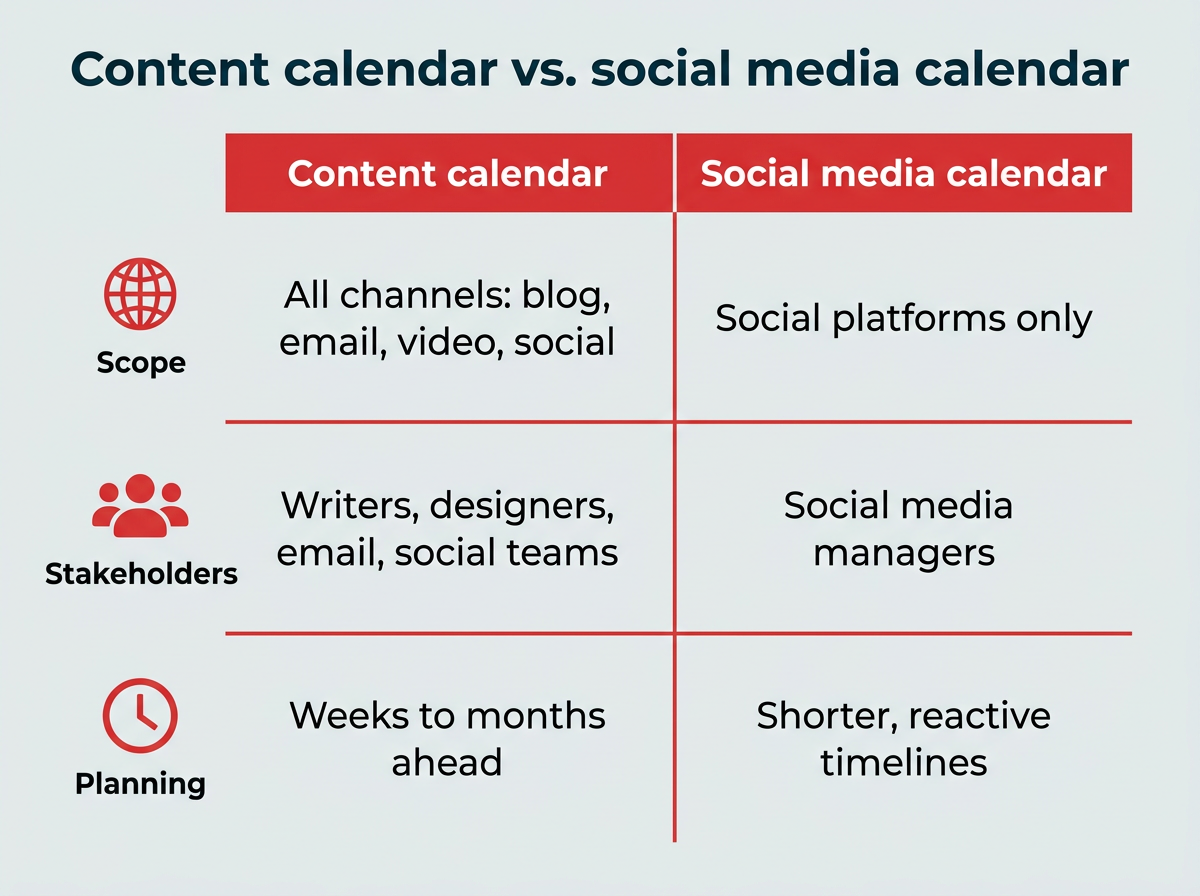
At its core, a content calendar tool provides a centralized hub for all marketing efforts. Unlike a more focused social media calendar, which specifically addresses planning and scheduling posts for platforms like Instagram, LinkedIn, TikTok, and Facebook, a comprehensive content calendar encompasses all facets of a brand’s digital footprint. This includes blog posts, email newsletters, video content, podcasts, and other marketing initiatives. The distinction is crucial: while a dedicated social media calendar might suffice for teams solely managing social channels, a broader content calendar tool offers the overarching visibility and control necessary for coordinating diverse content streams across multiple platforms, ensuring strategic alignment and message consistency.

According to Carolina Horna, a seasoned Freelance Creative Director and Brand Strategist with over a decade of experience navigating the complexities of social media, the transition from rudimentary planning methods like Google Docs or spreadsheets to dedicated content calendar tools represents a significant leap forward in organizational efficacy. "Using a dedicated tool as opposed to a Google Doc or spreadsheet adds a level of organization and clarity that is hard to achieve without it," Horna states. "With a content calendar tool, I’m able to see my strategy come to life, maintain my content pillar distribution, and collaborate easily with my team." This expert insight underscores the shift from basic tracking to integrated, strategic content management.
The Evolution of Content Management: A Brief Chronology
The journey to today’s sophisticated content calendar tools mirrors the rapid evolution of the digital landscape itself. In the early 2000s, as social media platforms like MySpace and later Facebook began to gain traction, content planning was largely ad-hoc, often managed through simple spreadsheets or even manual notes. The focus was on presence rather than sophisticated strategy.
By the early 2010s, with the proliferation of platforms like Twitter, Instagram, and LinkedIn, and the increasing recognition of social media as a vital marketing channel, the need for more organized approaches became apparent. Marketing teams, often small and overwhelmed, began experimenting with shared documents to coordinate posts. This era saw the rise of the "social media manager" as a dedicated role.

The mid-2010s ushered in the first generation of dedicated social media scheduling tools, offering basic posting capabilities and rudimentary analytics. These tools helped alleviate some of the manual burden but lacked the holistic view required for multi-channel content strategies. As the volume of content exploded across blogs, video, email, and social media in the late 2010s, the demand for integrated solutions grew. Marketers found themselves juggling numerous platforms, deadlines, and content formats, leading to increased stress and inefficiencies.
The current landscape, particularly looking ahead to 2026, is defined by comprehensive content calendar tools that integrate advanced features like AI-powered content generation, sophisticated analytics, cross-platform scheduling, and robust collaboration workflows. These tools are no longer just about scheduling; they are about strategic orchestration, reflecting the maturity and complexity of modern digital marketing.
Key Features Driving Efficiency and Strategy
The utility of a content calendar tool extends far beyond mere scheduling. The most effective platforms offer a suite of features designed to streamline the entire content lifecycle. As Carolina Horna highlights, the ability to toggle between different views—such as spreadsheet, calendar, or Kanban—is invaluable for tailoring the interface to individual team members’ roles, ensuring they only interact with content relevant to their tasks. This granular control optimizes team time and minimizes cognitive overload.
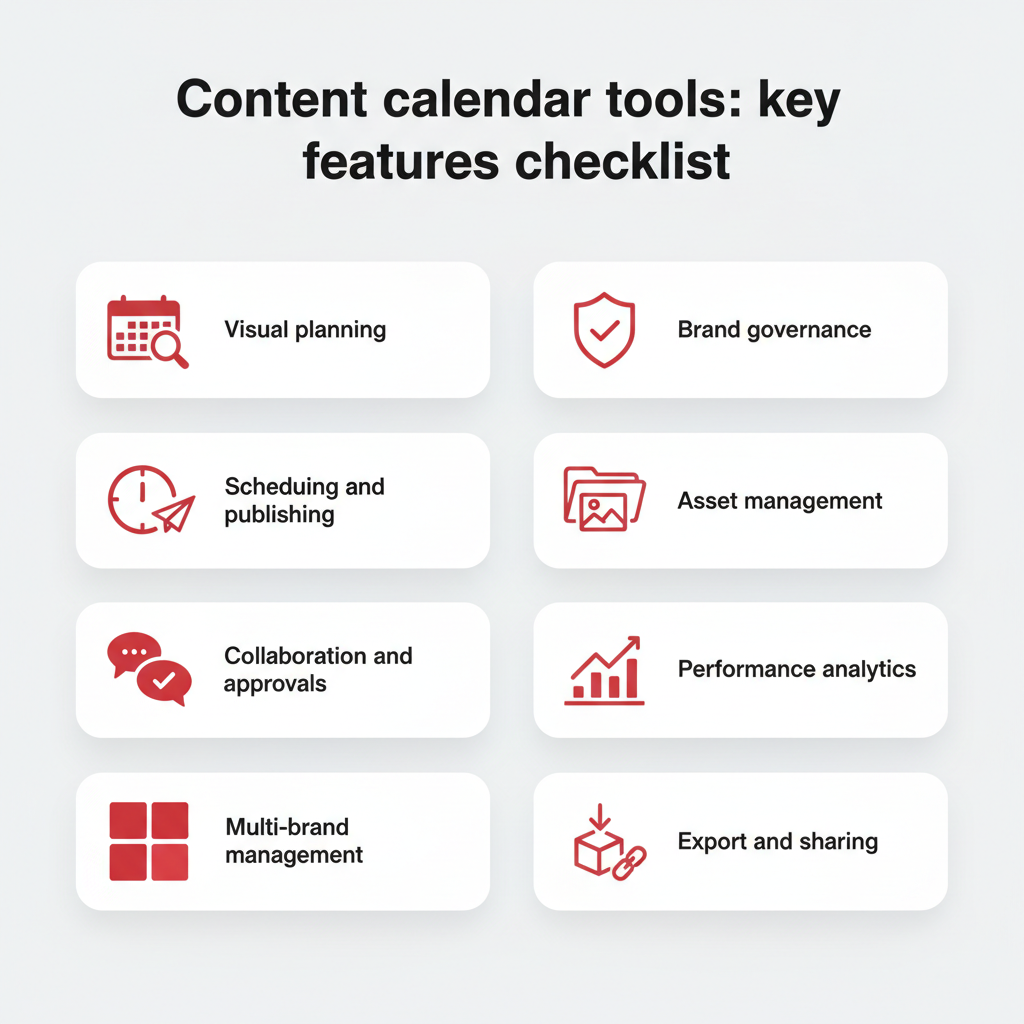
Essential features that define a top-tier content calendar tool include:
- Visual Planning and Calendar Views: Intuitive drag-and-drop interfaces, color-coded calendars, and multiple viewing options (daily, weekly, monthly, timeline) for easy content visualization.
- Cross-Channel Scheduling & Publishing: The ability to schedule and publish content directly to various social media platforms, blogs, and email marketing systems from a single dashboard.
- Workflow Automation & Approvals: Customizable workflows with automated notifications, task assignments, and multi-stage approval processes to ensure brand consistency and compliance.
- Content Library & Asset Management: A centralized repository for all content assets (images, videos, copy blocks, hashtags), facilitating reuse and maintaining brand guidelines.
- Collaboration Tools: Features like commenting, tagging, and real-time editing that enable seamless teamwork across different departments or external stakeholders.
- Analytics & Reporting: Integrated tools to track content performance, audience engagement, reach, and other key metrics, allowing for data-driven strategy adjustments.
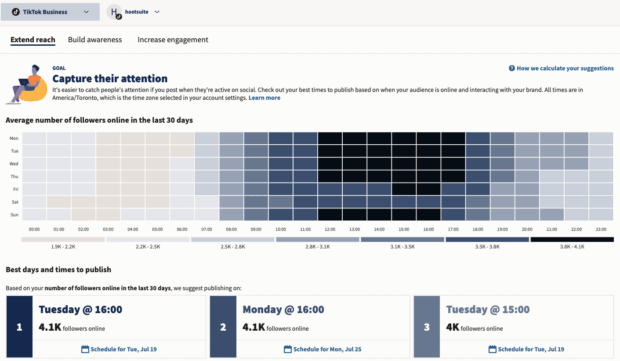
- AI-Powered Features: Increasingly, tools incorporate AI for content generation (e.g., caption writing, headline suggestions), trend analysis, and optimal posting time recommendations.
- Integrations: Compatibility with other essential marketing and productivity tools (CRMs, project management software, design platforms) to create a unified ecosystem.
Horna further emphasizes the practical impact of these features: "In my content calendar tool, I’ve created sections in my content forms that correspond to copywriting and design requirements. These are then filtered into separate spreadsheets for copywriters and designers to see tasks and revisions. It’s a game-changer because team members only have to go to one place to see which content needs their expertise." This level of customization and task segmentation is what elevates a simple planner to a strategic operational tool.
The Tangible Benefits: More Than Just Organization
The adoption of a dedicated content calendar tool offers a multitude of benefits that directly impact a marketing team’s efficiency, effectiveness, and overall business outcomes. Data from various industry reports underscore the growing pressures on marketers: 58% of marketers reported feeling overwhelmed in Marketing Week’s 2025 Career & Salary Survey, largely due to the challenges of managing multiple platforms and deadlines without a centralized system. This highlights a critical need for solutions that alleviate operational burdens.
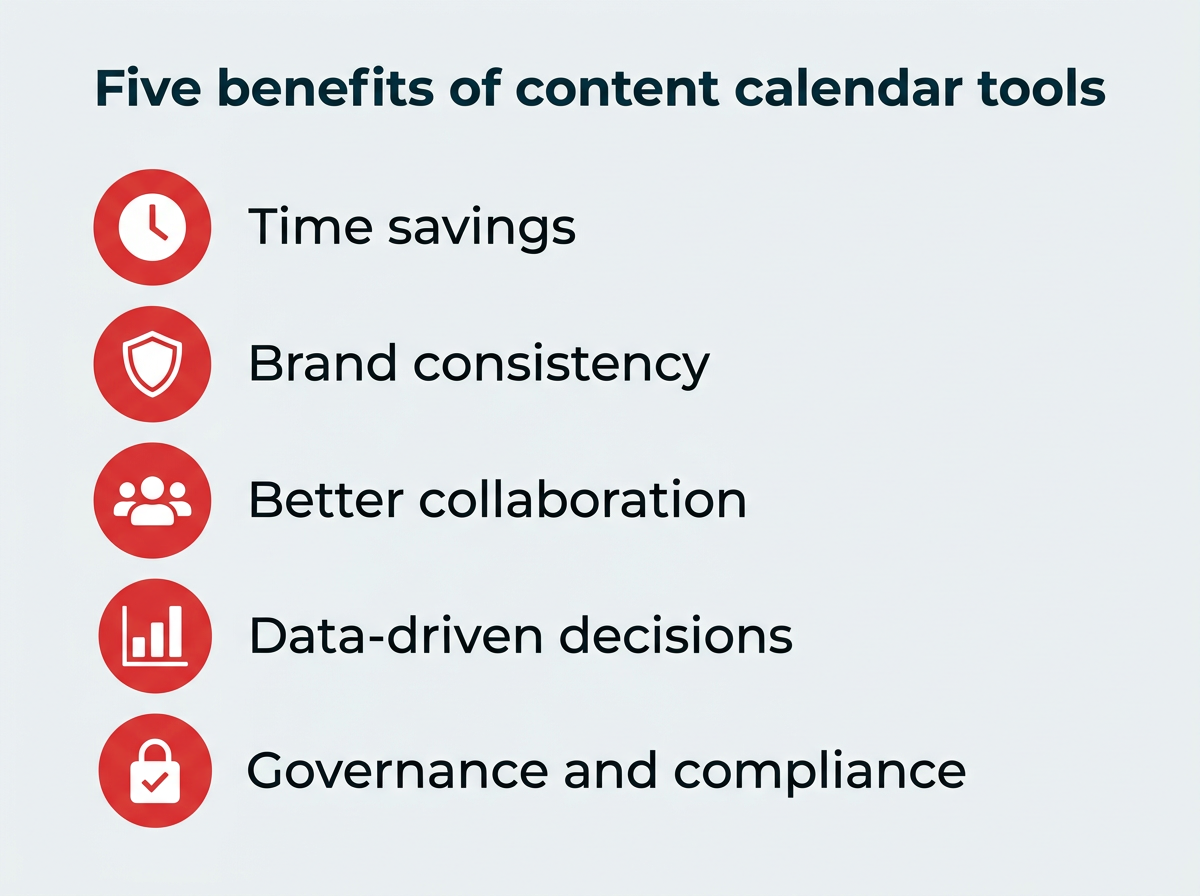
The core benefits of utilizing content calendar tools include:
- Time Savings & Increased Efficiency: Streamlining planning, creation, scheduling, and publishing processes significantly reduces manual effort. Studies indicate that teams leveraging integrated calendar solutions can experience up to a 30% reduction in content production time.
- Enhanced Brand Consistency: Centralized content management ensures that messaging, tone, and visual identity remain consistent across all channels, reinforcing brand perception and trust.
- Improved Team Collaboration: Clear workflows, task assignments, and communication features foster better teamwork, reduce miscommunication, and accelerate content delivery.
- Data-Driven Decision Making: Integrated analytics provide actionable insights into content performance, allowing teams to refine strategies, identify high-performing content types, and optimize posting schedules for maximum impact. This can lead to a projected 15-20% increase in engagement rates for optimized content.
- Stronger Governance & Compliance: For larger organizations, robust approval processes and permission settings ensure adherence to brand guidelines, legal requirements, and regulatory standards, minimizing risks.
- Strategic Content Alignment: By providing a bird’s-eye view of all content, these tools enable marketers to align individual pieces with overarching campaign goals and business objectives, ensuring every piece of content serves a purpose.
- Reduced Burnout: Automating repetitive tasks and providing clarity on roles and deadlines helps mitigate the emotional exhaustion frequently reported by marketing professionals.
Moreover, the increasing integration of Generative AI (GenAI) into these platforms is yielding significant returns on investment. A 2025 Gartner CMO Spend Survey revealed that 49% of CMOs and marketing leaders cite improved time efficiency as the top benefit of GenAI investments. AI-powered content tools are becoming an increasingly practical choice, further amplifying the benefits of content calendar solutions by assisting with ideation, drafting, and optimization.
Navigating the Market: Choosing the Right Tool for Your Team
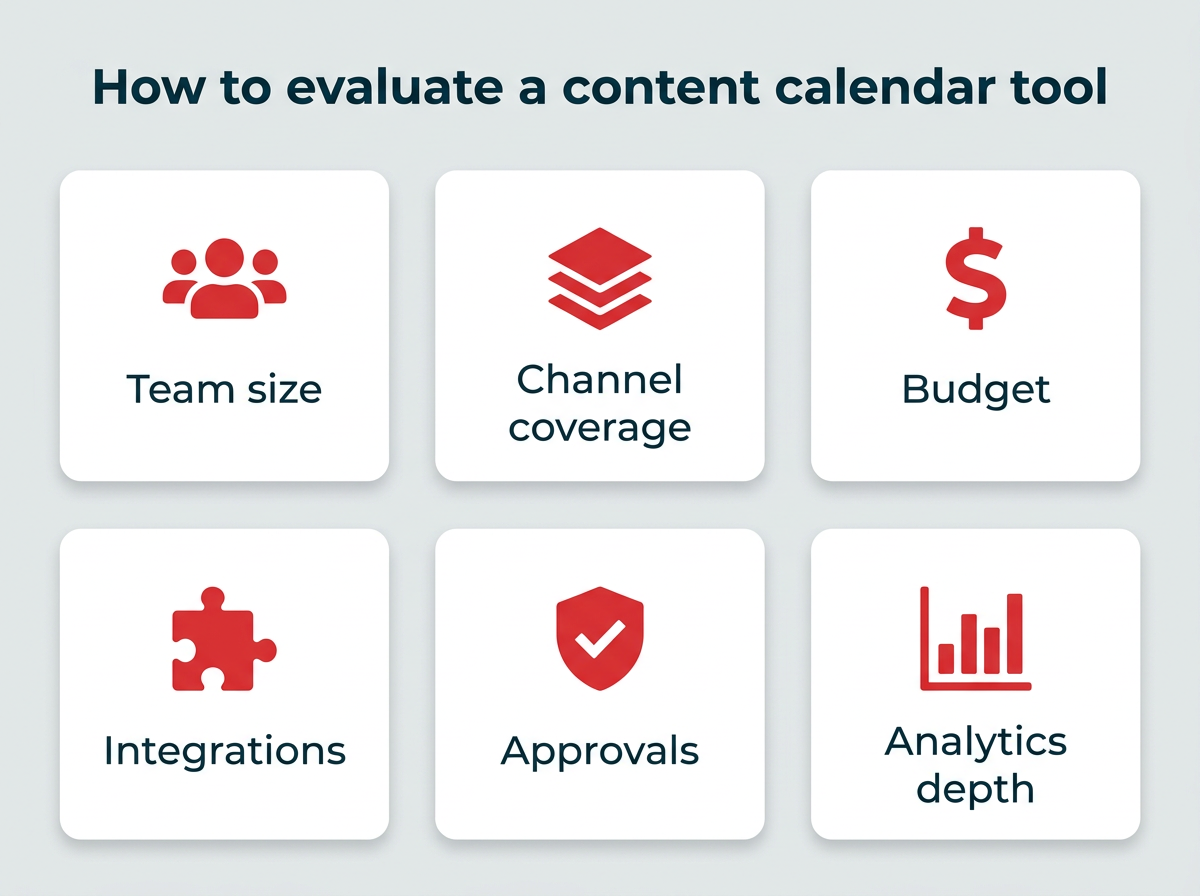
With a burgeoning market of content calendar tools, selecting the ideal solution requires careful consideration of several practical factors. The right choice depends heavily on a team’s size, the scope of its content operations, budget constraints, and specific functional needs. A strategic evaluation framework should guide this decision-making process:
- Team Size and Structure: Solo creators or small teams might opt for simpler, more affordable tools, while large enterprises require robust platforms with advanced governance and multi-brand management capabilities.
- Channel Coverage: Assess whether the tool primarily focuses on social media or offers broader integration for blogs, email, video, and other content types.
- Budget: Solutions range from free basic plans to premium enterprise-level subscriptions, with pricing often based on user count, connected profiles, and features.
- Integrations: Determine if the tool seamlessly connects with your existing tech stack, including CRMs, project management software, design tools, and analytics platforms.
- Approval Workflows & Governance: For regulated industries or large organizations, look for configurable approval processes, role-based permissions, and audit trails.
- Analytics Depth: Evaluate the reporting capabilities – from basic engagement metrics to advanced audience insights and ROI tracking.
- Ease of Use & Learning Curve: Consider how quickly your team can onboard and become proficient with the tool.
- Scalability: Choose a tool that can grow with your team and content needs, accommodating future expansion without requiring a complete system overhaul.
Leading Solutions in 2026: A Detailed Overview
The market for content calendar tools in 2026 offers a diverse array of options, each tailored to different organizational needs and strategic objectives. Here’s an in-depth look at some of the top contenders:
Hootsuite:
- Best for: Enterprise and all-in-one social media teams.
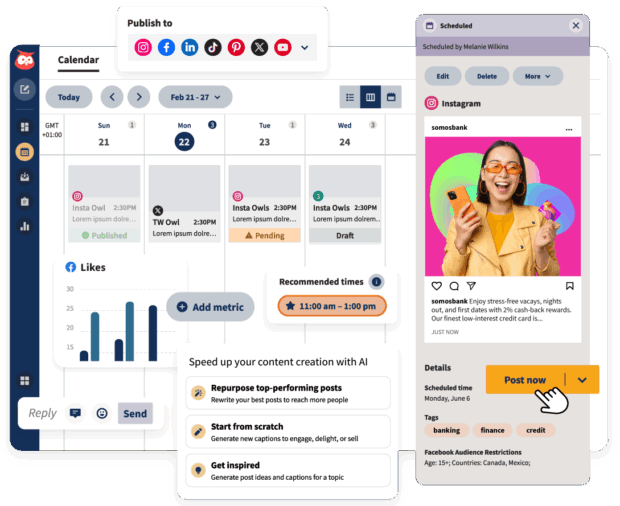
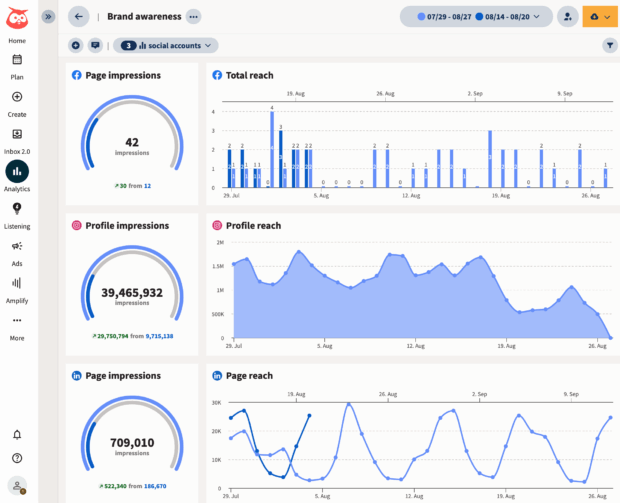
- Key Features: Hootsuite stands out as a comprehensive social media content calendar, scheduling platform, and analytics suite. Its drag-and-drop interface, bulk scheduling capabilities, and real-time updates make managing multiple social media channels intuitive. AI-powered features like OwlyWriter AI and robust content libraries assist in content creation. Crucially, its governance controls, multi-brand management, and Talkwalker-powered social listening are invaluable for enterprise teams managing diverse brands or regions. Its integration with Canva streamlines visual content creation, while enterprise-level analytics provide deep insights for strategy optimization.
- Pros: Highly scalable for large teams; extensive integrations with other marketing tools; powerful, customizable reporting; robust approval workflows and security features; strong AI assistance for content.
- Cons: Can be a higher cost investment than basic tools; the breadth of features may present a steeper learning curve for new users.
- Pricing: Custom pricing available upon contact, reflecting its enterprise focus.
Asana:
- Best for: Mid-to-large marketing teams requiring strong project and workflow management alongside content planning.
- Key Features: Asana excels as a project management platform, offering calendar, list, and timeline views to visualize content progress. Its strength lies in task assignment, dependency tracking, and customizable workflows that can be adapted for content production, ensuring all stakeholders are aligned.
- Pros: Excellent for collaboration and managing complex project workflows; highly scalable for growing teams; integrates well with many business applications.
- Cons: Less specialized for direct content publishing compared to dedicated social media tools; may require some initial setup to configure content-specific workflows effectively.
- Pricing: Ranges from Free to $24.99/user/month, with custom pricing for Enterprise.
Notion:
- Best for: Flexible individual or team setups desiring full control over content planning structure.
- Key Features: Notion’s highly customizable workspace allows users to build bespoke content calendars using databases, templates, and various views. Its strength is its versatility, serving as an all-in-one platform for notes, project management, and content organization.
- Pros: Extremely customizable to fit any workflow; affordable, especially for small teams; powerful for consolidating information and knowledge management.
- Cons: Requires significant initial setup and template creation; lacks native automation for publishing content directly to social media.
- Pricing: Free to $20/user/month, with custom pricing for Enterprise.
Later:
- Best for: Small marketing teams, creators, and solopreneurs focused on visual platforms like Instagram and TikTok.
- Key Features: Later is renowned for its visual content calendar, media library, and feed preview features. Its drag-and-drop functionality and hashtag suggestions make it intuitive for planning and scheduling visually rich content.
- Pros: Excellent for visual content planning, especially Instagram; user-friendly interface; strong media management capabilities.
- Cons: Analytics may be less comprehensive than full-suite platforms; advanced workflow or multi-channel support is not as robust.
- Pricing: $25 – $80/month.
Buffer:
- Best for: Solopreneurs and small marketing teams seeking simple, affordable social scheduling.
- Key Features: Buffer provides a clean interface for scheduling posts across multiple social platforms. Its basic analytics, content queuing, and browser extensions make it easy to manage a consistent social presence with a low learning curve.
- Pros: Very easy to use with an intuitive design; cost-effective with a generous free tier; reliable scheduling.
- Cons: Reporting is limited compared to more advanced tools; collaboration features are basic in lower tiers.
- Pricing: Free to $10/month.
Airtable:
- Best for: Mid to large marketing teams needing flexible data modeling alongside content planning.
- Key Features: Airtable combines spreadsheet simplicity with database power, offering multiple views, automations, and linked records. It’s highly effective for content planning, asset tracking, and managing complex content pipelines.
- Pros: Extremely flexible for organizing data and content assets; powerful automation capabilities; strong for cross-functional collaboration.
- Cons: Does not natively publish content to social media platforms; requires integrations or manual steps for direct posting.
- Pricing: $20/month per seat.
Sprinklr:
- Best for: Enterprise-level organizations demanding robust governance and omnichannel management.
- Key Features: Sprinklr is a comprehensive customer experience management platform, offering publishing, engagement, listening, advertising, and analytics across virtually all digital channels. Its governance and compliance features are paramount for large, complex organizations.
- Pros: Unparalleled enterprise-grade features; strong compliance and permission management; unified platform for customer experience.
- Cons: Very expensive, making it prohibitive for smaller businesses; steep learning curve due to its extensive functionality.
- Pricing: Not publicly listed; contact sales for a quote.
Canva Pro:
- Best for: Solopreneurs, small marketing teams, and freelancers who prioritize visual content creation.
- Key Features: Canva Pro integrates powerful design tools with basic content planning capabilities. Its vast library of templates, brand kits, and collaboration features streamline the creation and scheduling of visually appealing content.
- Pros: Exceptional for graphic design; huge template library; intuitive drag-and-drop design interface; affordable for visual content needs.
- Cons: Scheduling features are basic and not a full social media management suite; primarily focused on visual assets rather than comprehensive content strategy.
- Pricing: Contact for pricing.
HubSpot:
- Best for: Mid to enterprise marketing teams, especially B2B organizations seeking integrated marketing and sales tools.
- Key Features: HubSpot offers social publishing as part of its broader marketing automation platform, seamlessly integrating content scheduling with CRM, email campaigns, and lead management. Its strength lies in providing a unified view of marketing and sales efforts.
- Pros: Strong automation capabilities across the entire marketing funnel; native CRM integration for a unified customer view; comprehensive marketing platform.
- Cons: Social media features can sometimes feel secondary to its broader marketing and sales focus; can be expensive for full feature sets.
- Pricing: Free and various paid plans available.
Monday.com:
- Best for: Mid to large marketing teams seeking a central hub for content workflows and project management.
- Key Features: Monday.com, a versatile work operating system, can be customized with boards, automations, dependencies, and integrations to manage content calendars. It provides a flexible framework for structuring complex marketing workflows.
- Pros: Highly flexible for structuring diverse content workflows; excellent for visual project tracking; robust integrations with other tools.
- Cons: Not a dedicated social media scheduler; requires custom setup to function as a full content calendar.
- Pricing: Free to $19/seat/month, with custom pricing for Enterprise.
Trello:
- Best for: Solopreneurs and small marketing teams needing simple, visual content planning and ideation.
- Key Features: Trello’s intuitive board, list, and card system makes it ideal for lightweight content planning, campaign ideation, and task management. Its power-ups can extend functionality for specific needs.
- Pros: Very easy to use and visually appealing; great for collaborative brainstorming and simple project tracking; free tier is quite functional.
- Cons: Lacks native social media publishing features; can become unwieldy or messy with significant scale or complex requirements.
- Pricing: Free to $17.50/user/month, with Enterprise pricing varying by seat count.
CoSchedule:
- Best for: Marketing teams specifically needing a dedicated content and marketing calendar.
- Key Features: CoSchedule is purpose-built for content marketing, combining a robust marketing calendar with social scheduling, workflow automation, and unique features like a headline analyzer to optimize content performance.
- Pros: Specifically designed for content marketers; strong calendar views for comprehensive planning; good for workflow automation.
- Cons: Social media features are less robust than dedicated social management tools; may be less flexible for non-marketing project management.
- Pricing: Free calendar available; paid plans offer full features.
The Future: AI, Integration, and Strategic Orchestration
Looking ahead, the evolution of content calendar tools will be increasingly driven by artificial intelligence, deeper integrations, and a focus on strategic orchestration. AI will continue to enhance content creation, personalization, and performance prediction, enabling marketers to produce more impactful content with greater efficiency. The demand for seamless integration with CRM, sales, and customer service platforms will grow, aiming for a truly unified customer experience across all touchpoints.
Ultimately, content calendar tools are no longer just organizational aids; they are strategic imperatives. They empower marketing teams to navigate the complexities of the digital landscape, maintain brand consistency, foster efficient collaboration, and make data-driven decisions that propel business growth. As the digital sphere continues its rapid expansion, the role of these tools will only become more critical in shaping successful content strategies.
Frequently Asked Questions
What is the best free content calendar tool?
The best free content calendar tool depends on individual needs. Trello offers a free plan with unlimited boards and cards, ideal for visual planning. Google Sheets provides flexibility for custom calendar builds. Notion’s free plan includes customizable databases and calendar views, suitable for individuals and small teams. For social media-specific scheduling, Buffer’s free plan supports up to three social channels with basic posting.
How do enterprise teams choose content calendar tools?
Enterprise teams prioritize tools with robust governance controls, multi-stage approval workflows, and role-based permissions to manage large teams and multiple brands. Critical factors include deep integration capabilities with existing tech stacks (CRMs, marketing automation), enterprise-grade analytics, compliance features, and scalability across regions and business units. Platforms like Hootsuite and Sprinklr are designed to meet these complex requirements.

Can content calendar tools integrate with my CRM?
Yes, many enterprise content calendar tools offer CRM integrations. Hootsuite integrates with major CRMs like Salesforce, linking social engagement data with customer records. HubSpot natively integrates social scheduling within its comprehensive CRM and marketing automation platform. When evaluating tools, check their integration marketplace or API capabilities to ensure compatibility with your specific CRM system.
What’s the difference between a content calendar tool and a social media management platform?
A content calendar tool primarily focuses on planning and organizing content across all marketing channels, including blogs, email, video, and social media. A social media management platform, such as Hootsuite, encompasses content calendar functionality but extends to publishing, engaging with audiences, social listening, running advertising campaigns, and detailed analytics specifically for social channels. Social media management platforms offer a broader suite of features for teams heavily invested in social media marketing.
Do content calendar tools support AI content generation?
Yes, an increasing number of modern content calendar tools integrate AI-powered features for content generation. Hootsuite’s OwlyWriter AI assists in generating captions, content ideas, and optimizing posts for engagement. These AI capabilities can significantly reduce content creation time and help maintain brand voice. When selecting a tool, consider how its AI features align with your specific content creation needs, from text generation to image suggestions or trend analysis.
How much should I budget for a content calendar tool?
Budgeting for a content calendar tool varies widely based on team size and required features. Free options like Trello or Notion are suitable for individuals and very small teams. Mid-tier tools typically range from $20 to $100 per user per month for small to mid-sized teams. Enterprise platforms like Hootsuite and Sprinklr require custom pricing, determined by the number of users, connected social profiles, and advanced feature sets. When calculating ROI, factor in potential savings in time, increased efficiency, and improved content performance.