
The rapid evolution of Large Language Models (LLMs) has transitioned from simple conversational interfaces to sophisticated agentic systems capable of reviewing data, executing code, and managing complex professional workflows. However, as teams integrate AI into their daily operations, a recurring inefficiency has emerged: the necessity of repeating the same structural requirements, validation rules, and company standards in every new conversation. Anthropic has addressed this friction through the introduction of Claude Custom Skills, a framework designed to package reusable instructions, scripts, and reference files that the AI automatically invokes based on the task at hand. This shift toward "packaged expertise" marks a significant milestone in the move from general-purpose AI assistance to specialized, deterministic automation.
The Architectural Foundation of Custom Skills
At its core, a Claude Skill is defined as a structured directory containing a set of instructions and optional resources. Unlike traditional prompting, which relies on the user to provide context manually, Skills utilize a standardized format known as the Agent Skills open standard. This standard, documented at agentskills.io, ensures portability across the Claude ecosystem, including the Claude web and desktop applications, Claude Code (the command-line interface), the Claude Agent SDK, and the Claude Developer Platform.
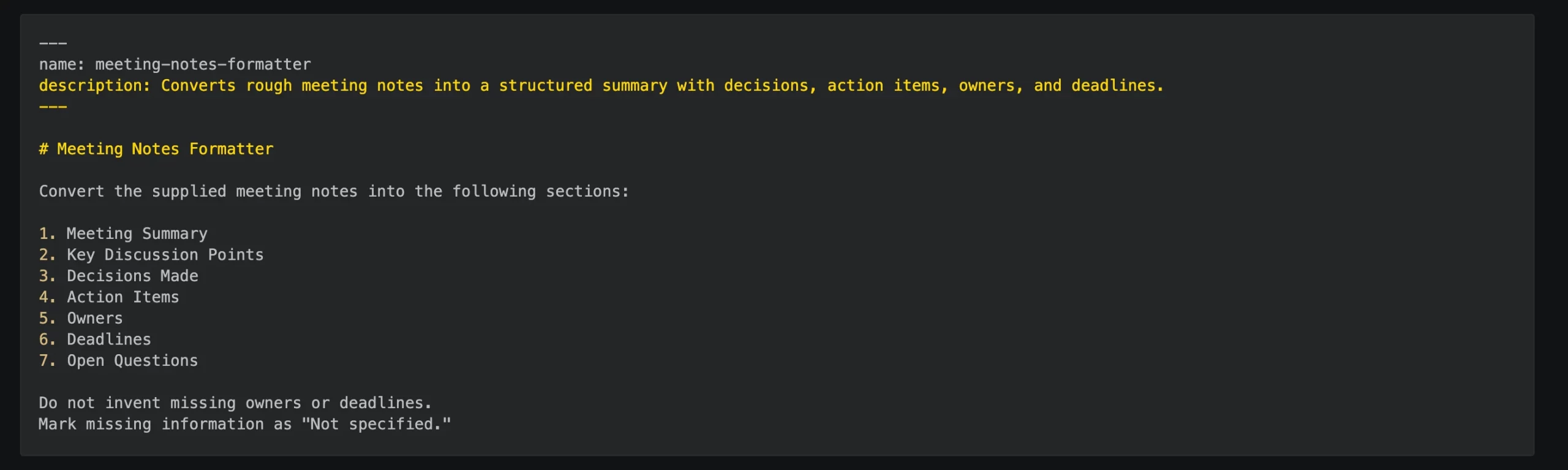
The mandatory entry point for any skill is a file named SKILL.md. This file serves as the "brain" of the skill, containing YAML frontmatter for metadata and Markdown for the operational logic. While a skill can function with only this single file, advanced implementations often include supporting subdirectories for scripts (Python or Bash), reference templates, and example datasets. This modularity allows developers to separate the interpretive logic—handled by the LLM—from deterministic calculations, which are better suited for traditional programming languages.

The Evolution of Claude Interface: Merging Commands and Skills
The trajectory of Anthropic’s developer tools reveals a concerted effort to unify the user experience. Previously, users of Claude Code relied on "custom commands" stored in specific directories to trigger automated actions. In recent updates, Anthropic has merged these custom commands into the Skills framework. A legacy command file located at .claude/commands/deploy.md is now functionally equivalent to a skill located at .claude/skills/deploy/SKILL.md.
This merger reflects a broader industry trend toward "agentic workflows," where the AI is not just a chatbot but an operator capable of navigating a file system and executing shell commands. By prioritizing Skills over legacy commands in the event of a name collision, Anthropic is nudging its user base toward a more robust, directory-based structure that supports supplementary assets like JSON schemas or Python utilities.

Technical Mechanism: The Three Stages of Progressive Disclosure
One of the primary challenges in AI engineering is managing the "context window"—the amount of information the model can process at one time. Loading every possible instruction and file into every conversation would quickly exhaust this window and increase latency. To mitigate this, Claude Skills operate on a principle of progressive disclosure, occurring in three distinct stages:
1. Discovery and Metadata Matching
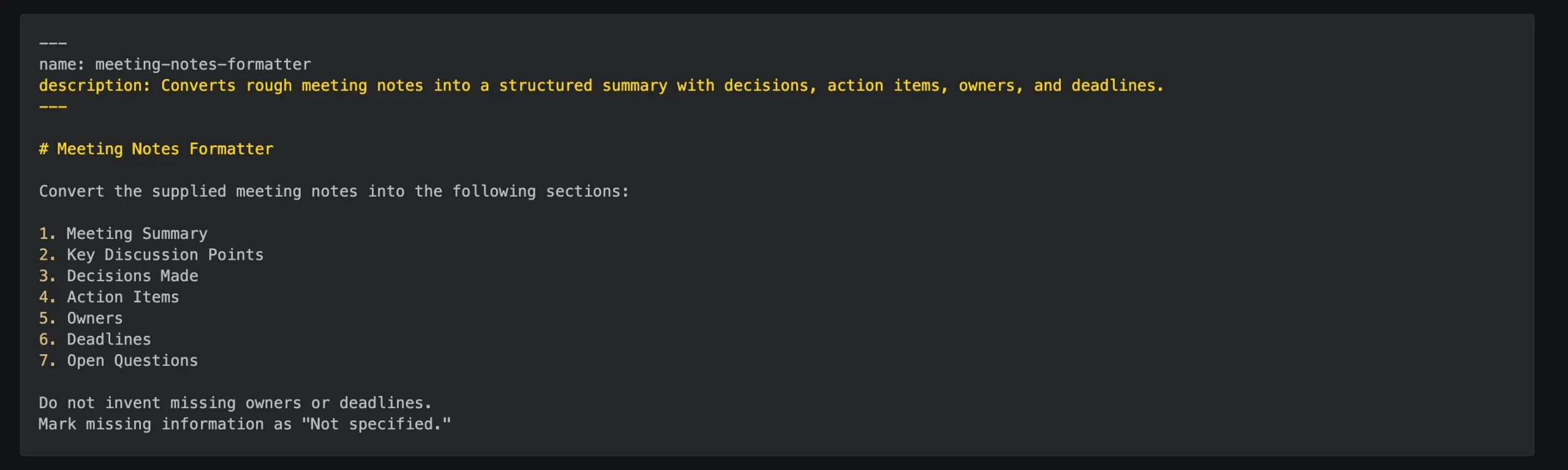
Upon startup, Claude reads only the metadata provided in the YAML frontmatter of each available skill. The description field is the most critical element during this phase. Claude uses this brief summary to determine if a user’s request aligns with the skill’s purpose. For instance, a description such as "Audits CSV files for data quality issues" will trigger the skill when a user asks to check a dataset, but remain dormant if the user asks for an email draft.
2. Instruction Loading
Once a match is identified, Claude loads the full Markdown body of the SKILL.md file. This stage introduces the specific workflows, constraints, and output formats required for the task. Because this content is only loaded when relevant, the model remains focused and efficient.
3. Resource Invocation
In the final stage, Claude accesses external scripts or reference files only as needed. By using tools like bash to execute a Python script, the model only consumes context tokens for the script’s output rather than the entire codebase. This "just-in-time" resource management allows for high-complexity tasks to be performed within a lean context budget.

Comparative Reference: Frontmatter and Platform Divergence
While the core of the Agent Skills standard is portable, specific implementations vary between the Claude Code CLI and the Claude.ai web interface. Developers must account for these differences to ensure cross-platform compatibility.
In Claude Code, frontmatter fields are highly flexible. The name defaults to the directory name, and the description can be inferred from the first paragraph of the Markdown if omitted. However, advanced fields such as allowed-tools (which pre-authorizes specific shell commands) and context: fork (which runs the skill in a sub-agent to prevent context contamination) provide granular control over the execution environment.

Conversely, the Claude.ai web and desktop applications enforce stricter requirements. Descriptions are capped at 200 characters, and the directory name must match the skill name exactly. These constraints are designed to maintain a clean UI for non-technical users while still providing the power of custom automation.
| Field | Claude Code Usage | Claude.ai (Web/App) Usage |
|---|---|---|
| name | Display label only | Must match directory name |
| description | Used for auto-activation | Limited to 200 characters |
| allowed-tools | Controls permission prompts | Not explicitly required for web |
| user-invocable | Toggles visibility in / menu |
Always visible if uploaded |
Practical Implementation: Building a Data Quality Auditor
To illustrate the utility of Custom Skills, consider the creation of a "Data Quality Auditor." This skill is designed to perform deterministic checks on CSV files—tasks that LLMs often struggle with due to their probabilistic nature—while using the LLM for high-level interpretation and reporting.

Step 1: Directory and Script Construction
The developer creates a directory structure where scripts/profile_csv.py handles the heavy lifting. Using libraries like pandas, the script calculates row counts, identifies duplicate records, and detects constant or empty columns. By returning this data as a structured JSON object, the script provides a "ground truth" for the AI to analyze.
Step 2: Defining the SKILL.md Logic
The SKILL.md file acts as the bridge. It contains instructions telling Claude to execute the Python script first, then compare the JSON results against a set of predefined organization-wide data quality rules stored in a reference file. The frontmatter includes an allowed-tools entry:
bash(python3 $CLAUDE_SKILL_DIR/scripts/profile_csv.py *)
This specific permission allows the skill to run without interrupting the user for authorization, streamlining the UX.

Step 3: Deployment and Testing
In a project-level deployment, the skill is placed in the .claude/skills/ directory of the repository. When the user types /data-quality-auditor data/customers.csv, Claude executes the script, ingests the JSON profile, and generates a report detailing whether the dataset is "machine-learning ready."
Distribution and Enterprise Management
The deployment of Custom Skills follows a hierarchical override system. Enterprise-level skills, managed by organization administrators, take the highest precedence, followed by personal skills (located in the user’s home directory) and finally project-specific skills. This allows companies to enforce standard operating procedures across all teams while still allowing individual developers to customize their local environments.

For non-developers, Anthropic has introduced a "recording" feature in the Claude for Mac application. Users on Pro, Max, or Team plans can record their screen while performing a task. Claude then analyzes the recording, captures the necessary steps, and automatically generates a Custom Skill. This democratizes the creation of "agents," allowing subject matter experts who may not know Python or Markdown to automate their workflows.
Broader Implications for the AI Ecosystem
The introduction of Claude Custom Skills represents a pivot toward the "Model Context Protocol" (MCP) and the broader vision of interoperable AI. By adhering to an open standard, Anthropic is positioning itself against proprietary ecosystems like OpenAI’s "GPTs." While GPTs are largely confined to the ChatGPT interface, Claude Skills are designed to live within the developer’s local environment and codebase.

Furthermore, the ability to combine skills—"stacking" commands like /write-tests /fix-issue—hints at a future where complex software engineering tasks are decomposed into a series of specialized, interoperable micro-agents. The persistence of skill content within a session ensures that once a skill is invoked, its rules remain active, providing a consistent "personality" or "rulebook" for the AI throughout the duration of a project.
As organizations move away from experimental AI use cases toward integrated production workflows, the demand for deterministic, repeatable, and verifiable AI behavior will only grow. Custom Skills provide the necessary framework to achieve this, ensuring that the AI operates within the boundaries of human expertise while leveraging the speed and scale of machine intelligence. The goal, as outlined by industry analysts, is not to store every piece of data within the AI’s memory, but to build a reliable system of "just-in-time" expertise that scales with the complexity of modern enterprise demands.