
Google Analytics 4 (GA4) has introduced a significant new feature, the "AI Assistant" channel, launched in May, designed to specifically measure and analyze traffic originating from generative AI platforms. This development marks a crucial step for businesses and marketers seeking to understand the impact of burgeoning AI technologies on their digital presence. While the feature has been available for several months, accumulated data now allows for a more comprehensive examination of its utility and implications.
The "AI Assistant" channel, as detailed in Google’s Analytics Help portal, is intended to capture traffic from prominent conversational AI interfaces such as ChatGPT, Google’s own Gemini, and Anthropic’s Claude. This explicit inclusion signifies Google’s recognition of these platforms as distinct referral sources, separate from traditional search engines or direct traffic. It’s important to note, however, that Google has clarified that certain AI-driven features, such as AI Overviews and what is referred to as "AI Mode" within search results, will not be categorized under the "AI Assistant" channel. Instead, clicks originating from these specific AI-powered search enhancements will continue to be reported under the "Organic Search" category, reflecting their integration into the broader search ecosystem.
Understanding AI-Driven Traffic in GA4
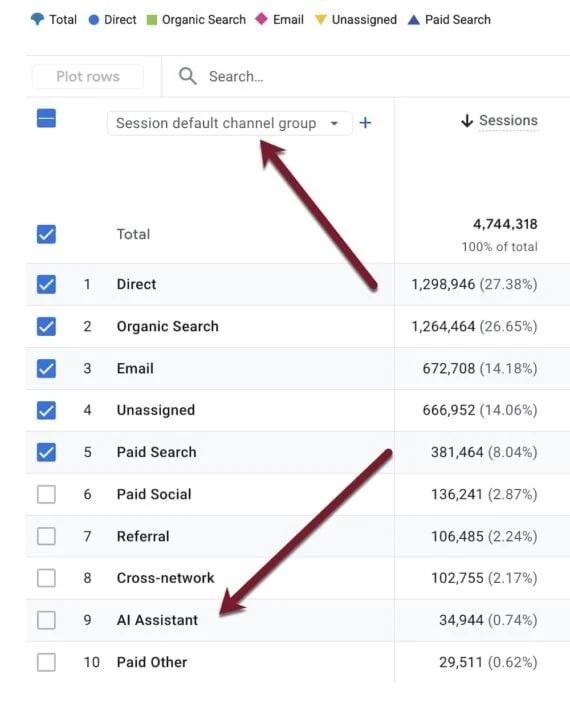
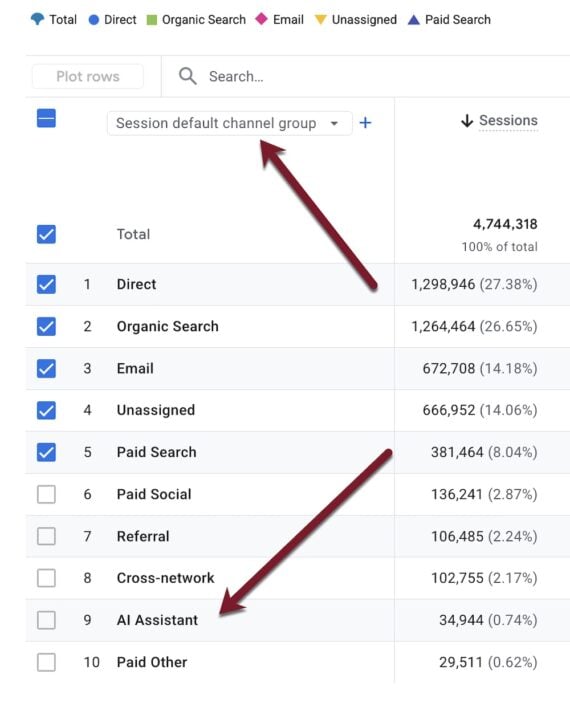
For users of Google Analytics 4, locating and analyzing data related to the "AI Assistant" channel is straightforward. The information can be accessed by navigating to the "Reports" section, then selecting "Acquisition," and subsequently "Traffic acquisition." Within this report, users will find the "AI Assistant" as an option under the "Session Channel Group" dimension. This allows for a granular view of performance metrics specifically attributed to AI-generated traffic.
The data available through this channel provides valuable insights into user engagement originating from generative AI platforms. Key performance indicators include engagement rates, the average number of events per session, and the average time spent on the site per session. This level of detail enables marketers to assess the quality of traffic referred by AI assistants and understand how these users interact with their content. For instance, a high engagement rate from an AI Assistant channel could indicate that the AI is effectively directing users with a clear intent to the website, potentially after providing relevant information or solutions.
Identifying Landing Page Performance from AI Referrals
Beyond overall traffic analysis, the "AI Assistant" channel offers a vital capability: identifying specific landing pages that are being cited and driving clicks from AI-generated answers. To access this information, users can navigate to "Reports," then "Engagement," and finally "Pages and screens." This section typically displays the highest-traffic pages on a website.
To isolate AI-driven traffic to these pages, users can apply a filter. By clicking "Add filter" at the top of the graph, they can then select the "Session channel group" as the dimension and choose "AI Assistant" as the value. Applying this filter will refine the "Pages and screens" report to show only those pages that have received clicks from generative AI platforms. This allows businesses to understand which of their content pieces are proving most valuable or relevant to AI models when they are generating responses.
Benchmarking AI Traffic Against Other Sources
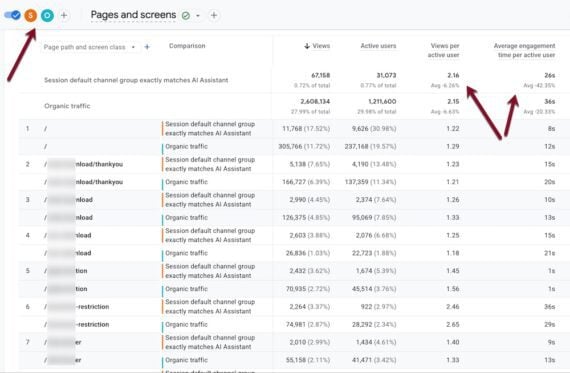
A critical aspect of understanding the impact of the "AI Assistant" channel lies in its comparison with other traffic sources. GA4 facilitates this by allowing users to add comparisons within the "Pages and screens" report. By clicking the "Add comparison" button, users can create a new comparison, selecting the "Session channel group" and specifying "AI Assistant" as the dimension.
This feature enables a direct, page-by-page comparison of AI-assisted traffic performance against other channel groups, such as "Organic Search," "Direct," or "Paid Search." This is invaluable for strategic decision-making. For example, if a particular page performs exceptionally well in terms of engagement from AI Assistant traffic but lags in organic search, it might indicate an opportunity to optimize that content further for search engines, or conversely, to leverage its AI-friendly nature for broader promotion.
Furthermore, users can compare AI-assisted traffic not just to all users but to specific sources. By creating a new comparison and removing "All users," one can isolate the performance of AI traffic against, for instance, the overall "Organic Search" traffic. This granular comparison allows for a nuanced understanding of how AI-referred users differ in their behavior and engagement compared to users arriving from more established channels. In preliminary tests, it has been observed that traffic from top organic search pages and AI-assisted pages often do not overlap significantly, suggesting distinct user journeys or content discovery mechanisms at play. This divergence underscores the importance of dedicated analysis for AI-driven traffic.
Leveraging Regular Expressions for Granular AI Source Tracking
While the "AI Assistant" default channel provides a broad categorization, it does not offer a breakdown of the specific generative AI platforms driving traffic. For marketers seeking a more detailed view, Google Analytics allows for the utilization of regular expressions (regex) to track individual traffic sources. This method can be particularly useful for identifying traffic from platforms that might not be explicitly categorized under the default "AI Assistant" channel or for users who wish to further segment their AI traffic.
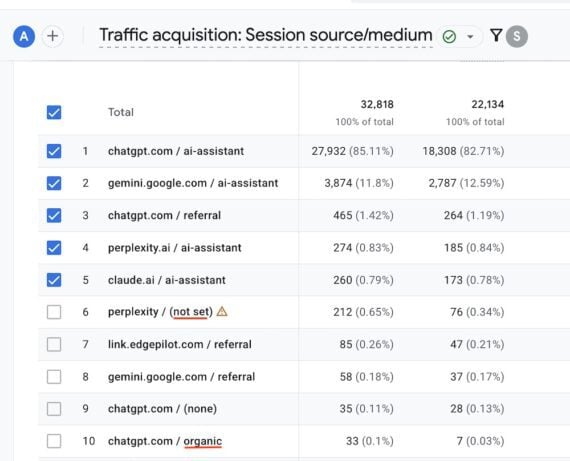
To implement this, users can navigate to "Reports," then "Acquisition," and "Traffic Acquisition." Within this report, they would select the "Session source / medium" dimension. By clicking "Add filter," they can choose "Session source / medium" and then select "Matches regex" for the filter condition. Subsequently, a comprehensive regex string can be pasted into the "Value" field to capture traffic from various AI platforms.
A sample regex provided for this purpose includes patterns for popular AI services: .*chatgpt.com.*|.*perplexity.*|.*edgepilot.*|.*copilot.microsoft.com.*|.*openai.com.*|.*gemini.google.com.*|.*claude.ai.*|.*grok.x.ai.*. This extensive pattern aims to capture traffic from websites associated with ChatGPT, Perplexity AI, Microsoft Copilot, OpenAI, Google Gemini, Anthropic Claude, and X’s Grok.
Using this regex in GA4’s "Session source / medium" report can reveal a detailed breakdown of AI traffic sources, listing each platform individually. Observations from such analyses have sometimes indicated minor data inconsistencies, where "Organic" and "(not set)" sources might appear in the regex-filtered report but not under the default "AI Assistant" channel. This highlights the ongoing refinement of GA4’s AI traffic attribution and the potential value of employing both default channels and custom regex for comprehensive tracking.
Broader Implications and Future Outlook
The introduction of the "AI Assistant" channel in Google Analytics 4 signifies a strategic pivot by Google to acknowledge and quantify the growing influence of generative AI on web traffic. As AI models become more sophisticated and integrated into users’ daily routines, understanding how they drive audiences to websites is no longer a niche concern but a fundamental aspect of digital marketing and SEO strategy.
The ability to differentiate AI-driven traffic from traditional sources allows businesses to:
- Optimize Content for AI: By identifying which content is being cited by AI, companies can refine their existing pieces or create new content that is more likely to be featured in AI-generated responses. This could involve focusing on factual accuracy, comprehensive explanations, and clear, structured information.
- Understand User Intent: Analyzing the engagement metrics of AI-referred traffic can provide clues about the intent of users who arrive via AI. Are they seeking quick answers, in-depth research, or product information? This understanding can inform content strategy and user experience design.
- Refine Marketing Strategies: The data allows for a more accurate assessment of the ROI of various traffic sources. If AI Assistant traffic proves to be highly engaged and converts well, it may warrant increased investment in strategies that encourage AI citations.
- Stay Ahead of the Curve: The digital landscape is rapidly evolving with AI. Proactive tracking and analysis of AI-driven traffic are essential for businesses to adapt and maintain a competitive edge.
The distinction Google makes between AI Assistant traffic and AI Overviews/AI Mode being categorized as Organic Search is also telling. It suggests a classification based on the user’s direct interaction with an AI chatbot versus an AI augmentation of traditional search results. This granular approach to classification is crucial for accurate data interpretation.
Looking ahead, it is reasonable to expect further enhancements and refinements to GA4’s AI tracking capabilities. As generative AI technologies continue to advance and diversify, Google will likely adapt its analytics tools to provide even more detailed insights. Marketers and website owners are encouraged to familiarize themselves with the "AI Assistant" channel and explore its reporting features to gain a comprehensive understanding of this increasingly important traffic source. The ability to track, analyze, and adapt to AI-driven traffic will undoubtedly be a key differentiator for success in the evolving digital ecosystem.