rifanmuazin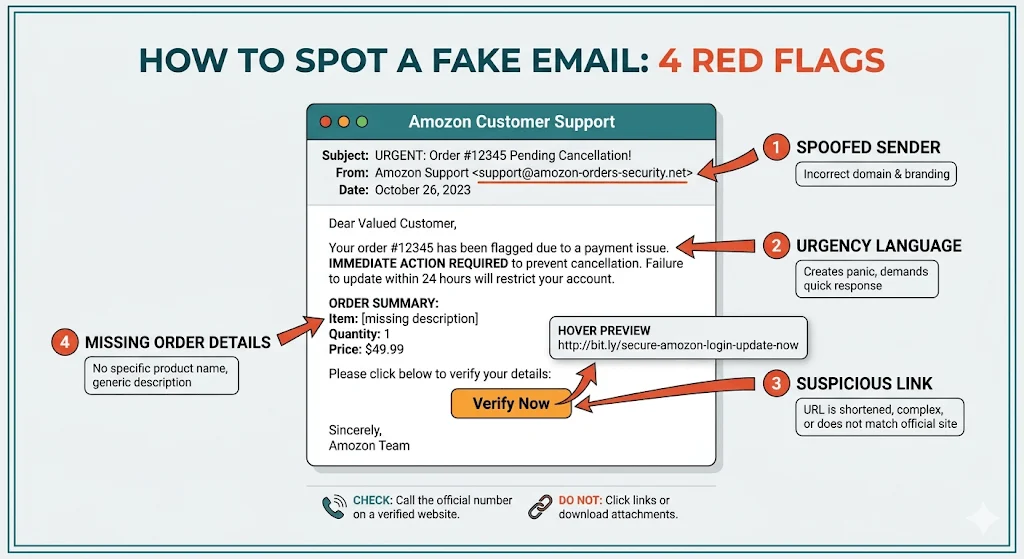
The digital landscape is increasingly fraught with sophisticated threats, none more pervasive than phishing scams. Daily, an staggering 3.4 billion phishing emails inundate inboxes globally, with approximately 83% now generated using advanced Artificial Intelligence (AI) tools. This alarming trend translates into annual financial losses estimated at $25 billion, underscoring the critical need for heightened vigilance. The primary objective of these meticulously crafted scams is to induce panic, pushing recipients into a vulnerable state where they are more likely to make rash decisions. This comprehensive guide serves as an essential resource for both consumers, outlining crucial red flags to instantly identify and thwart these deceptive attempts, and for online merchants, providing practical, actionable steps to secure their domains, prevent email spoofing, and safeguard their invaluable brand reputation.
The Evolving Threat: Understanding Fake Order Confirmation Emails
A fake order confirmation email is a highly effective phishing tactic employed by cybercriminals who impersonate legitimate brands. Their ultimate goal is to illicitly acquire sensitive information, primarily credit card details or account credentials. The entire fraudulent setup hinges on manufacturing a crisis. Typically, a recipient receives an unexpected receipt for an expensive item, often accompanied by a seemingly massive, unauthorized charge. The immediate, instinctual reaction is panic, compelling the individual to click a provided link, ostensibly to cancel the unauthorized transaction or investigate the supposed purchase.
Once this link is clicked, the recipient enters the “trap zone.” They are redirected to a fraudulent website meticulously designed to perfectly replicate a legitimate retailer’s actual login, product, or order cancellation page. Any credentials or payment information entered on this deceptive site are immediately captured by the scammers. Other variations of this scam may instruct the recipient to call a fake customer service number, where a live operator, trained in social engineering, manipulates them into divulging payment details over the phone.
Historically, spotting these scams was relatively straightforward, often requiring little more than identifying glaring typos or grammatical errors. However, the advent of Generative AI tools has dramatically altered this landscape. In 2026, fake order confirmations can be virtually indistinguishable from genuine communications. These AI models can produce flawless, contextually accurate, and highly convincing messages at scale, making it imperative for individuals to verify a message’s legitimacy before reacting impulsively.
A Brief History of Phishing and the AI Revolution
Phishing, a portmanteau of “fishing” and “phreaking,” has been a persistent cyber threat since the mid-1990s. Early iterations were often crude, characterized by obvious spelling mistakes, poor grammar, and generic greetings. These attacks relied on sheer volume and the hope that a small percentage of recipients would fall for the obvious traps. As internet literacy increased, scammers adapted, employing more sophisticated social engineering techniques and attempting to mimic legitimate sender domains.
The late 2010s saw a gradual improvement in phishing email quality, but the game-changer arrived with the widespread accessibility of Generative AI models. Tools like ChatGPT and similar large language models (LLMs) have democratized the creation of highly persuasive phishing content. Scammers can now:
- Generate flawless prose: Eliminating the tell-tale grammatical errors that once served as red flags.
- Personalize at scale: Create numerous variations of an email, adapting language and tone to appear more legitimate.
- Bypass language barriers: Easily translate and localize scams for global audiences, expanding their reach.
- Craft convincing narratives: Develop intricate backstories and scenarios that enhance the sense of urgency and legitimacy.
This AI-driven evolution means that the traditional advice of “look for typos” is largely obsolete. The current threat environment demands a more sophisticated and layered approach to detection and prevention.
Consumer Defense: A Proactive Checklist for Spotting Fake Order Confirmations
When an unexpected receipt lands in your inbox, it’s crucial to approach it with skepticism and a structured verification process. Consider the following points as a checklist to determine the legitimacy of the message:
1. Scrutinize the Sender’s Email Address
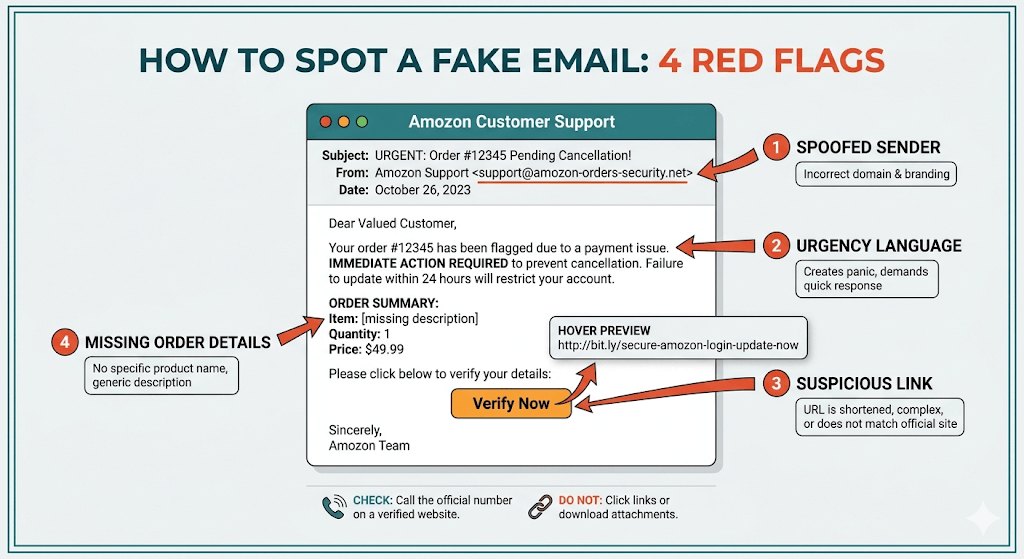
The “From” address is your first line of defense. While scammers often manipulate the display name to appear official (e.g., “Amazon Customer Service”), expanding the email address will usually reveal inconsistencies. Cybercriminals employ various tricks:
- Lookalike Domains: Substituting characters (e.g.,
amaz0n.cominstead ofamazon.com,rnicrosoft.cominstead ofmicrosoft.com). - Subdomains: Using legitimate-sounding subdomains (e.g.,
[email protected]). - Random Characters: Appending random letters or numbers to a known domain (e.g.,
[email protected]).
Always expand the sender’s full email address and compare it meticulously against the official domain you know.
2. Lack of Personalization and Specific Details
Legitimate retailers know their customers. A genuine order confirmation will invariably include your actual name, a specific order number, and precise shipping details. Scammers, sending mass emails, rely on vague language:
- Generic Greetings: “Dear Customer,” “Hello User,” or no greeting at all.
- Missing Order Numbers: The email might mention an order but omit the unique identifier.
- Vague Product Descriptions: Referring to “your recent purchase” or “the item you ordered” without specifics.
- Inaccurate Shipping Information: If any shipping details are provided, they may be generic or incorrect for your location.
3. Presence of Artificial Urgency or Panic
Phishing operates on psychological pressure, aiming to bypass rational thought and force an immediate reaction. Scammers create an artificial crisis to prevent you from analyzing the situation or checking your bank account.
- Threats of Immediate Action: “Cancel now to avoid charges,” “Account will be locked,” “Urgent action required.”
- Time-Sensitive Warnings: “Your order will be processed in 24 hours,” “Limited time to dispute.”
- High-Value Charges: An unexpectedly large sum designed to trigger maximum alarm.
4. Malicious or Misleading Links
Never click a “Cancel Order” or “View Invoice” button without verification.
- Hover to Reveal (Desktop): On a desktop, hover your mouse cursor over any link without clicking to reveal the true destination URL in the bottom-left corner of your browser or email client.
- Press and Hold (Mobile): On a mobile device, press and hold the link for a second or two to safely reveal the destination URL.
- Discrepancies: If the displayed URL doesn’t match the expected legitimate domain, it’s a scam. Always go to the retailer’s official website manually by typing the URL into a new browser tab and logging in directly to check your order history.
5. Absence of Comprehensive Order Details
A legitimate order confirmation must clearly state what you supposedly bought. Scammers keep content vague to make the trap applicable to a broader audience.
- No Itemized List: No specific product name, SKU, quantity, or unit price.
- Missing Total Breakdown: No clear breakdown of item cost, shipping fees, taxes, and total amount paid.
- Lack of Payment Method: No mention of the last four digits of the card used or the payment gateway.
- No Customer Service Information: Legitimate emails provide clear contact information for support, which a scam email often omits or provides a fake number for.
What to Do If You Receive a Fake Order Confirmation
Receiving a suspicious receipt can be unsettling. Once you’ve identified a fake, your priority shifts to containment and protection. Follow these steps to safeguard your personal information:
- Do Not Engage: Do not reply to the email, click any links, or call any phone numbers provided in the suspicious message.
- Report the Phishing Attempt:
- Email Provider: Use your email service’s built-in “Report Phishing” or “Mark as Spam” feature.
- Anti-Phishing Working Group (APWG): Forward the email to
[email protected]. - Government Agencies: In the U.S., report to the FTC (Federal Trade Commission) at
ftc.gov/complaintand the FBI’s Internet Crime Complaint Center (IC3) atic3.gov.
- Isolate and Scan (If Clicked): If you accidentally clicked a link, immediately disconnect your device from the internet (turn off Wi-Fi or unplug Ethernet). Run a full scan with reputable antivirus and anti-malware software.
- Change Passwords: If you entered any login credentials on a suspicious site, change those passwords immediately on all accounts where you use them, especially on a different, secure device. Enable Two-Factor Authentication (2FA) wherever possible.
- Monitor Financial Accounts: Regularly check your bank accounts and credit card statements for any unauthorized transactions. Set up transaction alerts for immediate notification of suspicious activity.
- Contact Your Bank/Credit Card Company: If you believe your payment details have been compromised, contact your bank or credit card issuer immediately to report potential fraud and discuss options for protecting your accounts.
How Scammers Exploit Trust: The Psychology Behind the Scam
Fake order confirmations are a favorite tactic for attackers because transactional messages boast exceptionally high open rates, often exceeding 60%. Furthermore, recipients inherently trust communications from businesses they regularly interact with. The psychological trigger is powerful: when a fake message claims you’ve spent hundreds of dollars on an unrecognized item, it triggers an immediate shock response that bypasses normal caution.
Scammers leverage these tactics to achieve two primary goals:
- Credential Harvesting: This involves enticing you to click a malicious link that directs you to a cloned login page, where your username and password are captured. Reports indicate that up to 43% of phishing emails rely on malicious links.
- Phone-Based Fraud: A fake customer support hotline connects you to a live operator skilled in social engineering, who manipulates you into verbally revealing credit card information or other sensitive data.
The increasing sophistication of Generative AI tools has eliminated the traditional spelling and grammar errors that once made phishing emails easy to spot. This makes it harder than ever for individuals to differentiate legitimate emails from sophisticated scams.
| Tactic | Why it’s Effective |
|---|---|
| High-value invoice | Triggers an immediate panic response, forcing an instant click to cancel or investigate. |
| Cloned brand imagery | Replicates official logos, color schemes, and layouts perfectly to imitate legitimate websites, building false trust. |
| Spoofed sender names | Uses lookalike domain names and display names that mimic real brands at first glance, deceiving casual observers. |
| Fake support hotlines | Moves the conversation off email to a live operator who can use verbal manipulation, bypassing email security layers. |
Merchant Vulnerabilities: The Damage of Brand Impersonation
For online businesses, the consequences of brand impersonation are severe and multi-faceted. Imagine a scenario where a customer receives a fake order confirmation from a spoofed version of your domain (e.g., [email protected]). They click, get phished, and subsequently blame your brand for their financial loss. Even if your actual store database remains completely secure, the victim irrevocably associates their financial misfortune directly with your business name. Multiply this by hundreds or thousands of incidents, and the result is catastrophic reputational damage.
The financial and operational toll on businesses is significant. According to Ringly, U.S. merchants can lose as much as $4.61 for every $1 in fraud, a figure that has escalated by 37% since 2020. When scammers manipulate your brand assets, the fallout impacts:
- Customer Support Resources: A surge in inquiries from confused or angry customers, diverting resources from legitimate issues.
- Customer Retention: Erosion of trust leads to customer churn and reluctance to purchase again.
- Chargebacks and Refunds: Increased incidence of chargebacks from victims, incurring fees and potentially impacting merchant account standing.
- Legal and Compliance Costs: Potential legal battles, investigations, and compliance fines if the fraud is perceived as a security lapse.
- Brand Equity and Perception: Long-term damage to the brand’s image, perceived reliability, and trustworthiness.
Merchant Defense: Safeguarding Your Digital Identity and Customer Trust
Proactive defense is paramount for merchants. Waiting for damage to occur before noticing a problem is a losing strategy. Businesses, especially those operating on platforms like Shopify or WooCommerce, must implement robust measures to protect their domains and customers.
1. Monitoring for Domain Spoofing
Before prevention, comes detection. Merchants need to monitor their domain authentication status to identify any active spoofing campaigns. Tools like MXToolbox’s DMARC SuperTool allow you to check your domain’s DMARC record and see its status. More advanced DMARC reporting services provide aggregate and forensic reports, giving insight into who is sending email on behalf of your domain and whether those emails are passing authentication checks. This continuous monitoring is crucial for catching scammers early.
2. Implementing Core Email Authentication Protocols: SPF, DKIM, and DMARC
These three protocols are the foundational layers of email security, verifying your identity to receiving servers and ensuring that campaigns with discrepancies are blocked.
- SPF (Sender Policy Framework): A DNS TXT record that lists all authorized servers permitted to send emails on behalf of your domain. It tells receiving mail servers, “Only emails from these IP addresses are legitimate for my domain.” Setup typically involves a quick DNS record update provided by your email platform.
- DKIM (DomainKeys Identified Mail): A digital signature attached to your outgoing messages. This signature acts as a tamper-evident seal, proving that the email’s content has not been altered in transit and that it genuinely originated from your domain. Your email provider usually generates this automatically for you to paste into your DNS settings.
- DMARC (Domain-based Message Authentication, Reporting & Conformance): This policy instructs receiving servers on how to handle emails that fail SPF or DKIM checks. DMARC allows you to set a policy (none, quarantine, or reject) and receive reports on email authentication failures. Implementing DMARC requires adding a text record to your domain, starting with a monitoring policy (
p=none) to gather data before moving to more stringentquarantineorrejectpolicies.
Most modern email marketing platforms, such as Omnisend, guide merchants through this entire process. Their intuitive infrastructure makes authentication highly accessible, allowing store owners to simply copy automatically generated strings and add them to their DNS records. Once these protocols are configured, fraudulent emails attempting to spoof your domain will fail authentication checks and be blocked before reaching customer inboxes.
3. Leveraging BIMI for Visual Trust
Brand Indicators for Message Identification (BIMI) adds a powerful visual layer of trust. When correctly configured, BIMI displays your official, verified company logo directly alongside your email in a customer’s inbox, even before they open the message. This is an exceptionally effective scam-prevention tool. Customers conditioned to see your verified logo next to legitimate communications are far less likely to fall for a fake email claiming to be from your store if it lacks this crucial visual identifier. It provides instant visual confirmation of authenticity. To be eligible for BIMI, a strict DMARC policy must already be in place, underscoring the layered approach to email security.
4. Designing Legitimate Order Confirmation Emails
Beyond technical authentication, the design and content of your legitimate emails play a vital role in reassuring customers. Scammers send vague emails; your emails should be the opposite.
- Comprehensive Information: Include the order number, product name(s), detailed description, quantity, price breakdown, shipping address, estimated delivery date, payment method used, and clear customer support contact information (official channels only).
- Clear Branding: Maintain consistent branding, including your logo, brand colors, and official website links.
- Post-Purchase Information: Include links to your return policy, FAQs, and tracking information.
- Personalization: Address the customer by name and, if appropriate, include personalized recommendations for future purchases.
The Role of Specialized Platforms in Brand Protection
Platforms like Omnisend are specifically engineered with robust transactional email infrastructure, prioritizing strong authentication and deliverability. They manage SPF and DKIM alignment natively and implement rigorous sender reputation management, abstracting the technical complexities for merchants. By utilizing such platforms for post-purchase workflows and order confirmation automation, every outgoing message is pre-configured for optimal deliverability and brand trust. This ensures customers receive personalized, clearly detailed, and visually consistent receipts that they will never mistake for a scam. Omnisend’s documented $79 ROI for every $1 spent highlights the tangible business benefits of investing in secure and effective email communication.
Conclusion
In an era where AI-generated phishing attacks are rapidly scaling in both volume and sophistication, proactive brand protection is no longer optional but a necessity. Consumers are now equipped with an actionable checklist to identify the red flags of fake order confirmations and clear instructions on how to respond safely without compromising their data. Simultaneously, e-commerce merchants have a definitive guide to detect active spoofing campaigns and fortify their sender domains using essential authentication protocols like SPF, DKIM, and DMARC, further enhanced by visual trust mechanisms like BIMI.
Ultimately, the most effective defense against brand impersonation combines the technical soundness of sender accounts with a meticulously designed, informative, and visually consistent message. By consistently sending fully authenticated, highly detailed, and on-brand order confirmation emails, businesses not only ensure their buyers recognize legitimate communications but also cultivate an enduring sense of trust and security, safeguarding their reputation against the relentless tide of cyber fraud.
FAQ
How to spot a fake order confirmation?
Look for an inconsistent sender email address, lack of personal details (your name, specific order number), urgent or threatening language, suspicious links (hover before clicking), and absence of detailed product or order information.
How to identify fake orders?
Check your bank statements for matching charges and log directly into the retailer’s official website (by typing the URL, not clicking links) to review your order history. If there’s no corresponding record, the email is a scam.
How to spot a fake purchase order?
Fake purchase orders typically lack specific data such as detailed item descriptions, product quantities, precise pricing, and other critical details that a legitimate email would include. Disregard and report such emails.
How to make an order confirmation?
Utilize an email marketing platform like Omnisend to automate the process. Include personalized greetings, specific order summaries, support details, and ensure your domain authentication (SPF, DKIM, DMARC) is properly configured to protect your sender reputation.
What should I do if I clicked a link in a fake order confirmation email?
Immediately disconnect your device from the internet, run a full antivirus/malware scan, and change all affected passwords on a separate, secure device. Monitor your bank accounts closely for any unauthorized charges and report the incident to relevant authorities.
How do I stop scammers from impersonating my store’s email domain?
Configure SPF, DKIM, and DMARC authentication records in your DNS settings. This prevents unauthorized senders from sending messages on your behalf, ensuring your brand reputation remains intact and protecting your customers.