
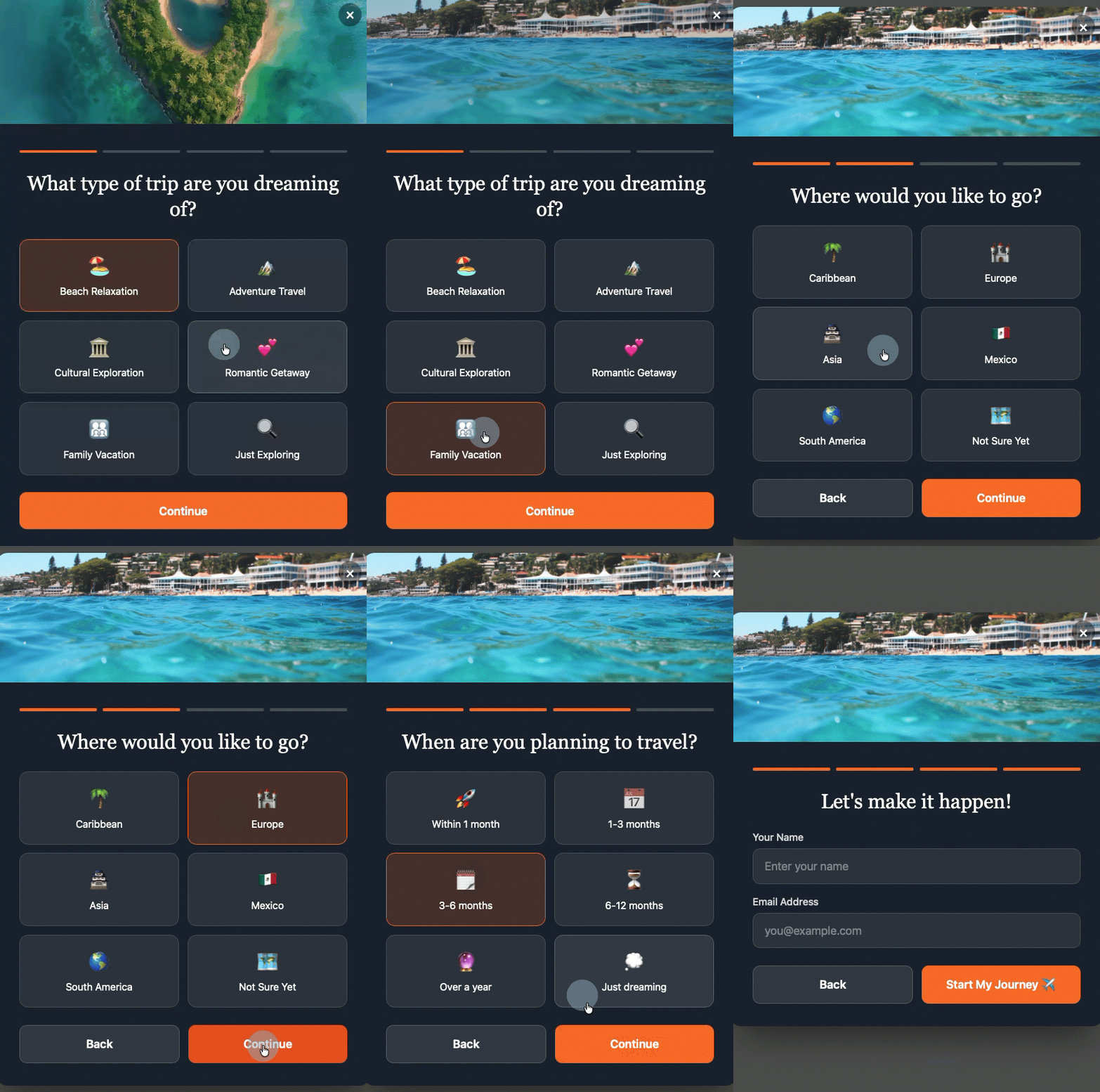
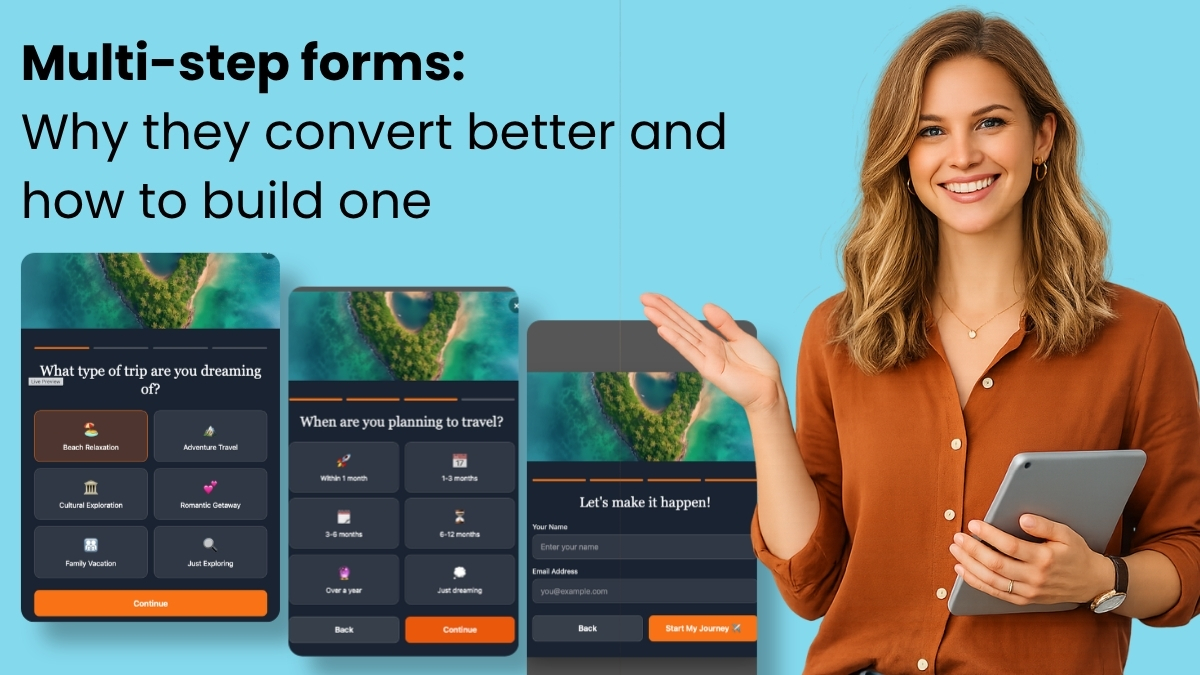
The landscape of digital marketing is undergoing a significant transformation, with multi-step forms emerging as a pivotal tool for enhancing online conversion rates. Research across diverse industries consistently demonstrates that these segmented forms convert at approximately three times the rate of traditional single-page forms, fundamentally reshaping how businesses capture leads and gather vital subscriber data. This profound impact is not merely a design quirk but is rooted in deeply understood psychological principles and is now being amplified by advanced artificial intelligence, making sophisticated form creation accessible to a broader range of enterprises.
For years, the standard approach to online data collection involved presenting users with a single, often lengthy, page filled with various input fields. While straightforward to implement, this method frequently suffered from high abandonment rates. The sheer visual weight of numerous fields could deter potential subscribers, leading to lost opportunities and inefficient marketing spend. The advent of multi-step forms directly addresses this challenge by breaking down a single, formidable task into a series of smaller, more manageable steps, thereby reducing perceived effort and fostering a sense of progress that encourages completion.
The Psychological Underpinnings of Enhanced Conversions
The superior performance of multi-step forms is not coincidental; it is meticulously engineered around several core psychological principles that govern human interaction and decision-making. Understanding these mechanisms is key to appreciating their effectiveness in boosting conversion metrics.
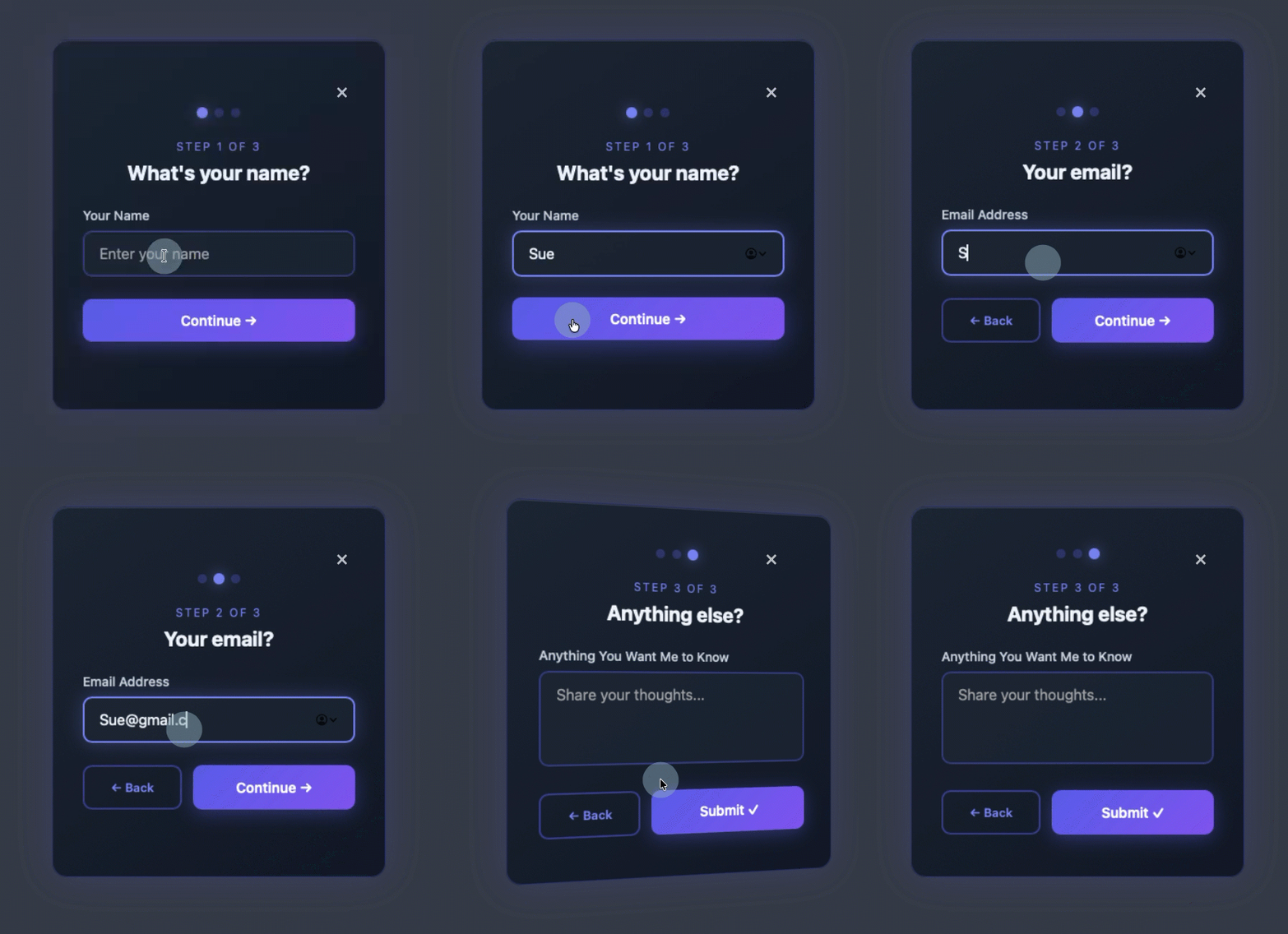
Firstly, Progressive Disclosure is a cornerstone of effective multi-step form design. This principle advocates for revealing only the information or actions necessary at any given moment, deferring secondary information until it is relevant. In the context of a form, this means presenting users with one or a very limited number of questions per screen, rather than an overwhelming array. A single-step form with five or more fields instantly triggers a cognitive load, prompting the user to perform an immediate, often subconscious, cost-benefit analysis: "Is this worth my time and effort?" Many users, faced with this initial hurdle, opt to abandon the form. Conversely, a multi-step form that begins with a single, easy question bypasses this calculation entirely. The visitor sees a minimal request, answers it, and proceeds, experiencing less friction and mental resistance. This gradual unveiling of information prevents cognitive overload and maintains user engagement.
Secondly, the Completion Effect, often linked to the Zeigarnik Effect, plays a crucial role. This psychological phenomenon posits that people remember uncompleted or interrupted tasks better than completed ones and feel a natural urge to finish what they’ve started. Once a user has invested even minimal effort by answering the first question in a multi-step form, a psychological commitment is established. This initial investment creates a powerful internal drive to complete the subsequent steps. Incomplete tasks generate a subtle tension, and users are intrinsically motivated to alleviate this tension by seeing the process through to its conclusion. This momentum, once initiated, becomes a significant factor in driving form completions.
Thirdly, Reduced Perceived Effort is perhaps the simplest yet most impactful factor. While the total number of fields and the actual effort required to complete a multi-step form might be identical to that of a single-page form, the perception of effort is dramatically different. Five fields on one screen can feel like a laborious chore, a bureaucratic hurdle. The same five fields spread across five distinct screens, however, feel more like a conversational exchange, a guided process. Each step feels small and achievable, contributing to an overall experience that feels fast, light, and less demanding. This shift in perception is critical; users are more likely to engage with tasks they perceive as easy and quick, even if the underlying complexity is unchanged.
Evolution of Form Design and Conversion Rate Optimization
The journey towards optimized online forms is deeply intertwined with the broader history of conversion rate optimization (CRO) and user experience (UX) design. In the early days of the internet, web forms were often rudimentary, designed primarily for functionality rather than user-friendliness. Designers and developers focused on simply collecting information, often overlooking the psychological impact of their interfaces. As e-commerce and digital marketing matured in the late 1990s and early 2000s, businesses began to recognize the direct correlation between website design and revenue. This period saw the rise of CRO as a specialized discipline, with A/B testing becoming a standard practice to identify bottlenecks in the user journey.
Early CRO efforts quickly highlighted forms as critical points of friction. Studies from analytics firms during this era consistently showed form abandonment rates ranging from 60% to 80% across various industries, representing a massive loss of potential leads and sales. These findings spurred innovation, leading to experiments with form length, field types, and visual layouts. It was during this time that the concept of breaking down long forms into shorter segments began to gain traction. Initially, implementing multi-step forms required custom coding and significant development effort, limiting their widespread adoption to larger organizations with dedicated web development teams.
The mid-2010s witnessed the proliferation of user-friendly form builders and marketing automation platforms, which simplified the creation of multi-step forms through drag-and-drop interfaces. This marked a significant democratization of advanced form design, allowing more businesses to experiment with and benefit from segmented forms. However, even these tools often presented a learning curve, requiring users to manually configure fields, styling, and conditional logic.
The current wave, exemplified by AI-powered form builders, represents another leap forward. These tools leverage natural language processing and machine learning to generate complex, branded multi-step forms from simple conversational prompts, further streamlining the process and making sophisticated CRO strategies accessible to even the smallest businesses. This evolution underscores a continuous drive to reduce friction for both the end-user and the marketer, ultimately leading to more efficient digital interactions.
Crafting Effective Multi-Step Forms: Best Practices
While the psychological advantages of multi-step forms are clear, their effectiveness hinges on adherence to specific design principles. A poorly designed multi-step form can inadvertently introduce new points of friction, negating its inherent benefits.
-
Start with the Easiest Question First: The initial step of a multi-step form is paramount. It must be effortlessly simple, requiring minimal cognitive load or personal disclosure. Questions like "What brings you here today?" with clickable options, or a simple preference selection, are ideal. This approach builds immediate momentum, leverages the completion effect from the outset, and gently eases the user into the interaction. Asking for sensitive information like a full name or email address too early can be perceived as an immediate barrier.
-
Keep Each Step to One Question (or a very closely related few): The core benefit of multi-step forms—reduced perceived effort—is undermined if individual steps become mini-forms themselves. The rule of thumb is one clear question per screen. If multiple fields are absolutely necessary on a single step, they should be logically grouped and minimal, ensuring the step still feels lightweight and focused. This maintains the conversational flow and prevents the user from feeling overwhelmed at any point.
-
Show Progress Visually: Uncertainty breeds anxiety. Users need to know where they are in a process and how much more effort is required. A clear visual indicator, such as a "Step X of Y" counter or a dynamic progress bar, is essential. This feedback mechanism not only manages user expectations but also reinforces the completion effect, as users can visually track their advancement towards the goal. Studies indicate that forms with clear progress indicators can see completion rates up to 15% higher than those without.
-
Put Name and Email Last, Not First: This is often counterintuitive for marketers accustomed to immediate lead capture, but it is a highly effective strategy. By placing personal information fields (name, email) towards the end of the form, after users have already invested time and effort answering interest-based or qualifying questions, they are more psychologically committed to the process. The act of entering personal details then feels like a natural conclusion to an engaging interaction, rather than an initial hurdle. This approach significantly reduces the perceived "cost" of providing personal data, as the user has already demonstrated a clear intent and interest.
-
Ensure Every Answer is Useful: A multi-step form is not just about collecting data; it’s about collecting actionable data. Every question posed should serve a distinct purpose, directly mapping to a tag, custom field, or segment within the email marketing platform. Questions asked merely to fill a step, without a clear strategy for their utilization, introduce unnecessary friction. The goal is to qualify the subscriber, personalize future communications, or facilitate targeted automation. This strategic data collection transforms a simple form into a powerful segmentation and personalization engine.
The AI Revolution in Form Building: A New Paradigm
The complexities of implementing multi-step forms, particularly with sophisticated branching logic and seamless integration into marketing ecosystems, have traditionally required either significant coding expertise or extensive manual configuration within existing platforms. However, the emergence of AI-powered form builders is democratizing this capability, making advanced form creation accessible to marketers of all technical skill levels.
Traditional form builders, while useful, often rely on templates that, by their nature, impose certain limitations. Users frequently find themselves trying to adapt their specific needs to a pre-built structure, spending valuable time rearranging fields, adjusting styling, and modifying copy to align with their brand and objectives. This "undo-and-redo" cycle can be inefficient and stifle creative expression.
AI-driven solutions, such as the AWeber AI Signup Form Builder, offer a fundamentally different approach. Instead of starting with a template, users describe their desired form in plain, conversational language. The AI then interprets these natural language prompts to generate a fully functional, branded multi-step form complete with dynamic animations, smooth transitions, and automatic field mapping. This eliminates the need for manual configuration, coding, or even deep design knowledge.
A compelling demonstration of this capability was showcased on "The Shift AI Show" by Chris Vasquez, AWeber’s Chief Product Officer. He built a multi-step personality quiz live, simply by describing its purpose and desired outcomes. The AI builder autonomously generated a comprehensive quiz, presenting each question on its own screen with clickable options. Crucially, after users completed the quiz and entered their name and email, the form immediately displayed their personality type. Behind the scenes, the AI also automatically created the necessary custom fields and applied relevant tags (e.g., "personality visionary") to the subscriber’s profile within AWeber. This immediate, granular segmentation empowers marketers to trigger highly specific welcome automations, drive hyper-targeted email sends, and implement dynamic content blocks from the very first interaction.
As Vasquez highlighted, "It’s so frictionless for them to give you that info up front. And frankly, it’s kind of fun to interact with, so it almost entices engagement. You don’t have to go, ‘I’ll learn more about them later.’ You can get a lot of that information up front without driving people away." This statement encapsulates the core value proposition: collect richer data effortlessly, and enhance the user experience simultaneously.
Broader Impact and Strategic Implications for Email Marketing
The benefits of multi-step forms extend far beyond mere conversion rate improvements; they fundamentally enhance the entire email marketing lifecycle, leading to more effective, personalized, and profitable campaigns.
-
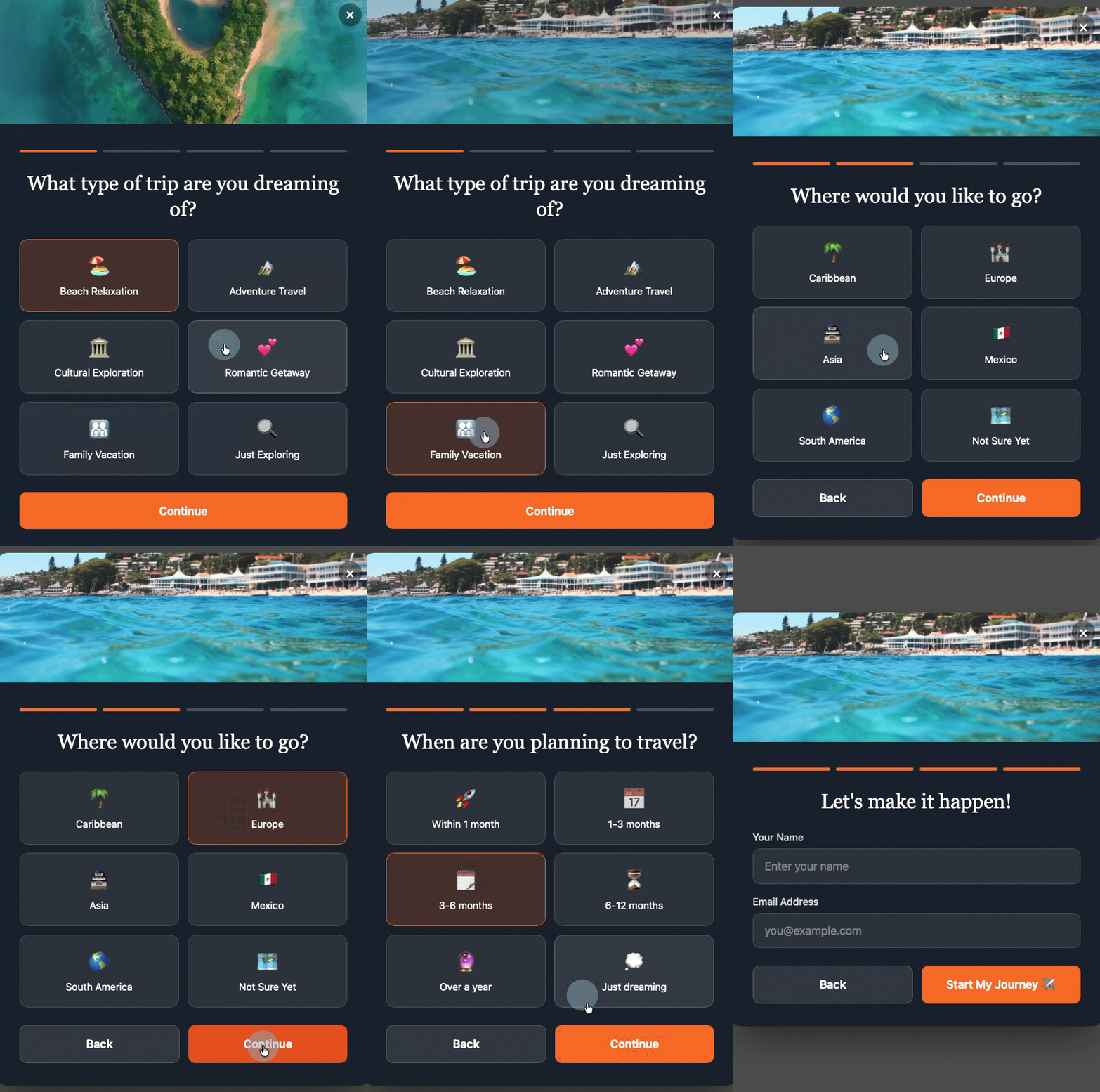
Automatic Segmentation: The strategic design of multi-step forms ensures that segmentation begins at the very point of signup. Each response given by a subscriber can be automatically mapped to a specific tag or custom field. This means that subscribers are immediately categorized into relevant groups without any manual intervention. For instance, a subscriber indicating interest in "vacation getaways" can be tagged accordingly, separating them from those interested in "investment property." This precise, real-time segmentation forms the bedrock of highly targeted marketing efforts.
-
Specific Welcome Sequences: Moving beyond a generic welcome email, multi-step forms enable the activation of diverse welcome sequences tailored to individual subscriber profiles. Based on quiz results, selected interests, or qualification answers, new subscribers can be funnelled into highly relevant nurture paths. A user who, through the form, expresses an urgent need for assistance can immediately receive an email sequence focused on rapid solutions, while another who is "just exploring" can enter a softer, informational nurture stream. This initial personalization significantly boosts engagement and reduces churn.
-
Practical Dynamic Content: AWeber, like many advanced email marketing platforms, allows for dynamic content blocks within a single email, where different content is displayed based on subscriber tags. Multi-step forms, by applying the right tags at signup, make dynamic content immediately practical and highly effective. Marketers no longer need to manually tag subscribers or wait to gather sufficient behavioral data. The form does the foundational work, ensuring that from the very first email, subscribers receive content that is directly relevant to their stated interests or needs, enhancing the perceived value of the communication.
Frequently Asked Questions about Multi-Step Forms
How many steps should a multi-step form have?
The optimal number of steps for a multi-step form typically ranges from three to five. Fewer than three steps may not provide enough of a progressive disclosure benefit to significantly outperform a well-designed single-page form. Conversely, exceeding five steps risks reintroducing friction and increasing drop-off rates, even with the completion effect in play. The crucial determinant, however, is the utility of each step. Every question must serve a clear purpose, collecting information that will be actively used for segmentation, personalization, or qualification. Any step that does not contribute to these objectives should be eliminated to maintain efficiency.
Can I build a multi-step form without knowing how to code?
Absolutely. Modern AI-powered form builders, such as the AWeber AI Signup Form Builder, are specifically designed to empower users without any coding knowledge. These tools allow marketers to describe their desired form—whether it’s a quiz, a lead qualification flow, or an interest selector—using natural, plain language prompts. The AI then automatically generates the complete, functional form, including dynamic transitions, animations, and the crucial automatic mapping of fields to custom fields and tags within the email platform. This democratizes access to sophisticated form design, removing traditional technical barriers.
How do multi-step forms work with email automation?
Multi-step forms are inherently designed for seamless integration with email automation. Each answer provided by a subscriber can be configured to apply a specific tag or populate a custom field within the email marketing platform. These tags and custom fields then serve as triggers for automated sequences. For example, if a subscriber selects "I need help right now" on a qualification quiz, that action can automatically enroll them into an urgent follow-up email sequence. Conversely, a selection of "just exploring" might trigger a longer, more general nurture sequence. This intelligent integration ensures that email automations are highly relevant and responsive from the moment of signup.
How do I create a multi-step form in WordPress?
Integrating multi-step forms, especially those generated by AI tools like AWeber’s, into a WordPress site is designed to be straightforward. Typically, it involves installing a one-time code snippet from the email marketing platform into your WordPress site’s header. This can be achieved either through your theme settings or by utilizing a plugin like WPCode. Once this initial setup is complete, all form creation, management, and updates are handled directly within the email platform’s dashboard. Any changes made there are automatically published to your WordPress site. Furthermore, platforms like AWeber are actively developing dedicated WordPress plugins that will offer even simpler, direct integration for the AI Signup Form Builder, eliminating the need for even a code snippet.
What are the best multi-step form tools?
For small businesses and marketers focused on maximizing email marketing effectiveness, the AWeber AI Signup Form Builder stands out as a leading multi-step form tool. Unlike conventional form builders that necessitate manual drag-and-drop configuration of each field, AWeber’s AI-driven approach creates complete multi-step forms from simple conversational prompts. Users describe their requirements in plain language, and the AI generates a functional, branded form complete with step-by-step transitions, automated custom field mapping, and intelligent subscriber tagging. Its purpose-built integration with email marketing platforms means that all collected data directly feeds into subscriber lists, segments, and automations without the need for complex third-party integrations or additional tools, offering a unified and highly efficient solution.
In conclusion, multi-step forms are no longer just an alternative design choice; they are a strategic imperative for businesses seeking to optimize their digital conversion funnels and build more meaningful connections with their audience. By leveraging inherent psychological principles to reduce friction and enhance user engagement, and by integrating seamlessly with powerful AI tools for effortless creation and data management, these forms represent a significant leap forward in email marketing effectiveness. They enable businesses to not only acquire more subscribers but to acquire richer, more actionable data, paving the way for hyper-personalized communications and superior customer experiences from the very first interaction.
Sean Tinney is a content marketer at AWeber with 15+ years working directly with small business owners on email strategy, list building, and automation. He focuses on what actually moves the needle for businesses without large marketing teams. Connect with Sean on LinkedIn
Sean Tinney