Facebook remains the preeminent social media channel for a vast majority of small businesses, owing to its extensive reach, remarkable versatility, precise targeting capabilities, and cost-effectiveness. This article provides an in-depth tutorial on navigating the intricacies of Facebook advertising, complete with practical guidance, visual aids, and answers to frequently asked questions.
The platform’s enduring popularity for advertisers is underscored by its ability to connect businesses with a massive, engaged audience. For small businesses operating with limited resources, Facebook offers an accessible entry point into digital advertising, enabling them to compete with larger enterprises. The platform’s sophisticated targeting tools allow businesses to pinpoint specific demographics, interests, and behaviors, ensuring that ad spend is directed towards the most relevant potential customers. Furthermore, the relatively low cost per impression and click compared to other digital advertising channels makes it an attractive option for those looking to maximize their return on investment.
Understanding the Facebook Advertising Ecosystem
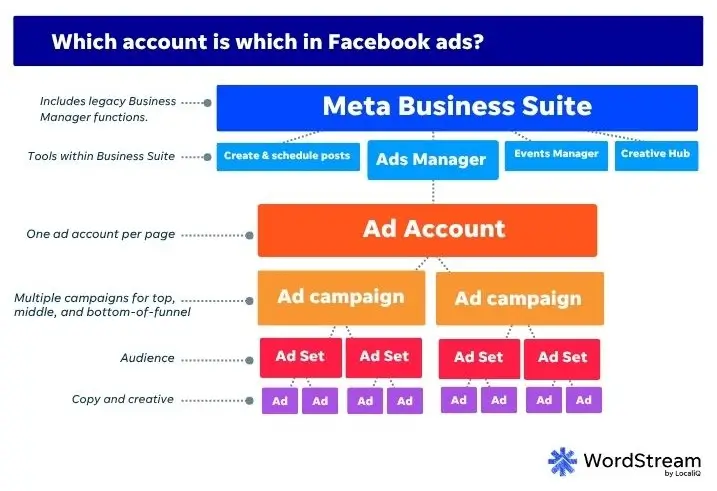
Before diving into the practical steps of creating an ad campaign, it’s crucial to understand the structure of Meta’s advertising platform. Unlike simpler systems like Google Ads, advertising on Facebook involves several interconnected components managed through the Meta Business Suite. For newcomers, this can initially seem complex, but a clear breakdown simplifies the process.
The core components include:
- Meta Business Suite: The central hub for managing business assets on Facebook and Instagram, including Pages, Ad Accounts, and Pixels.
- Facebook Page: A business’s public presence on Facebook, serving as the identity from which ads are run.
- Ad Account: The operational entity where advertising campaigns are created, managed, and billed.
- Meta Pixel: A piece of code installed on a website to track user activity, measure ad performance, and build custom audiences for retargeting.
- Conversions API: A tool that sends web events directly from a server to Meta, complementing the Pixel for more robust data tracking, especially in light of privacy changes.
Why Advertise on Facebook? The Data Speaks
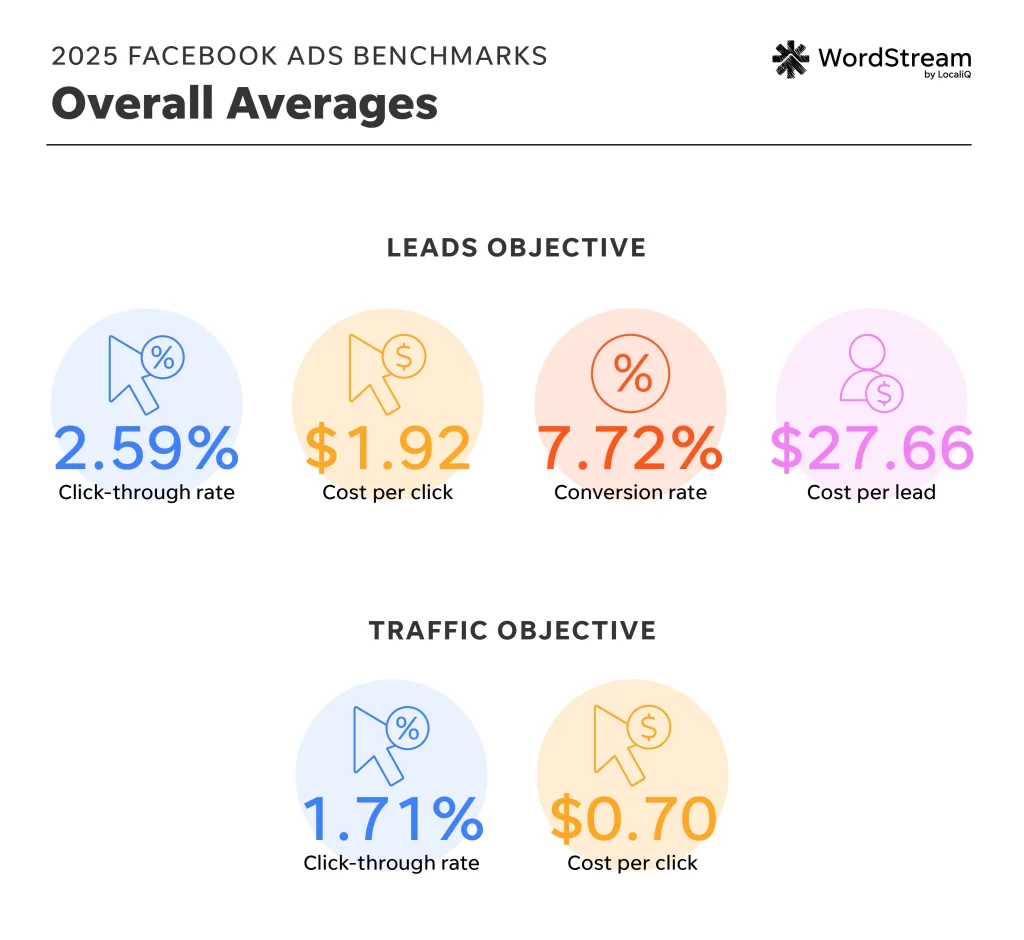
The rationale behind Facebook’s dominance in small business advertising is firmly rooted in data. With billions of active users worldwide, the platform offers unparalleled reach. Statistics consistently highlight the effectiveness of Facebook Ads in driving various business objectives. For instance, recent benchmarks often show impressive click-through rates and conversion rates across different campaign objectives, from brand awareness to direct sales.
Consider the following data points that underscore Facebook’s advertising prowess:
- Massive User Base: Billions of daily active users provide access to a diverse and extensive audience.
- Targeting Precision: Advanced demographic, interest, and behavior-based targeting options allow for highly specific audience segmentation.
- Cost Efficiency: Compared to many other advertising channels, Facebook Ads can offer a lower cost per acquisition, making it accessible for businesses with smaller budgets.
- Measurable Results: Robust analytics and reporting tools enable businesses to track campaign performance and optimize strategies for better outcomes.
Setting Up Your Facebook Advertising Foundation
The journey into Facebook advertising begins with establishing the necessary accounts and integrations. This foundational step is critical for ensuring smooth campaign execution and accurate performance tracking.
1. Creating Your Meta Business Suite Account
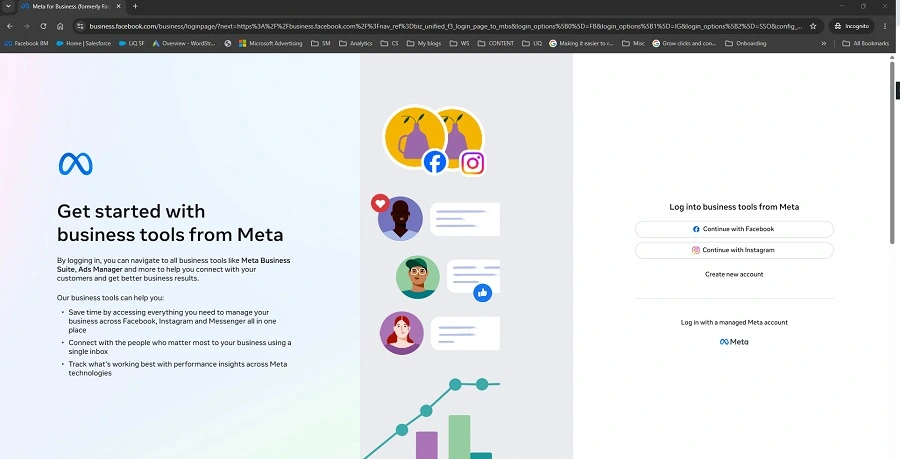
The first step is to establish a presence within the Meta Business Suite. This is achieved by visiting business.facebook.com and initiating the account creation process. Users will be prompted to provide their business name, personal name, and a business email address. After confirming the email, the Meta Business Suite interface will become accessible. This centralized dashboard is the gateway to managing all your business assets on the platform.
2. Connecting or Creating Your Facebook Page
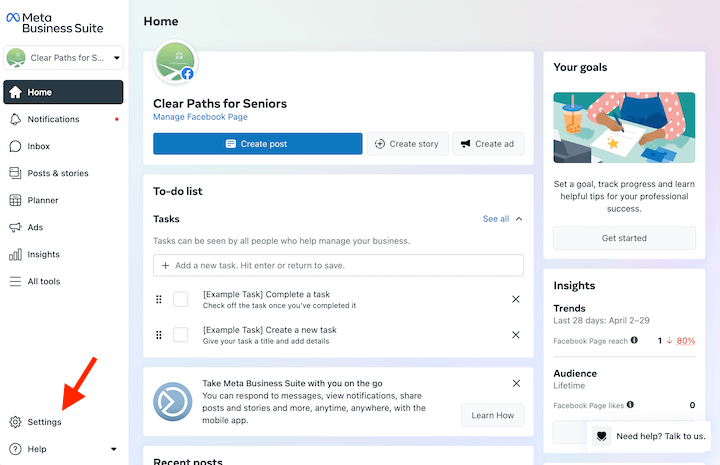
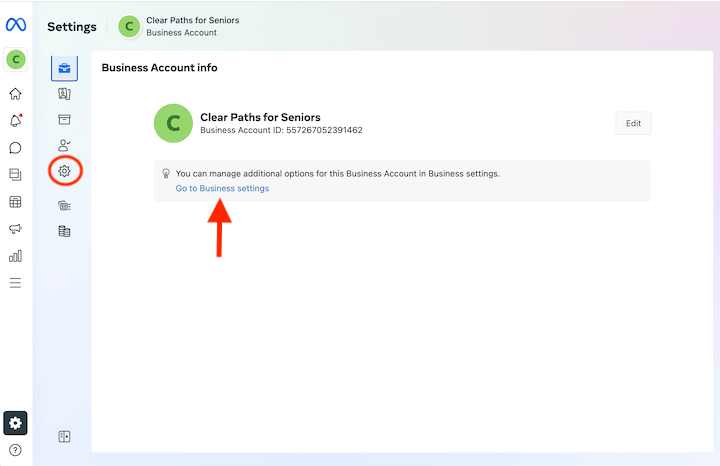
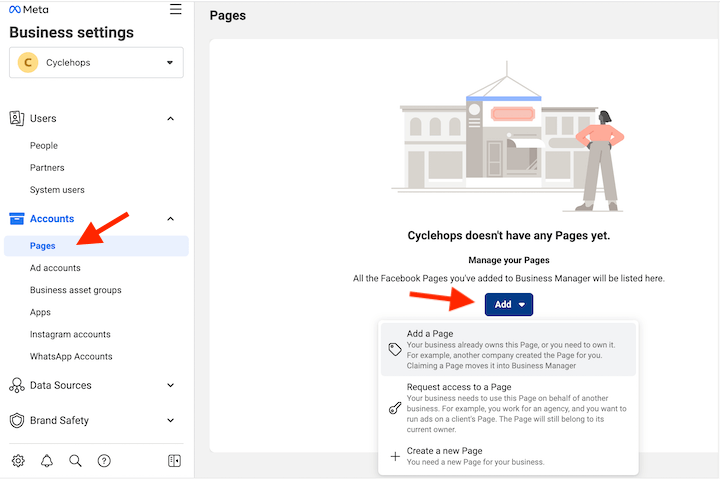
A Facebook Page is essential for running ads, as it serves as the advertiser’s identity. Within the Meta Business Suite, navigate to Settings and then to the Pages section. Here, businesses can add an existing Page, create a new one, or request access to a Page if managing ads for another entity. While a basic Page can be created quickly, it is advisable to fully flesh out the Page’s content and information before launching ad campaigns, as users may navigate to the Page from the ads themselves.
3. Establishing Your Ad Account
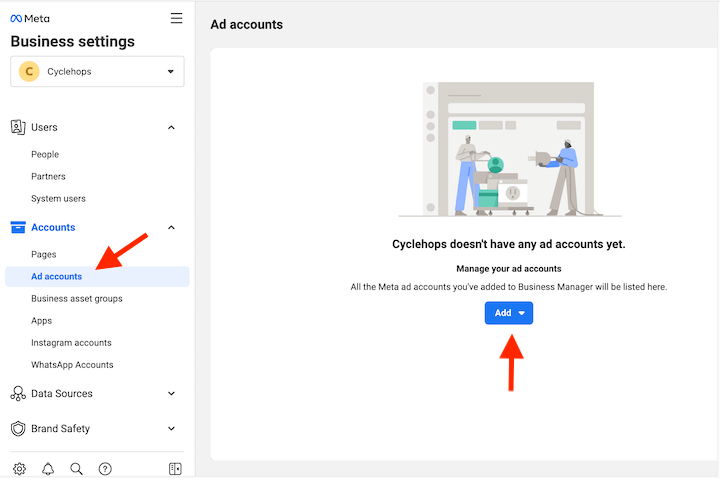
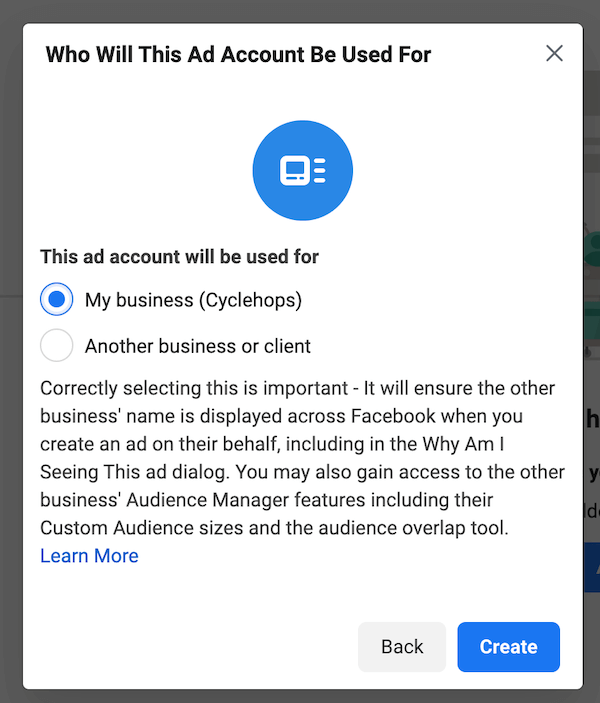
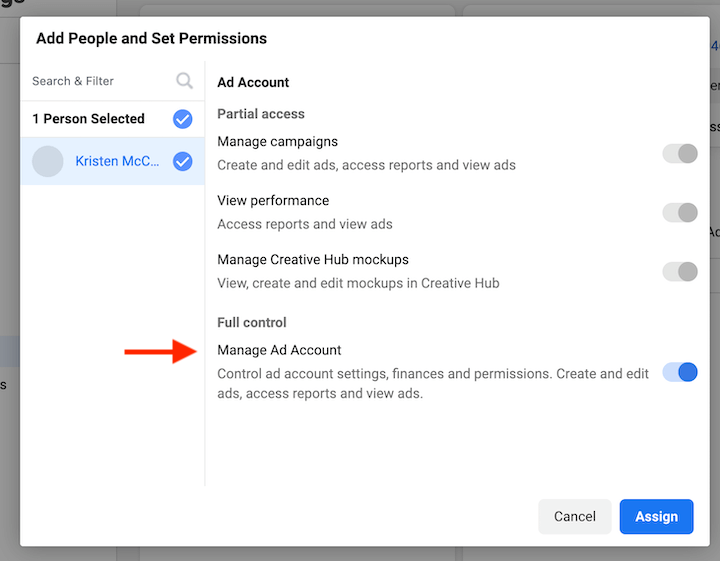
The Ad Account is where your advertising campaigns will be created and managed. Back in the Business Suite settings, locate the Ad Accounts section and select the option to create a new one. You will need to provide an Ad Account name, select your time zone, and choose your currency. Facebook will then ask whether this Ad Account will be used for your business or for a client. Following this, you’ll assign yourself full control over the account, ensuring you have complete management capabilities. The final step in this stage is to add payment information, which is essential for running any paid advertising.
4. Integrating the Meta Pixel and Conversions API
For robust tracking and audience building, installing the Meta Pixel on your website is indispensable. The Pixel is a small piece of code that tracks user actions on your website after they click on your ads. This data is invaluable for optimizing ad performance, understanding customer journeys, and creating highly effective retargeting audiences.
Complementing the Pixel, the Meta Conversions API (CAPI) is crucial for a strong first-party data strategy. CAPI sends data directly from your server to Meta, providing a more complete and reliable picture of user behavior, especially in environments where third-party cookie tracking is becoming less prevalent due to privacy regulations.
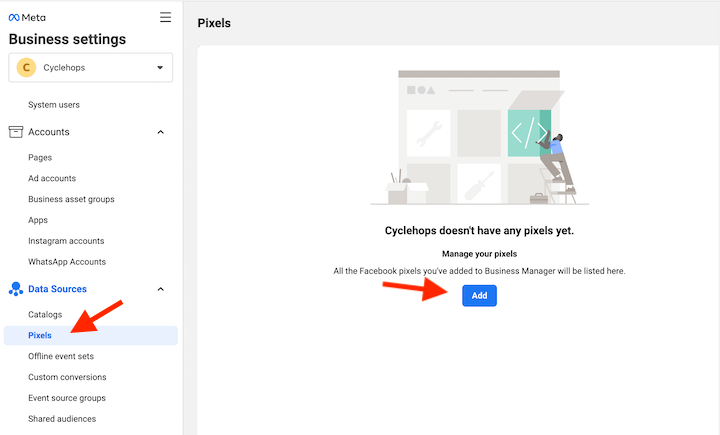
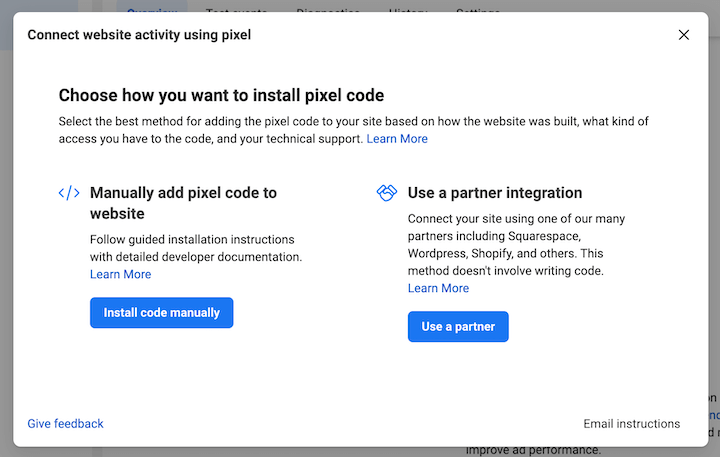
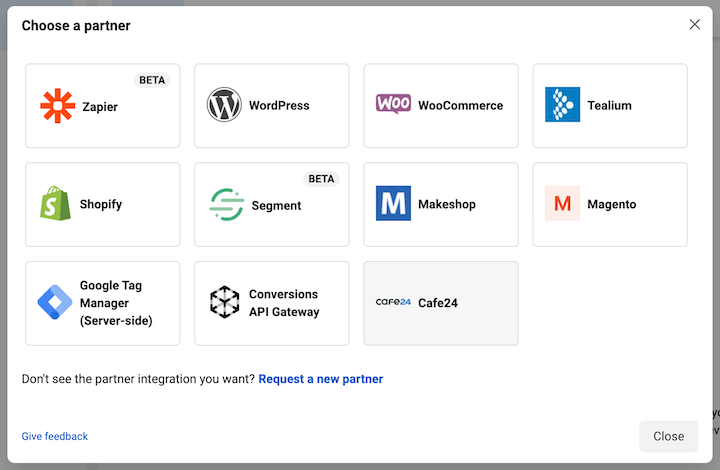
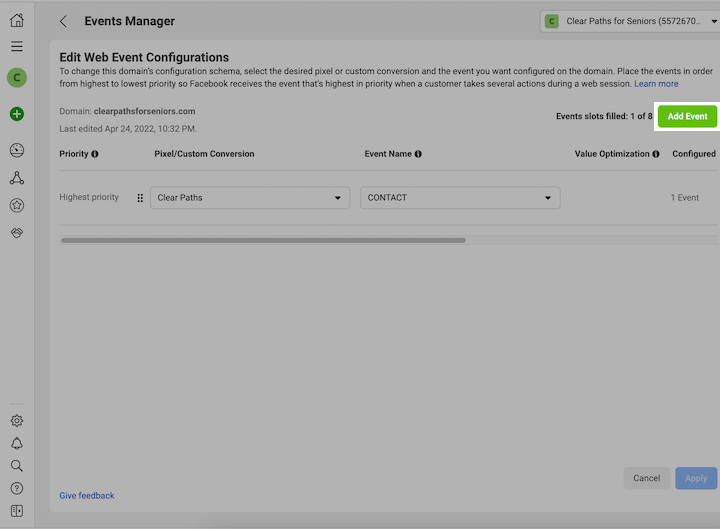
To set up the Meta Pixel, navigate to Data Sources, select Pixels, and click “Add.” Facebook offers options for manual installation or using partner integrations, which are generally more user-friendly for those without extensive coding knowledge. Platforms like Shopify, WooCommerce, and Google Tag Manager are among the popular partner integrations. During the Pixel setup, you will also be prompted to verify your domain and configure your web events, which define the specific actions you want to track (e.g., page views, add to cart, purchases).
The Core Process: Creating a Facebook Ad Campaign
With the foundational elements in place, the next phase involves the actual creation of your ad campaign. This process is managed through the Ads Manager.
5. Launching Your Facebook Ad Campaign
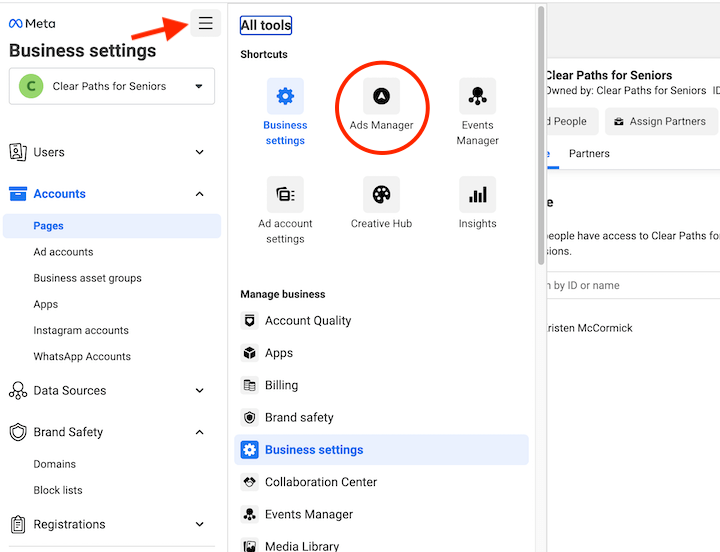
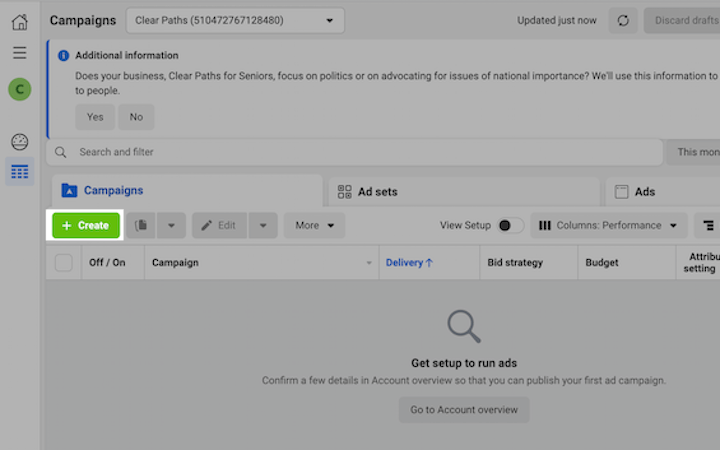
Access the Ads Manager via the “All tools” menu in the top left corner of your Meta Business Suite. From there, click the “Create” button to begin building your campaign.
Choosing Your Campaign Objective
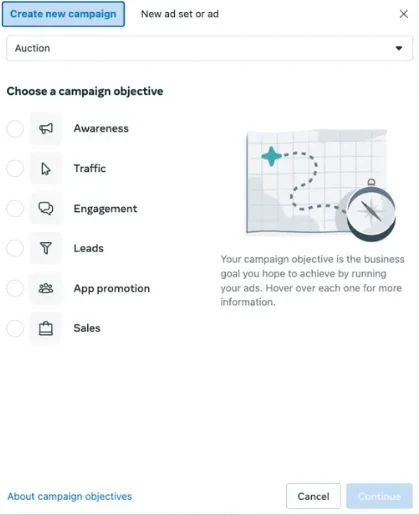
Facebook offers a range of campaign objectives designed to align with different business goals. These typically include:
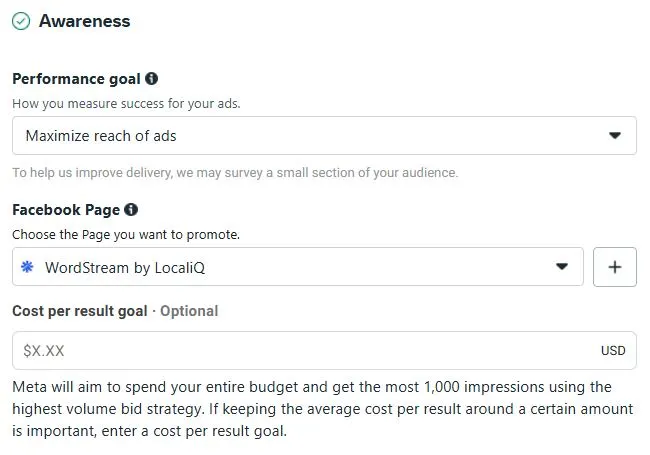
- Awareness: To reach the maximum number of people likely to remember your ads.
- Traffic: To send people to a destination, such as your website or app.
- Engagement: To get more post engagements, Page likes, event responses, or offer claims.
- Leads: To collect lead information from people interested in your business.
- App Promotion: To drive app installs or in-app actions.
- Sales: To find people likely to purchase your product or service.
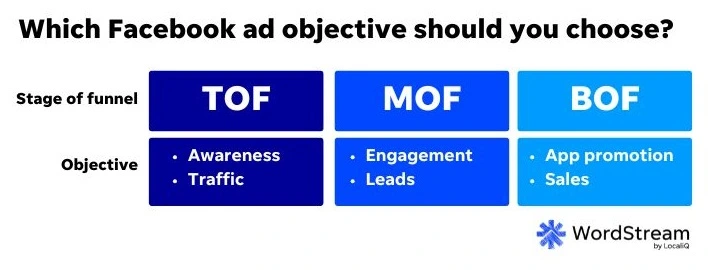
The selection of your campaign objective is paramount, as it dictates how Facebook’s algorithm will optimize your ad delivery. It’s recommended to adopt a full-funnel strategy, creating different campaigns for each stage of the customer journey.
Campaign Settings: Advantage+ vs. Manual Setup
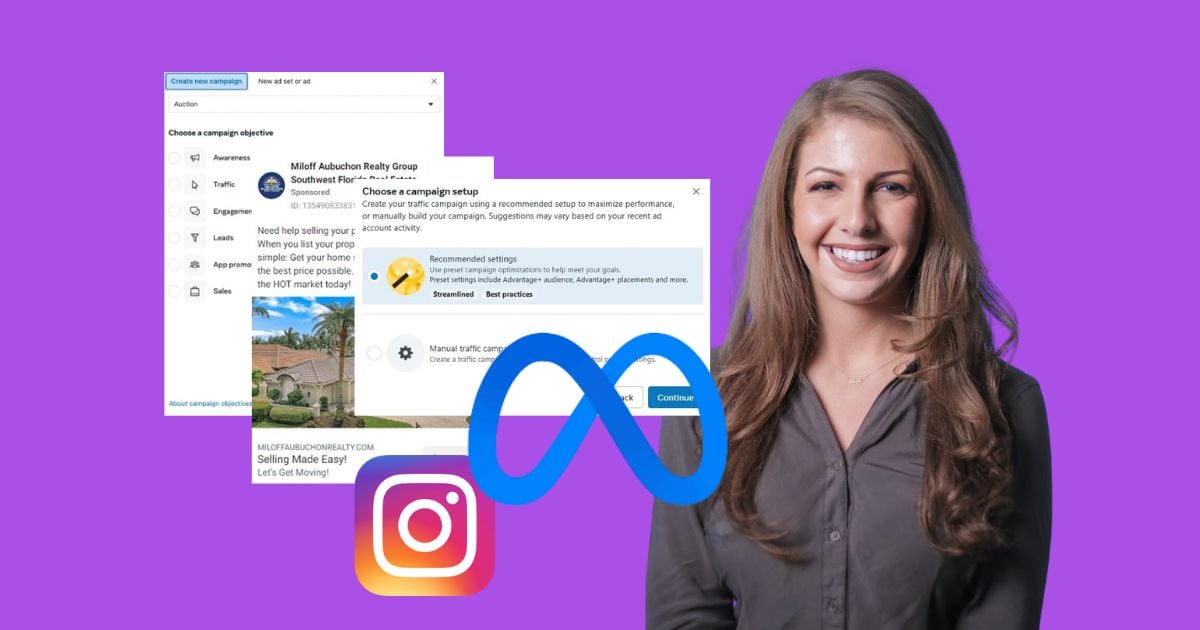
Upon selecting an objective, you’ll encounter the choice between automated settings (Meta Advantage+) and manual setup. Advantage+ campaigns leverage AI to automate aspects of campaign management, similar to Google Ads’ Smart campaigns. These are beneficial for businesses with limited time or expertise, or for testing new strategies. Manual setup, conversely, offers granular control over every aspect of the campaign, allowing for more precise optimization and testing. The choice between the two depends on your team’s preferences, goals, and available resources.
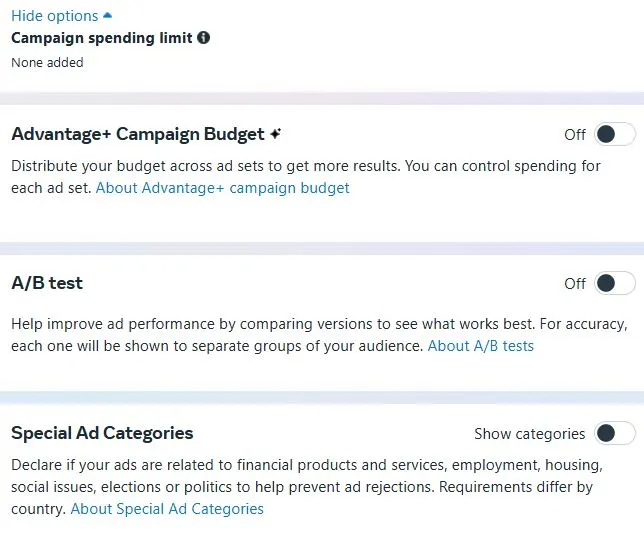
If opting for manual setup, you will configure various campaign-level settings, including campaign naming, special ad categories (if applicable), A/B testing, and campaign budget optimization.
6. Designing Your Facebook Ad Set
The Ad Set level is where you define the specifics of your audience, budget, schedule, and placements.
-
Budget and Schedule: Here, you’ll set your advertising budget. You can opt for a daily budget, which is a set amount you’re willing to spend per day, or a lifetime budget, which is a total amount for the entire campaign duration. Daily budgets are generally recommended for ongoing campaigns, while lifetime budgets can be useful for campaigns with a fixed end date. Starting with a modest daily budget of $5-$10 is often advised to allow the algorithm to gather sufficient data. Ad scheduling allows you to specify when your ads should run, aligning with your business hours or audience availability.
-
Audience Controls: This is a critical section where you define who will see your ads. Facebook offers powerful targeting options based on demographics (age, gender, location), interests (hobbies, pages liked), behaviors (purchase history, device usage), and custom audiences (website visitors, customer lists). You can also leverage lookalike audiences, which Facebook creates based on the characteristics of your existing customers or website visitors. Understanding the nuances of each audience type—Core Audiences, Custom Audiences, and Lookalike Audiences—is key to effective targeting.
-
Placements: Placements refer to where your ads will appear across the Meta network (Facebook, Instagram, Messenger, Audience Network). You have the option of automatic placements (recommended for beginners) or manual placements, where you can select specific locations. For initial campaigns, allowing Facebook to automatically place your ads across all available placements is often the most effective strategy to gather performance data before optimizing.
7. Crafting Your Facebook Ad
This is the creative stage where you design the actual advertisement.
-
Ad Creative: This is the visual element of your ad, which should be compelling and attention-grabbing. Facebook supports various ad formats, including single image/video ads, carousel ads (multiple images/videos that users can swipe through), and collection ads (showcasing products in a visually appealing format). You can upload your own creative assets or use existing posts.
-
Ad Copy: The text accompanying your visual creative is equally important. This includes the primary text, headline, and description. Your ad copy should be clear, concise, and persuasive, highlighting the benefits of your offer and encouraging action. Regularly rotating your ad copy is a good practice to test different messaging and identify what resonates best with your audience.
-
Call to Action (CTA): The CTA button prompts users to take a specific action. Facebook offers a variety of CTAs, such as “Shop Now,” “Learn More,” “Sign Up,” and “Download.” Choose the CTA that best aligns with your campaign objective.
-
Tracking Confirmation: Ensure that your website event tracking (Meta Pixel and Conversions API) is correctly set up to measure the effectiveness of your ad. You can also set up URL parameters for more granular tracking.
8. Publishing Your Ad
Once you’ve finalized all the elements of your campaign, ad set, and ad, you can hit the “Publish” button. Facebook’s system will then review your ad for compliance with their advertising policies. This review process can take anywhere from a few minutes to 24 hours or more. After approval, your ad will enter a learning period, during which Facebook’s algorithm gathers data to optimize its delivery to the most relevant audience.
Strategies for Maximizing Facebook Ad Performance
Beyond the fundamental steps of campaign creation, several strategic tips can significantly enhance your Facebook advertising efforts.
1. Leverage Facebook Lead Ads for Lead Generation
Facebook Lead Ads are specifically designed to capture leads directly within the Facebook platform, eliminating the need for users to visit an external website. The pre-filled forms collect essential information like names, email addresses, and phone numbers, which can then be used for follow-up marketing and remarketing efforts. The customizable nature of these lead forms allows businesses to gather the precise information they need to nurture potential customers effectively.
2. Optimize Your Budget, Even When It’s Small
A limited budget doesn’t preclude success on Facebook. The key lies in optimizing the spend you have. By carefully defining your audience, crafting compelling ad creative, and closely monitoring campaign performance, you can ensure that your budget is used as efficiently as possible. Facebook’s cost-effectiveness means that even with a modest budget, strategic campaigns can yield significant results.
3. Create Timely and Relevant Ads
The social media landscape is dynamic, and trends shift rapidly. To ensure your ads resonate with your audience, it’s crucial to stay abreast of current trends and cultural moments relevant to your business. Monitoring industry accounts, exploring the Facebook Ads Library for inspiration, and considering influencer collaborations can help you develop ad content that feels current and engaging.
4. Benchmark Against Competitors
Understanding how your campaigns perform relative to industry standards is vital. Facebook Ad Benchmarks, which provide industry-specific data on metrics like Cost Per Click (CPC) and Click-Through Rate (CTR), can offer valuable insights. By comparing your performance against these benchmarks, you can identify areas for improvement in your bidding strategies, budget allocation, and targeting. This data-driven approach helps in making informed decisions to remain competitive.
Frequently Asked Questions About Facebook Advertising
To further clarify common queries, here are answers to some frequently asked questions:
How Does the Facebook Ad Auction Work?
The Facebook ad auction determines which ads are shown to users. Unlike Google Ads, it considers factors beyond just the bid amount. Key elements include:
- Bid: The amount you’re willing to pay.
- Estimated Action Rates: Facebook’s prediction of how likely a user is to take a desired action (e.g., click, purchase).
- Ad Quality and Relevance: How relevant and high-quality Facebook deems your ad to be for the target audience.
A higher overall score, considering these factors, increases the likelihood of your ad winning the auction and being displayed. This encourages advertisers to focus on creating relevant and engaging ads for well-defined audiences.

What is the Cost of Facebook Ads?
The cost of Facebook ads can vary significantly based on industry, campaign objective, targeting, competition, and ad quality. Average costs per click can range from less than a dollar to several dollars. It’s essential to consult industry-specific benchmarks and monitor your own campaign performance to understand your typical cost per acquisition.
How Does Facebook Remarketing Work?
Facebook remarketing (or retargeting) allows you to show ads to people who have previously interacted with your business. This can include website visitors, app users, or individuals who have engaged with your Facebook Page or ads. By leveraging the Meta Pixel and Conversions API, you can build custom audiences of these engaged users and serve them tailored ads, significantly increasing the likelihood of conversion.
How Should I Structure My Ad Account?
An effective Meta Ads account structure typically mirrors a marketing funnel. This involves:
- Upper Funnel (Prospecting): Campaigns focused on broad awareness and reaching new potential customers, often using broad targeting or lookalike audiences.
- Mid Funnel: Campaigns targeting users with a slightly higher level of interest, potentially through more specific interests or custom audiences based on initial engagement.
- Lower Funnel (Remarketing): Campaigns aimed at users who have already shown significant interest, such as those who have visited specific product pages or added items to their cart.
Adjusting campaign objectives based on the funnel stage (e.g., awareness for upper funnel, sales for lower funnel) is crucial for optimal performance.
Why Aren’t My Facebook Ads Working?
Several factors can contribute to underperforming Facebook ads:
- Poor Targeting: The audience is not relevant to the offer.
- Weak Creative: The ad visuals or copy are not compelling.
- Irrelevant Offer: The product or service doesn’t align with audience needs.
- Low Ad Quality: Facebook deems the ad as low quality or irrelevant.
- Budget Too Low: The budget is insufficient for the algorithm to learn and optimize effectively.
- Incorrect Campaign Objective: The chosen objective doesn’t match the desired outcome.
By systematically analyzing these elements and applying the strategies outlined in this guide, advertisers can troubleshoot and improve their campaign performance.
Conclusion
Advertising on Facebook offers small businesses a powerful and accessible avenue to reach new customers, drive sales, and build brand loyalty. By understanding the platform’s ecosystem, meticulously setting up your accounts, and strategically crafting your campaigns, you can unlock the full potential of this dynamic advertising channel. Continuous learning, experimentation, and adaptation are key to navigating the evolving landscape of social media advertising and achieving sustained success.