For small businesses navigating the digital landscape, Facebook remains an undisputed titan, consistently ranking as the top social channel for advertising. Its broad reach, remarkable versatility, precise targeting capabilities, and cost-effectiveness make it an essential platform for reaching new customers and nurturing existing relationships. This in-depth guide provides a comprehensive tutorial on how to effectively advertise on Facebook, complete with actionable insights, visual aids, and answers to common questions, empowering businesses to leverage the platform’s full potential.
The enduring appeal of Facebook advertising for small businesses is rooted in its multifaceted advantages. Beyond its sheer user base, the platform offers unparalleled targeting options, allowing businesses to connect with specific demographics, interests, and behaviors. This precision minimizes wasted ad spend and maximizes the likelihood of reaching a receptive audience. Furthermore, the relatively low cost of entry compared to traditional advertising channels makes it an accessible and powerful tool for businesses of all sizes. Recent data continues to underscore Facebook’s dominance, with small businesses reporting it as their primary social media marketing channel.
The landscape of Facebook advertising can initially appear complex, particularly with the integration of Meta’s Business Suite. Unlike the more straightforward setup of platforms like Google Ads, Meta’s ecosystem involves several interconnected components. Understanding these elements is crucial for a seamless advertising experience.
Navigating the Meta Business Suite: An Ad Account Overview
The foundation of any Facebook advertising endeavor lies within the Meta Business Suite. This platform serves as the central hub for managing business assets, including Facebook Pages, ad accounts, and advertising campaigns. For newcomers, the initial setup can present a learning curve.
The core components of a Facebook ad account structure include:
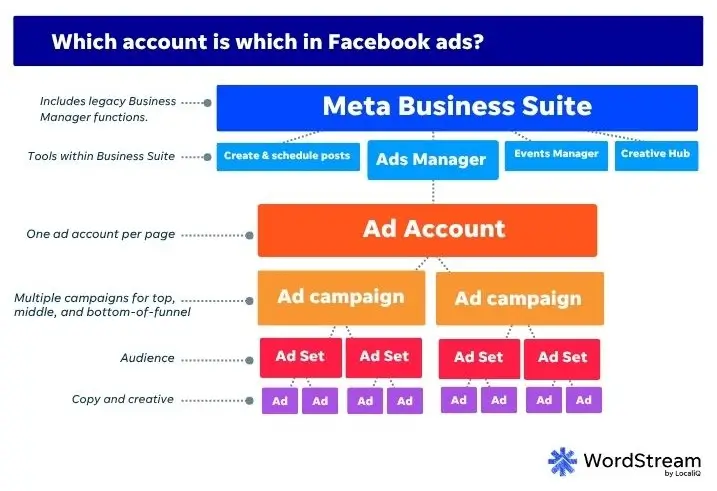
- Meta Business Suite Account: This is the overarching account that houses all your business assets. It’s the first point of entry for managing your presence on Facebook and Instagram.
- Facebook Page: A dedicated presence for your business on Facebook, serving as the identity that will be associated with your ads.
- Ad Account: This is where the actual advertising budget is managed, campaigns are created, and performance is tracked.
- Meta Pixel: A piece of code installed on your website that tracks visitor actions, enabling remarketing and campaign optimization.
- Meta Conversions API: Works in tandem with the Pixel to provide a more robust and reliable data stream, crucial for accurate tracking and attribution in an evolving privacy landscape.
Setting up these components correctly is the first step towards launching successful ad campaigns.
The Step-by-Step Process of Advertising on Facebook
Embarking on Facebook advertising requires a structured approach. Here’s a detailed walkthrough of the essential steps:
1. Establishing Your Meta Business Suite Account
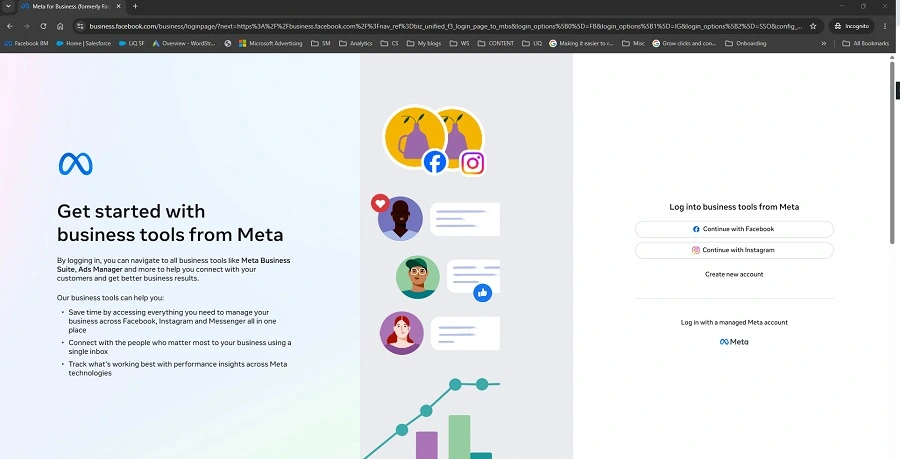
The journey begins by creating a Meta Business Suite account. Navigate to business.facebook.com and initiate the account creation process. You will be prompted to provide your business name, your personal name, and a business email address. Upon email verification, your Meta Business Suite account will be established, granting you access to the platform’s interface.
2. Connecting or Creating Your Facebook Page
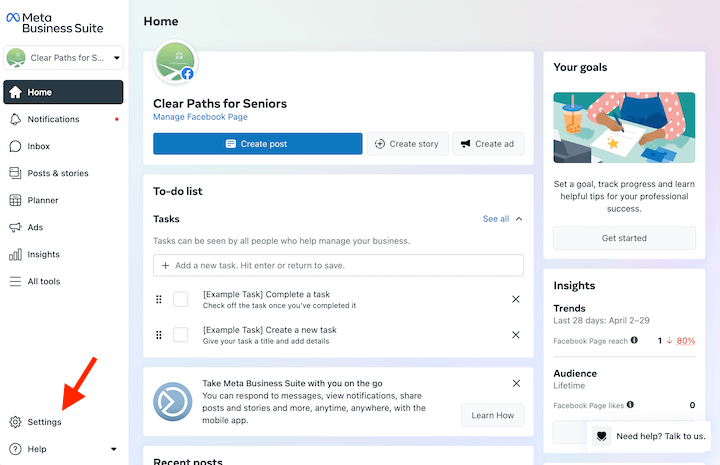
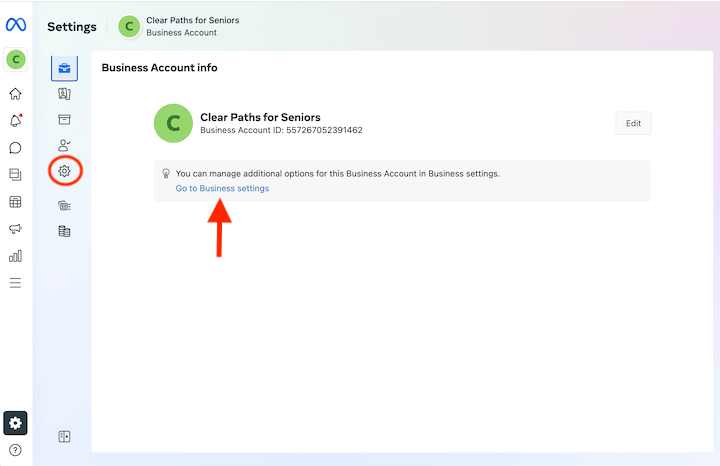
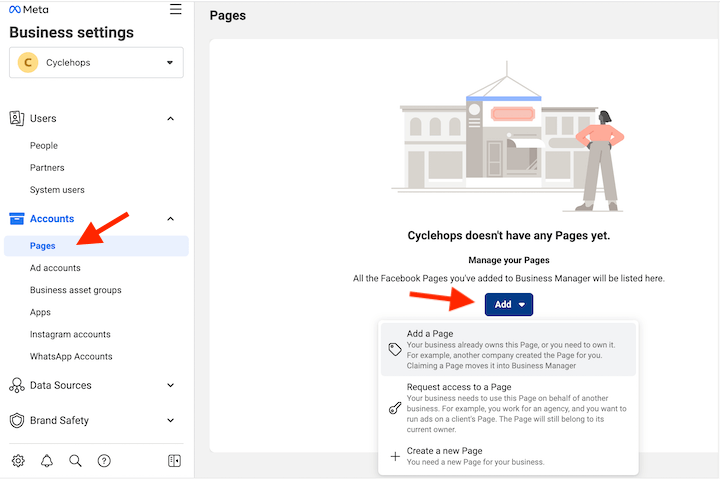
A Facebook Page is indispensable for running ads. Within the Meta Business Suite, locate the “Settings” option, typically found in the bottom-left corner. From there, navigate to “Business Settings” (which might be accessed by clicking a gear icon or a direct prompt). Within Business Settings, select “Pages” and then click “Add.” You have three options: add an existing Page, create a new Page, or request access to a Page if you are managing ads for another entity. While a basic Page can be created quickly, it’s highly recommended to fully develop your Page’s content and branding before launching ads, as users can easily navigate to your Page from your advertisements.
3. Setting Up Your Ad Account
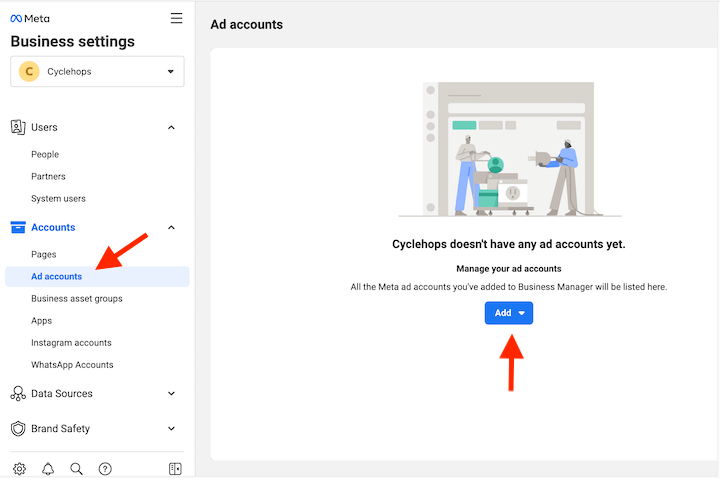
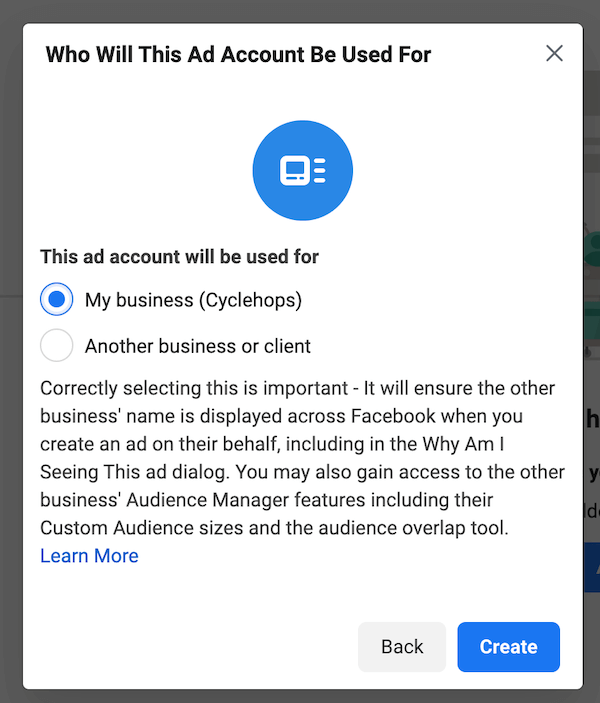
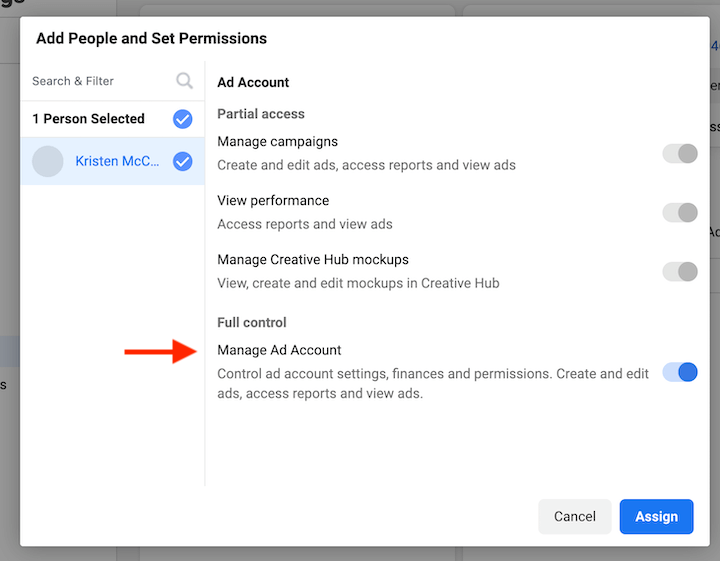
With your Facebook Page established, the next critical step is creating an ad account. Return to the “Business Settings” within Meta Business Suite and select “Ad accounts.” Click “Create” to set up a new ad account. You’ll need to provide an Ad account name, your time zone, and currency. Facebook will then inquire whether this ad account will be used for your own business or for a client. Following this, you’ll assign yourself full administrative control and then proceed to add your payment information. This completes the ad account setup.
4. Implementing the Meta Pixel and Conversions API
While not strictly mandatory for initial campaign launch, installing the Meta Pixel on your website is a foundational element for effective advertising. The Pixel is a snippet of code that tracks user behavior on your site after they click an ad. This data is invaluable for optimizing ad performance, refining targeting, and creating powerful retargeting audiences. For a robust first-party data strategy, setting up the Meta Conversions API alongside the Pixel is highly recommended, as it provides a more comprehensive and reliable view of your data.
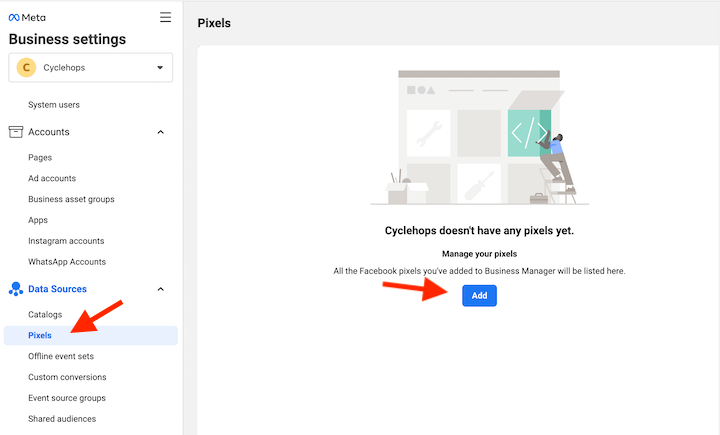
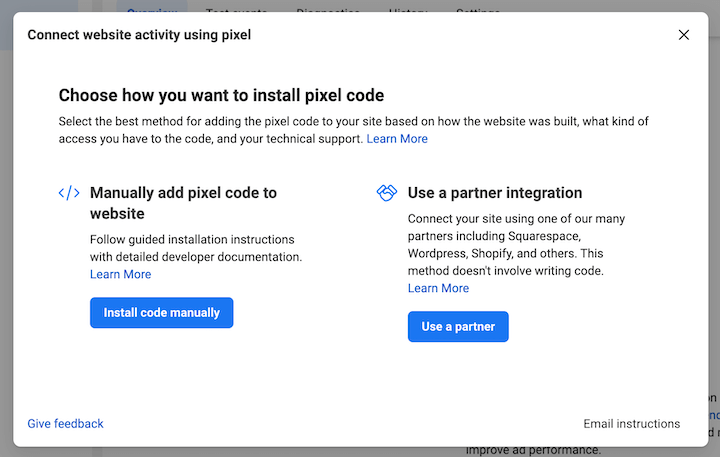
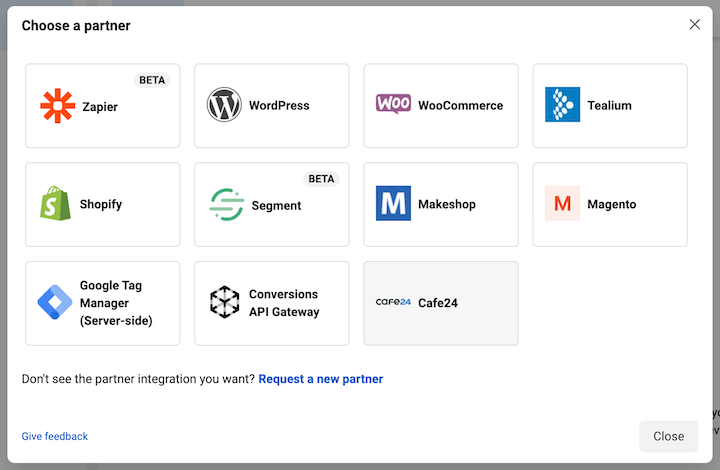
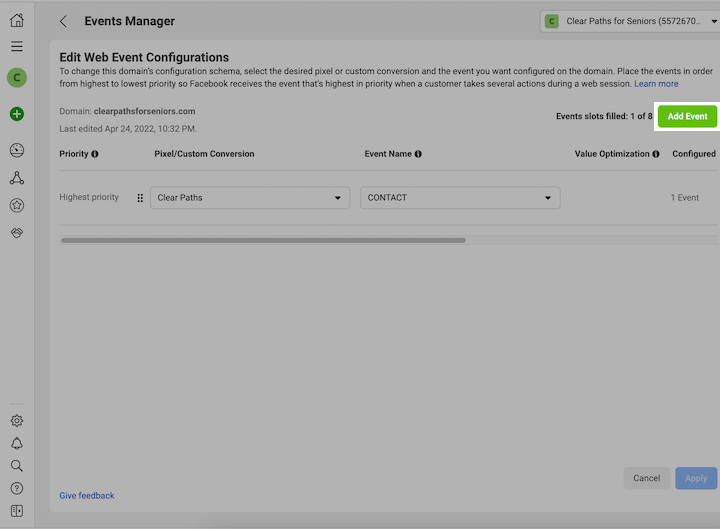
To install the Meta Pixel, navigate to “Data Sources,” select “Pixels,” and click “Add.” Facebook offers two primary installation methods: manual installation via code, or through a partner integration. Partner integrations, such as those with popular website builders and e-commerce platforms, often simplify the process without requiring direct coding. During the Pixel setup, you will also be guided through verifying your domain and configuring your web events, which define the specific actions you want to track (e.g., page views, add to cart, purchases).
5. Launching Your Facebook Ad Campaign
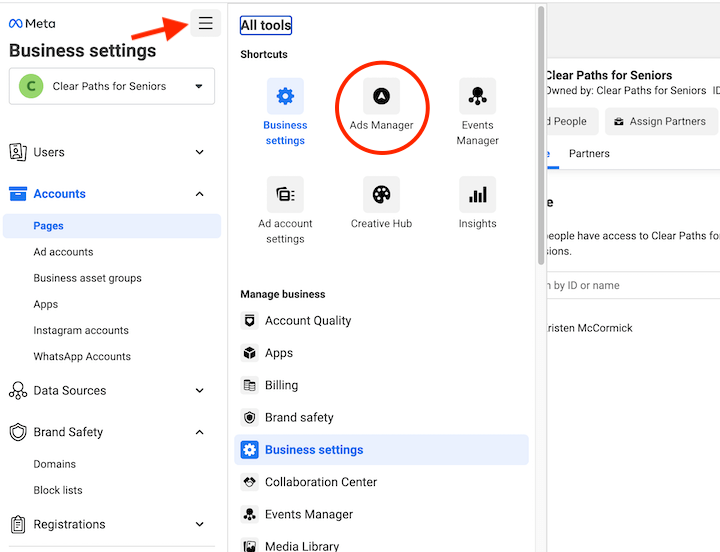
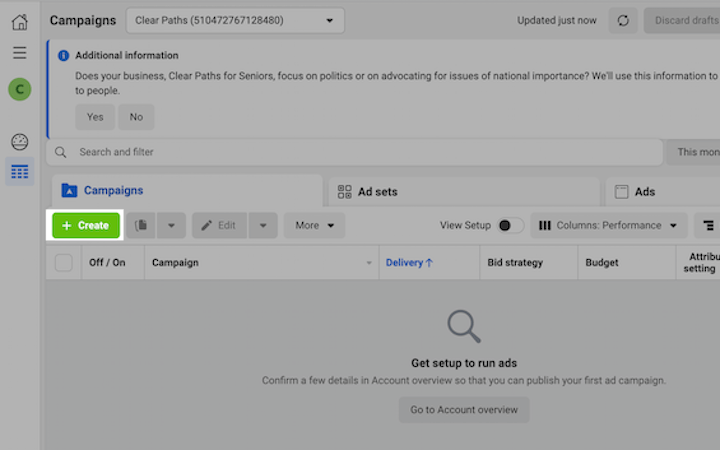
The campaign creation process is initiated through Ads Manager. From the Meta Business Suite, click the “hamburger menu” (all tools) and select “Ads Manager.” On the left-hand side, click “Create” to begin building your campaign.
Campaign Objective Selection
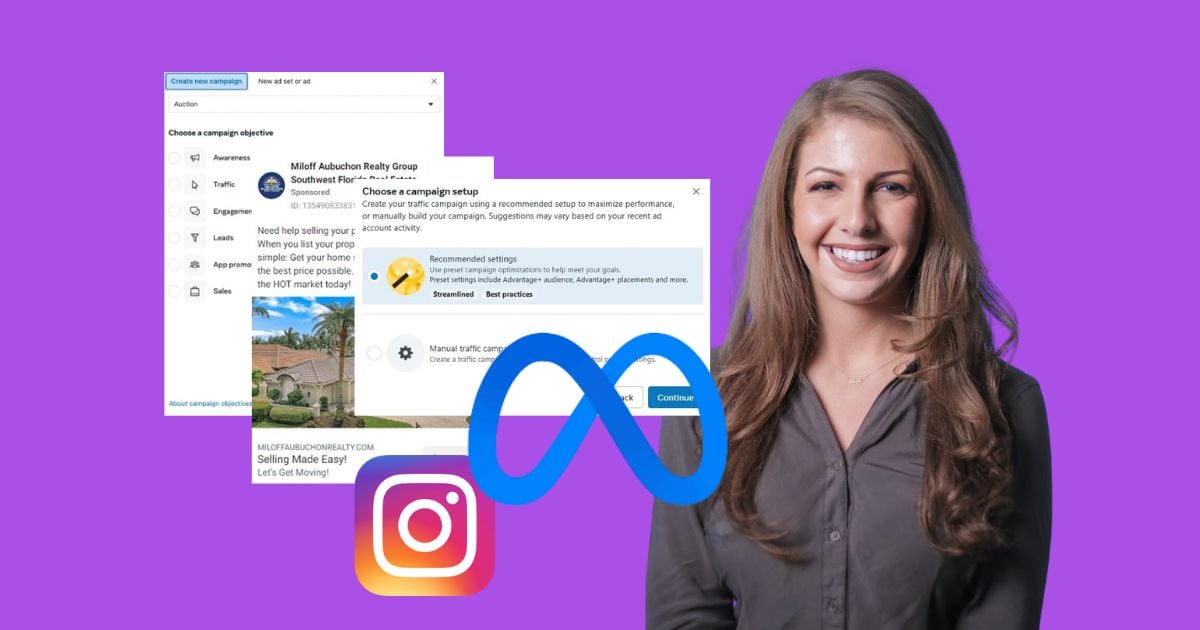
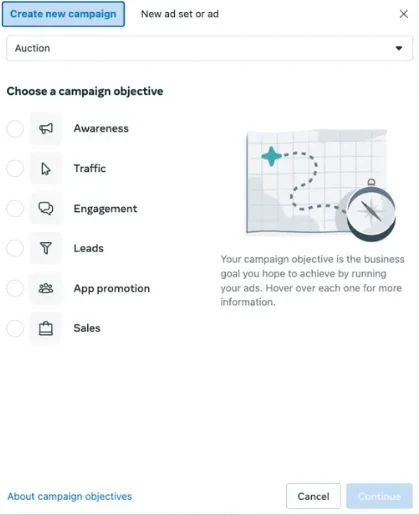
Facebook offers a range of campaign objectives designed to align with specific business goals: Awareness, Traffic, Engagement, Leads, App Promotion, and Sales. The choice of objective is paramount and should directly correlate with your desired outcome. For instance, if your primary goal is to drive website visits, the “Traffic” objective is appropriate. If you aim to generate new customer information, “Leads” is the strategic choice. Developing a comprehensive, full-funnel Facebook ad strategy often involves creating separate campaigns for each stage of the customer journey, utilizing different objectives accordingly.
Campaign Settings: Advantage+ vs. Manual
Upon selecting an objective, you will encounter the choice between “Advantage+” campaign setup and a manual setup. Advantage+ leverages Meta’s AI-powered features to automate various aspects of campaign management, similar to Google Ads’ Smart Campaigns. This can be beneficial for advertisers with limited time or expertise, or for those seeking to explore automated optimization.
Conversely, manual setup provides greater granular control over specific settings, placements, and audience segmentation. This approach is often preferred by experienced advertisers who wish to meticulously test and scale their strategies. The optimal choice depends on your team’s resources, experience, and strategic priorities.
If opting for manual setup, you will configure key campaign-level settings, including budget optimization and campaign spending limits.
6. Defining Your Ad Set
The ad set level is where you refine the specifics of who will see your ads and how they will be delivered.
Budget and Schedule
Here, you’ll determine your budget and the duration of your campaign. You can opt for a “daily budget,” which is spent each day, or a “lifetime budget,” which is spread across the campaign’s duration. Daily budgets are ideal for ongoing campaigns where consistent visibility is key, while lifetime budgets are suitable for campaigns with a fixed end date or when aiming for a specific outcome within a set timeframe. For beginners, starting with a modest daily budget of $5-$10 is often recommended to allow for sufficient data collection for optimization. Ad scheduling can also be configured, allowing ads to run only during specific hours or days, aligning with business operations or audience availability.
Audience Controls
This is a critical juncture where you define your target audience. Facebook’s targeting capabilities are extensive, allowing you to reach users based on:
- Demographics: Age, gender, location, language, education, and more.
- Interests: Hobbies, activities, and pages users have liked.
- Behaviors: Purchase behavior, device usage, and travel patterns.
Facebook offers several audience types:
- Core Audiences: Based on detailed demographic, interest, and behavior targeting.
- Custom Audiences: For remarketing to individuals who have previously interacted with your business (website visitors, app users, customer lists).
- Lookalike Audiences: These are audiences that Facebook identifies as being similar to your existing customers or website visitors, expanding your reach to new, highly relevant prospects.
- Advantage+ Audiences: Meta’s AI-powered audience expansion tool that broadens your reach beyond your specified targeting to find new customers who are likely to convert.
Placement Selection
Placements dictate where your ads will appear across the Facebook family of apps and services, including Facebook, Instagram, Messenger, and Audience Network. You have three options: automatic placements (recommended for beginners), manual placements, and Advantage+ placements. Starting with automatic or Advantage+ placements allows Facebook to test various placements and identify the most effective ones. After an initial learning period, you can switch to manual placements to optimize based on performance data.
7. Crafting Your Ad
This is where your creative vision comes to life.
Ad Creative
The visual component of your ad is its creative. Facebook supports various ad formats, including single image and video ads, carousel ads (showcasing multiple images or videos), and collection ads (immersive formats for mobile). You can create ads by uploading your own designs, using existing posts, or leveraging tools like Facebook’s Creative Hub for mockups.
Ad Copy
The text accompanying your visual is crucial for conveying your message. Ad copy typically includes:
- Primary Text: The main message of your ad, appearing above the creative.
- Headline: A concise, attention-grabbing phrase below the creative.
- Description: Additional details that appear below the headline.
It’s advisable to experiment with different ad copy variations to identify what resonates best with your target audience.
Call to Action (CTA)
Your Call to Action button guides users on the desired next step. Facebook offers a variety of CTA options, such as “Shop Now,” “Learn More,” “Sign Up,” and “Download.” Selecting the most relevant CTA for your offer is essential.
Tracking Confirmation
Ensure your website event tracking is correctly configured to measure the effectiveness of your ads and attribute conversions accurately.
8. Publishing Your Ad
Once all elements are in place, click the “Publish” button. Your ad will then undergo a review process by Meta’s systems to ensure compliance with their advertising policies. This review can take up to 24 hours, after which your ad will enter its “learning period.” During this phase, Facebook’s algorithm gathers performance data to optimize ad delivery and targeting.
Key Strategies for Facebook Advertising Success
To further enhance your Facebook advertising efforts, consider these proven tips:
- Leverage Facebook Lead Ads: These ads are specifically designed to capture leads directly within the Facebook platform, streamlining the process for users and providing valuable contact information for your business.
- Optimize for Smaller Budgets: Success on Facebook advertising is not solely dependent on a large budget. By meticulously optimizing your campaigns, targeting the right audiences, and crafting compelling creatives, you can achieve significant results even with limited spending.
- Maintain Relevance: Social media trends evolve rapidly. Stay abreast of current trends and popular content within your industry to create ads that are timely and resonate with your audience. The Facebook Ad Library is an excellent resource for inspiration and competitive analysis.
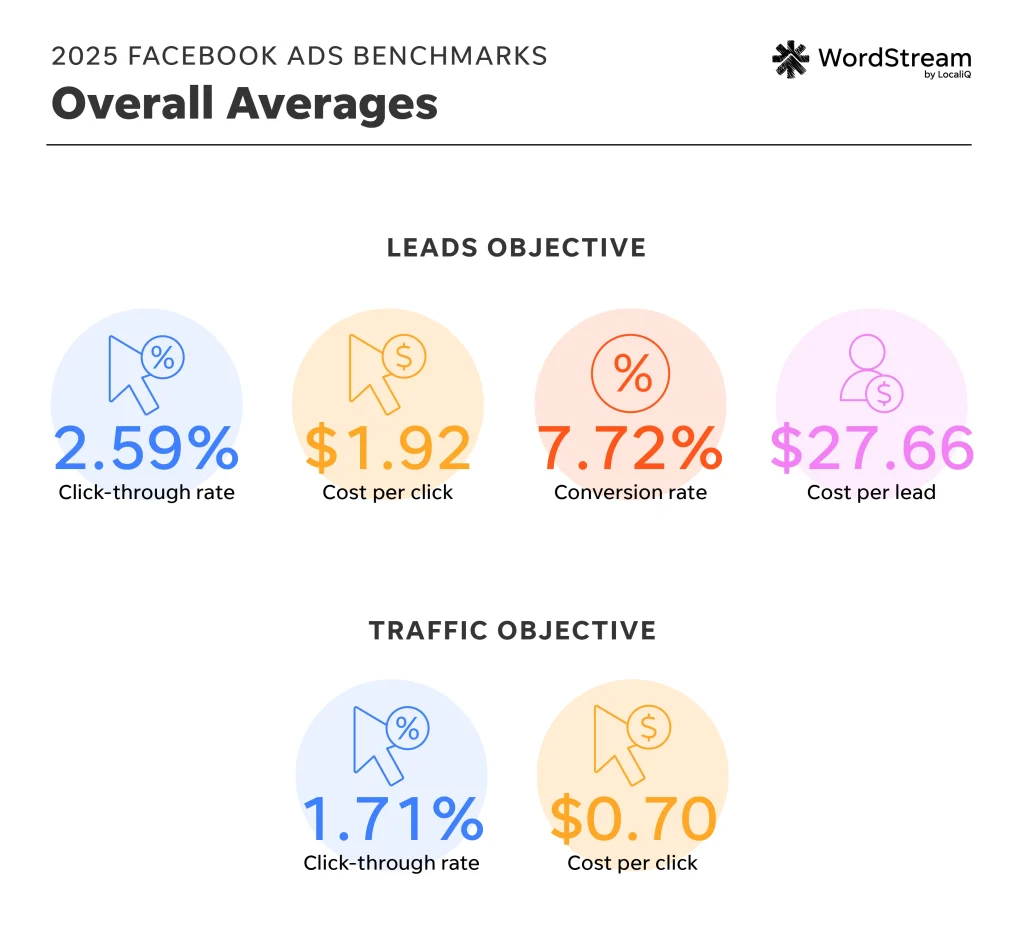
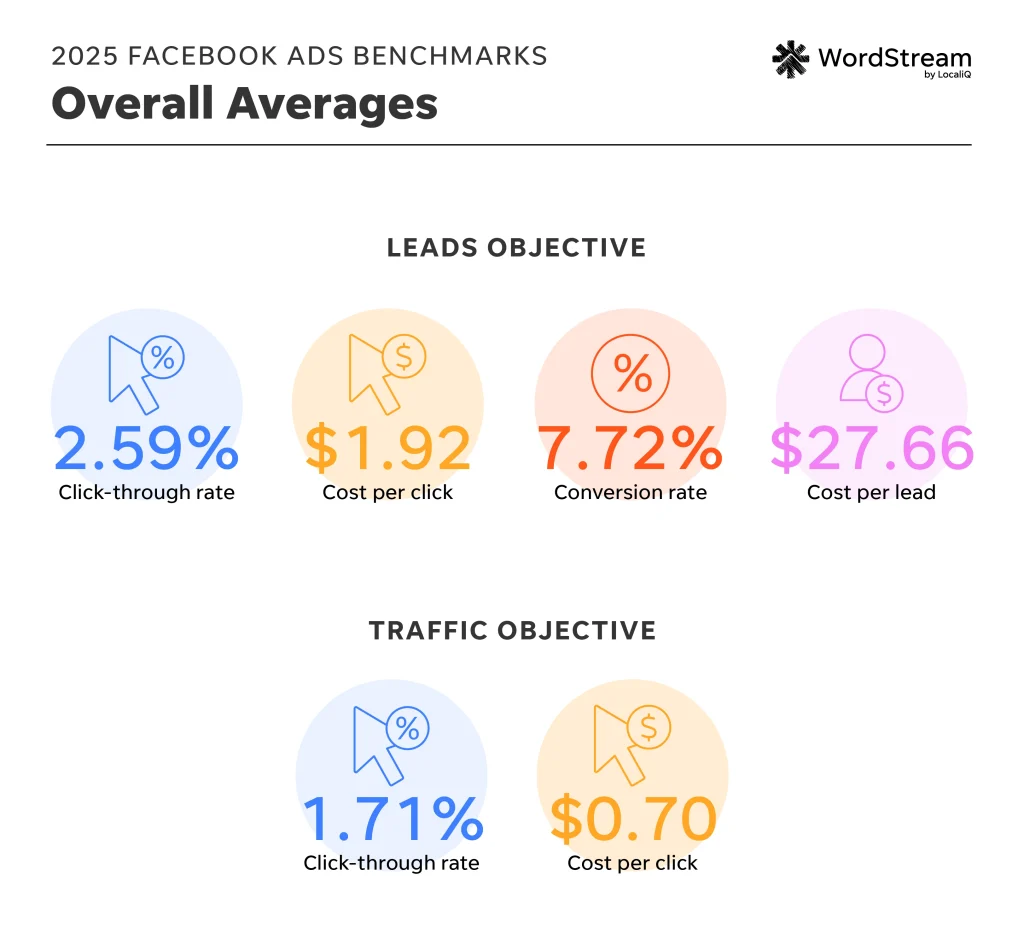
- Benchmark Against Competitors: Utilize industry benchmarks, such as those provided by Wordstream, to understand how your Facebook ad performance (e.g., cost per click, cost per lead) compares to competitors in your sector. This data can inform adjustments to your bidding and budget strategies.
Frequently Asked Questions About Facebook Advertising
How does the Facebook ad auction work?
The Facebook ad auction determines which ads are shown to users. Key factors include your bid, the estimated action rates (likelihood of a user taking a desired action), and ad quality and relevance. Higher relevance and better performance can lead to lower costs.
How much do Facebook ads cost?
The cost of Facebook ads varies widely based on industry, campaign objective, targeting, and competition. Average costs per click can range from $0.25 to $5. Continuous monitoring and optimization are crucial for managing ad spend effectively.
How does Facebook remarketing work?
Facebook remarketing allows you to target users who have previously interacted with your business, whether through your website, app, or Facebook presence. This highly effective strategy re-engages interested users and encourages them to complete a desired action.
How should I structure my account?
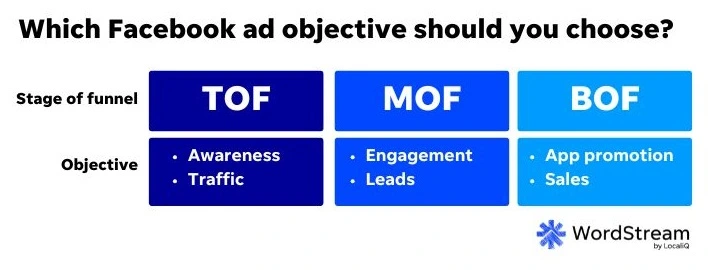
A well-structured Meta Ads account typically mirrors a marketing funnel. Upper-funnel campaigns focus on prospecting and awareness, mid-funnel campaigns target lookalike audiences and broader segments, and lower-funnel campaigns are dedicated to remarketing and driving conversions.
Why aren’t my Facebook ads working?
Several factors can contribute to underperforming ads:
- Poor targeting: Reaching the wrong audience.
- Uncompelling creative: Ads that don’t capture attention or convey value.
- Irrelevant messaging: Copy that doesn’t resonate with the audience.
- Low ad quality: Ads that are flagged for low relevance or poor user experience.
- Ineffective landing page: The destination of your ad does not meet user expectations.
- Insufficient budget: Not enough spend to gather sufficient data for optimization.
By addressing these points and continually refining your strategy, businesses can unlock the immense power of Facebook advertising to achieve their growth objectives.