rifanmuazin
In today’s competitive e-commerce landscape, customer support is no longer an afterthought; it’s a critical differentiator. Businesses of all sizes recognize the imperative of robust support software to track customer inquiries, manage order histories, and ensure swift resolutions. Among the leading contenders in this space, HubSpot Service Hub and Zendesk consistently emerge as frontrunners, each offering distinct strengths tailored to different operational needs. Understanding these nuances is crucial for e-commerce teams seeking to optimize their customer service strategies.
The choice between HubSpot Service Hub and Zendesk hinges on a fundamental question: what specific challenges does your e-commerce operation need to address? For businesses prioritizing a unified platform that seamlessly integrates CRM, marketing, and support, HubSpot Service Hub often presents a more compelling solution. Conversely, organizations focused on high-volume contact centers, with a primary emphasis on efficient ticket management and voice support, may find Zendesk to be the more potent option.
HubSpot’s Evolution: From Inbound Marketing to Comprehensive Customer Experience
HubSpot, once predominantly recognized for its pioneering role in inbound marketing, has significantly expanded its offerings to encompass a holistic customer relationship management ecosystem. The integration of HubSpot CRM with its Service Hub, bolstered by an increasingly sophisticated suite of AI tools, is demonstrably driving substantial results for a diverse range of businesses. A prime example is Liquidity Services, which reportedly achieved a 50% reduction in support costs by consolidating its operations onto HubSpot’s interconnected platform. This success underscores HubSpot’s ability to transform fragmented customer service operations into a cohesive and efficient unit.
Zendesk’s Focus: Streamlining High-Volume Support Operations
Zendesk, on the other hand, has cultivated a reputation as a specialized, robust ticket management system meticulously designed for high-volume service environments. For contact centers or teams perpetually grappling with an ever-growing queue of customer inquiries, Zendesk is engineered to act as a crucial extension of the support staff, providing the tools necessary to manage operational demands effectively. Its architecture is built for speed, predictability, and the relentless pace of intensive customer interaction.
A Comparative Overview of Core Strengths
HubSpot Service Hub’s foundation is deeply rooted in its inbound marketing philosophy, which emphasizes empowering and delighting customers rather than relying on aggressive outbound messaging. This customer-centric ethos naturally extends into its service offerings. The HubSpot CRM, enhanced by its AI capabilities, serves as the central nervous system for all its hubs. For support teams, the Service Hub acts as the primary interface, meticulously linking every touchpoint of the customer journey and facilitating the automation of routine tasks.
The recent integration of advanced AI tools, such as the customer agent, intelligent reply suggestions, and sophisticated routing logic, further amplifies HubSpot’s capabilities. These AI assistants are trained on the vast data within the CRM, ensuring that generated responses and automated actions align seamlessly with a company’s brand voice and existing customer context. This deep integration allows for a more personalized and efficient customer experience.
Zendesk’s primary appeal lies in its capacity to handle sheer volume. Its user interface is deliberately streamlined and efficient, catering to support professionals who spend their days managing and resolving tickets. The Zendesk Suite integrates a broad spectrum of communication channels, including email, chat, SMS, social media, and phone calls. Its voice support capabilities, in particular, are consistently lauded as industry-leading, offering a robust solution for businesses with significant call center operations.
The Critical Differentiator: Problem Identification
Ultimately, the selection between HubSpot and Zendesk boils down to a clear understanding of the problems each platform is best equipped to solve. While both are powerful tools, their underlying design principles and target use cases differ significantly.
HubSpot vs. Zendesk: An In-Depth Feature Analysis
To provide a comprehensive comparison, this analysis will delve into key functional areas, reflecting the critical considerations for e-commerce support teams.
Ease of Use, Onboarding, and Support Accessibility
Both HubSpot and Zendesk are frequently cited for their user-friendliness, a crucial factor for attracting and retaining support staff. Zendesk often feels like a meticulously organized workshop, where every tool is readily accessible and functions with remarkable speed, even under heavy load. Its intuitive design allows new agents to quickly acclimate to the platform, and its mobile application provides robust functionality for on-the-go support, enabling agents to respond, reassign, check customer information, and even handle voice interactions remotely without compromising on the full platform experience. Zendesk’s commitment to accessibility is further demonstrated by its inclusion of all major support channels (email, chat, phone) across all paid plans, ensuring immediate human interaction is always an option.
HubSpot offers a different, yet equally inviting, user experience. While the platform can appear more data-rich due to its integrated nature, it excels in its onboarding process, ensuring new users can become proficient with minimal delay. The learning curve is notably gentle, largely attributable to its consistent underlying logic: a single CRM, a unified timeline, and a singular customer record. However, HubSpot’s support model differs; free users do not receive one-on-one support, and phone support is reserved for higher-tier plans. Despite this, HubSpot Academy provides an extensive library of educational resources, enabling many teams to resolve queries through self-service much faster than they might through direct human assistance.
AI and Automation: HubSpot’s Breeze AI vs. Zendesk’s Service AI
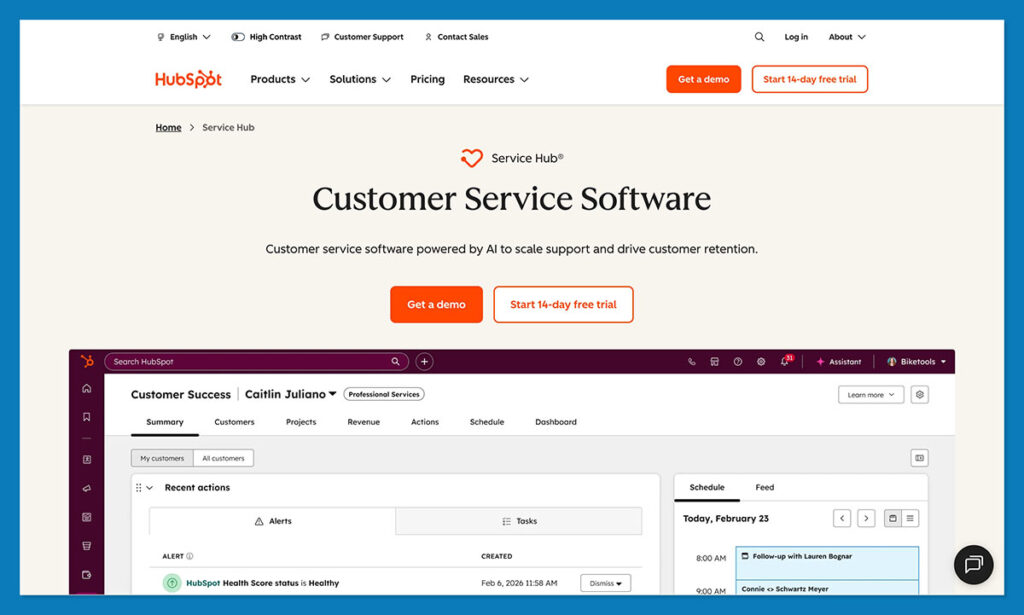
The current landscape of customer support software is heavily influenced by artificial intelligence, and both HubSpot and Zendesk have made substantial investments in this area. HubSpot’s AI offering, codenamed Breeze, is an integrated intelligence system designed to augment the user experience across the entire platform. The Breeze Assistant aids in information retrieval and response generation, while HubSpot Agents, such as the customer agent, are capable of automating end-to-end customer service tasks. HubSpot claims its customer agent can resolve up to 65% of conversations autonomously for many organizations.
Breeze Intelligence, in particular, stands out for its ability to unify and cleanse data, simplify forms, and extract insights that would otherwise require significant manual effort and time. This capability directly translates to a more efficient and data-driven support operation.
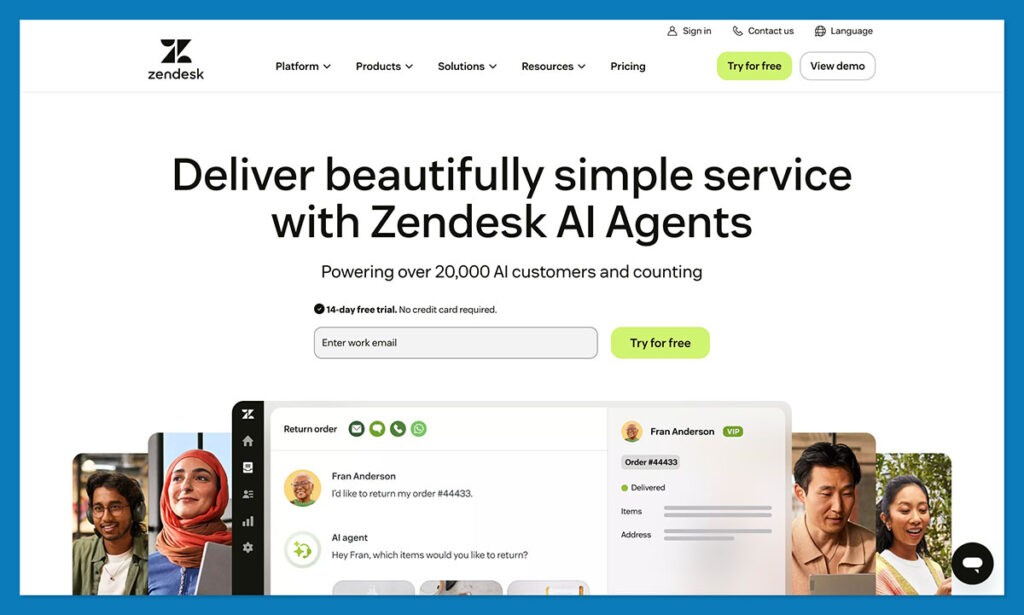
Zendesk’s AI, conversely, is heavily geared towards traditional support functions. Its strengths lie in features like suggested replies, automated ticket triage, call summarization, quality assurance scoring, and workforce management tools designed to keep large teams organized. These features are particularly valuable for organizations managing high volumes of inquiries. Zendesk’s AI excels in optimizing the flow and efficiency of support operations, especially for teams heavily reliant on phone-based interactions.
The fundamental divergence here is Zendesk’s sharp focus on the support queue, while HubSpot addresses the entire customer journey. HubSpot’s AI tools are designed to bridge the gaps between sales, marketing, and customer support, fostering a more interconnected customer experience.
Omnichannel Support and Ticket Management
The concept of a shared inbox, while seemingly basic, becomes transformative when implemented effectively. HubSpot consolidates email, chat, WhatsApp, Messenger, and form submissions into a single, unified view within the CRM. This integration allows agents to seamlessly transition between inquiries related to shipping status and product sizing without losing critical context. The ticket pipeline management within HubSpot is intuitive, enabling teams to efficiently categorize and prioritize issues such as returns, complaints, VIP inquiries, and general questions.
Zendesk boasts a broader array of supported channels, including SMS, in-app messaging, and a wider selection of social media platforms. For e-commerce businesses that leverage a diverse set of communication channels, Zendesk’s workspace can feel more comprehensive. However, a key limitation is that Zendesk’s workspace does not automatically pull full CRM history unless integrated. While channel coverage is extensive, the depth of customer context may require additional configuration or integration efforts to achieve the same level of seamlessness found in HubSpot.
CRM Strength and Product Extras
The distinction in CRM capabilities is perhaps the most significant differentiator between the two platforms. HubSpot’s CRM is the foundational element, and all activities are channeled through it. When a ticket arrives, an agent can immediately access the customer’s complete history, including purchase records, abandoned carts, email engagement, past service interactions, and notes from the sales team. This unified view provides unparalleled context for customer service.
Zendesk Sell, while functional as a CRM, is not as deeply integrated into the support experience. Having originated as Base CRM before its acquisition, it can sometimes feel like a separate entity. Agents requiring customer history often find themselves toggling between the support workspace and the CRM, which can lead to inefficiencies during busy shifts.
In terms of supplementary features, HubSpot offers several advantages that enhance the overall customer experience:
- Customer Success Workspace: Provides tools for proactive customer management and health scoring.
- NPS Tracking: Enables businesses to gauge customer satisfaction and identify areas for improvement.
- Playbooks: Offers guided workflows for support agents, ensuring consistent service delivery.
Zendesk’s additional features are primarily geared towards operational efficiency:
- Workforce Management (WFM): Tools for scheduling, forecasting, and managing support staff.
- Quality Assurance (QA) Tools: Features for monitoring and evaluating agent performance.
- Advanced Reporting Dashboards: Deep dives into contact center metrics and performance indicators.
These features are invaluable for managers focused on optimizing contact center operations and ensuring adherence to service level agreements (SLAs).
Reporting and Analytics
HubSpot’s reporting capabilities are a significant strength due to their integrated nature. Support data is intrinsically linked with sales figures, marketing campaign performance, order histories, and subscription details. This allows businesses to analyze the impact of customer service on revenue and retention, offering a more holistic view than simply tracking response times. The customer success workspace, health scoring, NPS tracking, and playbooks provide smaller teams with sophisticated tools typically found in enterprise-level solutions.
Zendesk’s reporting is more aligned with traditional support analytics. Its “Explore” feature offers robust ticket metrics, queue trend analysis, QA scoring, and staffing insights, which are highly valued by contact center managers. However, without further integrations, Zendesk does not natively connect support data with other aspects of the customer lifecycle.
Pricing and Scalability: A Look at Long-Term Value

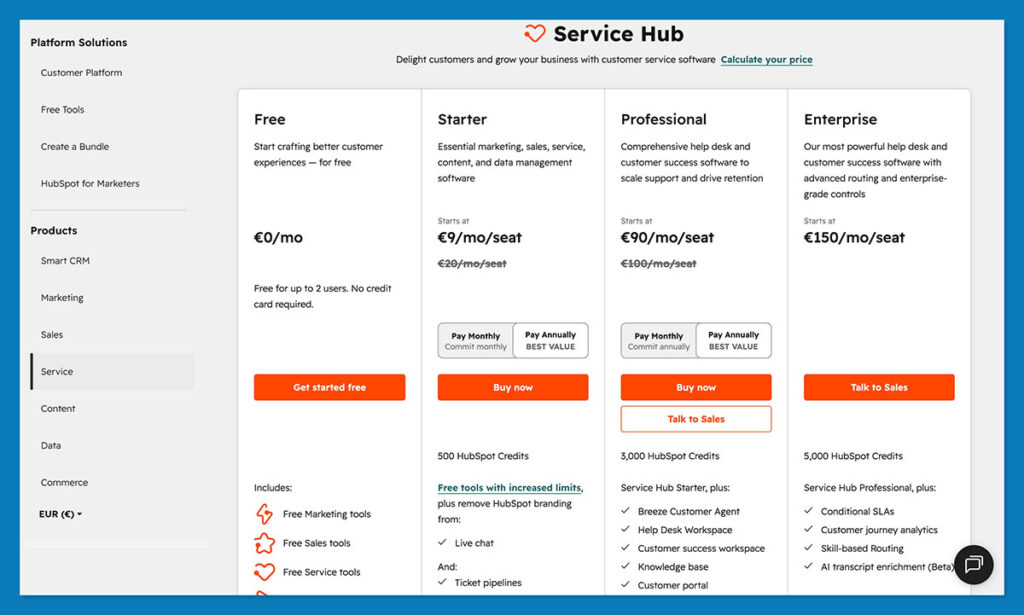
The cost and scalability of a platform are critical considerations for any e-commerce business. HubSpot offers a tiered pricing structure that begins with a genuinely useful free CRM, which includes basic ticketing for up to two users. Paid plans for Service Hub offer increasing levels of functionality:
- Starter: Starts at $15 per seat per month, providing core service tools.
- Professional: Significantly increases features and automation capabilities.
- Enterprise: Offers the most advanced features and customization options.
While there is a noticeable price jump between tiers, HubSpot can often lead to cost savings by consolidating multiple disparate tools into a single platform.
Zendesk does not offer a free tier, with paid plans starting around $19 per month per agent. Its pricing structure features smaller increments between tiers, offering a more gradual increase in features. However, it’s important to note that Zendesk Sell, its CRM component, is often an additional cost, and its integration with the core support suite can require further investment. When combining the costs of Zendesk Suite, Zendesk Sell, and necessary integrations, the total can approach enterprise-level pricing even for mid-sized businesses.
Scalability Considerations
HubSpot scales exceptionally well when built around a unified customer record. Adding users, workflows, and data is a straightforward process, as the CRM is designed for extensibility. The primary scaling challenge can arise from the cumulative cost of multiple hubs at higher tiers.
Zendesk’s scalability is geared towards handling immense ticket volume. Its architecture is robust enough to manage surges in customer inquiries without performance degradation. However, as a business grows beyond pure support volume, the need for integrated sales and marketing tools can expose the limitations of Zendesk’s “service-first” approach. While support teams can scale efficiently, other business functions may continue to rely on disconnected tools, potentially creating operational silos.
Integrations and App Ecosystems
E-commerce support cannot exist in isolation; it requires seamless integration with other business systems. HubSpot’s app ecosystem is robust and particularly well-suited for e-commerce, featuring numerous connectors for platforms like Shopify, WooCommerce, and BigCommerce. Its Data Hub facilitates clean, two-way data synchronization, ensuring that updates in one system are reflected across others. This means a customer updating their email in Shopify will be automatically updated in HubSpot, and vice versa. Crucially, because Service Hub is part of the broader HubSpot CRM, any integration automatically benefits sales, marketing, and support teams simultaneously.
Zendesk also offers a large app marketplace, allowing for extensive customization. However, the quality and depth of integration can vary. While many apps integrate seamlessly with the support workspace, fewer offer the same level of clean integration with Zendesk Sell. Given that Sell operates somewhat independently from Zendesk Suite, integrations can feel fragmented. Many e-commerce businesses using Zendesk often operate with a separate CRM, marketing stack, and custom scripts, a setup that can become fragile during peak operational periods. While connectors are available, some rely on intermediary services like Zapier, which can introduce latency and occasional bugs during high order volumes.
The Verdict: Which Platform Reigns Supreme?
The choice between HubSpot Service Hub and Zendesk is not about identifying a universally “better” platform, but rather the one that best aligns with an organization’s specific needs and strategic objectives.
Zendesk undeniably excels in its core competency: managing high-volume support operations with exceptional efficiency. For contact centers where the primary focus is on ticket resolution speed, SLA adherence, and robust voice support, Zendesk remains a formidable leader. Its streamlined interface and specialized tools are designed to empower teams to navigate the complexities of high-demand customer service.
However, for e-commerce teams that prioritize a holistic view of the customer journey and seek to unify their CRM, marketing, and support functions, HubSpot Service Hub emerges as the more natural and effective solution. Its integrated CRM provides unparalleled context, enabling support agents to understand the complete customer lifecycle. This unified approach fosters better customer relationships, drives retention, and ultimately contributes to increased customer lifetime value. The seamless flow of data across departments, powered by HubSpot’s AI and robust integration capabilities, positions it as a more strategic choice for businesses aiming for comprehensive customer engagement.
For e-commerce businesses considering HubSpot, taking advantage of its free CRM account is a practical first step. By inputting real customer data and submitting test tickets, teams can directly assess how the platform aligns with their operational workflows and strategic goals.
Frequently Asked Questions
How does HubSpot compare to Zendesk in the e-commerce context?
HubSpot integrates support with the entire customer journey, offering deep CRM context. Zendesk focuses primarily on ticket flow and high-volume contact center operations. For businesses valuing contextual customer understanding, HubSpot generally has the advantage. For those prioritizing queue management and intensive voice support, Zendesk often feels more streamlined.
When is HubSpot the ideal choice for e-commerce?
HubSpot is best suited for e-commerce stores where repeat business and a comprehensive customer view are paramount. When support, marketing, and sales teams draw from a single CRM, enabling them to understand the triggers behind customer inquiries, HubSpot shines. It’s particularly beneficial for businesses aiming to boost customer retention and lifetime value.
Is HubSpot cost-effective for small businesses?
Yes, HubSpot offers a free CRM that includes essential contact management and basic ticketing for up to two users, making it accessible for small businesses. Service Hub Starter plans begin at an affordable rate, though costs increase with the Professional and Enterprise tiers, reflecting expanded functionality and advanced features.