rifanmuazin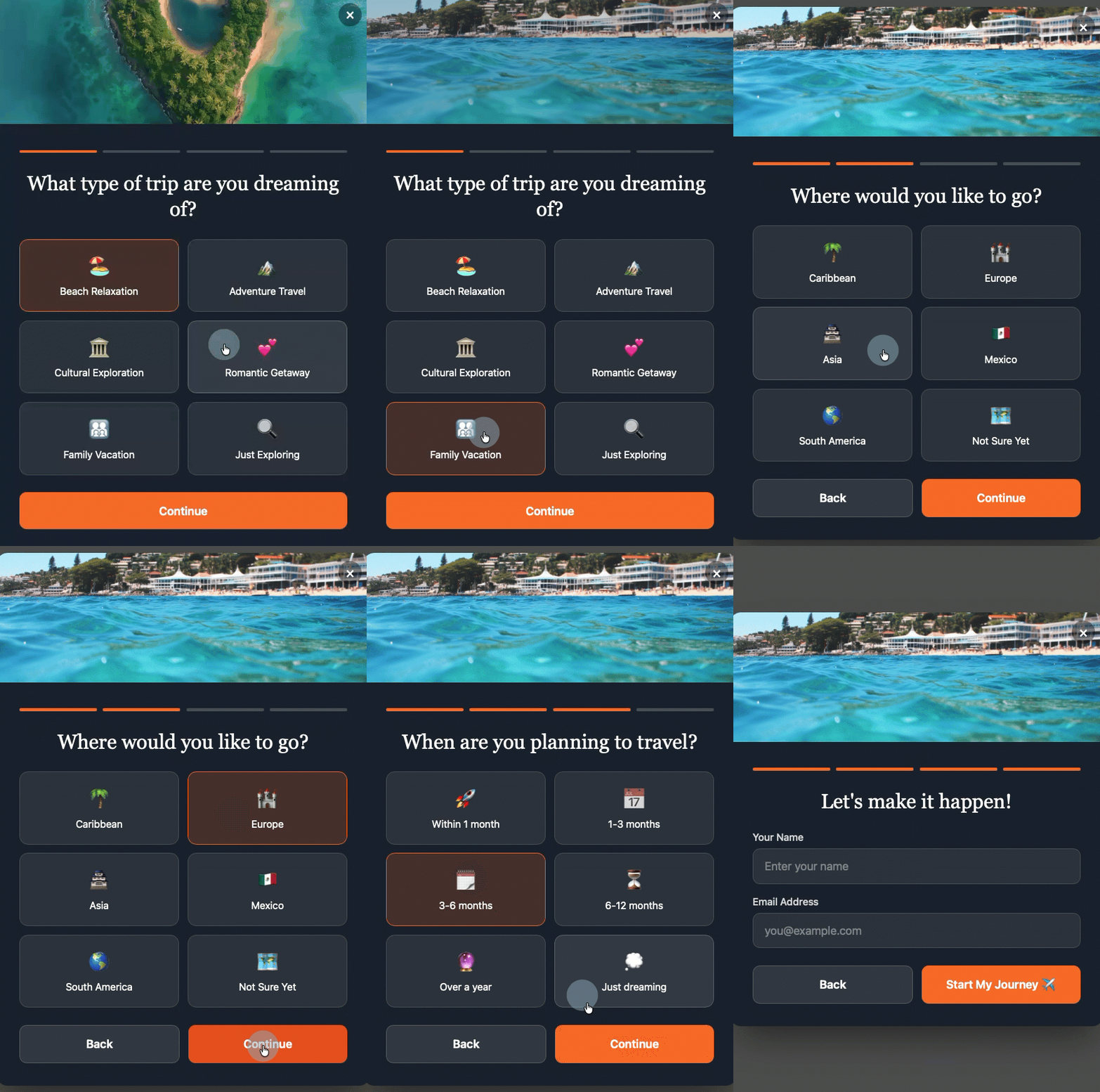
The landscape of digital marketing is constantly evolving, with businesses continually seeking innovative methods to enhance user engagement and improve conversion rates. A significant development in this quest is the widespread adoption of multi-step forms, a design choice proven to dramatically boost signup and lead generation success. Research across various industries consistently demonstrates that multi-step forms convert at approximately three times the rate of their single-page counterparts, marking a critical shift in how online interactions are structured. This efficacy is further amplified by the integration of Artificial Intelligence (AI) into form building, allowing for unprecedented ease of creation, customization, and intelligent subscriber segmentation, fundamentally reshaping email marketing strategies.
The Psychological Edge: Why Multi-Step Forms Outperform Single-Page Designs
The superior performance of multi-step forms is not merely anecdotal; it is deeply rooted in several well-established psychological principles that govern human interaction and decision-making. By breaking down a lengthy data collection process into smaller, manageable screens, these forms mitigate user fatigue and apprehension, fostering a more positive and productive experience.
One primary psychological driver is progressive disclosure. This principle dictates that users should only be shown information or options relevant to their current task, reducing cognitive load and preventing overwhelm. A traditional single-step form, presenting a barrage of five or more fields simultaneously—demanding a name, email, company, and interests all at once—forces an immediate, often daunting, calculation in the user’s mind: “Is this amount of effort worth the perceived reward?” Many visitors, confronted with this upfront commitment, opt to abandon the form rather than proceed. In contrast, a multi-step form that begins with a single, simple question bypasses this mental hurdle. The user sees one clear task, completes it, and then effortlessly moves to the next, making the entire process feel less intrusive and more conversational.
Following the initial interaction, the completion effect comes into play. Once an individual has invested even a minimal amount of effort—by answering the first question and clicking “next”—they are psychologically predisposed to finish the task. Humans inherently dislike incomplete actions; unfinished tasks create a sense of tension and a desire for closure. This innate drive encourages users to persist through subsequent steps, eager to see what comes next and to achieve the satisfaction of completion. This psychological momentum is a powerful force in driving conversions.
Finally, the concept of reduced perceived effort is a straightforward yet potent factor. While the total number of fields or questions remains identical, distributing them across multiple screens dramatically alters how users perceive the workload. Five fields clustered on a single page can feel like a laborious chore, a significant barrier to entry. However, those same five fields, spread across five distinct screens, transform into a series of quick, engaging micro-interactions. The experience shifts from filling out a cumbersome document to participating in a streamlined, almost gamified, dialogue. This psychological reframing significantly lowers the perceived burden, making users more willing to engage and complete the form.
A Historical Perspective on Form Optimization
The evolution of web forms reflects the broader journey of digital user experience design. In the early days of the internet, forms were often rudimentary, long, and poorly optimized, leading to high abandonment rates. Web developers and marketers quickly realized that friction in the signup process was a major impediment to lead generation and customer acquisition. The initial response involved simplifying forms, reducing the number of fields, and improving visual aesthetics.
However, the need for more granular data for segmentation and personalization often clashed with the desire for brevity. This tension spurred the development of multi-step forms in the early 2010s, emerging as a sophisticated solution to collect comprehensive data without overwhelming users. Specialized form builders and plugins began offering multi-step capabilities, but these often required significant manual configuration, coding knowledge, or reliance on rigid templates. The advent of AI in the mid-2020s marked the next frontier, promising to democratize advanced form design and make data-rich, high-converting forms accessible to businesses of all sizes, regardless of technical expertise.
The Dawn of AI-Powered Form Building

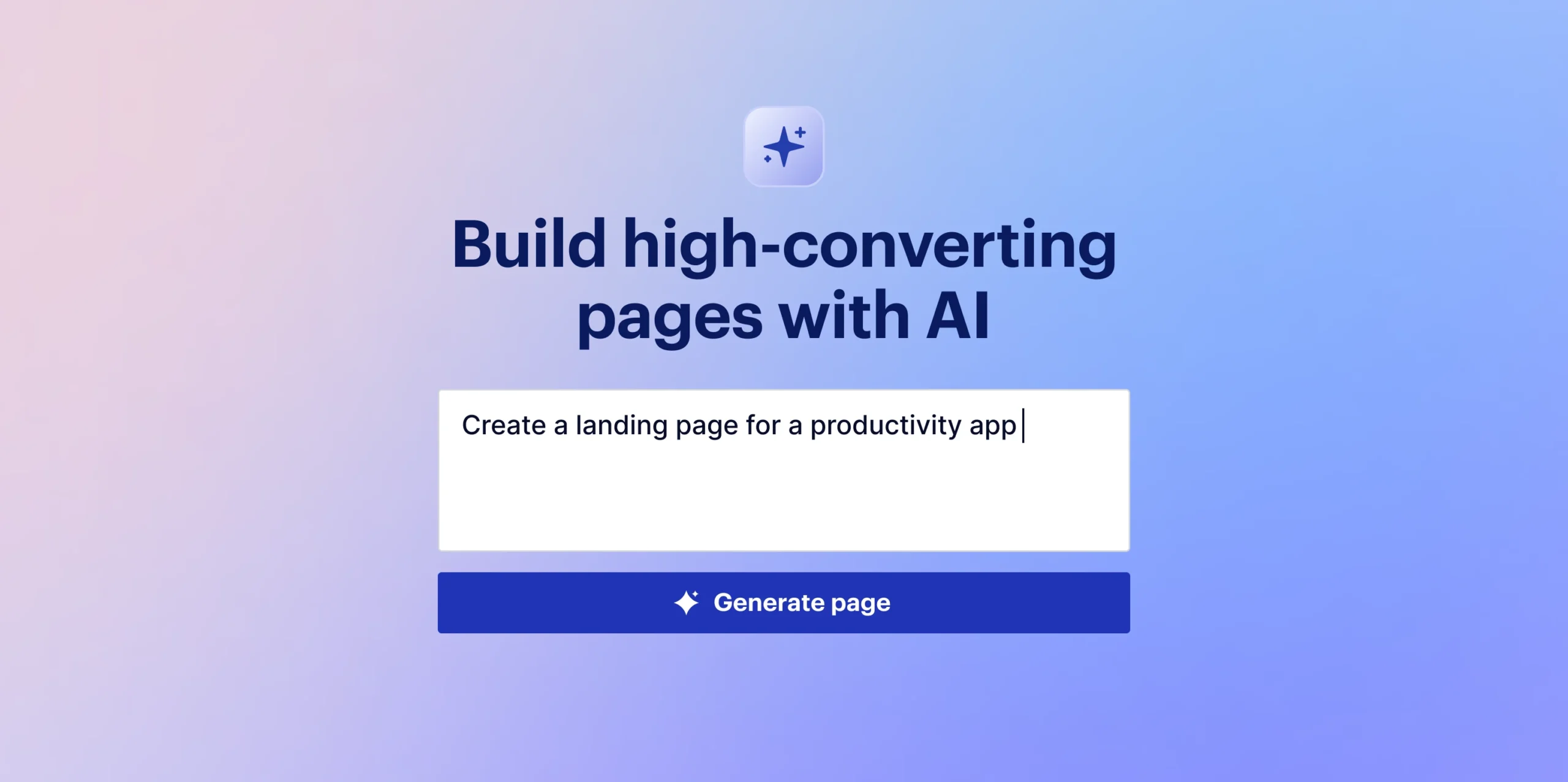
The integration of Artificial Intelligence represents a paradigm shift in form design and implementation. Traditionally, creating a high-converting multi-step form involved meticulous planning, design expertise, and often, coding. Marketers would spend hours conceptualizing flows, designing interfaces, and manually configuring conditional logic for various fields. The introduction of AI-powered form builders, such as the AWeber AI Signup Form Builder, streamlines this entire process, moving beyond the limitations of pre-built templates and manual customization.
These AI tools enable users to generate fully functional, branded multi-step forms from simple conversational prompts. Instead of dragging and dropping elements or sifting through template libraries, a user can articulate their requirements in plain language – for example, “I need a five-question quiz that segments subscribers by interest,” or “Create a three-step qualification form for my consulting business.” The AI then autonomously generates the form, complete with dynamic animations, smooth transitions between steps, and intelligent field mapping. This revolutionary approach significantly reduces the time and technical skill required, allowing businesses to rapidly deploy sophisticated forms that were once the exclusive domain of professional developers and UX designers.
Key Principles of Effective Multi-Step Form Design
While AI simplifies the creation process, adherence to fundamental design principles remains crucial for maximizing the effectiveness of multi-step forms. Breaking these rules can inadvertently reintroduce friction, negating the very benefits of the multi-step approach.
-
Start with the Easiest Question First: The initial interaction is paramount. The opening question should demand virtually no cognitive effort from the user. For instance, offering “What brings you here today?” with three clickable options (e.g., “Exploring,” “Ready to buy,” “Just curious”) is far less intimidating than immediately asking for a full name or email address. This easy first step creates immediate momentum and a sense of accomplishment, encouraging users to continue. It’s about building a psychological bridge, not a barrier.
-
Keep Each Step to One Question: The core advantage of multi-step forms lies in their simplicity per screen. The moment a single step presents multiple fields or complex choices, it begins to resemble a traditional, overwhelming form, thereby losing its psychological advantage. The golden rule is one distinct question or decision point per screen. This singular focus maintains clarity, reduces visual clutter, and reinforces the perception of minimal effort.
-
Show Progress Visually: Transparency is key to user confidence. Implementing a clear progress indicator, such as a simple step counter (“Step 2 of 4”) or a visual progress bar, informs users exactly where they are in the process and how much remains. Uncertainty about the length or complexity of a form can generate anxiety, leading to abandonment. Conversely, clear visual feedback fosters a sense of control and confidence, reassuring users that their investment of time is finite and manageable.
-
Put Name and Email Last, Not First: This is often counterintuitive for marketers accustomed to collecting contact information upfront. However, strategic placement of personal data fields (like name and email) at the end of the form significantly boosts conversion. When visitors engage with interest-based or qualification questions first, they invest effort and build a commitment to the interaction. By the time they reach the name and email fields, they have already psychologically “bought into” the process. Entering personal information then feels like a natural conclusion to their journey rather than an initial barrier, transforming it from a “cost” to a logical next step.
Beyond these structural principles, every question within a multi-step form must serve a clear purpose. Each response should directly map to a tag, custom field, or segment within the email marketing platform. Questions asked merely to fill a step without yielding actionable data are superfluous and should be eliminated. The goal is to either qualify the subscriber or gather information for future personalization. AWeber’s AI Signup Form Builder exemplifies this by allowing users to instruct the AI to tag subscribers based on their answers, automatically creating necessary tags and custom fields within the account, ensuring every data point is immediately useful.
Deep Dive into AI-Driven Personalization and Automation
The true power of AI-generated multi-step forms extends beyond mere conversion rates; it lies in their ability to fuel sophisticated email marketing strategies through automated, hyper-personalized interactions. The data collected at the point of signup becomes the foundation for highly targeted campaigns.

-
Automatic Segmentation: The manual process of segmenting subscribers can be time-consuming and prone to error. With AI-driven multi-step forms, segmentation becomes an inherent part of the signup process. As subscribers complete the form, their answers automatically trigger the application of specific tags or the population of custom fields. For instance, a subscriber indicating interest in “vacation getaways” can be instantly tagged and placed into a dedicated segment, while another expressing interest in “investment property” goes into a different one. This real-time, automated sorting eliminates manual intervention, ensuring that every new subscriber is immediately categorized into the most relevant audience group.
-
Specific Welcome Sequences: Generic welcome emails often fall flat, failing to resonate with the diverse motivations of new subscribers. Multi-step forms enable the activation of highly specific welcome sequences tailored to individual responses. Imagine a qualification quiz where one subscriber selects “I need help right now” and another chooses “just exploring.” The AI can trigger an urgent follow-up sequence for the former, perhaps including direct contact information or immediate solution-oriented content, while the latter receives a nurturing sequence focused on educational content and brand discovery. This immediate relevance significantly increases engagement and the likelihood of future conversions.
-
Dynamic Content Becomes Practical: Modern email platforms, like AWeber, allow for dynamic content blocks—sections within a single email that display different content based on subscriber tags or custom fields. Multi-step forms, by applying precise tags at the moment of signup, make dynamic content immediately actionable. There’s no need for manual tagging or waiting to gather more data about the audience. From the very first email, subscribers can receive content specifically curated to their expressed interests, preferences, or qualification status. This level of personalization, automated from the point of entry, dramatically enhances the user experience and strengthens the subscriber-brand relationship.
Case Study: AWeber’s AI Signup Form Builder in Action
The capabilities of AI in form building are best illustrated through practical examples. On an episode of “The Shift AI Show,” Chris Vasquez, AWeber’s Chief Product Officer, demonstrated the power of their AI Signup Form Builder by creating a multi-step personality quiz live. The prompt was simple, yet the AI generated a complete, interactive quiz where each question resided on its own screen. Users interacted by clicking options rather than typing, reducing friction further. Crucially, after entering their name and email, the form immediately displayed their personality type on the same page, providing instant gratification.
Beyond the seamless user experience, the back-end automation was equally impressive. The form automatically created the necessary custom fields and tags within the AWeber account. When Chris reviewed his subscriber list, the new contact was already tagged “personality: visionary.” This immediate, precise tagging can then trigger a specific welcome automation, drive segmented email sends, or power dynamic content blocks within future communications, ensuring that every interaction is tailored. As Vasquez noted during the demo, “It’s so frictionless for them to give you that info up front. And frankly, it’s kind of fun to interact with, so it almost entices engagement. You don’t have to go, ‘I’ll learn more about them later.’ You can get a lot of that information up front without driving people away.” This statement encapsulates the core value: collecting richer data effortlessly, while simultaneously enhancing the subscriber’s journey.
Addressing Common Concerns and Best Practices
Several questions frequently arise regarding the implementation and optimization of multi-step forms. Understanding these nuances is crucial for maximizing their impact.
-
How many steps should a multi-step form have?
Most effective multi-step forms typically utilize between three and five steps. Fewer than three steps may not provide sufficient progressive disclosure benefit, potentially still feeling like a consolidated form. Conversely, exceeding five steps risks increasing user drop-off, even with the completion effect at play. The optimal number is ultimately dictated by the data requirements; every step must collect information genuinely useful for segmentation, personalization, or qualification. If a step doesn’t serve a clear strategic purpose, it should be removed to maintain efficiency. -
Can I build a multi-step form without knowing how to code?
Absolutely. The advent of AI-powered form builders, like the AWeber AI Signup Form Builder, has entirely democratized this process. Users can describe their desired form—whether it’s a quiz, a qualification flow, or an interest selector—using natural language prompts. The AI then generates the complete, functional form, incorporating transitions, animations, and automatic field mapping. Custom fields and tags are automatically created based on the form’s questions and answer options, eliminating the need for any HTML, CSS, or JavaScript coding. -
How do multi-step forms work with email automation?
The synergy between multi-step forms and email automation is a cornerstone of modern digital marketing. Each answer collected within a multi-step form can be configured to apply a specific tag or populate a custom field within the email platform. These tags, in turn, serve as triggers for automated sequences. For example, a subscriber selecting “I need help right now” on a qualification quiz can be automatically enrolled in an urgent follow-up sequence, while someone choosing “just exploring” enters a more general nurture campaign. This ensures that every automation is contextually relevant from the very first email, optimizing engagement and conversion paths.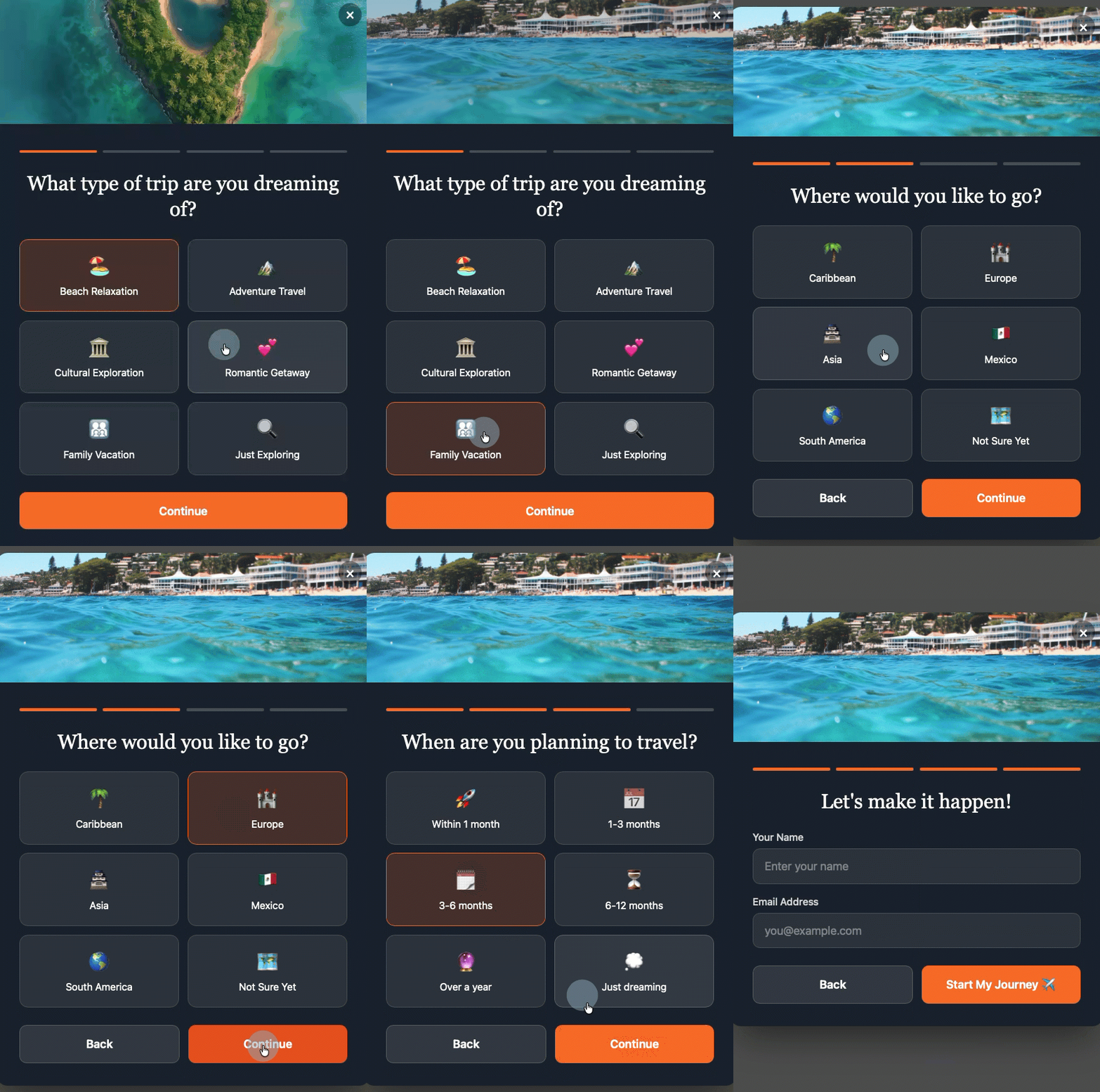
-
How do I create a multi-step form in WordPress?
Integrating AI-generated multi-step forms into a WordPress site is straightforward. Typically, it involves installing a one-time code snippet from the email marketing platform (e.g., AWeber) into the WordPress site’s header, either through theme settings or a plugin like WPCode. Once this initial setup is complete, all form creation, management, and updates are handled directly within the email platform’s dashboard. Any changes made there are automatically published to the WordPress site. The AWeber WordPress plugin is also being developed to directly support the AI Signup Form Builder, further simplifying the installation and management process for WordPress users. -
What are the best multi-step form tools?
For small businesses and individual marketers seeking efficiency and advanced capabilities, tools like the AWeber AI Signup Form Builder stand out. Unlike traditional form builders that necessitate manual configuration of each field, AWeber’s AI builder creates comprehensive multi-step forms from a conversational prompt. This allows users to simply describe their needs in plain language, and the AI generates a functional, branded form complete with step transitions, custom field mapping, and automatic subscriber tagging. Its direct integration with email marketing platforms eliminates the need for third-party integrations, making it a purpose-built solution for enhancing subscriber lists, segments, and automations.
The Strategic Imperative: Beyond Conversion Rates
The benefits of multi-step forms, particularly when powered by AI, extend far beyond merely increasing conversion rates. They fundamentally transform the quality of data collected and the efficacy of subsequent marketing efforts. By gathering richer, more nuanced information at the point of signup, businesses gain an unparalleled understanding of their audience’s motivations, preferences, and needs. This superior data quality enables marketers to craft highly relevant, personalized communications from day one, fostering deeper customer relationships and increasing lifetime value.
For small businesses and entrepreneurs, AI-powered multi-step forms democratize access to sophisticated marketing tools that were once exclusive to large enterprises with dedicated development teams. This levels the playing field, allowing them to compete more effectively by implementing advanced personalization strategies with minimal effort and technical expertise. The strategic imperative is clear: in an increasingly competitive digital landscape, leveraging tools that enhance both conversion and data quality is no longer a luxury but a necessity for sustainable growth.
The Future of Form Design: A Glimpse Ahead
The evolution of AI in form building is just beginning. Future iterations may include even more adaptive forms that adjust questions based on real-time user behavior, deeper integration with CRM systems for a unified customer view, and perhaps even voice-activated form completion. The trajectory is towards increasingly intelligent, intuitive, and seamlessly integrated user experiences that make data collection an engaging, almost invisible, part of the customer journey.
In conclusion, multi-step forms have proven their value by significantly outperforming single-page forms in conversion rates, driven by sound psychological principles. The integration of Artificial Intelligence into form builders marks a pivotal advancement, making these powerful tools more accessible and effective than ever before. By streamlining design, automating segmentation, and enabling hyper-personalization, AI-powered multi-step forms are not just enhancing email marketing; they are redefining how businesses connect with their audience, collect valuable data, and ultimately, drive growth in the digital age.