Azzam Bilal Chamdy
In a significant clarification for webmasters and search engine optimization (SEO) professionals, Google Search has recently updated its official favicon documentation to explicitly state that Googlebot must be able to follow any redirects from a website’s homepage to the page where the favicon is specified. This seemingly minor adjustment to the guidelines underscores Google’s ongoing commitment to precise crawling instructions and the seamless rendering of search results, ensuring a consistent user experience across its vast ecosystem. The updated directive further emphasizes that these crucial URLs, including the favicon file itself, must not be obstructed by robots.txt directives or any other blocking mechanisms, reinforcing fundamental principles of crawlability.
The Core Update: A Shift Towards Explicit Clarity
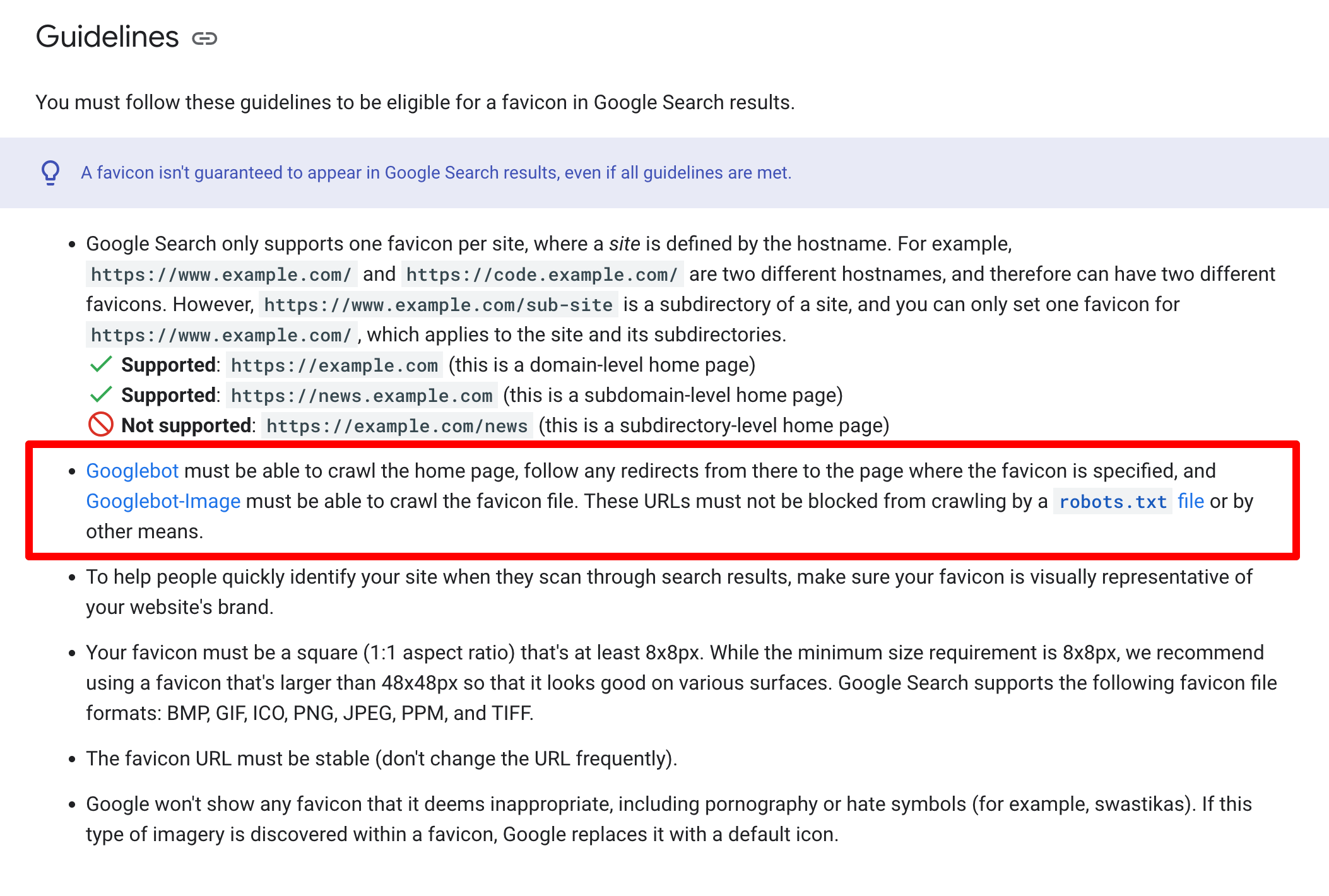
The change in Google’s documentation, specifically within the "Define a favicon to show in search results" guide, pinpoints a crucial aspect of how Googlebot interacts with site assets. Previously, the guideline stated, "Googlebot-Image must be able to crawl the favicon file and Googlebot must be able to crawl the home page; they cannot be blocked for crawling." While this instruction broadly covered the necessities, it lacked specificity regarding intermediate steps, particularly redirects.
The revised language now provides a more granular and unambiguous directive: "Googlebot must be able to crawl the home page, follow any redirects from there to the page where the favicon is specified, and Googlebot-Image must be able to crawl the favicon file. These URLs must not be blocked from crawling by a robots.txt file or by other means."
This modification is not merely a semantic tweak but a critical clarification that addresses potential points of failure in the favicon discovery process. It ensures that even complex site architectures, which often employ redirects for various reasons—such as enforcing www or https versions, handling legacy URLs, or routing internal requests—do not inadvertently hinder Google’s ability to locate and display the correct favicon.
Understanding Favicons: A Small Icon with Big Impact
Favicons, short for "favorite icons," are small, often 16×16 or 32×32 pixel images that serve as a brand’s visual identifier in various digital interfaces. Their history dates back to 1999 with Internet Explorer 5, where they were first used to denote bookmarked pages. Over the years, their utility expanded significantly. Today, favicons appear in:
- Browser tabs: Providing quick visual cues for open websites.
- Bookmarks and favorites lists: Helping users identify saved pages at a glance.
- Browser history: Making navigation through past visited sites easier.
- Mobile device home screens: When a website is added as a shortcut.
- Google Search results: Displayed next to the organic search snippets, enhancing brand recognition and user experience (UX).
For webmasters, a correctly implemented favicon is more than just an aesthetic detail; it’s a vital component of brand consistency and user trust. In search results, a recognizable favicon can subtly influence click-through rates (CTRs) by making a listing stand out and appear more authoritative and professional. Conversely, a missing or broken favicon can make a site appear less polished or even untrustworthy, potentially deterring users. Google’s commitment to ensuring these icons are correctly displayed underscores their perceived importance in the overall search experience.
Googlebot’s Role and the Intricacies of Crawling
Googlebot is Google’s primary web crawler, responsible for discovering and indexing the vast expanse of the internet. It operates continuously, following links from page to page, reading sitemaps, and periodically re-crawling known URLs to detect updates. There are different types of Googlebots, each with specific functions. For instance, Googlebot-Image is specialized in crawling image files, including favicons, while the main Googlebot handles general web pages.
The process of crawling is highly dependent on a site’s structure and configuration. Any barrier to Googlebot’s access can prevent content from being indexed or, in this case, prevent essential site assets like favicons from being discovered. Redirects are a common and necessary part of web management, used to:
- Consolidate URLs: Directing users and search engines from old or multiple URLs to a single canonical version (e.g.,
http://example.comtohttps://www.example.com). - Handle site migrations: Seamlessly moving content to new domains or subdomains.
- Fix broken links: Guiding users from outdated links to current, relevant pages.
- Enforce preferred URL structures: Ensuring consistency in how URLs are accessed.
However, redirects can also introduce complexities. A poorly implemented redirect chain—one that is too long, contains loops, or points to a non-existent page—can confuse crawlers and waste "crawl budget," the number of URLs Googlebot can and wants to crawl on a site within a given timeframe. More critically, if a redirect in the path to the favicon’s declaration is broken or blocked, Googlebot will fail to retrieve the favicon.
The updated documentation specifically highlights the need for Googlebot to follow redirects from the homepage to the page where the favicon is specified. This is crucial because many sites declare their favicon in the <head> section of their HTML, and if the homepage itself redirects (e.g., from a non-secure HTTP version to an HTTPS version), Googlebot needs to successfully navigate that redirect before it can even parse the HTML to find the favicon link.
A Brief Timeline of Google’s Favicon Guidelines and Crawling Directives
Google first introduced the ability for webmasters to define favicons for search results in 2019, recognizing their value in enhancing visual identity within search listings. At that time, the initial guidelines focused on technical specifications (size, format, placement) and the basic requirement for Googlebot to crawl the favicon file and the homepage.
Over the years, Google has consistently refined its guidelines for various aspects of website crawling and indexing. This continuous refinement reflects the evolving complexity of the web and Google’s efforts to provide clearer, more actionable advice to webmasters. Previous clarifications have often addressed common pitfalls or ambiguities in how sites are structured, ranging from JavaScript rendering instructions to the handling of canonical tags.
This particular update concerning redirects fits into a broader pattern of Google moving towards more explicit instructions to reduce ambiguity. The web is dynamic, and best practices evolve. What might have been an implicit understanding for experienced SEOs is now an explicit requirement, signaling Google’s commitment to reducing inconsistencies in how site assets are processed.
Implications for Webmasters and SEO Practitioners
The updated favicon documentation carries several important implications for webmasters and SEO professionals:
- Mandatory Audit of Redirect Chains: Site owners must now proactively audit any redirect chains originating from their homepage. If the homepage redirects, the entire path to the favicon’s declaration (
<link rel="icon">) and the favicon file itself (.ico,.png,.svg) must be transparent and crawlable for Googlebot. This includes checking for 301 (permanent) and 302 (temporary) redirects. While 301s are generally preferred for passing link equity, any redirect in the chain must function correctly. robots.txtVigilance: The explicit mention ofrobots.txtblocking is a reminder that webmasters often inadvertently block critical resources. It is common to userobots.txtto prevent crawlers from accessing certain directories or files (e.g., staging environments, admin panels). However, if the directory containing the favicon, or the HTML file declaring it, is blocked, Googlebot will be unable to retrieve the icon. Tools like Google Search Console’srobots.txtTester can be invaluable here.- Noindex Directives and Other Blocking Means: Beyond
robots.txt, other "means" of blocking includenoindexmeta tags or HTTP headers, which tell search engines not to index a page. While less common for favicons directly, if the page declaring the favicon were somehow blocked from indexing, it could indirectly affect the favicon’s discovery, as Googlebot might not fully process anoindexedpage for all its assets. HTTP authentication or server-side blocking could also be issues. - Consistency in Favicon Implementation: This update reinforces the need for consistent and standard favicon implementation. The
<link rel="icon" type="image/x-icon" href="/favicon.ico">tag should be placed within the<head>section of the homepage’s HTML. Ensure thehrefattribute points to the correct, accessible path. - Enhanced User Experience Focus: Google’s emphasis on favicons reflects its broader focus on user experience. A site with a broken favicon appears less professional, potentially impacting user perception even before they click. Ensuring the favicon loads correctly contributes to a polished, trustworthy presence in search results.
- Crawl Budget Efficiency: While unlikely to significantly impact crawl budget on its own, ensuring smooth crawling for favicons is part of a larger strategy for efficient crawl budget management. Every unnecessary redirect or blocked resource consumes some portion of the crawl budget.
Why This Clarification Matters: Google’s Perspective and Consistency
From Google’s perspective, this clarification serves several purposes:
- Standardization: It helps standardize the way favicons are discovered and displayed, reducing inconsistencies that might arise from varying site configurations.
- Reduced Support Load: Clearer documentation can reduce the number of queries and issues reported by webmasters experiencing favicon display problems.
- Improved Search Result Quality: By ensuring more sites display their favicons correctly, Google maintains a cleaner, more visually consistent search results page, benefiting users.
- Addressing Common Issues: The update likely stems from Google observing common issues where favicons were not being picked up due to redirect complexities. By explicitly stating the requirement, Google aims to guide webmasters away from these common pitfalls.
While not a new "rule" in the sense of fundamentally altering how Googlebot operates, it is a crucial clarification that elevates an often-overlooked detail to a prominent requirement. It implies that if your favicon isn’t showing, checking your homepage’s redirect path should be high on your troubleshooting list.
Ensuring Compliance: Practical Steps for Webmasters
To ensure your website complies with the updated guidelines and that your favicon appears correctly in Google Search results, consider the following practical steps:
- Check Your Homepage’s Redirects:
- Access your homepage directly using its root URL (e.g.,
example.com). - Use browser developer tools (Network tab) or an online HTTP header checker to observe if there are any 301 or 302 redirects.
- Trace the entire redirect chain. For instance,
http://example.commight redirect tohttps://example.com, which then redirects tohttps://www.example.com. All these steps must be clear for Googlebot.
- Access your homepage directly using its root URL (e.g.,
- Verify Favicon Declaration:
- Ensure your favicon is declared in the
<head>section of your HTML using the<link rel="icon" ...>tag. - The
hrefattribute must point to the correct, publicly accessible path of your favicon file.
- Ensure your favicon is declared in the
- Test Favicon Accessibility:
- Attempt to access your favicon file directly in a browser (e.g.,
https://www.example.com/favicon.ico). It should load without errors. - Use Google Search Console’s "URL Inspection Tool" for your homepage. Check the "Crawled page" details to see if Googlebot encountered any issues during the crawl, particularly related to resources. While it might not explicitly flag favicon issues, it can reveal general crawlability problems.
- Utilize the
robots.txtTester in Google Search Console to confirm that neither your favicon file nor the page declaring it is disallowed.
- Attempt to access your favicon file directly in a browser (e.g.,
- Favicon File Best Practices:
- Use a supported format:
.ico,.png,.gif,.jpg,.svg..icois widely supported. - Ensure appropriate sizing: Google recommends multiples of 48px square (e.g., 48x48px, 96x96px, 144x144px). The file should be precisely 16x16px if using
.ico. - Keep the favicon visually appropriate: It should be a clear representation of your brand and not contain offensive content.
- Use a supported format:
- Regular Monitoring: Periodically check your site’s appearance in Google Search results to ensure your favicon is displayed as expected. Any changes to your site’s structure, hosting, or redirect setup could inadvertently affect favicon crawlability.
Broader SEO Context: The Importance of Crawlability for All Assets
This favicon update serves as a powerful reminder of a fundamental SEO principle: crawlability is paramount, not just for primary content, but for all assets that contribute to a website’s presentation and user experience. Just as Googlebot needs to access CSS and JavaScript files to fully render a page, it also needs unimpeded access to elements like favicons.
Ignoring these smaller details can lead to a less-than-optimal presence in search results, impacting brand perception and potentially click-through rates. In an increasingly competitive digital landscape, every element that contributes to a positive user experience and strong brand identity in search results becomes a differentiator.
The SEO community, while often interpreting such updates as clarifications of existing best practices, generally welcomes explicit guidelines. They remove ambiguity and provide concrete actions for webmasters to ensure their sites are fully optimized for Google Search. This particular update regarding favicon redirects solidifies the expectation that a website’s entire digital footprint, from its core content to its smallest visual identifiers, must be fully accessible and understandable to search engine crawlers.
Conclusion
Google’s updated favicon documentation, mandating that Googlebot follow redirects from the homepage to the favicon’s specified location and that no related URLs be blocked, is a testament to the search giant’s continuous effort to refine its crawling instructions. While appearing as a technical detail, its implications are far-reaching, emphasizing the importance of meticulous site configuration, efficient redirect management, and comprehensive crawlability. For webmasters, this serves as a critical prompt to review their site’s architecture, ensuring that every element, however small, contributes to a seamless and professional presence in Google Search results. Prioritizing these foundational SEO elements is key to maintaining optimal visibility and delivering a consistent brand experience to users worldwide.


 Pevita Pearce
 Nila Kartika Wati