In the dynamic landscape of digital marketing, the newsletter signup form remains a critical conduit, serving as the singular point of entry between a website visitor and an organization’s invaluable email list. This seemingly simple digital mechanism is responsible for collecting subscriber information, seamlessly integrating it into an email platform, and thus enabling the commencement of targeted communication. However, a prevalent oversight among many small businesses is the tendency to deploy a basic form and subsequently disregard its strategic potential. This passive approach often results in forms that demand excessive information, fail to adequately articulate value, and are positioned in suboptimal locations, cumulatively creating significant friction that deters potential subscribers before they ever receive their inaugural email. Rectifying these common deficiencies is paramount for fostering robust list growth and maximizing engagement.
The Foundation of Conversion: Streamlining Form Fields
The bedrock of an effective newsletter signup form lies in its simplicity. Expert consensus dictates starting with the absolute minimum: an email address field complemented by a clear subscribe button. This minimalist approach is not arbitrary; every additional field introduced into a form incrementally increases friction, a known deterrent to conversion. For the vast majority of small business newsletters, an email address is the sole piece of data genuinely required to deliver consistent value and initiate the subscriber relationship.
When to Consider Additional Fields:
While minimalism is key, there are specific scenarios where an additional field can be justified. A first name field, for instance, earns its inclusion only when there is a deliberate strategy to leverage personalization within the newsletter content. Addressing a subscriber by their name, such as “Hey Sean” instead of a generic “Hey there,” has been empirically shown to enhance open rates and foster a stronger sense of connection. However, this benefit materializes exclusively if the email content actively utilizes this merge tag. If there are no plans to integrate the subscriber’s name into email communications, omitting this field is a strategic decision, as one fewer field translates to one less potential reason for a visitor to abandon the signup process. Studies by marketing analytics firms consistently show that reducing the number of form fields from five to three can increase conversion rates by as much as 25%.
Fields to Avoid on Newsletter Forms:
Certain data points are almost universally inappropriate for a standard newsletter signup form. These include phone numbers, company names, job titles, and physical addresses. Such fields are typically reserved for more intensive lead capture forms associated with gated content, sales inquiries, or detailed customer profiling. Their presence on a newsletter form sends an implicit signal that the business is seeking significant information from the subscriber before any value has been reciprocated. Furthermore, collecting data that will not be actively utilized in the newsletter strategy is an inefficient practice and can raise privacy concerns. The principle here is clear: if the collected data does not directly contribute to delivering value or enhancing the subscriber’s experience, it should not be requested.
Strategic Placement: Maximizing Visibility and Impact
The efficacy of even a perfectly designed signup form is severely hampered if it remains unseen. Placement is a critical determinant of visibility and, consequently, conversion potential. The most effective placements vary based on the website’s purpose and content, but each offers distinct advantages for small businesses aiming to grow their email lists.
Above the Fold on the Homepage:
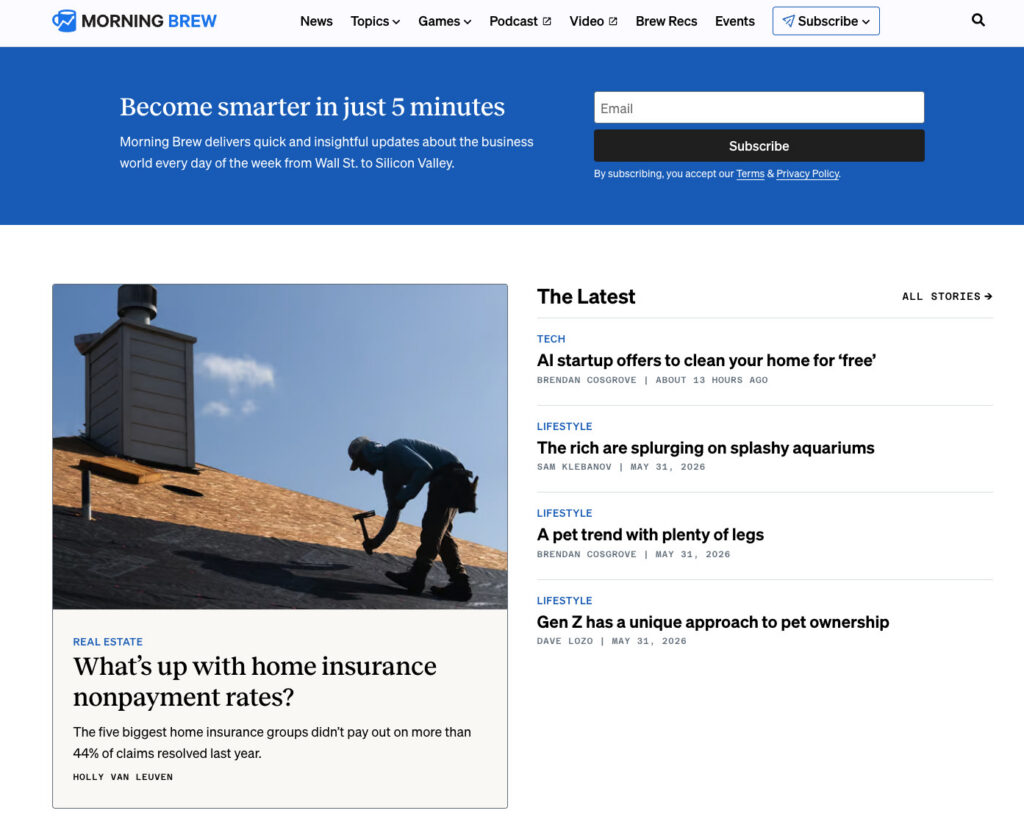
For businesses where the newsletter is the primary product—think prominent examples like Morning Brew or The Hustle—a homepage signup form positioned “above the fold” (visible without scrolling) is indispensable. Visitors arrive on these sites with the explicit intention of subscribing, making the form the central focus of the page. In these cases, the form’s immediate visibility directly aligns with user intent. For businesses where the newsletter supports a core product or service, a homepage form remains valuable but must be strategically placed to complement the primary message rather than overshadowing other key calls to action. The goal is to integrate it seamlessly into the user journey, offering an easy subscription path without disrupting the main content flow.
Sidebar Signup Forms:
A sidebar signup form offers persistent visibility as users navigate and scroll through content. This placement is particularly effective for content-heavy sites, such as blogs or news portals. If the newsletter’s themes align with the site’s content, a consistently visible sidebar form serves as a gentle, non-intrusive reminder of the subscription option. On desktop interfaces, sidebars are highly effective due to their continuous presence alongside the main content. However, it is crucial to recognize that on mobile devices, many website themes reconfigure the layout, collapsing sidebars below the primary content. Therefore, for optimal mobile performance, a sidebar form should always be complemented by at least one other mobile-optimized placement.

Dedicated Signup Page:
Creating a standalone page exclusively for newsletter signups provides ample space to articulate the compelling value proposition of subscribing, free from the competition of other calls to action. This dedicated space allows for a more comprehensive “sale” of the newsletter’s benefits. Such pages are ideal for linking from external platforms like social media bios, podcast show notes, guest post bylines, and any other external mentions of the newsletter. Alexandra Franzen, a business strategist renowned for building her audience primarily through email, famously describes her newsletter as “an art project,” emphasizing the need to make it so exceptional that readers eagerly share it. A dedicated signup page should embody this philosophy, focusing on selling the unique experience and value rather than merely soliciting a subscription.
Persistent Header or Top Navigation Bar Forms:
A compact, persistent signup form integrated into the website’s header or top navigation bar ensures constant visibility across every page. This placement is particularly potent for content-rich websites where visitors frequently browse multiple pages within a single session. The form should be minimalist—typically just an email field and a button—to maintain aesthetic appeal and avoid cluttering the navigation. Its ubiquitous presence subtly reminds users of the opportunity to subscribe, capturing interest as it arises during their browsing experience.
Footer Forms:
The footer of a website is a conventional location where visitors instinctively look for additional information or options once they have completed their primary interaction with the page content. A newsletter signup form positioned in the footer acts as an effective safety net, capturing individuals who have scrolled through an entire page and whose sustained interest indicates a readiness for further engagement. It caters to those who might not have been prepared to subscribe immediately upon arrival but have since found sufficient value to consider it.
Exit-Intent Popups:
An exit-intent popup is a sophisticated conversion tool that triggers when a visitor’s cursor indicates an intention to leave the website (e.g., moving towards the browser’s close or back button). This mechanism offers a final, strategically timed opportunity to present the newsletter subscription option before the visitor departs. The effectiveness of exit-intent popups hinges on several best practices: they should be displayed only once per session to avoid annoyance, feature an easily identifiable close button, and offer a highly specific, benefit-driven value proposition. For instance, “Get weekly email tips for your small business” significantly outperforms a generic “Subscribe to our newsletter.” When executed correctly, exit-intent popups can convert a portion of abandoning visitors into valuable subscribers. Data suggests that exit-intent popups can boost conversion rates by 2-4% on average, with some highly optimized implementations achieving even higher figures.
Crafting Compelling Copy: The Art of Conversion
Beyond placement and field count, the language used on a signup form is a decisive factor in conversion. Three elements are crucial: the explicit benefit promised, the clarity of frequency expectations, and the minimal effort demanded from the subscriber.
Lead with the Benefit, Not the Action:
Many default signup forms use uninspired copy such as “Subscribe to our newsletter.” While this clearly states the desired action, it fails to provide any compelling reason for the visitor to comply. The term “subscribe” is purely mechanical and does not address the fundamental question in a visitor’s mind: “What’s in it for me?”
Conversely, benefit-driven copy actively answers this question. Phrases like “Get one email per week with strategies to grow your small business” are highly effective because they immediately communicate three crucial pieces of information: what the subscriber will receive, how often they will receive it, and its direct relevance to their interests. This clarity enables visitors to make an informed decision within seconds, significantly reducing cognitive load and increasing the likelihood of conversion. The distinction is profound: “Subscribe to our newsletter” places the burden of imagination on the reader, whereas “Get our Tuesday email: one tactic to grow your list this week” provides a specific day, a clear promise, and a defined topic, leaving no room for guesswork.
Setting Frequency Expectations:
One of the most frequently overlooked yet critical elements on a newsletter signup form is the explicit statement of email frequency. Clearly informing potential subscribers that emails are sent “every Tuesday,” “twice a month,” or “weekly” dramatically reduces post-signup unsubscribes. When individuals subscribe without a clear understanding of the sending schedule, an unexpected email can trigger an immediate unsubscribe reaction. Establishing frequency expectations upfront prevents this negative reaction, fostering trust and ensuring that subscribers opt-in with a full understanding of what to expect. This mutual understanding forms a foundational contract between the sender and receiver, strengthening the relationship from the very first interaction. Research indicates that transparency regarding email frequency can reduce early unsubscribe rates by up to 15-20%.
Using a Specific Call-to-Action (CTA) Button:
The call-to-action button is the final element a visitor interacts with before committing to subscribe. Generic text such as “Submit” offers no persuasive power. “Subscribe” is marginally better but still lacks specificity. The most potent button text directly mirrors the benefit articulated above the form. For example, if the headline promises “Weekly email marketing strategies for small businesses,” the button could read “Get weekly strategies” or “Send me the tips.” This alignment transforms the button from a mere mechanical instruction into a confirmation of the value being offered.
Incorporating social proof can further enhance CTA button effectiveness. A phrase like “Join 1,200 readers” leverages the psychological principle of conformity, signaling to new visitors that a significant number of others have already deemed the newsletter valuable. If a substantial subscriber count exists, featuring it prominently on the button can be a powerful motivator. Conversely, ambiguous button text such as “Learn more” or “Get started” should be avoided, as it creates uncertainty about the immediate outcome of clicking. The button’s purpose must be unequivocally clear: to subscribe to the newsletter.
Beyond Generic Templates: The Rise of AI-Powered Form Generation
For many years, the standard advice for creating newsletter signup forms involved selecting a template, customizing colors and logos, and then publishing. The inherent limitation of this approach is that templates are, by design, generic; they are built for a hypothetical business with generic needs, generic copy, and a generic field structure. This often leads businesses to work backward from a pre-defined design rather than forward from the unique value proposition of their newsletter. A template cannot account for specific details like a newsletter’s weekly Tuesday dispatch, its target audience of freelance designers or food industry entrepreneurs, or a brand’s unique voice and aesthetic. Businesses are left to fill in blanks that were not initially conceived with their specific context in mind.
This is where innovative solutions like the AI Signup Form Builder in AWeber offer a paradigm shift. Instead of starting with a blank template, users describe their newsletter’s essence, and the AI generates a complete form meticulously matched to their brand. This advanced tool analyzes the user’s website, comprehends its content and brand voice, and then produces a form that seamlessly integrates with the site’s existing design and messaging. This approach eliminates the guesswork and manual customization inherent in traditional template-based methods, ensuring brand consistency and relevance from the outset.
The AI-generated forms offer versatility, capable of being embedded on any web page, deployed as standalone landing pages, or configured as exit-intent popups. Their placement can be specified directly to the AI, which intelligently renders the form in the desired location. Crucially, each form is directly linked to the user’s subscriber list, ensuring that new signups are immediately added and ready to receive the next scheduled newsletter. This integration streamlines the entire list-building process, from design to deployment and subscriber management.
Measuring Success: Data-Driven Optimization
Creating an optimized signup form is merely the first step; continuous tracking and analysis of its performance are essential to ascertain whether design, placement, and copy choices are yielding the desired results.
Conversion Rate by Placement:
Monitoring signups per form placement is a critical analytical practice. This data reveals which locations are most effective in attracting new subscribers. For instance, a form embedded within a high-performing blog post might achieve a 3% conversion rate, while a footer form on the same site converts at 0.5%. Such insights are invaluable for strategically reallocating marketing efforts and optimizing form visibility. Advanced tools like AWeber’s AI Signup Form Builder often integrate this tracking capability, providing clear dashboards for performance monitoring.
Unsubscribe Rate in the First 30 Days:
A high unsubscribe rate within the first month of subscription is a strong indicator that the signup form may be setting incorrect expectations. This metric necessitates a thorough review of the form’s copy against the actual content and frequency of the emails being sent. A discrepancy between what was promised during signup and what is delivered in subsequent emails is the most common catalyst for early unsubscribes. Ensuring complete alignment between the form’s messaging and the newsletter’s reality is fundamental to building long-term subscriber trust and retention. Industry benchmarks for early unsubscribe rates vary, but consistently exceeding 1-2% in the initial period often signals a need for re-evaluation of the onboarding experience.

Addressing Common Inquiries: Practical Applications
What is a newsletter signup form?
A newsletter signup form is a dedicated web form, either embedded within a website or hosted as a standalone page, designed specifically to capture visitor information for the purpose of adding them to a recurring email newsletter list. Unlike broader email signup forms that might funnel subscribers into automated sequences, product update lists, or transactional email streams, a newsletter form has a singular, focused objective: to onboard the right individuals onto a specific newsletter. This distinction is vital because the form’s design, persuasive copy, and field selection must precisely reflect the nature of the content the subscriber is opting to receive. Misalignment, such as promising “weekly tips” but delivering “daily promotions,” erodes trust before the first email even lands.
How do I add a newsletter signup form to my website?
Using modern email marketing platforms like AWeber, the process is streamlined. Within the AI Signup Form Builder, after describing the newsletter, a brand-matched form is generated. Users then copy the provided embed code and paste it into the HTML of their website where the form is intended to appear. Most contemporary website builders, including WordPress, Squarespace, and Wix, support the integration of custom HTML blocks, making this process accessible even for users without extensive coding knowledge.
How do I add a newsletter signup to Facebook?
To integrate a newsletter signup option with a Facebook page, the most effective method is to create the signup form within an email marketing platform like AWeber and then obtain the form’s unique hosted URL. This link can then be strategically placed on the Facebook page’s action button, within the page’s “About” section or bio, or pinned prominently in a post. When visitors click this link, they are directed to the hosted form, allowing them to subscribe seamlessly without leaving their browser environment.
How do I create a newsletter signup form in HTML?
While it is possible to code a form entirely from scratch in HTML, the most efficient and reliable approach is to build the form using an email marketing platform first. Platforms like AWeber generate a clean, functional HTML version of the form that can be copied and directly edited. This provides a robust foundation with the essential subscription logic already wired to the email list, significantly simplifying the process. Users can then customize the styling, field labels, and layout directly within the HTML without the arduous task of building the backend integration from the ground up. This method ensures both design flexibility and seamless connectivity to the subscriber management system.
Broader Implications for Small Businesses
In an era dominated by ever-changing social media algorithms and fragmented digital attention, owning an email list represents one of the most stable and valuable assets a small business can cultivate. An optimized newsletter signup process is not merely a technical detail; it is a strategic imperative that directly impacts customer acquisition, retention, and long-term revenue. By minimizing friction, clearly articulating value, and strategically placing forms, businesses can transform casual website visitors into engaged subscribers and, eventually, loyal customers. The investment in refining these gateway mechanisms pays dividends in the form of higher conversion rates, lower unsubscribe rates, and a more robust, direct channel for communication and commerce. Ultimately, the effectiveness of a newsletter signup form underpins the entire edifice of an email marketing strategy, making its meticulous optimization a cornerstone of sustainable digital growth.